Search the Community
Showing results for tags 'white'.
-
During my playthrough of Generation V of the games, I felt that some pokemon especially potentially powerful species are only available after the E4, including ones that involve Fishing or only at Victory Road. These powerful species being late bloomers will not make it in time for the trainer, assuming that he is not using Pokesav, to train them to a point they are capable of taking on the Elite Four and Team Plasma's elite members. To add salt to the wound, the creators of the game actually only allowed fishing to be accessible after the E4. So the player will have to contend with fewer species to choose from within the game! This is only made worse with the fact that White Forest or certain routes are only available after you defeat the E4; Some of those routes contain many potentially powerful species too. This hack will seek to resolve the issues by changing the encounter locations of certain species as if they were an ecology and also gives the player more choices to pick for their next fighter in the team. This hack will not add Pokemon from previous generations unless they are to be encounter in that place only after the Elite 4. Pokemon Black/white is now also more of a hunter's expedition because some good species have be edited to be rare so the player is going to have to go through a few more wild encounters before you will encounter that "potentially powerful" or rare species for your team. Testers and suggestions are welcome Credits Myself-- Siam on Project Pokemon/ FlameEntei on Pokecommunity. Drayano – the first guy to edit wild encounters in B/W Aragornbird- For teaching me how to edit wild Encounters Kazowar- Evolution editor Andibad- For being supportive of my hack Twistedfate- Creation of the stats editor and Wild editor. Features: 1. More species to catch 2. Starters are catchable Oshawott: Route 1- Surf Tepig- Dreamyard- Grass Snivy- Pinwheel Forest Inner 3. No need to fish to encounter some species 4. Gym Leaders are stronger Gym Leaders will not be so easy to defeat as their teams become a little more diverse in their moves. The first 4 gym leaders will have Pokemon of slightly higher levels. Somewhat at above 20 and below 30 Conversations edited Dreamyard Sends out <next Pokemon> Trainers edited Trainers will have more Pokemon since the new encounters will reflect in their teams. For EXP for the player. Release Date May - June 2011
-
 We all remember the Translation work our amazing team did, right? I was wondering if we can take all the english from an English version of the game and load it into the Kanji fileset of a Japanese version (setting up so we can swtich between a Japanese version and an English version on the fly!) I remember this being implimented with the translation patch. I figure it shouldnt be to hard to take the ALREADY translated files from an english game and plug them into a Japanese one where the Kanji tab's script would go. If anyone knows how to do this, or has a patch already, could it be mentioned please? I tend to break games when I open and edit the data Having a setup like this could mean also having a multilang patch for a number of combinations of languages. I think the biggest advantage would be being able to rename pokemon names (and even catching them) in Japanese and switching to the English script for storyline and such.:creep: Biggest disadvantage I see would be the namelength issue. catching pokemon in the english script would give them their perfectly normal english names, however renaming them would impose a character limit. the User's name too. (seeing as my English username is within the limits anyway, this isnt important) (In a simple summary: The japanese version has support for switching between Kana and Kanji scripts. Could we use an English version's files to replace either the Kana or Kanji scripts with english so we can switch between english and japanese anytime like we could in the translation project? (this time however, using the official translation))
 -
FEATURES: *Rated X for eXtremely hard! Because let's face it, Pokemon was made with children in mind so it's made possible for a 6-year old to beat it. These hacks will prove difficult even for adult Pokemon fans. You can beat the real games simply by using your most powerful attacks, but that won't work in Pure White/Pitch Black. You'll have to rely on more advanced strategies like status effects, stat-lowering moves, and switching constantly to keep your team alive. A guide will be given to tell you how to beat the Gym Leaders/Elite 4, but their actual teams won't be revealed because that's for you to find out! *Old Places, New Faces Non-Unova Pokemon will be available to you as soon as you begin your adventure. This gives you more team options to face the upcoming challenges. Of course, you should expect your opponents to use non-Unova Pokemon as well. *Gotta Catch 'Em All! All 649 Pokemon will be available in this game without trading, transferring, or accessing the Dream World. This includes legendary Pokemon as well, although they will be especially tough to find. A list of Pokemon locations will be provided. *The Solution to Evolution Pokemon that used to evolve by trade have new evolution methods so you won't have to trade anymore. A list of new evolution methods will be provided. *Trainer is about to send in..."something"? By default in the real games, you'll always be told what your opponent will send in which gives you a chance to easily counter your opponent's next Pokemon. In these games, the trainer's Pokemon name has been replaced with the word "something" which means you'll never know what your opponent will send in next! *Smugleaf just got Smugger The truth is, starting with a Snivy gives you a disadvantage since this game is especially tough on Grass-types. To make up for this, the Snivy line now evolves much quicker than the other two starters. In addition, it also learns two new moves - Earth Power instead of Wring Out and Dragon Pulse instead of Gastro Acid. If for some reason, you still want Wring Out and Gastro Acid, you can always learn them as a Servine. *Pseudo Tutors The reason a lot of Unova Pokemon don't learn many good moves is because the huge list of tutor moves from 3rd and 4th gens are missing. To slightly make up for this, some Pokemon now learn a "tutor" move by level up. For instance, Unfezant gets Superpower, Lilligant and Vanilluxe get Earth Power, and Klinklang gets Zen Headbutt. *Doctors? More like Murderers! Doctors will always heal your Pokemon to full health...if you can beat them! But they'll always engage in triple or rotation battles and have extremely powerful Pokemon with extremely powerful moves. They may be even tougher than Gym Leaders! Don't expect to win against them the first time. However they are completely optional, just like in the real games. Nurses on the other hand, are very easy to beat and use Audinos, Chanseys, and Blisseys which are great for EXP. *Maybe you'll actually Read this time. Regular trainers in the real games never have anything to say other than a few generic lines. In these games, some trainers here and there will have a bit more interesting dialog. Expect to hear references to pop culture, world events, internet memes, innuendos, and maybe even a few things not appropriate for a Pokemon game! *WHAT DO YOU MEAN IT GETS HARDER?!? Don't expect the challenges to end once you've beaten the main storyline. Besides the rematches against the Elite 4 and your Rivals, there are more difficult battles in store for you. Can you beat the Riches family, who are even tougher than the Elite 4? Or how about clearing Challenger's Cave, where everything is at Level 100 (even the wild Pokemon!). Don't even think about beating Morimoto the first time! *Winners really Win! When the hacks come out, it will come with another challenge for players. Record your victories against the major trainers in the game and you can win actual prizes! I'll give you free shiny Pokemon (legit ones, not ones made by Pokesav), free art requests (because I can draw), and even free online gift cards! I'll post a video up with rules and more details when it is released, so stay tuned! Possible Features: *Music Editing If I finish everything listed above and there's still time left, I'll try to insert a bit of nostalgia by putting in music from Gen 1. Either way, I might hire someone to do it for me. So if you know how to insert and loop music in Black/White, I'll pay you real money for something you already know how to do! *Title Logo Editing Not anything major. Just replacing the real logos with edited logos of the names of these hacks (the images you see at the top of this post). This isn't top priority. Screenshots: Progress: Wild Pokemon Editing: Up to Celestial Tower Major Trainer Editing: Up to Marshal (first battle) Regular Trainer Editing: Up to Route 7 Expected Release Date: Last week of April 2011 Credits: KazoWAR for his Trainer Editor Pedro250 for his Evolution Editor SCV for PPTXT Drayano for telling how to edit Wild Pokemon locations elementking for telling how to edit Pokemon Level-Up moves What I want from you: Think of interesting dialog that you want trainers to say in these games. Make sure it's not related to Pokemon so that it's clearly distinguishable from the unedited dialog. Preferably something funny or something that references another popular game or movie. Keep it clean. There's only ONE trainer in this game that swears and I'd like to keep it that way.
-
It's been a couple of weeks since BW has been out in English, so it's time to release the new Project Pokemon ROM Editor. This version includes a heavy amount of Pokemon and Move editing as well as Trainer editing. In addition, Map editing has been improved with overworlds incorporated and a full 3D editor. Sprites can be edited too. Example of the map edit screen: Download link: http://dl.dropbox.com/u/2030539/ppre/V/ppre-v_b04.exe
-

patch Pokémon Black and White: No$GBA Patch
Alpha posted a topic in ROM - NDS Guides and Other Resources
No$GBA may be outdated, but it still has some good qualities to it. To me, and others, debugging is super helpful. To some, they prefer it to play and get screenshots from. However, Black and White has been a bit harder to get working with it. So, I made this patch. The patch allows the player to get EXP from battles, start the game, and even save! Best part is, no AR code is required to play your game. The current patch supports ENGLISH WHITE VERSION ONLY. If there is interest in Black version, I will get a copy of that out as well. To use, you will need a copy of the original xdelta and knowledge of the basic command line. If your ROM is 256 MB, it needs to be trimmed: First download the file below and the xdelta from the previous link. For ease, put xdelta, the patch, and your trimmed ROM into the same directory. Navigate into that directory via command line. Run this command (assuming your game is called "white.nds"): xdelta patch white_nocash.patch white.nds white_patched.nds If you did everything right, white_patched.nds is your new patched ROM. Downloads: white_nocash.patch -
 Hi ProjectPokemon, I'd like to say Pokemon: Black and White are NOT untouchable, in fact, most of the files look like they're the same as HG/SS (for example, a/0/0/0 etc) although a few files have been added, and as you can imagine, many have been edited for the new things in B/W but the file structure looks pretty much the same. I haven't seen anyone actually decompress a B/W ROM yet (so I guess I'm the first w00t) so I thought I'd post this. It's not really a tutorial as much as a demonstration but here is a picture to prove my words : http://img7.imageshack.us/img7/6082/hni0001b.jpg (It's pretty big so you can clearly see it's been hacked/modified) In case your wondering it's just a simple hack - I hacked the game title on the boot screen to show what I talked about above. Also to prove this is in fact the Pokemon White ROM instead of something like DPPtHGSS with a modified icon and header, here is another image I took of my DS actually playing Pokemon White : http://img31.imageshack.us/img31/7622/hni0004df.jpg (An epic Picture of ZEKROM on the titlescreen - I love it!) The unfortunate part is BW has a really weird Anti-Piracy this time around. There is no lag, the game runs really great, but: 1) No Pokemon can gain experience (henceforth making it impossible to completely win the game with lvl 5 Pkmn alone) 2) Saving seemed to work until I tried loading the save, which didn't work too well Might've just been a setting of mine that was incorrect (There are editable settings in Wood R4) so I'm not 100% sure this is the AP's fault. But anyways, even the beginning gameplay was great. *insert-something-here-reader lol* - Project X
 -
 We know that is possible to select from 2 alphabets in the Pokemon B/W games, so why we could not use one for the english traduction and another for the spanish traduction? It would come very useful and easy because you only need 1 game for english and spanish and you could change between these language at any times. ------------------------------ Sabemos que es posible seleccionar por 2 alfabetos en los juegos de Pokemon B/W, asi que por que no usamos uno para la traduccion inglesa y otro para la traduccion española? Sería MUCHISIMO más util y facil para todos ya que solo necesitariamos 1 juego para inglesd y español y podriamos cambiar en cualquier momento.
 -

idea Little Enhancement idea to Black and White.
theSLAYER posted a topic in ROM - NDS Discussion & Help
Hi peeps! In Pokemon Heartgold and Soulsilver, a feature that was first introducted in Pokemon Yellow was revived: Pokemon following you. However, immediately after HGSS, It was removed in black and white D: Maybe there is a way to "hack" this function out? -
 Hello, I am currently working on a rom hack for pokemon black. One of the things I need to do is change the starter pokemon. I have searched this site and the internet for tools or hex editing tutorials to do this, to no avail. I do not care if it still says "snivy," "tepig," and "oshawott" in the selection screen. What I want to happen is if you pick the grass choice, you get chikorita, fire gives you cyndaquil, and water gives you totodile. Additionally, I want to make it so the dreamyard monkeys get replaced by the gen 1 starter of their respective types. Could anyone give me a rundown on how to do this?
 -
 Howdy! I'm new to ROM Hacking and this forum in general, I'm in the process of making two Gen V Hacks. I have tools for encounters, trainers, text, even sprite stuff. But I want to know if there's tools for Gen V where can I add Static Pokemon (and adding custom trainers since I'm not sure if I can do that in my trainer editor) Thanks so much for the help.
 -
Hi Everyone I have recently got into ROM Hacking and had a lot of fun playing with Wild Pokemon Levels, Trainer Pokemon Levels and tweaking difficulties etc. in Platinum. However the two main things I want to try and learn how to do are: 1). Change the levels of Legendary Pokemon - I cannot for the life of me find out how to change these, I have only managed to do Wild Pokemon so far. Basically I want to change a few levels in Platinum and slightly change their movepools: (eg. Regigigas to Lvl 70, The Regis to Lvl 40 atleast, Arceus to Lvl 100, Giratina to Lvl 50, Heatran to Lvl 70) This is to go with the increased level challenges I am giving myself (along with changing the Pkmn Evolutions to not require trading which I have already done successfully) 2). I have just finished playing through Black & White, and I was wondering if it is possible to make the version alternate Dragon (Zekrom in Black, Reshiram in White) appear in Dragon Spiral Tower in the Post-Game? I would set it to be captured at Lvl 70 so there is the option of catching both of the Yin & Yang Dragons. (I would do this in B2W2 as well at a later date when I finally play through that) This I imagine will be quite advanced, as I havent got that far into Map Editting etc. Would anyone be able to give me any tips in approaching these two ideas if possible please? Number 1 I have a funny feeling im missing something incredibly obvious, but number 2 should be a longer term project I will do over the coming weekends - Just looking for some guidance to see if it is possible and the best tools / tutorials to look at to achieve this Many thanks in advance! Monty
-
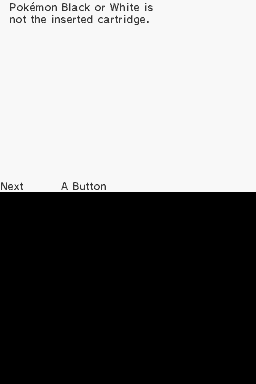
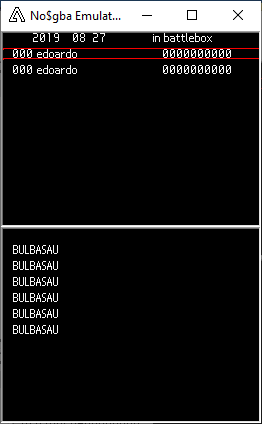
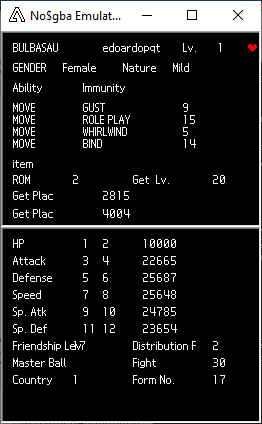
.thumb.png.5915d4253e5629bbe5cccce770eebd21.png) Background About a month ago I ordered a DSi off of eBay (it was only $40). When I got it I noticed there was something strange on it: "PWC2010"? I never heard about there being DSiWare for Pokemon? I consulted with other people on the internet and it turns out nobody else has heard it either. I tried to message the seller, but he said that he has no idea either (most likely he bought them in bulk as he was selling a lot of other models at the time). The mystery was just starting, a group of individuals from the DS(i) homebrew scene started to get to the bottom of this (me being invited despite my lack of knowledge due to being the one who found it), here's what we were able to figure out: The Investigation Begins... The hardware The system itself is appears to be a normal black DSi, nothing about it is different from that of a stock model The casing has some minor scratches and such, and is missing the original stylus. On the front side where the camera is, there are two faded silhouettes of what look to be rectangular stickers The system was formatted when I got it and it didn't come with an SD card (this will become a problem later on) The Software The apps included are: Flipnote Studios, DSi + Internet, PWC2010 Rule Check Tool, PWC2010 Log Viewer, and PokemonBW2 Rule Check Tool. All of which were preinstalled to the NAND as there is no way to access "Data Mangement" to move them to a SD card. At first, the only app that would boot was Log Viewer as both of the Rule Check Tools would just crash and return back to the menu. It was later revealed the apps were looking for 3 files at the root of an SD card before being able to boot. Through observations we were able to get some insights on what each of the 3 mystery apps do: PWC2010 Rule Check Tool From what the name implies, this tool must have been used for the Pokemon World Championship (PWC) in 2010 The app looks for 3 file on the SD card: regulation.bin, regulation.cfg, and rule.prd. By making 3 dummy files full of garbage data and naming them as the files listed before, we were able to get it to boot, after which we were greeted with a lovely message: The weird thing is, Black and White were used for the 2011 PWC, not 2010. This could imply that the app was a carry over from a previous tool used the year before. Luckily, I just so happen to have a copy of Black. Putting in the correct cartridge displays the message "No problems found" and ask if you want to save the results. Through testing we were able to figure out how to get past this screen as it turns out "No problems found" also acts as a default message, if something does fail one of the checks it will display what the error was. It's possible to make it check both the party Pokemon and Pokemon in the Battle Box by editing regulation.cfg file. PWC2010 Log Viewer Log viewer shows the results saved from Rule Check, it shows the player's username and gives a technical description of each Pokemon in the party (stats, friendship, exp, moveset, etc.). By pressing "X" it will do the same thing but for the Battle Box instead. PokemonBW2 Rule Check Tool Exactly the same as PWC2010, expect looks for the Black2/White2 cartridge instead More Technical Details Looking into the game's files, we were able to extract the messages displayed by Rule Check: Rule Check Messages regulation.cfg is, as the name suggests, a config file. Through dumb luck I was able to figure out this much: Offset 0x00: checks party Offset 0x01: checks battlebox Offset 0x05: turns on cart access Offset 0x0C: save to livematch.dat These values have to be "turned on" meaning the value is set to '1' If offset 0x05 isn't turned on then it will say that the cart isn't inserted. If offset 0x00 or 0x01 aren't turned on but 0x05 is, then it will say that it passed all checks (probably the default message) The files saved from Rule Check and are viewed in Log Viewer are named "logTYYMMDD.dat" and "logBYYMMDD.dat" (YYMMDD is the date, so something like Oct. 31 2019 would be 191031). LogT is for the results from the party (T=Team?) and logB is from the Battle Box. Through great efforts, users Epicpkmn11 and edo9300 were both able to reverse-engineer these files before we were able to figure out how to save it: Google Sheets regulation.bin appears to handle simple checks like invalid number of Pokemon in party, level caps, and duplicate items/Pokemon rule.prd may be used for more advance checks like invalid movesets and banned Pokemon/items Conclusion As of right now, interest has been dying as people began shifting to their own personal projects. For the past 3 weeks nobody has found anything new and I'm left to try and figure it out on my own. The problem is I know very little about NDS development and how the Pokemon games work in a technical level, which is why I'm turning here for help. We still know very little about regulation.bin and rule.prd, which are believe to be two key factors in order to get Rule Check to work properly, and without the original SD card we are left in the dark. It's possible that rule.prd is somehow linked to the hex values found in Pokemon (movesets, lvls, type, etc.), but can't really determine where and what to look for We don't know how much is relied on the files or if certain checks are programmed Any insights, suggestions, resources, or tips are greatly accepted!
Background About a month ago I ordered a DSi off of eBay (it was only $40). When I got it I noticed there was something strange on it: "PWC2010"? I never heard about there being DSiWare for Pokemon? I consulted with other people on the internet and it turns out nobody else has heard it either. I tried to message the seller, but he said that he has no idea either (most likely he bought them in bulk as he was selling a lot of other models at the time). The mystery was just starting, a group of individuals from the DS(i) homebrew scene started to get to the bottom of this (me being invited despite my lack of knowledge due to being the one who found it), here's what we were able to figure out: The Investigation Begins... The hardware The system itself is appears to be a normal black DSi, nothing about it is different from that of a stock model The casing has some minor scratches and such, and is missing the original stylus. On the front side where the camera is, there are two faded silhouettes of what look to be rectangular stickers The system was formatted when I got it and it didn't come with an SD card (this will become a problem later on) The Software The apps included are: Flipnote Studios, DSi + Internet, PWC2010 Rule Check Tool, PWC2010 Log Viewer, and PokemonBW2 Rule Check Tool. All of which were preinstalled to the NAND as there is no way to access "Data Mangement" to move them to a SD card. At first, the only app that would boot was Log Viewer as both of the Rule Check Tools would just crash and return back to the menu. It was later revealed the apps were looking for 3 files at the root of an SD card before being able to boot. Through observations we were able to get some insights on what each of the 3 mystery apps do: PWC2010 Rule Check Tool From what the name implies, this tool must have been used for the Pokemon World Championship (PWC) in 2010 The app looks for 3 file on the SD card: regulation.bin, regulation.cfg, and rule.prd. By making 3 dummy files full of garbage data and naming them as the files listed before, we were able to get it to boot, after which we were greeted with a lovely message: The weird thing is, Black and White were used for the 2011 PWC, not 2010. This could imply that the app was a carry over from a previous tool used the year before. Luckily, I just so happen to have a copy of Black. Putting in the correct cartridge displays the message "No problems found" and ask if you want to save the results. Through testing we were able to figure out how to get past this screen as it turns out "No problems found" also acts as a default message, if something does fail one of the checks it will display what the error was. It's possible to make it check both the party Pokemon and Pokemon in the Battle Box by editing regulation.cfg file. PWC2010 Log Viewer Log viewer shows the results saved from Rule Check, it shows the player's username and gives a technical description of each Pokemon in the party (stats, friendship, exp, moveset, etc.). By pressing "X" it will do the same thing but for the Battle Box instead. PokemonBW2 Rule Check Tool Exactly the same as PWC2010, expect looks for the Black2/White2 cartridge instead More Technical Details Looking into the game's files, we were able to extract the messages displayed by Rule Check: Rule Check Messages regulation.cfg is, as the name suggests, a config file. Through dumb luck I was able to figure out this much: Offset 0x00: checks party Offset 0x01: checks battlebox Offset 0x05: turns on cart access Offset 0x0C: save to livematch.dat These values have to be "turned on" meaning the value is set to '1' If offset 0x05 isn't turned on then it will say that the cart isn't inserted. If offset 0x00 or 0x01 aren't turned on but 0x05 is, then it will say that it passed all checks (probably the default message) The files saved from Rule Check and are viewed in Log Viewer are named "logTYYMMDD.dat" and "logBYYMMDD.dat" (YYMMDD is the date, so something like Oct. 31 2019 would be 191031). LogT is for the results from the party (T=Team?) and logB is from the Battle Box. Through great efforts, users Epicpkmn11 and edo9300 were both able to reverse-engineer these files before we were able to figure out how to save it: Google Sheets regulation.bin appears to handle simple checks like invalid number of Pokemon in party, level caps, and duplicate items/Pokemon rule.prd may be used for more advance checks like invalid movesets and banned Pokemon/items Conclusion As of right now, interest has been dying as people began shifting to their own personal projects. For the past 3 weeks nobody has found anything new and I'm left to try and figure it out on my own. The problem is I know very little about NDS development and how the Pokemon games work in a technical level, which is why I'm turning here for help. We still know very little about regulation.bin and rule.prd, which are believe to be two key factors in order to get Rule Check to work properly, and without the original SD card we are left in the dark. It's possible that rule.prd is somehow linked to the hex values found in Pokemon (movesets, lvls, type, etc.), but can't really determine where and what to look for We don't know how much is relied on the files or if certain checks are programmed Any insights, suggestions, resources, or tips are greatly accepted!


-

Pokémon Black and white Changing shiny Odds
Patesaus77 posted a topic in ROM - NDS Discussion & Help
Hey, Does somebody know how to change the shiny odds in Pokémon black and white? -
 Ok. Long time no see. I had both a Pokemon Black and Pokemon White game saves on LEGITIMATE cartdriges that were 100% done (exept Legendaries), but I lost those save files when some sort of glitch occured. So my request is a Pokemon Black save file that has been saved at the Elite 4 (before Reshiram, so no HoF), the main character can be of any gender, name etc... since it can be changed via PkHex. However, Tornadus musn't be roaming yet, Zorua and Zoroark not triggered and no Legendaries caught. I found the perfect one for White on some file-sharing place, but there was none for Black... Just in case, is it possible to convert a White save to a Black save? I am asking this due to the Black City/White Forest glitches that occurs when you swap version save files... And the save file MUST be from an English version. Thanks!
 -
I've played a few Soul Link's so far and every time I start my play session for the day it's always kind of an annoying process. Loading up 2 separate emulators, 2 roms, having to rekeybind the controllers every time. I was wondering if someone would be able to make a program that could make it easier. If your unfimiliar with a Soul Link Nuzlocke, heres the rules. 1- Any Pokémon that faints is considered "dead," and must be released or stored in a specified PC box for "dead" Pokémon. 2- You can only catch the first Pokémon encountered in each area, and none else. If the first Pokémon encountered faints or flees, there are no second chances. 3- You must also nickname all of your Pokémon, for the sake of forming "stronger emotional bonds." 4- In a new area, the first encounters for both players will be, "linked," together until death. 5- If one Pokémon in a linked pair is placed in the PC, it's Soul Link partner must be placed in the PC as well. 6- If one Pokémon in a linked pair dies, it's Soul Link partner is considered dead as well. 7- If one player fails to capture their first encounter in an area, the second player must forfeit their encounter in their corresponding area. 8- Across both players parties, primary typings may not be repeated. Basically what I'm looking for is a program that emulates 2 roms side by side and be able to control them individually. I've thought of a few features to make it better. Features -Emulators from all consoles built in - Ex. VBA, Desmume, and Citra -Saves both roms under 1 "project" and loads them on the same side every time -Type Chart ready -Online Remote Play - Be able to join your friends session online to see and control one of the games. -Games connected locally so you can trade and battle -Database where you can input your linked pokemon pairs and where you caught them -Built in Pokedex Database (Not necessary but would be helpful) -Program reads both your teams and displays them between the game (I'm aware that's not an easy ask but if it's possible, why not) I feel like except for a couple of them this is a completely possible thing to create. I know it probably wont happen but I just thought I'd get the idea out there. I love doing Soul Links and I'm so happy people found a way to make Pokemon Co-op. Thanks for your time.
-
- 6
-

-

-

-
- rom
- multiplayer
- (and 43 more)
-
 It's been a loooong time, but finally, I've discovered how the BDHC files work. Please, if you are gonna copy this post in other site, give credits! First of all, I have to thank JayT, who discovered how is the file structured in different parts. Now, I'm gonna explain what does each part. Part P Sets the coordinates of certain points, used later to build rectangles or "plates" of different heights in the Part S. The structure of each element is the following one: 00 00 XX XX 00 00 YY YY XX XX are the coordinates in the X-axis, and YY YY the Y-axis ones. Keep in mind that the origin of coordinates is located at the midpoint of the map, not in a corner. This means that the lower right corner always use positive numbers, but the upper left corner instead must use negative numbers. Remember that FF FF = -1, FE FF = -2, FD FF = -3... The four tiles in the midpoint of the map are (FFFF, FFFF), (0000, FFFF), (FFFF, 0000) and (0000, 0000) respectively. Thus, the point of the upper left corner is: 00 00 F0 FF 00 00 F0 FF And the lower right corner: 00 00 10 00 00 00 10 00 Part Q It may be related to the stairs, but I need to investigate further. I've already solved this part, but I've still got to translate it to English Part R It sets the different heights where the hero can be in different rectangles or "plates". The structure of the elements of this part is: MM MM ZZ ZZ ZZ ZZ refers to the complete-tiles height, ie; for example if the character is at a neutral level, then ZZ ZZ = 00 00. If we climb some stairs and now we are in a height +1, then ZZ ZZ = FF FF (at higher height, instead of growing, it decreases) . If we were at a height +5, it would be FB FF. And if for example we were at -2; 02 00. MM MM measures, instead of full tiles, 65536-ths of tile. For not to talk complicated things; MM MM = 00 80 if the character is in a lake (it would be half a tile down, ie -0.5 tall) and MM MM = 00 00 if the character is anywhere else. For example, if we have: 00 80 FF FF it would mean: FF FF = Height +1 00 80 = Height -0.5 Total height = +0.5 Part S Link points of Part P to create the "plates" or rectangles, and assigns a height of an element of Part R. AA 00 BB 00 QQ 00 RR 00 AA is the number (in hex) of the Part P element where the point of the rectangle in the upper left corner is. Remember that the first element is 00, the second is 01, the third is 02... BB is the number (in hex) of the Part P element where the point of the rectangle in the lower right corner is. RR is the number (in hex) of the Part R element which establishes the height of the plate. If in Part P, for example, we have this: 00 00 F0 FF 00 00 F0 FF 00 00 10 00 00 00 10 00 And in the Part R we have: 00 00 FE 00 00 00 01 00 In the S part we have to write: 00 00 01 00 00 00 00 00 so we create a plate covering from (-16, -16) to (16, 16) (ie, the whole map) and setting a height in the Z axis +2. If instead out: 00 00 01 00 00 00 01 00 It would be the same as the previous one, but with a height of -1. Part T It divides the map in horizontal strips. Everything must be divided so if we move vertically (up or down) and thus we get in/out of a lake, stairs or similar, we must also be entering a new strip. It's hard to explain; the game can not detect when you enter an area with different height when you move vertically in the same strip (horizontally no problem) so you have to create a new separate strip. As I know it's hard to understand, here's a little picture: There is an element for each strip there. The structure of each element of Part T is: 00 00 YY YY NN NN UU UU Where YY YY is the Y-axis line where the lower limit of the strip is. NN is the number of elements of the Part U that are taken, and starting counting from element number UU UU. Do not worry, I'll explain later. For example, a map where there were two strips, one in the upper half and one in the lower half, would be: 00 00 00 00 NN NN UU UU 00 00 10 00 NN NN UU UU Part U It is a list or enumeration of adjacent plates/rectangles to the strip with which it is linked in Part T. That is, if I'm in the strip 00, Part T load a number of elements of the Part U where there are numbered all the plates where the player is or can access, from this strip. The structure of the elements of Part U is: SS 00 where SS is the number (in hex) of the Part S plate. Part U have many elements of these, and they are usually "segmented" in "zones". In Part T is loaded the number of items to be taken (NN NN) and the number it starts counting (UU UU). For example, in Part U we have: 00 00 01 00 02 00 04 00 00 00 03 00 04 00 And in the T part we are: 00 00 YY YY 04 00 00 00 00 00 YY YY 03 00 04 00 Then, from the first strip, we are or we can access the plates 00, 01, 02 and 04, while from the second strip we are or we can access the plates 00, 03 and 04. Remember they are all adjacent plates, ie, plates belonging to the strip and the ones which are in the limits but do not belong to it (ie, those plates whose height the game has to load while the player is in the strip).
 -
 [video=youtube;7CCKERTzGJI] This is the format of the banlist: 00 00 00 00 00 00 00 00 00 00 00 00 00 00 00 00 00 00 C0 00 00 00 00 00 00 00 00 00 00 00 00 0E 00 00 00 00 00 00 00 00 00 00 00 00 00 00 00 C0 07 00 00 00 00 00 00 00 00 00 00 00 98 7E 00 00 00 00 00 00 00 00 00 00 00 00 00 00 00 00 00 00 D8 03 Notes: The banlist is 0-based and should be read in binary. Bit=0 means its corresponding Pokémon is allowed. Bit=1 means its corresponding Pokémon is banned. Formula to find whether a Pokémon is banned or not is P=(8×B)+b with: P (Pokémon) being a number between 0 and 649 included; B being the Byte number, counting from 0; b being the bit number from a given Byte, from 0 to 7 included read from right to left. The banlist is located at narc a/1/0/5 in BW, and narc a/1/0/6 in B2W2. Even though the banlist is the same between the facilities enforcing it, the banlist itself is technically not unique as you'll see below: Battle Subway and Battle Institute (All versions): Single Battle and Wi-Fi: file 20 Double Battle: file 21 Multi Battle: file 22 PWT (Black 2 and White 2 only): Single Battle: file 33 Double Battle: file 34 Triple Battle: file 35 Rotation Battle: file 36
 -
 I keep forgetting to post this and I don't even have the time to test this out, but when hacking a ROM, if you set fully evolved Pokemon to evolve to themselves at level 100, would they then be considered "NFE" thereby making eviolites give them Def/SpDef boosts? I haven't done any ROM hacking/editing in a while, but I know you can change the way Pokemon evolve and choose what they evolve into. If someone can test this out, it should theoretically work on both Black/White(2) and XYORAS. Otherwise, I guess you could set them to evolve to a dummy 'mon (Mewtwo evolves to Caterpie at level 50). Let me know if this works for anyone
 -
 Hello to all. I have just figured out that the midi mappings that Pokemon Black and White in bwmidi.zip (which are direct rips of the game files), and PKMN_E.zip (again, direct rips of the midi files) use are almost completely compatible with the sound mappings for the default Roland MT32 and CM32L patches when mapped to 16 channels. A way to emulate this on GS modules is to force all channels to the last bank, and set the drumset to the last one in the default bank. This gives MT32 Sound, which maps better than GM, and is universal across all areas of the game's music. For a DS-sized MT32 bank, you can either google "2GMGSMT.sf2", "4GMGSMT.sf2", "5GMGSMT.sf2,", "8GMGSMT.sf2", or "16.5mb gm gs mt32 bank v2.51.sf2", and add "LuckyMax" to the query. The bank was made in '01. It is not very accurate to the real MT32 though. I will provide a 1 gig sampleset via google drive, but in case a homebrew music project is in need of even more sounds, I will provide a mod of Zandro Revielle's DB50XG sampleset which has the inaccurate MT32 samples, and the SC-88 samples from a similarly accurate SC88 soundfont in this post. The link to the 1GB uncompressed 24bit MT32/CM32L/BW/RSEFRLG/HGSS/DPPT soundset is here https://drive.google.com/open?id=0B3iwOegRlzCXVkZ6WmFHNzNhcTg Attached to this link is the soundfont containing the DB50XG Mod, the SC-88 Samples, and the MT32/CM32L samples: https://drive.google.com/open?id=0B3iwOegRlzCXWmRQbktoWDBmQTA The file above is 32.5MiB Below, I have an even less accurate, but more faithful version of the MT32 samples, but with GM and GS drumsets, and GM instruments where possible. It is 8mb. MT32.sf2
 -
Hey! I came up with this idea when I first got into the Fairy Tail fandom, which was a long time ago, and since then, I have gained some experience in game hacks. When I was looking through my computer a little while ago, I found my ideas on a notepad and decided to start working on it. Over the last couple of days, I have been working on it and have started to create a Fairy Tail x Pokemon hack for Pokemon Black and White. My basic ideas are as follows: The protagonists would either be Natsu and Gray, and then Erza and Lucy (Different Versions) or Natsu and Lucy, and then Gray and Erza. (Once again, different versions.) Cheren and Bianca would be the other characters that you can play as in the other version. Starters appropriate for each trainer. Gym Leaders and Elite Four would be other FT characters such as Juvia, Gajeel, Levy, Lisanna etc. Wendy would almost definitely replace Iris. Text edited to fit a slightly different storyline and made for Fairy Tail. Ghetsis would be Zeref. (With obvious text edits.) Other Fairy Tail characters would be included like Jellal as N, (fits him perfectly) Meredy and Ultear as the blonde and pink haired women, (can't remember their names) Professor Juniper, (not sure who she would be) and Nurse Joy. (Possibly Mira since it fits her nicely.) I have been working on it for a little while but have had multiple errors. My main problem is that I have had trouble finding a good text editor to use for this hack and I have not been able to recreate amazing sprites despite many attempts. I was wondering if anybody could suggest a good text editor and let me know where I can find the files containing the text. (I tried thenewpoketext for my previous Gen 4 hacks but it was complex and I had a lot of errors and problems with it, so I didn't like it too much.) I'd also like a little help with creating the sprites. I have done a few Gen 4 FT sprites but if anybody could make me some Gen 5 sprites, that would be amazing. (NOTE: Overworld, Mugshots, Front and Back for the 4 Possible Protagonists. - Overworld, Frontsprite and Mugshots for Zeref, Jellal, Possible Gym Leaders and Elite Four - Overworld for any other characters.) If you have any ideas or questions, feel free to share! (Sorry if this is really long or in the wrong place since this is my first post.)
-
Greetings, all. I am new here, so I apologize if this is in the wrong subforum. Now, what I am needing to do: My girlfriend and I are planning on playing all of the Pokemon games from gen 4 right up to gen 7. We both have homebrewed 3DSs with CFW and have the NDS Pokemon games as ROMS on R4i cards. The idea is to play HeartGold and SoulSilver> Platinum and Diamond> Black and White> Black 2 and White 2> X and Y> Omega Ruby and Alpha Sapphire> Sun and Moon, in that order. What we want to do is transfer Pokemon over each time we move over to the next pair of games. Each time we play a pair, we plan to catch all Pokemon available in that respective game, then move them all forwards to the next game. HeartGold/SoulSilver can trade to Platinum and Diamond, and Platinum and Diamond can trade to Black and White, and Black and White can trade to Black 2 and White 2, but each of these processes will take ages to accomplish, and there seems to be no way to trade Pokemon from Black 2/White 2 to X/Y when using an R4i card and a legitimate card is impossible to get in my country. So: Is there a way that I can batch export all Pokemon from a save (All .pkm/whatever files from the .sav) and the inject it into the next save? PkHex and PokeGen only allow for exporting and importing 1 Pokemon at a time, whereas I would like to do so as a batch to save a lot of time. I have .sav files on R4i and can make .sav backups for 3DS Pokemon games, I just need a way to transfer the Pokemon between them as a batch rather than individually. As a nitpick: Is there also a way that I can have Pokemon moved via this method be registered in the Pokedex for the game I inject them into? Thanks in advance and sorry for repeating myself in some parts
-
Hello, PP Just dropping a question to see if Gen 5 games will get more support such as functioning c-gear skins, PokeDex Skins, and dream world pokemon editing. Please do consider this as it will only benefit Gen 5 games. I'm playing through Black again so I thought I'd ask this question Thanks!
-
For some reason, the option to edit battle points for Gen 5 saves is not available. It's not found in the Trainer Info nor in the Misc Edits buttons. However, it is present for Gen 4 saves though... Hope it's added to the next update too.
-
 Hi, this is my second tool for editing Pokemon Black and White. A Starter Editor. Notes: - As for now, the program can only change what starter Pokemon YOU get, so when you open the box from Prof. Juniper at the beginning of the game, the screen will still shows Snivy, Tepig and Oshawott. I still have no idea on how to edit that. - This program support both ROM (.nds) and NARC (a/0/5/7). - This program will not change the Pokemon that your rivals/friends get, since it need to be edited in another narc. I don't think I'll add it. Changelog: v1.0.0 - The first version. v1.0.1 - Remove the alt form from list, add in function to edit the starter's level. v1.0.2 - Fix the issue of loading different region's ROM. v1.0.2.1 - Should really fix the issue of loading different region's ROM. Credits: - Andibad, for all the information on where to edit. Please try the program (and with caution) and report here if there's any bugs. Zero's Black & White Starter Editor v1.0.2.1
 -
Hi. As you can see, I'm quite an inactive member of this forum, so today I decided to share a program that I create myself. A Wild Pokemon Editor. Currently, the editor is capable of editing Pokemon encountered in all the location in the game with the exception of White Forest (impossible to edit from the ROM/NARC). Notes: As of version 1.0.4, this program/tool now support both NARC and ROM (.nds). This means, for those who does not has any experience with NitroExplorer can now edit the ROM directly. I had not finished Pokemon Black, so I might made a mistake on encounters of some location. Please point out if you found any mistakes. I'm a beginner in programming, so if got any bugs, please do point out. I will also point out that this program was build using Visual Studio 2010 on Windows 7, so I have absolutely no idea if it works on older version of windows or not (95,98,2k,ME,XP,Vista). Please do test it and report here. Thanks. Just a side note, it's always safer for everyone to save the changes on a new NARC (if you're using the NARC) or create a backup of the ROM (either by the program itself or you yourself). By doing that, you can always revert back to the original file if something went wrong. Why "load from text file" capability in v1.0.9? Someone like me usually plan out the Pokemon encounters in a notepad, as I can copy-paste duplicated lines and plan slowly without having to mess up with the ROM from the beginning. But, when I want to use this tool to populate my planned encounters, it'll take few hours. Therefore, I add in this functionality. Also, I didn't put all the new stuff in the version with header, so I'll still keep the links for v1.0.7. By the way, I'll put this note also: White Forest encounter is NOT supported as its data is actually in the save file instead of ROM. Load-from-file text file format: location_name pokemon_1,min_level,max_level pokemon_2,min_level,max_level . . . pokemon_56,min_level,max_level The line "pokemon_1,min_level,max_level" need to be repeated for 56 times per location; 12 grass, 12 dark grass, 12 shaking grass, 5 surfing, 5 rare surfing spot, 5 fishing and 5 rare fishing spot. These are the Pokemon that the alternate form is supported: Basculin Deerling Sawsbuck Burmy Wormadam Castform Cherrim Shellos Gastrodon Deoxys Rotom Meloetta Shaymin Giratina Darmanitan Credits: Drayano (I began my coding based on the information that he gave in here) Andibad (On the similar thread, I get the information on the different form of Pokemon from him) Kaphotics (I use the header data structure that he posted. Also on the same thread as above:smile:) Update: v1.0.1 : Forgot to remove Pichu Alt. form from the Pokemon list. v1.0.2 : More small changes. Change the "Dark Grass" to "Double Grass", add in instruction on how to extract the NARC (the one that this program work with) using NitroExplorer2b (don't ask me for it. Google it yourself), etc. v1.0.3 : Some more small changes. This time it's more on cosmetic changes (all these small changes are proving that I'm a total beginner in programming. Gonna learn a lesson from these) v1.0.4 : Added rom (.nds) support as well as retaining the NARC support. v1.0.4b: Well, the 'b' instead of v1.0.5 is because this update is an absolutely tiny update. Also, now I had tested the ROM and NARC support and had confirmed that it works (for me, at least) v1.0.4c: The previous version cannot load Pokemon White. This version fix it. v1.0.5 : Fix Bugs #2. v1.0.6 : I'm very sure this one fix Bugs #2. Now support Japan, Korean, US, EUR, Italian, Spanish, etc version. Also added Striaton City to the location list. v1.0.7 :I split the program into 2 version; with capability of messing up the header and without. For the header information, I don't know what it might affect, so if you just want to edit the wild encounter, get the regular version, as it totally will not display the header information and won't allow the user to edit them. Also added Route 10 (in the badge checking area), and Victory Road unknown room (I can't find it). v1.0.9 :I added the ability to load the encounter data from a text file, added a huge map for Victory Road, and rename the Victory Road Missing Room to Trial Chamber (I never encounter anything in there during my play through, so need clarification). Also added the capability to save the encounter data from the ROM into a text file. v1.0.9.3 :Fixed Ho-oh bug. v1.0.9.4 :Make the tool smaller in size in order to make the tool usable by user with smaller laptop/netbook. Bugs: 1. Found by Wyndamn: The size of NARC file changed after editing the file with the old version, followed by the new version of the tool. Status:Not fixed (unable to reproduce the same error). Link to the original post 2. Wild Pokemon Editor will not work for ROM that had been edited by KazoWar's Trainer Editor. Main reason is because the size of a/0/9/3 will change depend on number of Pokemon of the trainer, so the offset of the NARC will change accordingly. Will work on this problem. Fixed in version 1.0.7 3. Found by James816. Selecting Ho-oh will give the error of "Invalid Level". Fixed in version 1.0.9.3 Here's the files: Mediafire link for v1.0.7 (With header) Mediafire link for v1.0.7 (Regular) Latest (v1.0.9.3): Mediafire link for v1.0.9.3 Megaupload link for v1.0.9.3 Compact version (smaller size & smaller Victory Road map window) Mediafire link for v1.0.9.4 Megaupload link for v1.0.9.4 Also, since this program was built on Visual Studio 2010, I think it'll need .NET Framework 4.0 Client Profile to work. Download here : Microsoft .NET Framework 4 Client Profile (Standalone Installer)