theSLAYER
-
Posts
22961 -
Joined
-
Last visited
-
Days Won
1016
Content Type
Profiles
Pokédex
Portal
Technical Documentation
Pages
Tutorials
Forums
Events
Downloads
Gallery
Blogs
Everything posted by theSLAYER
-
have you played Sword & Shield on the console before (either cart or eshop download)? The game needs to launched at least once, in order for it to appear in Checkpoint.
-
sounds like the issue is modifying party stats. try depositing them into a box then withdrawing, see if that makes a difference.
-
did you create a mon from scratch, and tried to edit on in an existing slot?
-
@PkGamer009 read this:
-
To be precise, you gotta at least be able to receive a mystery gift (or tried) to be able to use the Crystals. Try to receive Meowth, and then after that dyna-crystals will work. The Dynamax Crystals actually don't have a fixed encounter; their encounters is updated as the software receives soft updates. I hacked in the items, after my console received a Mystery Gift, and I confirm the 2 specifically named ones works (The rest doesn't, cause no encounter data tagged to em yet)
-
Legality hasn't been fully implemented, and we're aware, thanks.
-
 Yeah sorry, Switch Lites aren’t exploitable presently. I misread what you said, and saw it as “are any Switches expoitable yet”. My bad ><
 -
only certain Switches, not all. CFW guide: https://nh-server.github.io/switch-guide/ Use at your own risk
-
Frankly, the risk isn't with bricking your switch or losing data. The risk is with getting one's Switch banned. It is fine that you don't wanna take the plunge, it's your prerogative. However, it is unfair for others to take the fall for you, simply because you wanted hax but didn't want to hack your Switch. (Switch bans from Nintendo can come from modding the Switch, trading hacked mons, trading normally but using a hacked switch, trading mons from USUM when HOME isn't even out etc) If someone wants to help you, they'll PM you after reading this. Else, don't create this topic again. (I mean, seriously, if you want hacks at your beck and call, hack your device. >< ) [also, I removed your duplicate thread lulz]
-
Opinion: Switch should have something akin to R4i dongle
theSLAYER replied to patsworld's topic in Peripheral Hardware
Oh look, someone decided to ask for a PKHeX SWSH update again, after I specifically said: Seriously, just be patient and wait. The games are not officially out. Do not ask again. If anyone asks even before the game is out, based on what is being said, it could mean that you pirated the games, and that assertion can lead to bans. For your own good, stop asking. -
well, if your save file was completely corrupted, it wouldn't open at all. Hmm, upload your save file to here. Over the next few days, I would find time and try to "fix your save file". (Basically I would port over trainer info, event flags, box data, party data and items over to a working save. Maybe that would help.)
-
for now, stop doing the transfer to and fro. Now, set your NDS time to 11:56 PM, leave it on, and the time has to switch into 12AM while you're in the Pokemon game. (bypassing time lock: https://gamefaqs.gamespot.com/boards/946308-pokemon-platinum-version/49751779)
-
Are you using an emulator or cart on DS? A before save (before you get it) and an after save (after you get the accessory.) There must be minimal to no changes between the saves otherwise. Keep doing this, take note of what byte value get changed. Slowly and surely, you'll build an excel table with all the changes identified.
-
Opinion: Switch should have something akin to R4i dongle
theSLAYER replied to patsworld's topic in Peripheral Hardware
Switch saves are not stored on the cartridge: instead it is stored on the Switch itself. Since saves aren't stored on the cart itself, no hardware can extract a save from the cart itself I assume it is to make it impossible to create hardware like the dongle you mentioned, or powersaves. -
 @Tye_Gen I am letting you know that I deleted this, cause what you posted is not a review.
 -
people providing before and after saves of the event redemption increases the chances of this happening
-
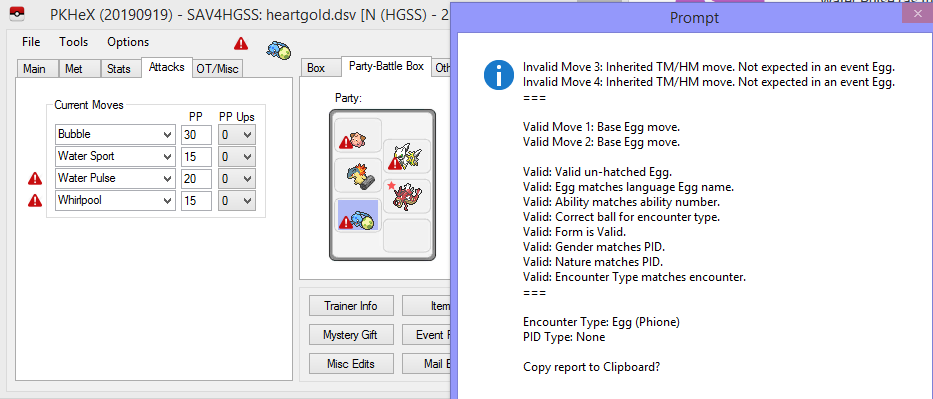
Just test this myself, I can confirm that it happens in HGSS saves.
-
Sword and sheild ROM Hack
theSLAYER replied to patsworld's topic in ROM - 3DS Guides and Other Resources
The game is not even out officially. Stop asking for Sword and Shield content, as it could mean you're pirating the game. Wait until it is officially out.- 1 reply
-
- 1
-

-
Your title: "Pokegen for sword and sheild" Pokegen ≠ PKHeX You've asked this question before. and here was my answer then. That answer is still valid. Seriously, just be patient and wait. If there's anything complications, I imagine @Kaphotics or someone else would mention so here or on twitter. So just wait, alright
-
main cannot be named.
-
LGPE codes were region free. Can't be sure about SWSH codes until SWSH is out. But then again. the Switch can change regions pretty easily anyway
-
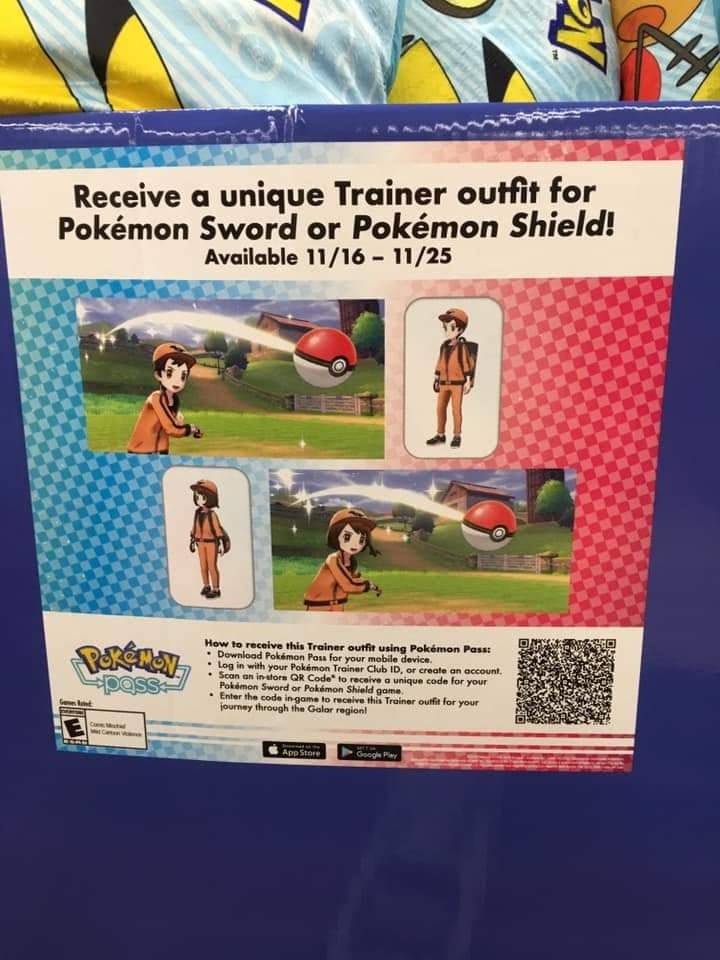
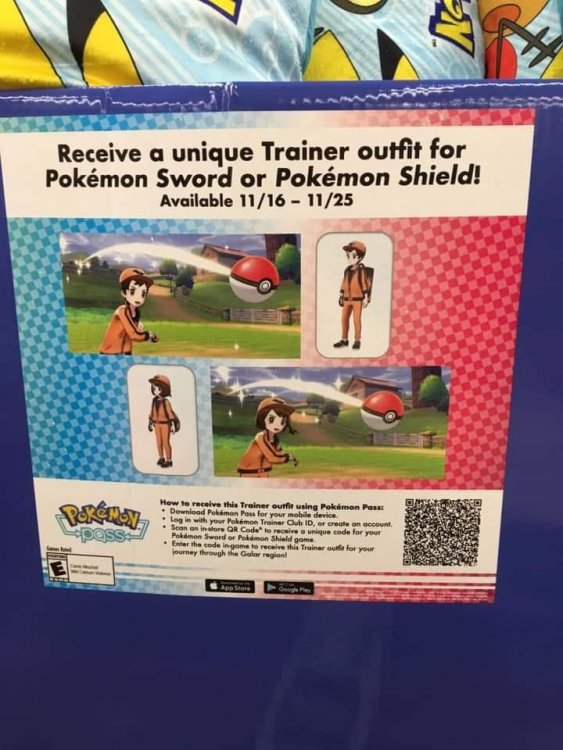
Nintendosoup reported that using Pokemon Pass in Walmart during the event period will give players the serial code to receive the Tracksuit Outfit in Sword & Shield! This distribution was previously announced for Japan (preorder via 7 Net Shopping) and Europe (Shopto, Game, Gamestop etc.)
-
Gen VIII & IX Event Contribution Thread
theSLAYER replied to theSLAYER's topic in Event Contributions
-
Hello everyone, I'm theSLAYER, your events moderator and forum manager here! First of all, I'll like to thank everyone for their past contributions and co-operation thus far! Foreword My hopes aside, I expect SWSH's events to be similar to LGPE, namely being non-injectable. As there are distributions for items and clothings/outfits, our contribution system would slightly differ from previous generations. Please please please read the entire section below, especially before you redeem your gift. How to contribute We need both of these: 1. Data that contains the event Provide a before redemption save and after redemption save (you could upload it here or PM it to me) [You're gonna need a modified/hacked Switch in order to extract the saves] or Alternatively, you may PM me and donate to us the serial code, if it's a items or clothings/outfits event. [Do note that with this, I will not be able to return you the code] 2. Details relating to the event If possible provide as much of below as possible: Pictures of the event location, the distribution device etc (if it's a local distribution) Photo/screengrab of receiving screen Serial code card (you can blank out the last 12 digits of the code; we only need the prefix, and a nice look at the card)
-
That's odd. Does that byte happen to be used for detection? At least if a similar issue were to happen in the future, we could link back to this page. edit: I couldn't replicate on my own save. Wrote 0x0C (the value on OP's save) to the same location as above, and it didn't trigger the error on my own save. Also, for OP's save, values such as 0x0D and 0x10 triggers the error, but 0xFF doesn't. Also copied the whole row to my own save, and it didn't trigger the error. I'm giving up for now