



Kaphotics
-
Posts
8125 -
Joined
-
Last visited
-
Days Won
503
Content Type
Profiles
Pokédex
Portal
Technical Documentation
Pages
Tutorials
Forums
Events
Downloads
Gallery
Blogs
Everything posted by Kaphotics
-
PKHeX does not support ROM hacks. This ROM hack in particular has changed how the data is saved in the savedata.bin, so it's essentially an entirely separate game as the regular data structures cannot read the data the same way. They have a fork of PKHeX that adjusts the code to read their variant, but it is not supported or discussed here.
-
Nope; if it's a misassigment by HOME or by the user, PKHeX will flag it. You can fix it by putting them back in HOME and retrieving them. I'm not changing that priority. As previously mentioned, official glitches are still flagged by PKHeX. Invalid move PP, bottle caps, etc, still flagged.
-
They need to be handled by the OT (not the HT), since they're from your save file. PKHeX flags incorrect states; this could very well have been a bug with early versions of HOME and fixed. Same as the Gold Bottle Cap issue that GameFreak later fixed, it is better to flag the incorrect state and get the user to fix their error, as you need to consider that 99% of people who encounter this error in the present day are because they generated data incorrectly instead.
-
Incorrect format. Needs to be a 128KB save file, not 64 KB.
-
Can't know what is happening without knowing the trainer ID of the currently loaded save file, and the ID of the Pokemon. If the Pokemon details matches the save file, then it should be handled by the OT, otherwise, should be the HT. Hence the message. Sharing trainer IDs across different versions results in incorrect handler flags because the game does not check the trainer Version, and it's a sign that the Pokemon or save file is not legitimate.
-
Date modified on your save file is an hour before your original post, yet you have save states with more recent timestamps (today). Be sure you are exporting your edited save file from PKHeX (date modified changes), and that the emulator is told to look at the edited save file (depends on the emulator).
-
Verify that you're setting your changes to the spots you're intending, and that you're exporting your save file to the correct file location. PKHeX doesn't eat your changes and ignore them on export; data does not magically revert.
-
You haven't mentioned how you are playing your game, via emulator or on console. If emulator, find where the emulator stores its save files. If console, dump it the same way you dumped the ROM. Not all emulators behave the same and store consistently, and it's outside the scope of PKHeX. Once you find your save file and have it exported correctly, you can load it into the program.
-
PKHeX is a save file editor. You uploaded an nds file, which is a ROM. Open the sav instead.
-
Was reported and fixed earlier, use the dev build or wait for the next release (maybe end of this weekend)
-
"HaX" only unclamps some editors and allows disabling the recalculation of stats. If the emulator does not recognize changes, and your changes persist when reopening the save with the editor, then you didn't import your save back to the emulator correctly. Be sure to not be using save states when resuming your emulation session, as the emulator needs to read your saved data rather than continue from a previous snapshot.
-

Create Shiny Egg for Gen 4 Pokemon using Core.DLL
Kaphotics replied to evievi's topic in General Development
In generation 4, shininess is determined based on who hatches the pokemon. You're using two separate objects to fetch the trainer ID. The code you pasted does not compile on the latest PKHeX.Core dll, because `ShinyUtil.GetShinyPID` requires different typed arguments. public static uint GetShinyPID(in ushort tid, in ushort sid, in uint pid, in uint type) { var low = pid & 0xFFFF; return ((type ^ tid ^ sid ^ low) << 16) | low; } TrainerTID7 is a uint, not a ushort. When in doubt, look for how PKHeX itself uses the methods: As you can see, you need to provide the 16-bit trainer values. You're passing in a 0 for the old PID, so the shiny PID that comes out will be less "random" with the lowest 16 bits being 0.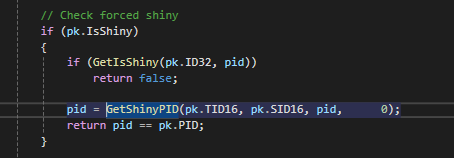
-
Previous versions didn't visibly flag pokemon for missing HOME trackers; it only showed the message if a verbose legality report was requested. Recent versions changed the behavior, because it is not legal to lack a HOME tracker for foreign game transfers. The program has a plethora of settings that you can turn on and off if you feel it is irrelevant to how you want to use the program.
-
The mobile application has not been updated in years, and was never updated to support BDSP and future games. This forum is for the PKHeX Windows Desktop application.
-
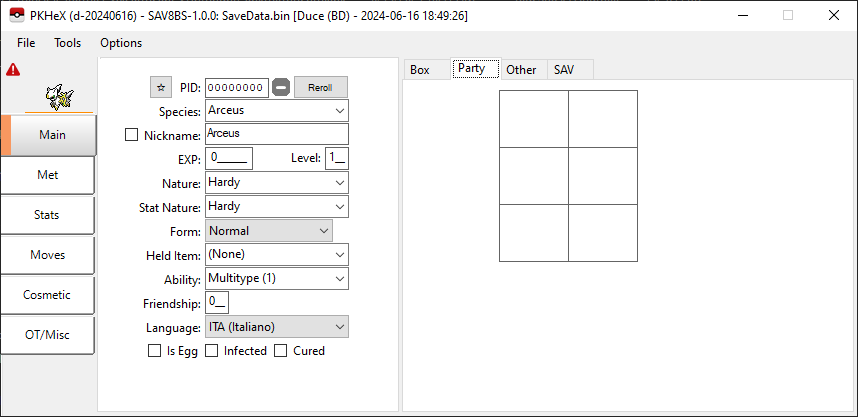
No, it opens it just fine, hence the picture I posted of it working.
-
PKHeX opens it just fine. You've only played 2 minutes.
-
No it's not.
-
Look around in PKHeX. Look around the Internet. Forks exist.
-
You'll need to be much more descriptive because hidden ability has been around for 5 generations now. Be sure the hidden ability is possible to obtain in the game, and ensure that the encounter is capable of obtaining it in the situation where the game does not have Ability Patch available.
-
Now compare the difference
-
Behavior adjusted on latest commits; try dev build. https://github.com/kwsch/PKHeX/commit/6b51250f880e0075a2b1eefa78e7d6b8e0facb1c#diff-38e0fe4dc7d210c5436b833b03c8581aff804ee6526e7c2ffe4c31a1d9af260dL51 Can also just use the batch editor to clear the HiddenAbility flag.
-
Use the encounter database. Plugins are unrelated to this forum.
-
If it were traded to someone else, would it remember who it was last traded to?
-
PKHeX is a save file editor. If you want to edit your save file to unlock things, open your save file to edit it. If you cannot obtain your save file (no cfw to extract it), then you cannot edit your save file.
-
Trade evolutions require trading. If it has never been traded, it never could have been trade evolved.

