theSLAYER
-
Posts
22961 -
Joined
-
Last visited
-
Days Won
1016
Content Type
Profiles
Pokédex
Portal
Technical Documentation
Pages
Tutorials
Forums
Events
Downloads
Gallery
Blogs
Everything posted by theSLAYER
-
PKHeX is now able to edit parts of the save, known as save blocks. It allows users to export and import various save blocks. Here's a tutorial on how to get it done. Steps 0. Keep a safe backup of your unedited save, somewhere on your computer. We're not liable if this results in a corrupted save. 1. Make sure you redownloaded and use the latest PKHeX. (Initial version with this feature caused corruption. Additionally, older copies do not have the feature) 2. Load the target save in PKHeX. 3. Now, click on SAV on the tabs. 4. Now, click on the button Block Data 5. Another window should open up. 6. Scroll through the dropdown list at Block Key:. For this example, I'll be importing the file normal_encount into *Object KNormalEncount (Original quote below, can be found here) Since I'm importing into *Object KNormalEncount, that is what my screenshot shows. 7. Now that Block Key: is showing the correct value, select Import Current Block. 8. A window should pop-up. Select the correct file to import, then select Open. In my case, I'm importing the file normal_encount. 9. Now that the file has been imported, close only the first window 10. Then, proceed to File > Export SAV... > Export main 11. Now close PKHeX. If you want to make sure the new save file is not corrupted, reopen PKHeX and try to load the save. 12. You're done. Now reimport the save into your Switch to observe the effects. Note: As of v.1.2.0 of the game, they added a new file called normal_encount_rigel1, which I've been told is required for wild area events to work. For wild area events Index 24 and lesser, simply also import normal_encount into knormalencountrigel1. This means normal_encount is imported into two block IDs, being knormalencount and knormalencountrigel1. View full tutorial
-
PKHeX is now able to edit parts of the save, known as save blocks. It allows users to export and import various save blocks. Here's a tutorial on how to get it done. Steps 0. Keep a safe backup of your unedited save, somewhere on your computer. We're not liable if this results in a corrupted save. 1. Make sure you redownloaded and use the latest PKHeX. (Initial version with this feature caused corruption. Additionally, older copies do not have the feature) 2. Load the target save in PKHeX. 3. Now, click on SAV on the tabs. 4. Now, click on the button Block Data 5. Another window should open up. 6. Scroll through the dropdown list at Block Key:. For this example, I'll be importing the file normal_encount into *Object KNormalEncount (Original quote below, can be found here) Since I'm importing into *Object KNormalEncount, that is what my screenshot shows. 7. Now that Block Key: is showing the correct value, select Import Current Block. 8. A window should pop-up. Select the correct file to import, then select Open. In my case, I'm importing the file normal_encount. 9. Now that the file has been imported, close only the first window 10. Then, proceed to File > Export SAV... > Export main 11. Now close PKHeX. If you want to make sure the new save file is not corrupted, reopen PKHeX and try to load the save. 12. You're done. Now reimport the save into your Switch to observe the effects. Note: As of v.1.2.0 of the game, they added a new file called normal_encount_rigel1, which I've been told is required for wild area events to work. For wild area events Index 24 and lesser, simply also import normal_encount into knormalencountrigel1. This means normal_encount is imported into two block IDs, being knormalencount and knormalencountrigel1.
-
Can you also send me a screenshot of the folder you’re importing your Switch? the one that says main, backup etc. Also send me the edited save.
-
When you “switch crashes”, can you show a screenshot of the crash? Can you also send me a screenshot of the folder you’re importing your Switch? just import all of those into the respective blocks. Just import current block. It worked for me
-
Did you save a game with the latest update? (Block editing on gen 8 files caused corruption) initial version of latest update is bugged, please redownload PKHeX and load up a backup file.
-
Did you right click on the file, go to “properties” and unblocked it?
-
Did you redownload the latest versions of PKHeX. The initial version had a bug that was hotfixed. Also make sure that PKHeX can open the file, after you saved the save and quit PKHeX.
-
Wild Area Event #4: New Years 2020
theSLAYER commented on Project Pokémon Bot's file in Sword & Shield
 Details for Index 6 of normal_encount Rewards for Index 6 of normal_encount Details for Index 6 of dai_encount Rewards for Index 6 of dai_encount
 -
 your linked e-mail to the purchase. It sent me an e-mail to my e-mail account. Confirm purchases, as well as serial code.
 -
I'm assuming PKHeX handles this for you, just drag the file into PKHeX with the save open, then export the mon. you don't. Too much data scrubbed to recreate, without taking creative liberties..
-
event archive Gen I - V Event Contributions Thread
theSLAYER replied to theSLAYER's topic in Event Contributions
@Gridelin maybe search for it's moves instead? The moves are together with the mon data. As for @YamiM, I mainly refer to sites and their documentation for their offsets. In Gen 1's case, I would refer to this -
event archive Gen I - V Event Contributions Thread
theSLAYER replied to theSLAYER's topic in Event Contributions
if I'm not mistaken, the chain of OTs is not in the same offsets as the Pokemon data tho (for gen 1) But if I'm not mistaken, trainer names are further in the file, so maybe that's a good sign. -
event archive Gen I - V Event Contributions Thread
theSLAYER replied to theSLAYER's topic in Event Contributions
as far as I can tell, only box 2 and your party contained real pokemon? Where was Mew located? I could be a simple thing and fix the species data, or a more tedious thing and it's all wiped. Yikers. -
PKHeX doesn't allow me to insert a FireRed save file
theSLAYER replied to BigChickenMan's topic in PKHeX
upload the save for us to check it. -
Pokemon Sword Save File with Lastest Ruleset downloaded
theSLAYER replied to Tommytruxo's topic in Saves - Files and Requests
If you know which block it gets stored in, we can try to extract it for you. edit: both this and read here. -
Version 1.0.14
11845 downloads
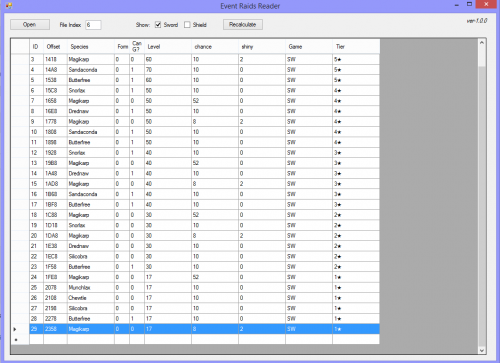
A basic reader that can read normal_encount and dai_encount file, that is the file that controls event/promoted raids. To extract such a file from your save, read up on this page. Not much features, and I don't really plan to add much. Besides species, chance, game, tiers, and possibility of shiny (0 is shiny allowed, 2 is forced shiny) what else is there to add, hmm? Note - Refers to no. of attacks. It appears to be the number of moves the mon makes per turn, beyond the Dmax/Gmax move. Note that drop_rewards/bonus_rewards presently not supported properly, and I have no intention for it to be supported properly. -
Note: before we begin, this isn't a thread to ask for stuff or request stuff. It's purely for documenting the info. Event/Promoted Raids and Dynamax Crystal data Download Rules data Official Competition Data Fashion More to come.. maybe? note: this page isn’t a FAQ. Go to the appropriate thread for that.
- 4 replies
-
- 12
-

-

-
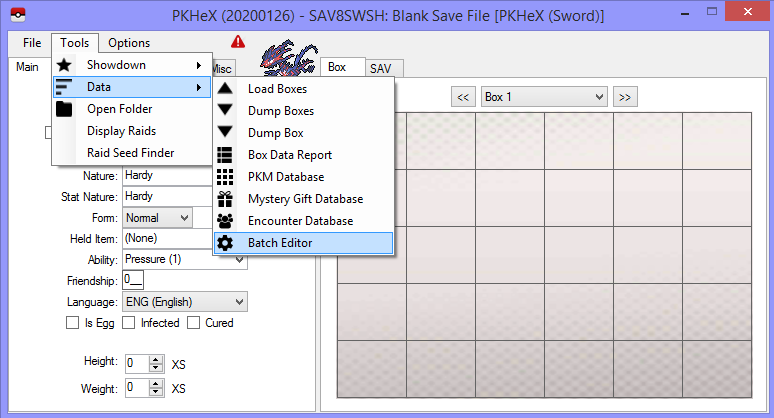
or you can grab a save file with all mons, then use Batch editor to turn them to eggs. code: .IsEgg=True .IsNicknamed=True .Egg_Location=60002 .Met_Location=0 .Moves=$suggest .RelearnMoves=$suggest .Nickname=Egg .EV_ATK=0 .EV_DEF=0 .EV_HP=0 .EV_SPA=0 .EV_SPD=0 .EV_SPE=0 .Move1_PP=$suggest .Move2_PP=$suggest .Move3_PP=$suggest .Move4_PP=$suggest .CurrentFriendship=1 .Met_Level=1 .DynamaxLevel=0 as it stands, the issues you would have to fix is: a. remove all the evolved species and b. change all the levels to match lv 1s.
-
Glad you got it to work =3 Case closed.
-
there has to be something wrong with your transfer process or your Sword isn't version1.1.0 Cause I took your files, and showed you that it loads. I don't know what else to advice you otherwise.
-
Make sure Checkpoint is up to date, make sure the update for Sword is installed. Make sure you restored the correct folder back into your game.
-
No idea what it doesn't work for you. I just restored those exact files and it works fine on my end.
-
now show me a screenshot of the folder your restoring (show the screenshot from your PC) both the backup and main isn't corrupt.
-
send me both the files again fresh from your folder, I'll take a look.