



theSLAYER
-
Posts
22961 -
Joined
-
Last visited
-
Days Won
1016
Content Type
Profiles
Pokédex
Portal
Technical Documentation
Pages
Tutorials
Forums
Events
Downloads
Gallery
Blogs
Everything posted by theSLAYER
-
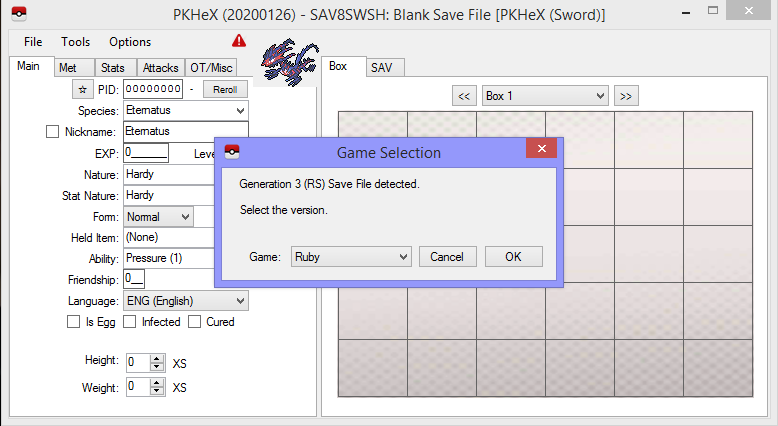
Codes caused corruption. It happened to me before. Open a PKHeX window, click Open sav in PKHeX, and then load the save (holding Ctrl while selecting the file). A window will pop-up for you to choose game type. Alternatively, hold down Ctrl while dragging and dropping a save into PKHeX.
-

editing help Trouble loading Emerald backup save on pc
theSLAYER replied to Aero9371's topic in Saves - Editing Help
It's not a supported binary. In hex it's just random data, can't seem to load it into VBA. -
Wild Area Event #7: Gigantamax Toxtricity
theSLAYER commented on Project Pokémon Bot's file in Sword & Shield
 Details for Index 10 of dai_encount Rewards for Index 10 of dai_encount
 -
that means you didn't load up a save. you know, the FIRST step: Boot up PKHeX, then drag a SWSH into the PKHeX window. We got many saves submitted to our forums, use one if you don't have one.
-
Wild Area Event #7: Gigantamax Toxtricity
theSLAYER commented on Project Pokémon Bot's file in Sword & Shield
Details for Index 10 of normal_encount Rewards for Index 10 of normal_encount -
@kaytee Okay, how bout don't do ANY of those things. First, load up a save file in PKHeX. Then, create as many mons as you like. Then, Tools > Data > Dump Boxes. Choose a folder to dump to. (alternatively, File > Export SAV..) If you go by the Dump Boxes route, the folder will have lots of PK8. To import them into another save: Tools > Data > Load Boxes
-
Look, I tried to import the exact save box data as you, and it loaded fine. Clearly you are doing something wrong. Next, the "export" button is grayed out as you did not load a save file. Load a switch file, have all the mons there. Alternatively, use PKHeX's Tools > Data > Dump Boxes, to dump all the PK8 files into a folder.
-
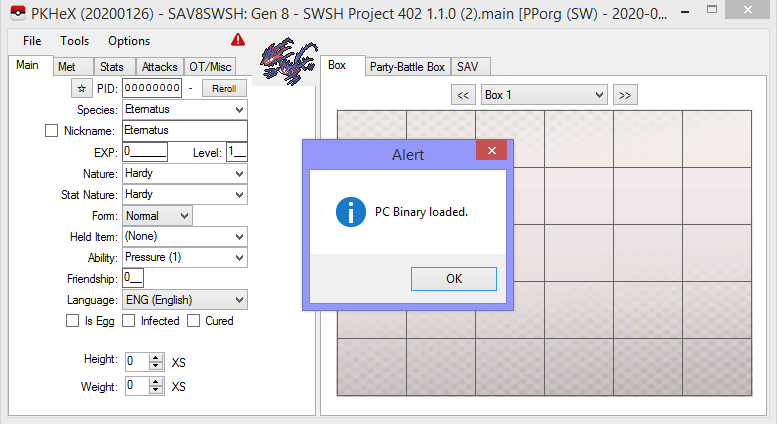
As far as I can tell, the pcdata file is blank? I loaded it onto my SWSH save file, and it wiped out the pc. (also, your video shows nothing to me. edit: downloaded, and opened it in VLC, and there's finally an image.) 1. Extract PKHeX from the zip. 2. Drag and Drop the pcdata onto PKHeX. As in use the mouse to drop the file ONTO PKHeX. Requires you to extract to do so. (hence the first step) 3. Do not "double-click" the PCdata to try to access the data. You need to drag and drop it on PKHeX. Anyhow, the pcdata is empty. No idea why you're trying to import an empty file.
-
@kaytee I was telling you to upload the pcdata for us. In any case: a) was the pcdata file created for Sword and Shield, and: b) did you see Kaphotics post above? pcdata NOT created for SWSH cannot be used on SWSH... c) try drag and dropping the pcdata into PKHeX
-
the pcdata? upload it. Also was it created for SWSH?
-
@kaytee erm, JKSM.cia is a homebrew app for your 3DS. You won't be able to open it in PKHeX. What generation is the PCdata for? Maybe try to loading a save before importing the box.
-
did you import all 4 files? (pretty sure I gave you this answer somewhere else, yet you decided to repost it here) Given that you asked for more details elsewhere, the 4 files regarding event raids are as described here: You can download the 4 files on our event gallery. (We don't have the Toxtricity file, as it hasn't been released as per time of writing)
-
Go to our tutorial, block importing and exporting.
-
Like as said, as long as the file you have on the save is different from the file/checksum that the server uses, you won't be able to share the raid online. So even if you can predict the slots the species will be in, and change the items rewards etc, and impossibly create a copy of the file that WOULD be used, as long as it's different from the one the server is currently having, the raid won't be sharable. Look, if you want SHARABLE raids, either rely on RAM or ROM hacking. The file in the SAV would only ever be sharable if it's the same as the server, i.e no sharing edited files online. Please read and learn what I've just said, thanks. Please understand that I feel frustrated; I've repeated these points a few times already, and it seems as though you're just glossing over them
-
I don't know what you mean by "error". If the raids change when you go online, that's not an "error", that is simply the behavior of the game.. If you don't use the files from the event, but rather use any hex edited files, then it won't be able to be shared online. If the file on the save does not match the checksum on the one used by the server, the server will forcibly change the raid. It's rather simple really.
-
you probably did not import all 4 of the event files.
-
I moved your post, cause it’s not constructive there. It’s species offset - 0x0A in the file, if I’m not mistaken
-
your post is off-topic. Create a new thread in the appropriate sub-forum
-
Using PKHeX: Loading and Saving
theSLAYER replied to evandixon's topic in Saves - Guides and Other Resources
G-max Toxtricity wasn't released yet, so no, you can't create a legal copy. -
It was mentioned in the video. IIRC it was so that they reduce the chances of them destroying the machine. The faster it's sent back, the more unlikely they'll have chances for destroying the machine.
-
should b okay.
-
If TR’s aren’t using their in-game ID, there’s no reason for items to use their in-game ID too. Well this gives me a slight idea towards finding non-TRs, but I’m not very hopeful presently..
-
Once again, I am having issues with TRs. TR19 doesn't show up. No clue, didn't bother looking for it.
-
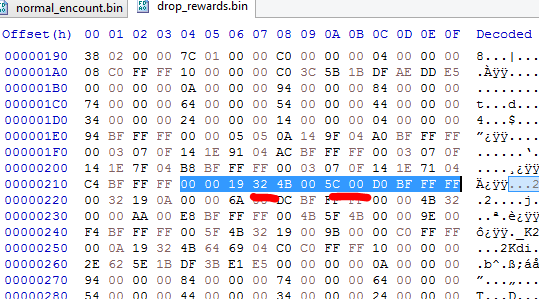
Preliminary guesses, but this is one item slot that contains Nugget. While the 0x32 does seem to match a chance of 50%: However, previous 2 slots seems to be TR21 and TR07. Pretty sure these weren't given for event raids..
-
Yeah, I edited my previous post. Tho 98 entries doesn't seem realistic, right. Event dens, taking into account for each slot and each game version, only goes up to 60. edit: Just realized it's not one nugget per slot. some slots get more..