



theSLAYER
-
Posts
22961 -
Joined
-
Last visited
-
Days Won
1016
Content Type
Profiles
Pokédex
Portal
Technical Documentation
Pages
Tutorials
Forums
Events
Downloads
Gallery
Blogs
Everything posted by theSLAYER
-
 Shadow Pokémon found in XD cannot be shiny. use Eligor to calculate PID if you want to change nature.
 -
OFW and CFW is disconnected. Behavoir is normal. One of the only way around this is to remove emuMMC from SD card.
-
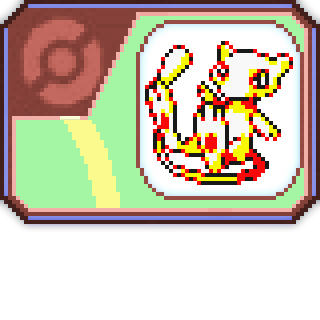
Version .
1967 downloads
Original Description: The Club Nintendo Mew distribution ran in Norway from October 15th 2000, to November 20th 2000 and required you to be a Club Nintendo member to receive a Mew. More can be read on the original thread. Disclaimer: THIS POKEMON WILL NOT BE LEGAL WITH ANY VIRTUAL CONSOLE RELEASE (AND BY EXTENSION, CANNOT BE SENT TO GEN 7 AND ONWARD). Credits: Digiex Member Golden Toilette Original Thread: -
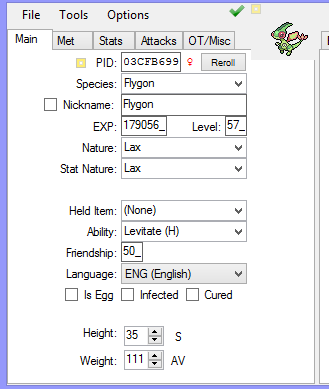
While hidden ability Trapinch is flagged as possible, I don't think that's accurate; from the 3 dens that were on Serebii, Flygon family cannot have the HA. edit: Looks like Serebii presets any Pokémon that has no HA to "Standard" on their site regarding Max raids. Additionally, looks like Leanny's plugin does the same thing too (when using Flygon on Raid calculator, only showed Ability 1 & 2) Thus, I calculated the seed based on a Dragapult having HA, but swapped the randroll to Flygon. The result: The Flygon has HA. The encounter I used was 5 stars at Rolling Fields 2. (and file 330 ★ - Flygon - A4733D2FF7D2.pk8) In any case, PKHeX handles flagging the abilities just fine. And the game does indeed generate mons with HA, even if the ability is the same as standard ability.
-
You literally just showed me a screenshot where you couldn't even copy a file to your Desktop, so I doubt it is "perfectly fine". Functionality of copying a file to Desktop has nothing to do with PKHeX, that is just your SD slot/SD reader/SD card. Maybe it "was perfectly fine", with the focus on was, past tense, but now that doesn't seem to be the case in the present. I don't know how long ago USUM editing was for you (for me, the 3DS era was at least 2 years back), but these things do degrade over time. If you can get your SD slot/SD reader/SD card working long enough, I do recommend you copy the files and keep a safe backup, just in case your SD card is on the verge of failing. Even if it isn't, it doesn't hurt to keep a safe backup on your computer or external HDD
-
yeah it doesn't look like a PKHeX issue, but instead a bad card or bad card reader issue. It seems that your SD card/SD reader keeps popping in and out of existence for your computer. The only advise I can think of is.. make sure the file exists long enough for you to copy. If it continues to be erratic, consider a new card and/or card reader.
-
Have you tried copying the file to your desktop, then opening said file that's on your desktop?
-
Does PKHeX even support other Mystery Dungeon games? I'm operating under the assumption that besides Colo and XD, it only supports mainline games.
-

Pokemon Sword Save from EmuMMC doesn't carry to Stock
theSLAYER replied to RonaldoR99's topic in Saves - Editing Help
as long as you're using CFW, there is a chance of getting banned. Even if your CFW is designed to block user reports (which Nintendo servers can use it to tell if you're hacking), if a crucial report isn't sent (imagine if it's supposed to be sent) or if a crucial report isn't blocked (it wasn't supposed to be sent but was), servers can tell. This is the nature of the cat and mouse game between hackers and Ninty. Someone will get banned, that someone makes a report to CFW devs, then it gets implemented, then everyone else doesn't get banned. In other words, no one can give you the guarantee you need. -
This tutorial is made with the presumption that you are capable of understanding and following simple steps. While you may ask questions on details regarding the subject, you CANNOT ask on the how to inject/extract save file, how to install CFW etc. There are other tutorials for that (and this tutorial presumes you already know those things) Required items 1. PKHeX 2. able to extract and inject a modified SWSH save 3. A working internet browser (in case you wanna check what den has what mons, etc) 4. Latest version of Leanny's plugin Steps 1. Load your game on your Switch, save in-game, then export the save with your favorite save manager. 2. Figure out what mon resides at (a) what physical den, and (b) what pool does it reside in. (Our page sorts them out by the physical dens, as listed in Leanny's plugin as well as PKHeX’s raid parameters. Also, you can fight Dens via here.) In this case, I'll go for G-Butterfree. For (b), it can be found in the Rare Den. Open the page where it can be found, and take note of the (c) stars and percentage chance. 3. Load the save into PKHeX 4. Open Leanny's Plugin (Tools>Display Raids), scroll to den found previously (a), then open Raid Calculator. In my case, it's Rolling Fields 3. You should see the seed in Den Search being the same seed as the one displayed on your Raid List. If it is not the same seed, type in the seed value into Den Search. 5. Now, change the species, IVs and other stats as you deem fit. Once done, hit Search. Once found, copy the Seed displayed. In my case, I want Square Shiny Male G-Butterfree. (Note: may take awhile to find the entry) 6. Exit Leanny's Plugin, with the same PKHeX window, go to SAV > Raids. Go to the (a), and paste the seed, as well as set the Dentype and flag (parameters based on this page) For my case, it will be G-Butterfree. So I scroll to Den 003, as found in (a). I set Den Type to Rare, as it is a rare den As per (c) I intend to fight it at 1 star, and it's noted to be 10% chance, and based on the page, it's the last 10% of 1 star on the page. As such, randroll is 91 - 100 (last ten entries to 100), and star is 0 (for stars, it starts with 0th index, so it's intended -1) I've drawn arrows at the values that needs to be changed. Example on how randroll correlates to the percentages on serebii 6. Save the save in PKHeX, import it into your game. 7. Now find the den in your game. If you're lost, Leanny's plugin has a mini-map that can show where the den is. 8. Alas, at the physical den, is your encounter! For my case, my 1 star square shiny male Butterfree is achieved! View full tutorial
-
This tutorial is made with the presumption that you are capable of understanding and following simple steps. While you may ask questions on details regarding the subject, you CANNOT ask on the how to inject/extract save file, how to install CFW etc. There are other tutorials for that (and this tutorial presumes you already know those things) Required items 1. PKHeX 2. able to extract and inject a modified SWSH save 3. A working internet browser (in case you wanna check what den has what mons, etc) 4. Latest version of Leanny's plugin Steps 1. Load your game on your Switch, save in-game, then export the save with your favorite save manager. 2. Figure out what mon resides at (a) what physical den, and (b) what pool does it reside in. (Our page sorts them out by the physical dens, as listed in Leanny's plugin as well as PKHeX’s raid parameters. Also, you can fight Dens via here.) In this case, I'll go for G-Butterfree. For (b), it can be found in the Rare Den. Open the page where it can be found, and take note of the (c) stars and percentage chance. 3. Load the save into PKHeX 4. Open Leanny's Plugin (Tools>Display Raids), scroll to den found previously (a), then open Raid Calculator. In my case, it's Rolling Fields 3. You should see the seed in Den Search being the same seed as the one displayed on your Raid List. If it is not the same seed, type in the seed value into Den Search. 5. Now, change the species, IVs and other stats as you deem fit. Once done, hit Search. Once found, copy the Seed displayed. In my case, I want Square Shiny Male G-Butterfree. (Note: may take awhile to find the entry) 6. Exit Leanny's Plugin, with the same PKHeX window, go to SAV > Raids. Go to the (a), and paste the seed, as well as set the Dentype and flag (parameters based on this page) For my case, it will be G-Butterfree. So I scroll to Den 003, as found in (a). I set Den Type to Rare, as it is a rare den As per (c) I intend to fight it at 1 star, and it's noted to be 10% chance, and based on the page, it's the last 10% of 1 star on the page. As such, randroll is 91 - 100 (last ten entries to 100), and star is 0 (for stars, it starts with 0th index, so it's intended -1) I've drawn arrows at the values that needs to be changed. Example on how randroll correlates to the percentages on serebii 6. Save the save in PKHeX, import it into your game. 7. Now find the den in your game. If you're lost, Leanny's plugin has a mini-map that can show where the den is. 8. Alas, at the physical den, is your encounter! For my case, my 1 star square shiny male Butterfree is achieved!
-
 As long as you have wild area event news updated (for this cycle), don’t update it again and don’t receive any new mystery gifts during a hypothetical new cycle, and also don’t try to host it online, you’ll be able to get them past the event cycle. That’s how I got delibird past the event date. (Was still Delibird on my save due to the lack of updating)
 -
As posted in the description, the others variants are now available via the event raids. Tho despite the flavor, they can only have the Strawberry Decoration. Not sure if the game allows for different decorations to appear in raid battles. (The other decorations can Gigantamax, maybe those will be distributed as an event, but I digress) If you’re asking if I’ll upload the files, then yeah, I’ll upload the files once I set up my PPorg save to go for them.
-
that's not what they're talking about.
-
Shiny count is based on how many shiny Pokémon in your pokedex. If you want it to be lower, then remove the shiny data in your pokedex
-
Gigantamax Butterfree
theSLAYER commented on Project Pokémon Bot's file in Sword & Shield (Base Game)
 I will upload to github one day. One day. But don't expect it to be any time soon. Happy downloading. edit: I've updated the github for now, and added other Gmax entries I plan to release in the future.
 -
if the Pokegen is open, for starters, save as a SAV file somewhere else unrelated to Desmume. Also, use PKHeX. PKHeX is able to edit DSVs directly. Now, that you've saved elsewhere, you should be able to import battery file with desmume, using that SAV we just made.
-
Pokemon Sword Save from EmuMMC doesn't carry to Stock
theSLAYER replied to RonaldoR99's topic in Saves - Editing Help
typically, saves injected into emuMMC won't magically "sync" with your saves on sysMMC. Even if they share the same profile, they're treated by the switch as separate profiles. Only way is to boot CFW into your sysMMC, and that typically means not having a emuMMC. -
those mons should already have met location on file. Even if you drag em with PKHeX, their original met location won't change. Yup, there weren't programmed into Moon, thus don't exist in Moon. You can't import over what doesn't exist.
-
Somehow accidentally overwrote main game data on Pokemon Shield
theSLAYER replied to strangeone1969's topic in PKHeX
we'll never know what you do and what you won't do, will or will not result in a ban. Even if things are okay now, there's no guarantee it will or won't be in the future. There's no guarantee whether a not you'll end up being faulted for things you did long ago. Anything you do, at your own risk. -
Somehow accidentally overwrote main game data on Pokemon Shield
theSLAYER replied to strangeone1969's topic in PKHeX
that is also not something that can be patched out by FW updates. You probably updated your entry to bootloader method or did something different. (or maybe your OFW and CFW is at different FW levels now? I don't know) There's one way to save to sysnand: simply not have emunand. The thread I linked has a way to make CFW boot into sysnand (by not having emunand at all) -
sounds like it's a problem with the save. can't remember where and when, but I replied to threads with the solution to the problem you mentioned. Search older threads. edit: read this entire thread: It's likely that save's mons were created, and another problem will likely occur in the future. I say go with another save instead.
-
 yup wait to PKHeX to implement it, if it ever does.
 -
Somehow accidentally overwrote main game data on Pokemon Shield
theSLAYER replied to strangeone1969's topic in PKHeX
seems like you can't boot the CFW into sysnand anymore. Read this entire thread: -
1. restart your game 2. Play your game till you unlocked the first pokecenter. 3. open another PKHeX window 4. use batch editor to change their TID, SID, OT etc (if their fateful encounter flag is off) 5. now import all the mons into the main window (your new save) You pretty much can use Pokemon Bank early on, so that's pretty much it. Use at your own risk


