


theSLAYER
-
Posts
22961 -
Joined
-
Last visited
-
Days Won
1016
Content Type
Profiles
Pokédex
Portal
Technical Documentation
Pages
Tutorials
Forums
Events
Downloads
Gallery
Blogs
Everything posted by theSLAYER
-
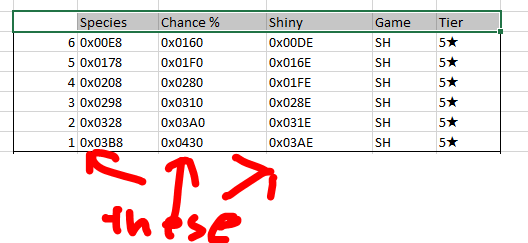
That's where you went wrong: you're not supposed to open the excel file in HxD You're supposed to download one of the normal_encount file that we uploaded, or export the correct block from your save. THEN use HxD to edit that file (the normal_encount or the one dumped). Based on the offsets from the excel spreadsheet. The excel file just tell you what offsets/address the species are in the normal_encount file.
-
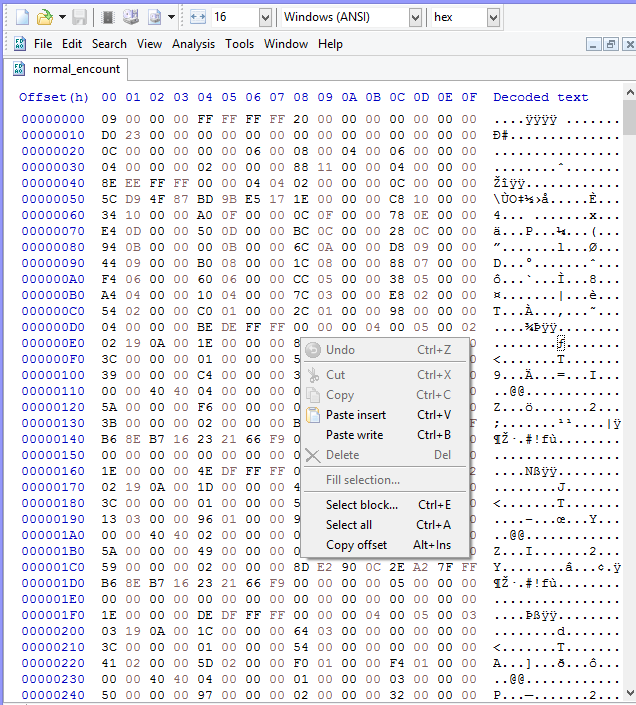
looks like you changed the size. Don't "Ctrl V" (paste insert) Use Paste Write "Ctrl B". [paste insert changes file sizes] this:
-
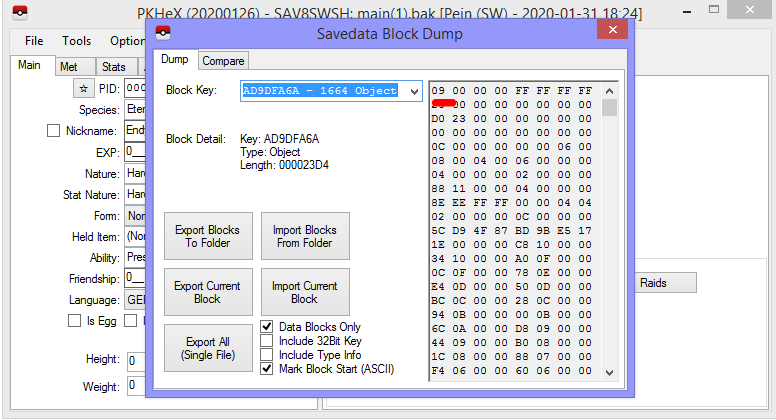
Follow the tutorial as I provided in step 1. It explains how the export the correct current block
-
sorry, no, I don't do voice chat. And also, everything has been laid out for you already. I've explained dec->hex conversion, account for endianness, how to ensure the raid is an event raid, how to interpret the offset and what does it means. Honestly, at this point all you got to do is refer back to the outline either Kaph or I wrote for you, then when you don't know how those steps work, follow the expanded versions as given to you. I've already taught you how to interpret the addresses, and all you gotta do now is edit the values in those addresses. Any other questions?
-
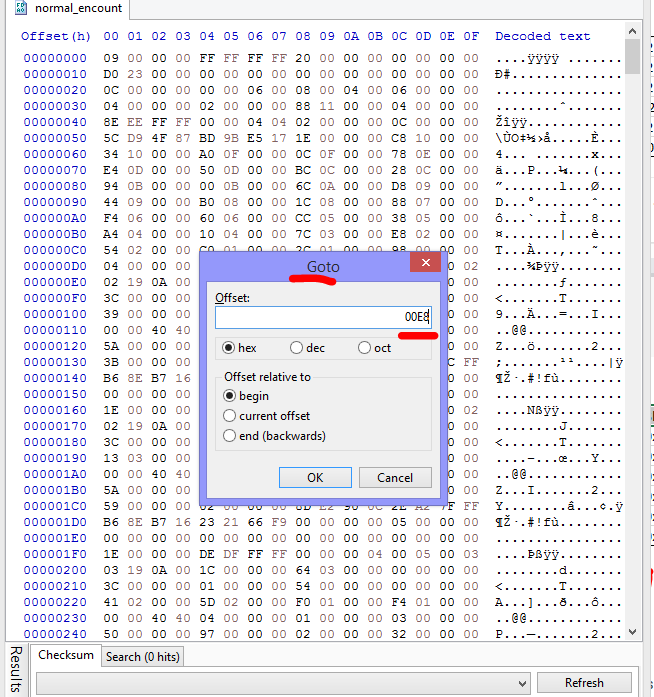
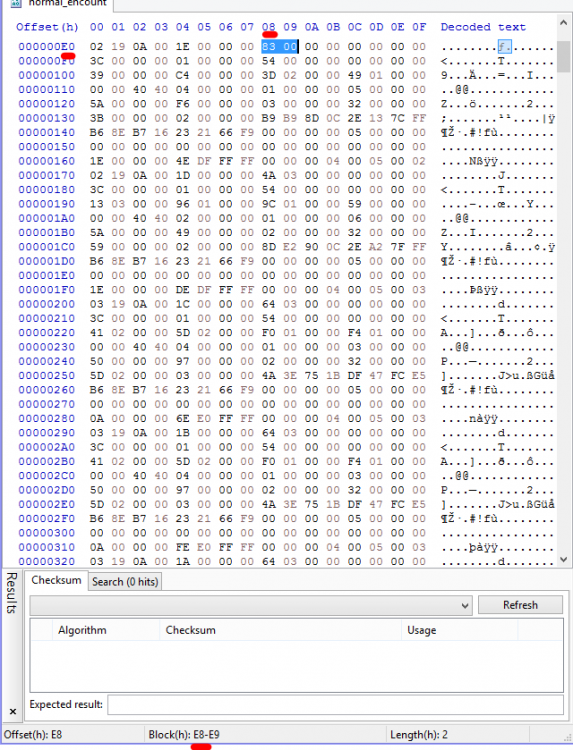
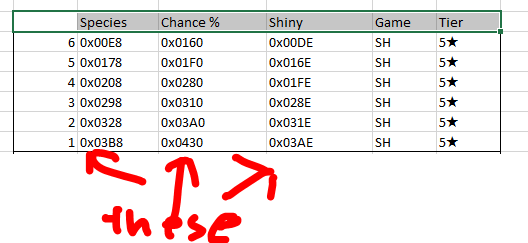
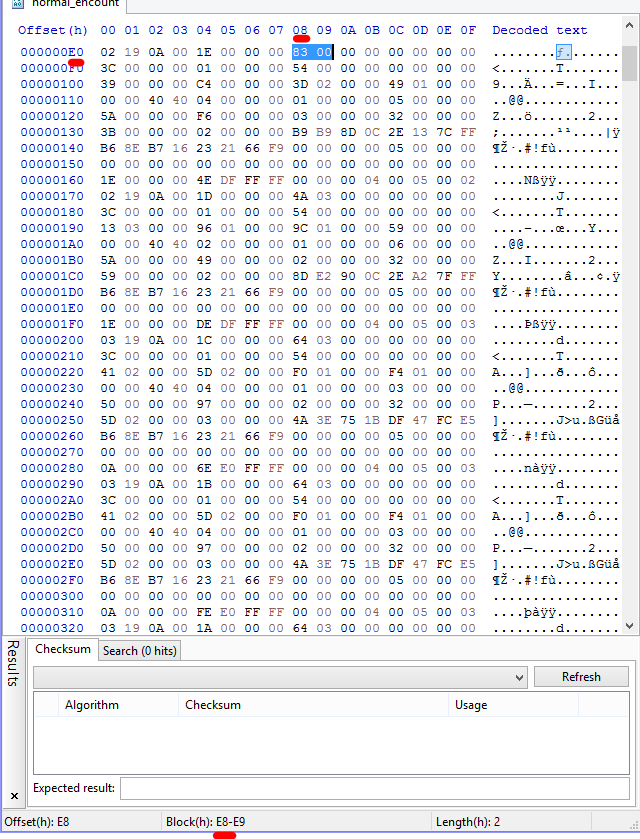
Going back to what I sent you These are addresses. locations. So for example, 5* raid for Shield slot 6, the species is located at 0x00E8. Now go to 0x00E8 on the file. ' Row: 0xE0 Col: 0x08 Thus, that address is 0xE8 As you can see, I highlighted the block that the species value would have gone into. [as we know, and I demonstrated earlier, species value takes up 2 bytes. Those are the two bytes] Does that make sense to you? :3 (in case you're curious, the hex editor I'm using is called HxD. It's free)
-
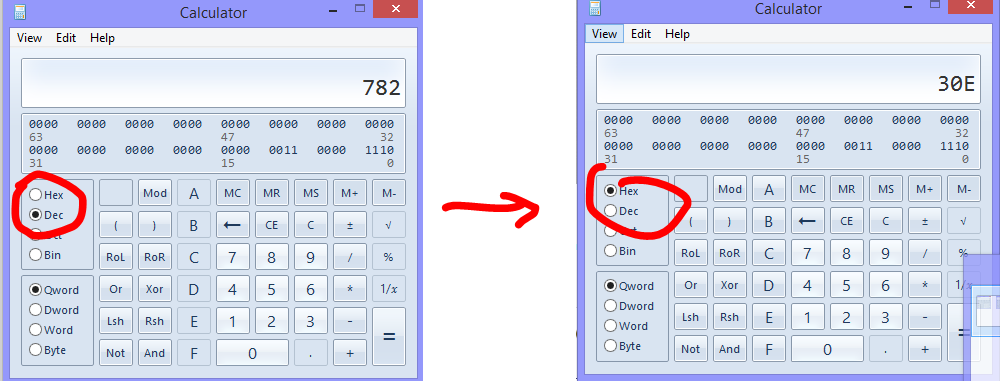
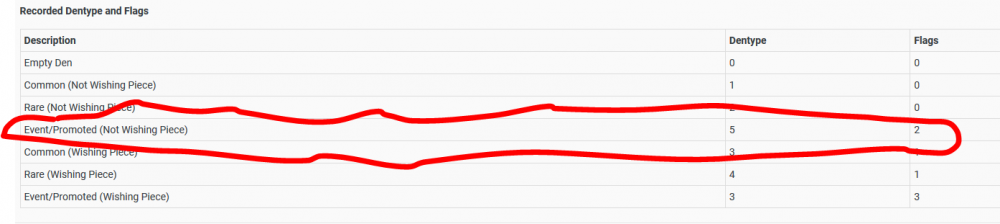
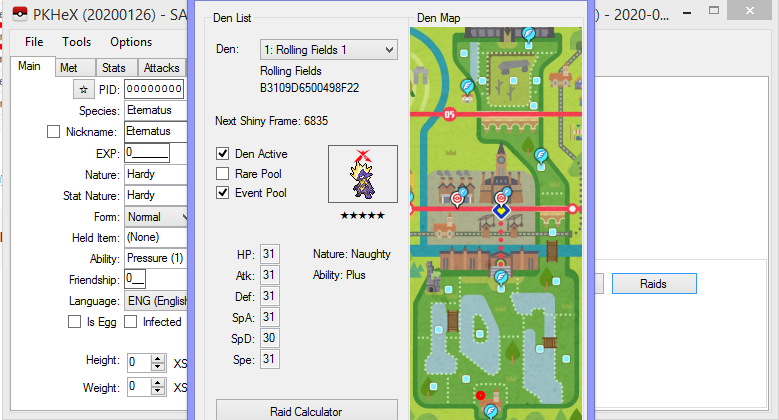
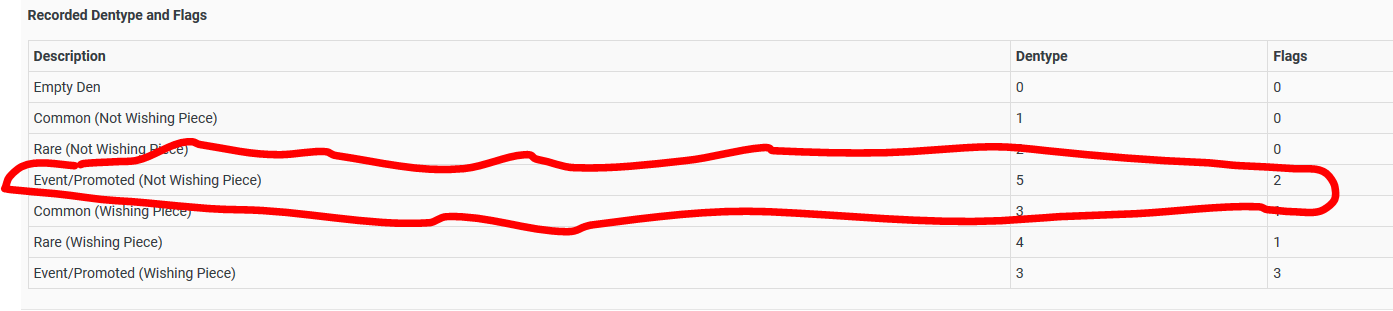
Let me walk you step by step alright? Let's say that something is a Jangmo-o. National ID is 782 -> hex 0x30E Now, to account for "endianness": To write it into the file, you gotta change the order, front two become back two, vice versa. thus, what you write into the file is "0E 03" So likewise, when you write the mewtwo into the file, it would be "96 00". Now, how to guarantee event raid? After you import the file using PKHeX, open the raid editor, and set these values for the den, as per this page. Specifically: Anyway the updated Plugin will tell what you are going to encounter, provided you edited the file correctly, and imported said file
-
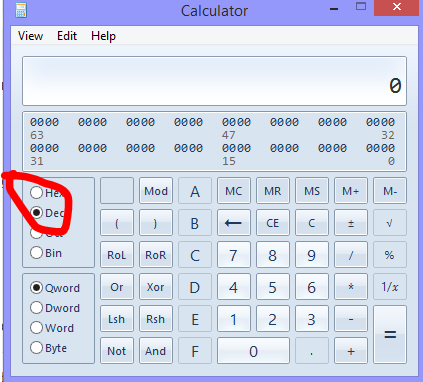
Literally google for a decimal to hexadecimal converter. Alternatively use your calculator that is preinstalled on your computer, switch to Programmer mode, and it is right there. The offsets are in the document. Maybe you don't understand the word "offset" when it comes to editing. Location? Address? Do you know what is hex editing?
-
Use their National ID, convert that value from decimal to hexadecimal. Also, the offsets (location) on where to put the numbers is already linked in the excel file I gave you.
-
If you're not interested in sharing raids, and you just wanna do them (as in take part in raids, without sharing with others): (remember: you did start off the thread talking about how they were shared online) 0. Keep a safe backup of the unedited save on your computer. 1. Use PKHeX export the event raids (or use the raid files), using it's block editor. Follow this tutorial on how to export/import them, and the block key and corresponding file data is on this page. 2. Hex edit the raid files. The offsets should be as per this file. Don't forget to account for endianness 3. Use PKHeX to import the edited files, using the block editor (as per above), save the save, import it into your game. 4. Profit.
-
When I previously used pkNX, I used it to hack LGPE. Not sure if it's been updated for SWSH (haven't performed ROM hacks for SWSH). Anyway no need to bump this thread. If anyone knows, and they come across this thread, they'll probably help you. edit: while this is true for SAV editing event raids, these won't be able to be shared online via hosting. Anyhow, hosting illegal raids and catching them is probably a bad idea... (Plus, it's not like what you catch would be legal anyway...)
-
I think almost the start of December someone did a ROM hack and shared their Squirtle to viewers, and that person nor the viewers got banned. Tho is this issue persists, they may ban the various hosts.who knows really
-
The online illegal raids spree you see are due to ROM Hacking. PKHeX cannot be used to perform ROM hacking.
-
I'm curious to why that is as well. As far as I can tell, Theivul can be encountered in Dens at Bridge Field, and it has valid Den RNG. @Kaphotics is there something else that is making this illegal or was it missing from PKHeX? ><
-
 PKHeX isn't updated to deal with non-strawberry Alcremie that can Gigantamax. Check back after the next update drops.
 -
no one knows where it is, so no.
-
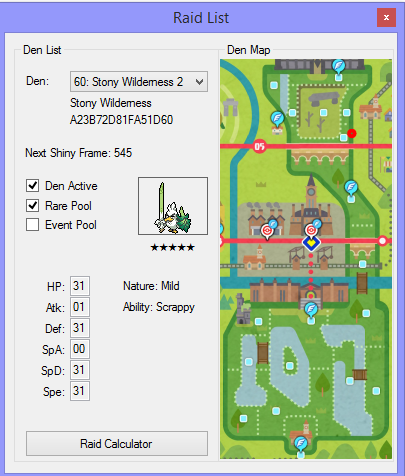
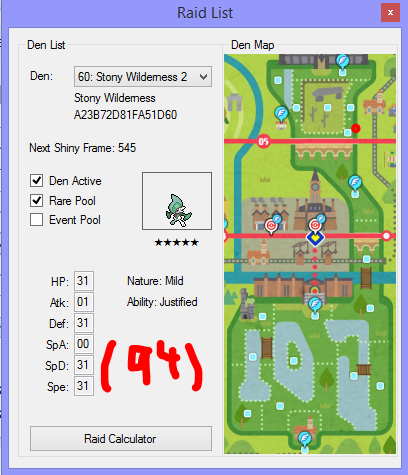
Randroll is from 1-100. Given gmax machamp is 5%, so 96-100, and you need 1% that is before gmax machamp, try 95 as randroll. Also update your plugin (use the latest version). They should have fixed all of the one-off errors by now. Also, for rare dens (purple lights), I recommend using either 2-0 or 4-1 for dentype and flag respectively. (as per used by the base game) In any case, it shows up fine on my plugin. (using 95 VS 94)
- 1 reply
-
- 1
-

-
you can have illegal mons on PKHeX, they'll just be flagged illegal. Thad doesn't stop PKHeX from functioning.
-
PKHeX doesn't allow me to insert a FireRed save file
theSLAYER replied to BigChickenMan's topic in PKHeX
@BigChickenMan maybe just stop double posting. The edit button is there, and you can edit in to your previous post any new information. I've merged your posts. As mentioned, your save data didn't contain any data. Maybe you didn't save in-game, maybe you attached the wrong file, maybe the emulator punked you, etc etc. -
you said the Larvitar wouldn't spawn, so I tested it to prove that it's working just fine. Hacked raids (set to event raids) would show up just fine, but I've yet to test if you can wishing piece event dens (injected this way) or get those (injected this way) to spawn naturally. However, given that this doesn't seem that different from updating wild area news (no other flags seems to be set), it is probably fine.
-
@Kristian094 as far as I can tell there's nothing wrong with your save. I did add some Dynamax Crystals, and the save does load for me. As you can see, it your save (see the trainer card) and the Larvitar spawned just fine. By the way, the description for the Dynamax Crystals wouldn't exist if the right files didn't exist. (It would display as ??? instead of what you see there)
.thumb.jpg.9554bf3b44eba6ef2cad6a16449bfa3f.jpg)
.thumb.jpg.5d1482d3a8fc3bf84d9905ea0bc6163f.jpg)
.thumb.jpg.b0f23a83c494f34f2e60c314c552e5b5.jpg)
.thumb.jpg.de6ed5587ff8d39eb6bee452d40fb7f1.jpg)
.thumb.jpg.d917a4cfc6a0ac16d11ead3a19c5fabd.jpg)
.thumb.jpg.0cb23958647c51263d13ab5a11cc0afa.jpg)
-
send me your save. I've injected into a fresh save, and the Dynamax Crystals worked, so I'm wondering if you're doing it wrong.
-
did you import the other 3 files as well? Maybe all 4 files are required.
-
I'm assuming that Runerigus wasn't met in raids. Runerigus from evolved Yamask requires at least 49 damage done to it, in order to evolve. In other words, Runerigus that isn't from raids cannot have 0 in that value. (which is that box below Relaxed) [this topic was brought up last week]
-
You save loads just fine on my Switch. (as seen in the screenshots in the spoiler below) This has nothing to do with PKHeX and block editing, and everything to do with your importing process. Maybe update your Checkpoint, make sure the files are named correctly, etc. edit: From what I can tell, you loaded Index 09 (Gigantamax Milcery file) Meaning, it won't be Alcremie event raids, but instead Milcery Event raids. (Alcremie is Index 08. Since the Index is wrong, the raid file you loaded was wrong) In any case, consider using wishing pieces, or try finding red light in the wild area. You can also hack the raids.
.thumb.jpg.81692e470b4e82a6fd9d6379ea710672.jpg)
.thumb.jpg.7c405ec10fb89128e8da431133022da0.jpg)
-
the file you sent me is called main.bak Can you confirm the file you sent me is the same as the one in the image?

.jpg.f07b3638591f1d6a17edc66610aee23d.jpg)
.jpg.71126d3355aaf4589307dae36d13bd4a.jpg)
.jpg.e63203dd9d48e585d8af3d58d892c44e.jpg)
.jpg.ec5382079c0408e0f07f70b2018938e6.jpg)
.jpg.ec4fdabe234843f5e59488a02d764ab8.jpg)
.jpg.32d5a1ad6527f0ec1773019803ebe98e.jpg)

.jpg.1195077d7bedc1a3144902072a333ac8.jpg)
.jpg.f9055a446f6a686e92903986dfcdc26f.jpg)