



theSLAYER
-
Posts
22961 -
Joined
-
Last visited
-
Days Won
1016
Content Type
Profiles
Pokédex
Portal
Technical Documentation
Pages
Tutorials
Forums
Events
Downloads
Gallery
Blogs
Everything posted by theSLAYER
-
There isn't a way to do so directly. Your only hopes would be to edit save files that the mons can be found in, then send them in via PKHeX. For example, if a mon only exists in SWSH, you gotta edit a SWSH save file then send it in. No information about this exists publicly at this time. There is potential to spoof HOME's commands to do that, but I don't even know if that info exists. Plus even then it's a huge ban risk. Edit: @RanchBurner it seems all you've done on the forum is to make posts relating to spoofing/fake trading/direct injection to HOME. I would suggest you stop. Such a method is not known to exist. Unless you're some sort of technical wizz, I suggest you don't bother to try. Consider going to reddit and something to try to find someone to inject mons for you then slowly trade to your on HOME one by one; while we do have a requests Pokemon page, it doesn't see any traction. People rarely want to commit to something time consuming.
-
I recall something like that happening when I sequence broke the game using too many walk to wall cheats, and/or giving badges at incorrect timing, etc. Do what BlackShark said :3
-
 First load a LGPE save, then either: a) Set the file into PKHeX's GP1 editor, or b) Set the GP1 into box (drag and drop)
 -

Can't move save data from repro Soul Silver to legit cart
theSLAYER replied to Mismatched's topic in Saves - Editing Help
Very odd indeed. Maybe try reading this: https://gbatemp.net/threads/new3ds-cannot-load-certain-nds-cartridges-after-installing-cfw-twlfix-not-working.576971/ I wonder if it’s an installation procedure or some missing that is messing with your NDS connection. Try loading the NDS wifi settings in your 3DS system settings, see if it loads. Also give a brief read to that thread. It seems like they might have the same issue as you, not sure if it was resolved tho. -
Pokepark (ポケパーク) Eggs: Featherdance Taillow
theSLAYER commented on Project Pokémon Bot's file in Japanese
 Use winrar.
 -
The user hasn’t been around since Jan 2021. I’m unsure they’ll see it, but I’ll keep this post unlocked just in case they wanna reply.
-
Static = Fixed. encounter = encounter. For example, you know how some games you get a guaranteed Rayquaza encounter (let’s say atop Sky Pillar), that’s a static encounter. It is programmed to be there. Certain other things are programmed along the fixed encounter. For example, XY Unknown Dungeon Mewtwo cannot be shiny. So if you hacked it to be shiny, it’ll be a static encounter mismatch.
-
Yes. We’re extracting the full Pokémon data, and it only generates when you’re battling them. When the battle is on screen.
-
If I’m not mistaken VBA should have a memory viewer/memory dump options. Just look through options/debugger options, if any. well, you need to be battling the trainer, if you want to dump their mons. basically, for any device, even phones, whatever is shown on screen is a result of the data being in Random Access Memory (RAM). So if you want something to be in RAM, gotta make sure you’re in that scenario on screen. also, as an added note, don’t upload the RAM. The ROM data is in the RAM. (The ROM needs to be loaded into the devices’ temporary memory, in order for the device to do whatever)
-
ROM != RAM. RAM is internal memory of the device. Makes me wonder if you even gotten the RAM at the first place. If you're using an emulator, either a) the emulator has an option to dump RAM/Memory; or b) use Task Manager on the emulator while it's running the game, then Right Click > Create Dump File
-
Use a Hex editor and remove these bytes. The save will then load in PKHeX.
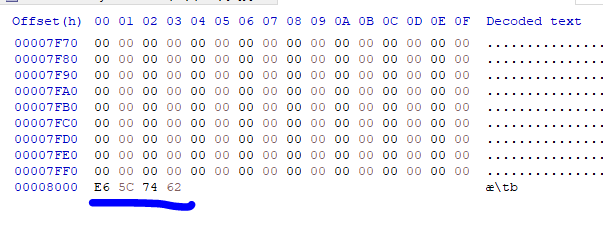
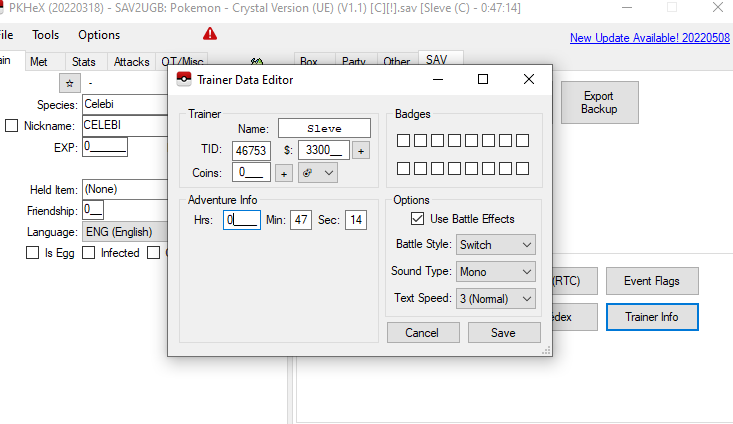
-
Can't move save data from repro Soul Silver to legit cart
theSLAYER replied to Mismatched's topic in Saves - Editing Help
Yeah then your conclusion doesn’t really help >< If the issue is their cart, and the save is being saved on some other physical chip, hence why the device can’t recognize it, playing on an emulator doesn’t really help to get to the bottom of that problem. It does confirm that the ROM isn’t the problem, but it usually isn’t the problem anyway, and we’ve been operating with the reasonable assumption that the ROM isn’t the problem. We’re back to square one, being the cart being the problem. Anyhow, you mentioned something I missed. Another device can play the game more consistently? In the case dump using that device. As per my previous post, if the device can play it, try to dump from there. -
Can't move save data from repro Soul Silver to legit cart
theSLAYER replied to Mismatched's topic in Saves - Editing Help
And how did you do that. Play his ROM on a emulator? On a flash cart? Reflashed an old repro cart of yours? -
Try here: https://github.com/kwsch/PKHeX/blob/a57f40ae7d878293d81d73826fdbf0c6cbe386e6/PKHeX.Core/Legality/RNG/MethodFinder.cs
-
Can't move save data from repro Soul Silver to legit cart
theSLAYER replied to Mismatched's topic in Saves - Editing Help
The issue should be irrelevant to which device you mod I suppose. If you can play it, then that same device can dump its data. Just whether can it find the data is up to the make of your cart. Is TWLsavetool unable to read the cart to dump the save? -
Can't move save data from repro Soul Silver to legit cart
theSLAYER replied to Mismatched's topic in Saves - Editing Help
You should check as per what BlackShark gave you, but just in case, mind sharing a screenshot of your trainer card? Just wanna make sure the name is formatted as you say, with no extra characters or anything. Even changing the formatting or capitalisation would change what needs to be searched. -
Can't move save data from repro Soul Silver to legit cart
theSLAYER replied to Mismatched's topic in Saves - Editing Help
Maybe for starters look for your trainer ID? Take your trainer ID, convert it to hexadecimal, then swap the placements of the digits around for endianness. For example, trainer number 10303 is 0x283F in hex. So in a save, it’ll be stored as 3F28 (First two and last two digits are swapped). if there’s any leading zeros, make sure to include it for the swap. Now, open the ROM in a hex editor, and Search, find hex, insert your digits, and search all. Make take a bit. I can’t give exact steps cause every hex editor is different, and I’m not by my com so I can’t recommend the one I use and show screenshots. In any case, let us know how many results it shows you. If that fails, or has too many results, I suppose the next thing we can try is to find your in game name. What’s the exact IGN you’re using for that game? -
Posted in the wrong section again. Like, there isn’t a semblance of even trying. Locked the thread, moved it.
-
Can't move save data from repro Soul Silver to legit cart
theSLAYER replied to Mismatched's topic in Saves - Editing Help
Well, not every repro cart is the same. Given that the programs try to dump the correct partition, perhaps the data isn’t saved in the correct partition. Here’s something you can try to do, but keep in mind you can’t post the file here: Dump the ROM, and try to find the save inside it. Usually only Gen 3 bootlegs store the saves in the ROMs, but I don’t know, maybe you’re experiencing it? In any case, if Kaphotics says a file you provided isn’t a save, then it isn’t a save. He knows what he’s doing. So given you’re desperate and nothing is working, maybe try any idea you may have, throw it at the fan, and see what sticks. -
@pharohzeke Does it work when you double click to open it?
-
Unable to open Pokémon Green [JP] save file in PKHeX
theSLAYER replied to Elbub's topic in Saves - Editing Help
as with my response to the previous fella, you've gotta upload a save for us to take a look. Can't perform magic here and just give a random solution without knowing the problem -
I did say I think there's no correlations, right? And I also said "It has restrictions to what value could exist", so that perhaps is the 'rule' you've mentioned? Assuming this information isn't inaccurate, this is probably what you're looking for in terms of 'rules': Else, look at PKHeX Pokewalker's documentation. Cheers.
-
I don't think that's specific enough tho. I hope you don't mind, I'll like to ask some questions: For starters, were you able to run PKHeX before? Did you extract the program from a zip? Are you running it on a OneDrive account? Have you tried opening the exe directly first?
-
Maybe someone can correct me if I'm wrong, but I don't think Pokéradar has known correlations. It has restrictions to what value could exist, but I don't think there's correlations. You're better off using Encounter Database on PKHeX to generate one.
-
and can you not load off the old save?

