All Activity
- Past hour
-
So even moving it to my OS and Storage, it still gives a similar error. Exception Details: System.IO.IOException: Access to the path '\\?\C:\pk3ds\encdata' is denied. Exception Details: System.IO.IOException: Access to the path '\\?\D:\pk3ds\encdata' is denied.
-
 Simple question: If I take Pikachu from the starters, can It evolve into Alolan Raichu?
 -
Do not run the program from a OneDrive folder; place it on your computer's hard drive instead of a cloud folder.
-
Having an issue where PK3DS pops up with an "unhandled exception" error when randomizing Wild Encounters. I'm not sure why it doesn't have access to the path and I'm not sure how to fix this. I've looked everywhere for help. Exception Details: System.IO.IOException: Access to the path '\\?\C:\Users\megan\OneDrive\Desktop\pk3ds\pk3DS\net10.0-windows\encdata' is denied. at System.IO.FileSystem.RemoveDirectoryInternal(String fullPath, Boolean topLevel, Boolean allowDirectoryNotEmpty) at System.IO.FileSystem.RemoveDirectoryRecursive(String fullPath, WIN32_FIND_DATA& findData, Boolean topLevel) at System.IO.FileSystem.RemoveDirectory(String fullPath, Boolean recursive) at pk3DS.WinForms.Main.FileSet(IEnumerable`1 files, Boolean keep) in D:\a\1\s\pk3DS.WinForms\Main.cs:line 1110 at pk3DS.WinForms.Main.<B_Wild_Click>b__45_0() in D:\a\1\s\pk3DS.WinForms\Main.cs:line 841 at System.Threading.Thread.StartCallback() Loaded Assemblies: -------------------- System.Private.CoreLib, Version=10.0.0.0, Culture=neutral, PublicKeyToken=7cec85d7bea7798e C:\Program Files\dotnet\shared\Microsoft.NETCore.App\10.0.4\System.Private.CoreLib.dll pk3DS.WinForms, Version=1.0.0.0, Culture=neutral, PublicKeyToken=null C:\Users\megan\OneDrive\Desktop\pk3ds\pk3DS\net10.0-windows\pk3DS.WinForms.dll System.Runtime, Version=10.0.0.0, Culture=neutral, PublicKeyToken=b03f5f7f11d50a3a C:\Program Files\dotnet\shared\Microsoft.NETCore.App\10.0.4\System.Runtime.dll System.Threading.Thread, Version=10.0.0.0, Culture=neutral, PublicKeyToken=b03f5f7f11d50a3a C:\Program Files\dotnet\shared\Microsoft.NETCore.App\10.0.4\System.Threading.Thread.dll System.Windows.Forms, Version=10.0.0.0, Culture=neutral, PublicKeyToken=b77a5c561934e089 C:\Program Files\dotnet\shared\Microsoft.WindowsDesktop.App\10.0.4\System.Windows.Forms.dll System.ComponentModel.Primitives, Version=10.0.0.0, Culture=neutral, PublicKeyToken=b03f5f7f11d50a3a C:\Program Files\dotnet\shared\Microsoft.NETCore.App\10.0.4\System.ComponentModel.Primitives.dll System.Windows.Forms.Primitives, Version=10.0.0.0, Culture=neutral, PublicKeyToken=b77a5c561934e089 C:\Program Files\dotnet\shared\Microsoft.WindowsDesktop.App\10.0.4\System.Windows.Forms.Primitives.dll System.Private.Windows.Core, Version=10.0.0.0, Culture=neutral, PublicKeyToken=b77a5c561934e089 C:\Program Files\dotnet\shared\Microsoft.WindowsDesktop.App\10.0.4\System.Private.Windows.Core.dll System.Private.Windows.GdiPlus, Version=10.0.0.0, Culture=neutral, PublicKeyToken=b77a5c561934e089 C:\Program Files\dotnet\shared\Microsoft.WindowsDesktop.App\10.0.4\System.Private.Windows.GdiPlus.dll System.Drawing.Primitives, Version=10.0.0.0, Culture=neutral, PublicKeyToken=b03f5f7f11d50a3a C:\Program Files\dotnet\shared\Microsoft.NETCore.App\10.0.4\System.Drawing.Primitives.dll System.Collections.Specialized, Version=10.0.0.0, Culture=neutral, PublicKeyToken=b03f5f7f11d50a3a C:\Program Files\dotnet\shared\Microsoft.NETCore.App\10.0.4\System.Collections.Specialized.dll System.Collections.Concurrent, Version=10.0.0.0, Culture=neutral, PublicKeyToken=b03f5f7f11d50a3a C:\Program Files\dotnet\shared\Microsoft.NETCore.App\10.0.4\System.Collections.Concurrent.dll System.Collections, Version=10.0.0.0, Culture=neutral, PublicKeyToken=b03f5f7f11d50a3a C:\Program Files\dotnet\shared\Microsoft.NETCore.App\10.0.4\System.Collections.dll System.Runtime.InteropServices, Version=10.0.0.0, Culture=neutral, PublicKeyToken=b03f5f7f11d50a3a C:\Program Files\dotnet\shared\Microsoft.NETCore.App\10.0.4\System.Runtime.InteropServices.dll System.Threading, Version=10.0.0.0, Culture=neutral, PublicKeyToken=b03f5f7f11d50a3a C:\Program Files\dotnet\shared\Microsoft.NETCore.App\10.0.4\System.Threading.dll System.Configuration.ConfigurationManager, Version=10.0.0.0, Culture=neutral, PublicKeyToken=cc7b13ffcd2ddd51 C:\Program Files\dotnet\shared\Microsoft.WindowsDesktop.App\10.0.4\System.Configuration.ConfigurationManager.dll System.ObjectModel, Version=10.0.0.0, Culture=neutral, PublicKeyToken=b03f5f7f11d50a3a C:\Program Files\dotnet\shared\Microsoft.NETCore.App\10.0.4\System.ObjectModel.dll System.Linq, Version=10.0.0.0, Culture=neutral, PublicKeyToken=b03f5f7f11d50a3a C:\Program Files\dotnet\shared\Microsoft.NETCore.App\10.0.4\System.Linq.dll System.Drawing.Common, Version=10.0.0.0, Culture=neutral, PublicKeyToken=cc7b13ffcd2ddd51 C:\Program Files\dotnet\shared\Microsoft.WindowsDesktop.App\10.0.4\System.Drawing.Common.dll Microsoft.Win32.Primitives, Version=10.0.0.0, Culture=neutral, PublicKeyToken=b03f5f7f11d50a3a C:\Program Files\dotnet\shared\Microsoft.NETCore.App\10.0.4\Microsoft.Win32.Primitives.dll System.ComponentModel.EventBasedAsync, Version=10.0.0.0, Culture=neutral, PublicKeyToken=b03f5f7f11d50a3a C:\Program Files\dotnet\shared\Microsoft.NETCore.App\10.0.4\System.ComponentModel.EventBasedAsync.dll Accessibility, Version=4.0.0.0, Culture=neutral, PublicKeyToken=31bf3856ad364e35 C:\Program Files\dotnet\shared\Microsoft.WindowsDesktop.App\10.0.4\Accessibility.dll System.ComponentModel.TypeConverter, Version=10.0.0.0, Culture=neutral, PublicKeyToken=b03f5f7f11d50a3a C:\Program Files\dotnet\shared\Microsoft.NETCore.App\10.0.4\System.ComponentModel.TypeConverter.dll System.ComponentModel, Version=10.0.0.0, Culture=neutral, PublicKeyToken=b03f5f7f11d50a3a C:\Program Files\dotnet\shared\Microsoft.NETCore.App\10.0.4\System.ComponentModel.dll System.Numerics.Vectors, Version=10.0.0.0, Culture=neutral, PublicKeyToken=b03f5f7f11d50a3a C:\Program Files\dotnet\shared\Microsoft.NETCore.App\10.0.4\System.Numerics.Vectors.dll System.Diagnostics.FileVersionInfo, Version=10.0.0.0, Culture=neutral, PublicKeyToken=b03f5f7f11d50a3a C:\Program Files\dotnet\shared\Microsoft.NETCore.App\10.0.4\System.Diagnostics.FileVersionInfo.dll System.Memory, Version=10.0.0.0, Culture=neutral, PublicKeyToken=cc7b13ffcd2ddd51 C:\Program Files\dotnet\shared\Microsoft.NETCore.App\10.0.4\System.Memory.dll Microsoft.Win32.SystemEvents, Version=10.0.0.0, Culture=neutral, PublicKeyToken=cc7b13ffcd2ddd51 C:\Program Files\dotnet\shared\Microsoft.WindowsDesktop.App\10.0.4\Microsoft.Win32.SystemEvents.dll System.Runtime.Loader, Version=10.0.0.0, Culture=neutral, PublicKeyToken=b03f5f7f11d50a3a C:\Program Files\dotnet\shared\Microsoft.NETCore.App\10.0.4\System.Runtime.Loader.dll System.Private.Uri, Version=10.0.0.0, Culture=neutral, PublicKeyToken=b03f5f7f11d50a3a C:\Program Files\dotnet\shared\Microsoft.NETCore.App\10.0.4\System.Private.Uri.dll System.Security.Cryptography, Version=10.0.0.0, Culture=neutral, PublicKeyToken=b03f5f7f11d50a3a C:\Program Files\dotnet\shared\Microsoft.NETCore.App\10.0.4\System.Security.Cryptography.dll System.Xml.ReaderWriter, Version=10.0.0.0, Culture=neutral, PublicKeyToken=b03f5f7f11d50a3a C:\Program Files\dotnet\shared\Microsoft.NETCore.App\10.0.4\System.Xml.ReaderWriter.dll System.Private.Xml, Version=10.0.0.0, Culture=neutral, PublicKeyToken=cc7b13ffcd2ddd51 C:\Program Files\dotnet\shared\Microsoft.NETCore.App\10.0.4\System.Private.Xml.dll System.Net.WebClient, Version=10.0.0.0, Culture=neutral, PublicKeyToken=cc7b13ffcd2ddd51 C:\Program Files\dotnet\shared\Microsoft.NETCore.App\10.0.4\System.Net.WebClient.dll System.Text.Encoding.Extensions, Version=10.0.0.0, Culture=neutral, PublicKeyToken=b03f5f7f11d50a3a C:\Program Files\dotnet\shared\Microsoft.NETCore.App\10.0.4\System.Text.Encoding.Extensions.dll System.Runtime.Serialization.Formatters, Version=8.1.0.0, Culture=neutral, PublicKeyToken=b03f5f7f11d50a3a C:\Program Files\dotnet\shared\Microsoft.NETCore.App\10.0.4\System.Runtime.Serialization.Formatters.dll System.Xml.XmlSerializer, Version=10.0.0.0, Culture=neutral, PublicKeyToken=b03f5f7f11d50a3a C:\Program Files\dotnet\shared\Microsoft.NETCore.App\10.0.4\System.Xml.XmlSerializer.dll pk3DS.Core, Version=1.0.0.0, Culture=neutral, PublicKeyToken=null C:\Users\megan\OneDrive\Desktop\pk3ds\pk3DS\net10.0-windows\pk3DS.Core.dll System.Windows.Extensions, Version=10.0.0.0, Culture=neutral, PublicKeyToken=cc7b13ffcd2ddd51 C:\Program Files\dotnet\shared\Microsoft.WindowsDesktop.App\10.0.4\System.Windows.Extensions.dll System.Collections.NonGeneric, Version=10.0.0.0, Culture=neutral, PublicKeyToken=b03f5f7f11d50a3a C:\Program Files\dotnet\shared\Microsoft.NETCore.App\10.0.4\System.Collections.NonGeneric.dll Microsoft.Win32.Registry, Version=10.0.0.0, Culture=neutral, PublicKeyToken=b03f5f7f11d50a3a C:\Program Files\dotnet\shared\Microsoft.NETCore.App\10.0.4\Microsoft.Win32.Registry.dll System.Threading.ThreadPool, Version=10.0.0.0, Culture=neutral, PublicKeyToken=b03f5f7f11d50a3a C:\Program Files\dotnet\shared\Microsoft.NETCore.App\10.0.4\System.Threading.ThreadPool.dll System.Resources.Extensions, Version=10.0.0.0, Culture=neutral, PublicKeyToken=cc7b13ffcd2ddd51 C:\Program Files\dotnet\shared\Microsoft.WindowsDesktop.App\10.0.4\System.Resources.Extensions.dll System.Diagnostics.StackTrace, Version=10.0.0.0, Culture=neutral, PublicKeyToken=b03f5f7f11d50a3a C:\Program Files\dotnet\shared\Microsoft.NETCore.App\10.0.4\System.Diagnostics.StackTrace.dll System.Reflection.Metadata, Version=10.0.0.0, Culture=neutral, PublicKeyToken=b03f5f7f11d50a3a C:\Program Files\dotnet\shared\Microsoft.NETCore.App\10.0.4\System.Reflection.Metadata.dll System.Collections.Immutable, Version=10.0.0.0, Culture=neutral, PublicKeyToken=b03f5f7f11d50a3a C:\Program Files\dotnet\shared\Microsoft.NETCore.App\10.0.4\System.Collections.Immutable.dll System.IO.MemoryMappedFiles, Version=10.0.0.0, Culture=neutral, PublicKeyToken=b03f5f7f11d50a3a C:\Program Files\dotnet\shared\Microsoft.NETCore.App\10.0.4\System.IO.MemoryMappedFiles.dll -------------------- User Message: An unhandled exception has occurred. The program must now close.
- Today
-

Pokemon Mystery Dungeon: Explorers of Fortune
RyokoFennsune replied to WindchildWhimsy's topic in ROM - NDS ROM Hacks
I'm not sure if it's possible, but next update would it be possible to have Salandit as a starter? -

Pokemon Mystery Dungeon: Explorers of Fortune
Nalmoth replied to WindchildWhimsy's topic in ROM - NDS ROM Hacks
Yeah, I had 5 jobs - Yesterday
-

[Request] Sapphire file froze mid-save and deleted
ildahl replied to ildahl's topic in Saves - Files and Requests
Thank you very much! That file fixer is awesome! -

[Request] Sapphire file froze mid-save and deleted
Kaphotics replied to ildahl's topic in Saves - Files and Requests
projectpokemon/RecoverSaveGen3: Try and recover a Gen3 save file via console app!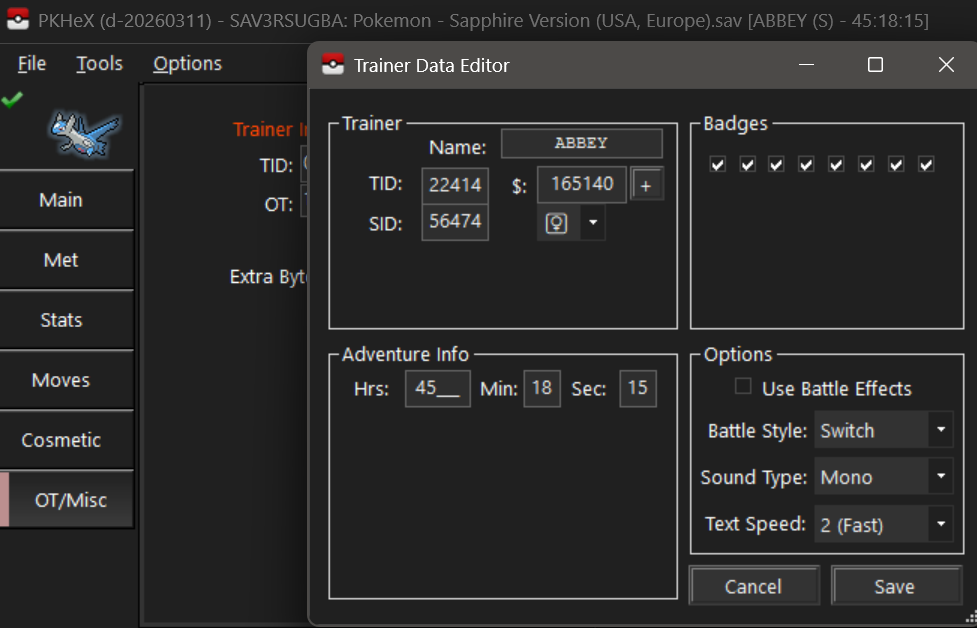
-
 @jsecarlosr review section ain’t for questions, deleted. to answer your question: IIRC PKHeX doesn’t validate against this event. Also make sure you aren’t adding these mons to a VC save (as VC RBYGSC cannot interact with PCNY, and there’s no legitimate way to transfer retail cart saves to VC Gen 1/2)
 -
I went to save my game and somehow it froze during the process. I let it sit for a few minutes, but I eventually had to bite the bullet and shut it off. Upon reboot, the game says "The save file has been deleted..." I backed up my save on a GB Operator and tried looking through the file on PkHex to see if it can be salvaged, and I even saw a previous post around here that pointed me in a possible direction. In the Trainer Editor, the OT, TID, SID, and playtime are all blanked out. However, when I tried plugging those back in, I couldn't save a new trainer name. If you wanna take a shot at re-adding those, the OT is ABBEY, the TID is 22414, SID is 56474, and my time was at approximately 41 hours. Any advice is appreciated. Thank you! (Also don't mind the event gift Pokemon; I have a flash cart and was using Aura Mews as synchronizers in my Emerald save) Pokemon - Sapphire Version (USA, Europe).sav
-

Extracting Pokemon from Generation 5 RAM
paniagua replied to Poke J's topic in RAM - NDS Guides and Other Resources
Hi everyone, I’m trying to find RAM addresses in Pokémon White. So far, I’ve already found the addresses for the current map, X/Y position, and facing direction. The problem is that I’m struggling to find the battle-related values. I’m especially looking for the RAM addresses for: current HP and max HP of the active Pokémon (player and enemy) number of alive/remaining Pokémon for both the player and the enemy battle menu values (Fight, Bag, Party, Run) number of caught Pokémon number of badges obtained If anyone knows any of these addresses, I’d really appreciate the help. Even finding just one of them would help my project move forward. Best regards. -
ildahl changed their profile photo
-
 hanspeter280 changed their profile photo
 -
 kay', after more scrounging around i found a list of a buncha cheats. as for item modifier i found a site with a list of all the item ids: https://blue587.github.io/PMD/Super/items.html also, theres a few moves missing from the list in the post but they're added in the txt PSMD Move IDs.txt psmdardef.txt typing.txt
 -
Not a valid dump; console-encrypted files are impossible to read unless you decrypt them first. You cannot simply copy the file off the SD card and have external programs read that.
-
I've got a corrupt childhood Alpha Sapphire save of my own. I'm aware the file I've provided is essentially unusable, but it's all I've managed to attain so far. I've tried using Checkpoint and PKSM but they won't give me a main file, they just spit out the 0xD900458 error code, which just to my knowledge is just the default 3DS corrupted data code. If there's any way someone here could point me in the right direction to get a main file and help me recover my lost pokemon, I'd be eternally grateful. 000400000011C500_v02.sav
-
 Hello, it's my first time posting here but I've tried and could not find a solution; I lost my NDS weeks ago and I want to continue playing my playtrhoug of Pokemon Soulsilver I was playing in Japanese. I just beat the elite 4 and was out the first gym in Kanto, my name was ジェス and my team was: オーダイル lvl 55 feraligatr ゲンガー lvl 52 gengar エーフィ lvl 42 espeon ウインディ lvl 45 arcanine ハクリュー lvl 51 dragonair サナギラス lvl 48 pupitar I already cought ルギア lugia and エンテイ entei Please let me know if it is possible to get something similar to my old file, I will really appreciated, thank you for your effort and sorry english is not my first language. If recreating the savefile is not possible no problem, maybe is possible to find a savefile after elite 4 and before kanto gyms? thank you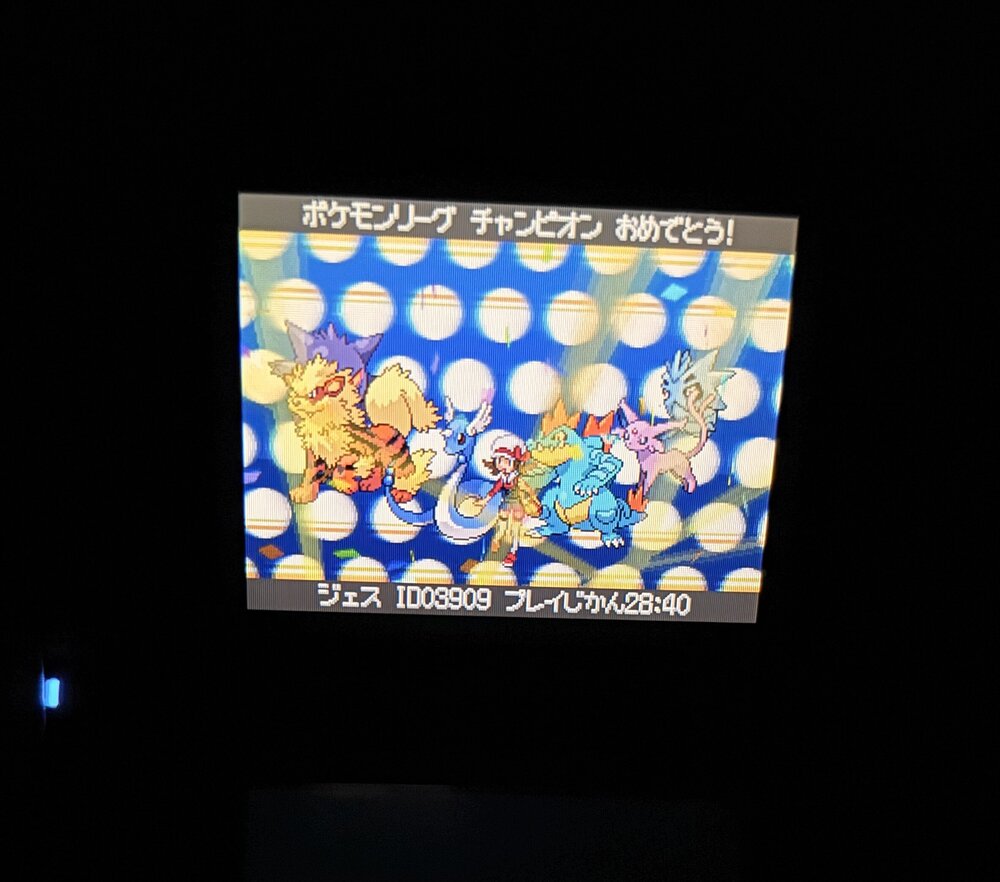
-

Pokemon Mystery Dungeon: Explorers of Fortune
WindchildWhimsy replied to WindchildWhimsy's topic in ROM - NDS ROM Hacks
did you have any jobs in that dungeon? -
thanks for sharing
-
Pokemon Mystery Dungeon: Explorers of Fortune
Nalmoth replied to WindchildWhimsy's topic in ROM - NDS ROM Hacks
Hello, thanks for the rom hack, it's really cool to play ! I have a question, I just did my first Zero Isle East, I unlocked the room that contains the zero key and have it in my inventory, however, when I finish the dungeon with it, there are no stairs, and when I take the warp, I just get TPed to the town. Maybe I didn't understood how the zero hoards are working ? I cannot find how to access it, if anyone could help. Thanks ! -

![More information about "[Glitches] (ACE) Gameboy Mark Shiny Treecko and Torchic"](https://projectpokemon.org/home/uploads/monthly_2026_03/2026-02-20_13-26-59.476_top.thumb.png.09f0c69eb117f49c90cfdaf1df5f788a.png)
Version 1.0.0
6 downloads
Many thanks to ChickasaurusGL and her tutorial: https://www.youtube.com/watch?v=Q2D-VuTwRfc By using wrong pocket TM ACE, we can set up our PC Boxes to place glitch pokemon Hex FC and Hex FF in our first box. For Torchic i followed the same steps as the video, just change the item throwaway count to correspond to Hex FF instead of FC and give it ember instead of absorb although i am unsure if that last step is necessary. Likewise you can also make them non-shiny if you wish by altering the DVs. i've left a gen 7 version and a transferred gen 9 version with a hometracker. The screenshots show the nicknames "Labelko" and "Jacketko" the fan names for the enigmatic characters on the covers of the album Dolls in Pseudo Paradise, but i figured most people would prefer them without nicknames so they've been removed. -
 Do you have an idea when the next update will be? If you get asked that a lot, I'm sorry. Won't ask again.
 -
- Last week
-

PKVault - Centralized pkm storage management & Pokedex app
KamiGatto replied to chnapy's topic in Saves - Tools
It works with both scarlet and ZA! THANKS!!! -
Yes, I can also confirm this bug. I was aware of it, but for some reason I forgot to write it. Added to the OP, thanks @WonderSquid
-
 GrondigTV changed their profile photo
 -

PKVault - Centralized pkm storage management & Pokedex app
chnapy replied to chnapy's topic in Saves - Tools
I just published a hotfix release 1.5.5 for this issue @KamiGatto, it should work well now.