



Kaphotics
-
Posts
8125 -
Joined
-
Last visited
-
Days Won
503
Content Type
Profiles
Pokédex
Portal
Technical Documentation
Pages
Tutorials
Forums
Events
Downloads
Gallery
Blogs
Everything posted by Kaphotics
-

Gengar "unable to match encounter origin", even though...?
Kaphotics replied to naamah's topic in Pokémon Legality
Use the encounter database to generate a Gastly. Level it up to the level it would evolve into Haunter at least. Set all the required fields as mentioned above to indicate that it was traded, so that it can be a Gengar that evolved via trade. -
Pokewalker https://github.com/kwsch/PKHeX/blob/a1914105bf60fe6c23b6ecf0c203ffa53bd78d99/PKHeX.Core/Editing/Saves/Slots/Extensions.cs#L75
-
Did you unzip the executable before running, or did you run it directly from the zip file?
-
Can't tell without seeing the save file. Be sure you've properly saved in game and aren't relying on save states to track progress.
-
There isn't enough met data stored in the PKM to indicate the exact encounter you obtained it from. All it has is the met level, and the moveset really. It finds a possible encounter, checks the moveset being possible, then settles. If an egg could have originated it, or a wild slot, or a starter, what's to say it is one vs the other? An egg will more often be legal, as it is more permissive with levels AND moveset (egg moves, inheritance) compared to other encounters, hence why it is evaluated first (successfully). As for PID correlations, those are only a thing for generations where the correlations exist. For VC transfers, the game generates a random PID and EC, and Nature is based on the experience value it is transferred with (modulo 25).
-
Gen 3 Hall of Fame Pokemon Extraction Help!! FireRed/Emerald
Kaphotics replied to -thefunck-'s topic in Miscellaneous Help
The latest commits of PKHeX have a Hall of Fame editor for Gen 3. https://projectpokemon.org/pkhex-dev/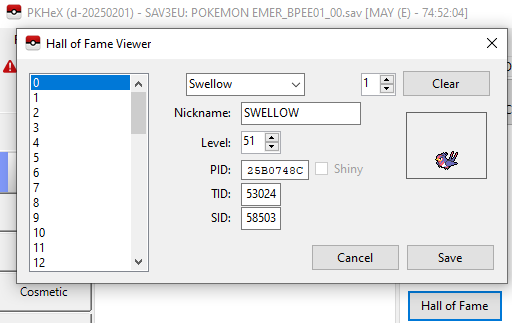
-
Working as intended. You don't have a `trainers` folder with data for BD or SP, so the program has to generate it with some kind of trainer data. The only trainer data available is your currently loaded save file, so it uses that. Since a BD/SP encounter cannot be handled via the Original Trainer in sw/sh (an entirely different version), the program flags it as illegal. You need to either provide `trainer` pkm files so that the encounter database can generate encounters with "legal" trainer data, or you need to change the trainer data of the resulting pkm after it has been generated with placeholder values. It's not really advisable to have the program create a random trainer for the "other" games it has no trainer data for, as there are pros & cons of doing it vs not.
-
Assistance with recover Pokemon X save data
Kaphotics replied to CrabChips's topic in Saves - Files and Requests
You need to re-export it from PKHeX because the checksums weren't fixed. -
Assistance with recover Pokemon X save data
Kaphotics replied to CrabChips's topic in Saves - Files and Requests
Here ya go -- looks like 31 bytes at the start of the save file were missing, and there was some junk data midway through the boxes when that was written at the end. (to any other readers, you can see how the save blocks blocks didn't align at their expected boundary, and that the pk6's sanity 00 00 values suddenly shifted) note: you need to export the save file from pkhex to fix the checksums of the attached file main
-
No, by virtue of how Gen3 stores save files. Since you had a misconfigured save size, only the first half of the save data was being retained. The save data is compromised of a primary save, a backup save (can be either order), followed by the hall of fame and e-reader block (if applicable). Since your save file is truncated, it only stores one save file (could be either the primary or backup), and a sliver of the other primary/backup. It's cut short well before it would have saved the hall of fame data. The fixer you used to extend the save file to the right size likely just copied half the file to the other half (or just zeroed out the latter half when extending), which isn't the correct fix. I've uploaded a Gen3 save file fixing program in the past month, if you want to try that, but again, your Hall of Fame data is gone, because of the misconfigured save file size.
-
PP legality checking was recently added; still needs work to weed out false positives. Can just ignore it for now, but healing the PP won't hurt
-
Does PKHEX has a Storage System similar to PKSM, Bank or Home?
Kaphotics replied to GoldenThunder's topic in Generation 9
Tools -> PKM Database If you dump any files into it, they will be accessible. It also loads everything from all backup save files. There's no need to delete the Pokémon if you grab it from another save file, because data is data. You can also open two windows of PKHeX and copy/delete individually/dump as you see fit. You won't be able to legitimately move them from VC->Gen9 because you'll not get a legitimate HOME tracker. You must transfer them into Gen7 then use Bank to migrate them into HOME the normal way for them to be legal.- 1 reply
-
- 1
-

-
The editor has automated fixes that will make illegal Pokemon legal. To check legality directly in the boxes, hold control when right clicking the slot. If they're from a ROM hack, they likely have the wrong ability, which is why the program snaps it back to a legal selection when editing.
-
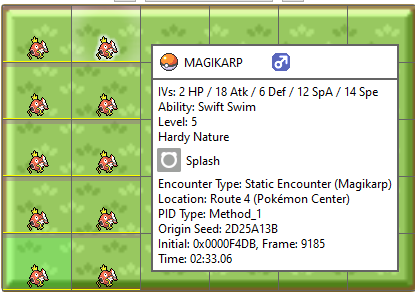
Oops, it's been a long day. I re-checked and indeed you are correct; your "real" Magikarp do show as Route 4. I verified on my own copy by obtaining a Magikarp, and they have the Met Location of [104], that of Route 4, not [99] for the Pokémon Center. I have pushed a fix so that the encounter is tagged with the correct met location ID. https://github.com/kwsch/PKHeX/commit/538374b33fb640f127628ee1dd0c1be82ac534b3 The program currently searches through the static encounters first; in Gen4 it's not comparing the met location (since it was changed), so it matched the static encounter first. In Gen3, it was comparing the met location to the template's 99, which didn't match, and it eventually landed on the encounter slot as the "first" adequate match. With the ^ fix, Gen3 will now recognize it as a static encounter. Conversely, what if you caught it via Old Rod Fishing? Well, it matches the details of the gift too, and the gift is checked first, so that would be why the reverse would have the "unexpected" result.
-
Maybe the logic was improved since the last release; it has been 2+ months and I've added a a good amount of improvements in the detection (as evident by the hover text differences in our images!) On the latest development build, your attached pk3's show up as Static Encounters in Gen3. Generally, you shouldn't have to worry about a "misidentification" -- it could technically be a fishing slot as well, as there aren't any exclusive features. Just is whatever the program finds first.
-
Not able to replicate; I generated 12 from the encounter database with randomized IVs and it showed the same origin (via Static Encounter in Route 4) in both Gen3 as well as when transferred to Gen4. Generally, when you transfer from Gen3->Gen4, you lose the original met location. PKHeX still has to iterate through every possible encounter until it finds a suitable match; without met location, the matching is one feature less strict (no met location check), so it sometimes it gives a compatible encounter from earlier in the iteration of all encounters. If you upload your Gen3 Magikarp I can take a look and explain why. If it's a Method 4 Magikarp, then it's not legal.
-
Revised behavior to clamp, now the GUI opens. https://github.com/kwsch/PKHeX/commit/4fa83b905fed9706e2c6cb1ce586f29df5eefd16 Your mailbox is likely corrupt, none of the data looks valid. Check in-game. You can try the above changes via the development build (once it finishes shortly after this post is sent):
-
The latest development build has a Hall of Fame editor for Gen1. Try it out: https://projectpokemon.org/home/files/file/2445-pkhex-development-build/
-
.DSV and .GCI Files Corrupting as soon as I use PKHeX
Kaphotics replied to coooooooops's topic in PKHeX
Attached file still fails to load in desmume when imported; something about it is wrong. Probably best to wipe the save file and start again, and be sure to save twice in-game before trying to edit again. -
.DSV and .GCI Files Corrupting as soon as I use PKHeX
Kaphotics replied to coooooooops's topic in PKHeX
Your "corruptdiamond" is filled with FFFFFF's; no data is present in the file. PKHeX doesn't do that. The "diamond" file exhibits the same behavior on desmume; do you have the original, unmodified file that the game successfully loads? Unrelated, but you forgot to set the edited Piplup back to the slot when you changed its level. The editor window is a copy, not a by-ref view. -
Open up two instances of PKHeX, for source and destination. Then just drag & drop. If you want to import a large amount, dump them to a folder then drop the folder in instead.
-
Re-read the first post of this thread.
-
https://www.reddit.com/r/romhacking/comments/qub9km/how_do_i_create_a_nds_rom_patch/
-
Autofixed pokemon? - Pokemon change trainer info in trades
Kaphotics replied to solid.snake.21's topic in PKM
Ask the owner of the bot you traded with. Some have features like replacing the OT details with that of the trader, but really it's not as foolproof as they'd hope. -
Those are the only two labeled. https://github.com/kwsch/PKHeX/blob/82d74e69502c7697f42aa1dcf1a08ea95cc4edcb/PKHeX.Core/Saves/Access/SaveBlockAccessor9SV.cs#L2108-L2109


