Kaphotics
-
Posts
8126 -
Joined
-
Last visited
-
Days Won
504
Content Type
Profiles
Pokédex
Portal
Technical Documentation
Pages
Tutorials
Forums
Events
Downloads
Gallery
Blogs
Everything posted by Kaphotics
-
Contest ribbons grant OT affection.
-
Unless you provide a specific example, then there's no proof to back up your claim. I'm inclined to believe that PKHeX is correct in whatever situation you suggest, because you're likely missing the other required values that would be present had you received the ribbon legitimately.
-
If you de evolved but didn't flip the PID as mentioned, then it would receive the same ability when evolving. Moxie's ability ID for regular games is likely not the same as the ability ID used by the ROM hack. You will have to consult the ROM hack's documentation for the correct value.
-
Tools->Data->Batch Editor Change your Gyarados species back to Magikarp. If it came with the wrong ability, then change the PID to make it end with an even digit,
-
PKHeX does not support ROM hacks; especially those that backport future content into older games. If you know the ability ID of Moxie, you can use the Batch Editor to selectively write the Ability to a specific slot in your box. Otherwise, you can devolve it back to Magikarp and evolve it in-game to have it update. For Pokémon with two abilities, the ability it uses is based on the PID being odd (1) or even (0).
-
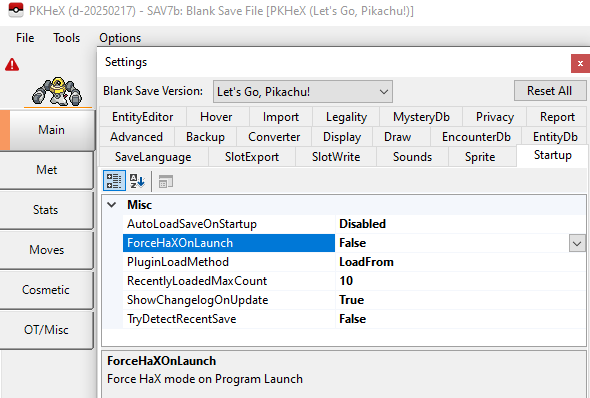
Set it to true and relaunch the program.
-

Equivalent of SendPkm for PKHeX files on BW2?
Kaphotics replied to REDRES's topic in Saves - Editing Help
The sendpkm you referred to is just another fakegts, like ir-gts-bw and the like. PKHeX is a save editor; you can also get pkm files from other tools like PokeGen and PikaEdit; hence why your topic was moved out of the PKHeX forum. Try to use a fakegts like shiny2.5: https://github.com/Gannio/Shiny2-and-a-Half -
Equivalent of SendPkm for PKHeX files on BW2?
Kaphotics replied to REDRES's topic in Saves - Editing Help
You host it yourself within your own network. Injecting PKM data via GTS does not do anything besides inject PKM data. It will not change your save file to facilitate in-game events. You're better off just hacking your console and editing your save file directly. -
You should NOT be wanting to change your trainer photo or any image that can be transferred online to others.
-
Gen8+ save files are encrypted and hashed; by mutating part of the save data haphazardly, you've invalidated the signature that authenticates it as valid. Hence why the program does not load it.
-
If the program says it needs a HOME tracker, then it needs a HOME tracker. The program is working as intended.
-
What is the Misc slot USUM and SV save's Other tab?
Kaphotics replied to XD_Lele's topic in Saves - Editing Help
The extra slots are defined here: https://github.com/kwsch/PKHeX/blob/master/PKHeX.Core%2FEditing%2FSaves%2FSlots%2FExtensions.cs#L240 -
If there isn't a block listed for ogerpon, then it isn't known how to respawn it. Usually your best options are to restore a backup save before the event, or if you're only after the resulting Ogerpon, just use the encounter database to create one.
-
Use the Block Data editor to reset the event flag.
-
Did you set the Pokémon back to the slot once you were done making changes?
-
My Pokemon has Mismatch in language and region in pkhex
Kaphotics replied to Stevejobsdalord's topic in Pokémon Legality
Not an issue, because those are just the geolocation data for when it first entered the 3DS era. PKHeX did not flag those features. -
PKHeX.Mobile save file editor for Android phones
Kaphotics replied to Nashobroh's topic in ROM - 3DS Discussion & Help
The app is a "proof of concept" so it doesn't have many features. You can't ask it to import a zip/folder of files. -
Restore a backup of your unedited save file. ROM hacks that change how the save file structure is saved will not usually accept save files that are modified by unmodified-game save editors. If you did not use a save editor, then try using one to see if it is recognized
-
No, those aren't legal in the slightest; and PKHeX won't even allow you to import the pcdata because the Pokemon format is different between games.
-
Use the emulator menus to import your editor files; same as you did after you dumped your save file/ROM from your cartridge to resume playing on emulator.
-
Use it to search for what you want. It will give you a legal starting point, and something to fall back on if you mess up your edits.
-
Use the command builder drop-down to assemble your filters in addition to commands. You can filter only files from one context (e.g. PK9 is Gen9) or based on Version ID (run once for SL and again for VL).
-
Gengar "unable to match encounter origin", even though...?
Kaphotics replied to naamah's topic in Pokémon Legality
You're more than capable of doing a tradeback with someone else and observing which fields of the Pokémon's data changed. I'm not going to spoonfeed you the exact steps on what to change because it's already quite evident from this thread (that you necro'd) what you would need to change. Read the messages in this thread, and rub your brain cells together instead of wanting someone to move your hand for you. -
Gengar "unable to match encounter origin", even though...?
Kaphotics replied to naamah's topic in Pokémon Legality
Put in a little bit of effort. -
Pokemon Ultra Sun shows "The save data is corrupted" error
Kaphotics replied to tuzinpq's topic in Saves - Editing Help
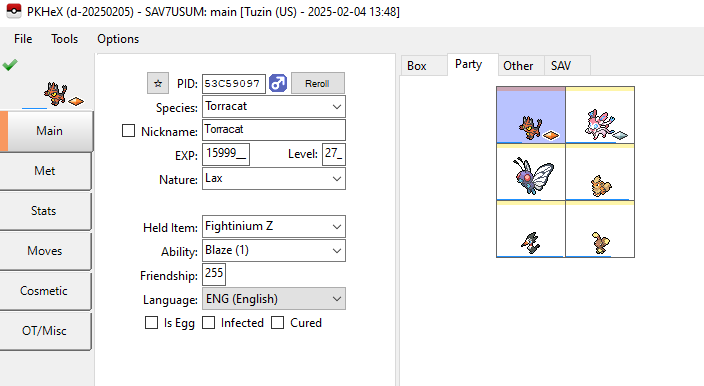
Was able to get it to load after rearranging some data in the file and trimming junk written at the end of the file. Inventory, Fashion, and LiveMatchData might have issues, but you can probably work around that. main