



Kaphotics
-
Posts
7957 -
Joined
-
Last visited
-
Days Won
476
Content Type
Profiles
Pokédex
Portal
Technical Documentation
Pages
Tutorials
Forums
Events
Downloads
Gallery
Blogs
Everything posted by Kaphotics
-
If it already passed through HOME, then it cannot be changed legally. An entirely different pokemon would have to be transferred instead, unless you try transferring an untransferred clone (which isn't really legal, but HOME doesn't really check).
-
Read the first post. You don't. You transfer them legitimately from their original game.
-
 Refer to the save file structure on bulbapedia; the save file needs to have the correct layout of 0x1000 chunks of save blocks. Using a hex editor, you can find the correct blocks of save data and reassemble a working save file. 005 Pokemon Leaf Green.srm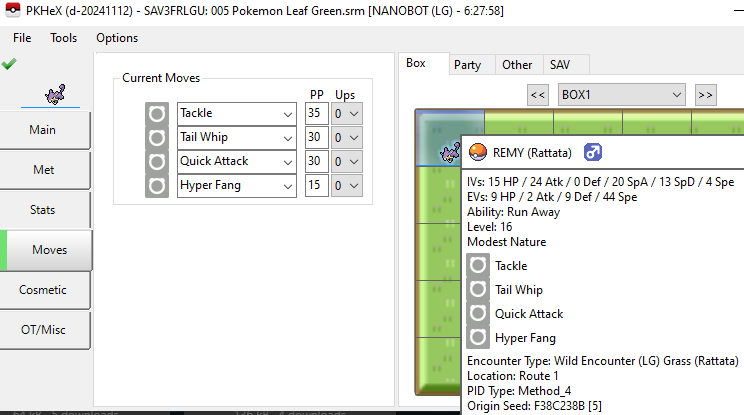
-
Check the error log file next to the exe file.
-
How can I edit a modification made with pnkx?
Kaphotics replied to Chrisard's topic in ROM - Switch Discussion & Help
pkNX outputs a folder of all modified files for a given ROM you open. This output folder is what is copied to the console to use as the layeredfs file replacements. You have a set of layeredfs file replacements from someone else that you wish to modify. So, you do the process in reverse. You put the layeredfs file replacements back into pkNX's output folder. When you open the ROM to edit, pkNX will find those replacements as if the program was the one that originally put them there. -
How can I edit a modification made with pnkx?
Kaphotics replied to Chrisard's topic in ROM - Switch Discussion & Help
No, you put the mod files in pkNX's output folder, as if they were modified by you. -
How can I edit a modification made with pnkx?
Kaphotics replied to Chrisard's topic in ROM - Switch Discussion & Help
Put the files you wish to have modified in pknx's output folder, and pkNX will read those when you open your ROM as usual. The program checks the output folder first, so any modified files will be used if available. -
Obtaining TID/SID for games. For encounters that originate from Violet, they should have Violet trainer data, and not reuse the Scarlet trainer data (with a changed Version value). To obtain an encounter from a given Version, you should have trainer data available for that Version. Otherwise ALM will fabricate it by reusing TID/SID and changing Version. Reusing trainer data is not legal. Correct.
-
Please think about it. As was mentioned to you in your thread, data which has already touched HOME should not have immutable values changed. They check the immutable data against the tracker, and reject (error 10015) it from re-entering HOME. Anyone can try to upload your tampered data, and will be rejected as well, so you won't be fooling anyone.
-
Can you? Sure. But anyone who looks at your data will immediately know it's not legitimate -- TID/SID is 1-4billion odds to get the exact same. Players have been disqualified from VGC because they reused trainer data across versions. So the real question, should you? No. If you want something to be as legal as possible, then you shouldn't be taking shortcuts only possible via cheating. Get a legitimate trainer for the version you want. Trade bots can dump pkm files, and trade bots can trade pkm files. Trade bots can also generate if you provide trainer data via their request formats.
-
You cannot legally change any immutable value after it has touched HOME. Since GO 'mons originate within HOME, there is no way to modify their data and retain validity of the tracker & transferability.
-
If you did not complete ANY of the training missions, you couldn't have legally received the ribbon. The mission completions are also stored in the PKM data for Gen6/7 formats.
-
If it's not documented for a given game, then the program won't have it.
-
Legality issue for ralts wish egg? Help Requested
Kaphotics replied to Lucylle's topic in Pokémon Legality
https://www.linqpad.net/ https://www.nuget.org/packages/PKHeX.Core, but some logic might only be available on the current working code (continuous improvements!). NuGet has integrations to Visual Studio, however you can always download `nupkg`'s manually and just change the extension to .zip and get the .dll that way. https://github.com/kwsch/PKHeX https://visualstudio.microsoft.com/vs/community/ PKHeX.Core is essentially the backend API that the GUI uses to do all the calculations. Unlike ladder logic, it's the usual code programming (like structured text? but so much less ugly!) The only real documentation is the source code itself, which (biased take, since I'm the primary author) isn't too bad. There's just a LOT, but understanding the terminology will get you 99% of the way there when looking for things. -
Legality issue for ralts wish egg? Help Requested
Kaphotics replied to Lucylle's topic in Pokémon Legality
Gender is determined from PID and the Species' gender ratio, which is stored in the "personal info" for the game. var ratio = PersonalTable.E[Species].Gender; var gender = EntityGender.GetFromPIDAndRatio(pid, ratio); if (gender != 1) // Female continue; for ralts: var ratio = PersonalTable.E[(int)Species.Ralts].Gender; For your specific case, the only (1) result is a male. You'd have to hatch it on a different save file (TID/SID) which would be an entirely different PID-IV (nature) spread. You can potentially remove the constraint of shininess to get more results, and add the gender constraint (and even an attack IV = 0 constraint) or whatever other constraints you want to filter down the list, and calculate what TID/SID combination would make that spread shiny. -
Legality issue for ralts wish egg? Help Requested
Kaphotics replied to Lucylle's topic in Pokémon Legality
You'd need to know the details about how the encounter is created, and how to bruteforce the entire range of results. That's what those search programs (and this script) do. Writing the code is pretty straightforward if it's focused on checking one type of result. -
Legality issue for ralts wish egg? Help Requested
Kaphotics replied to Lucylle's topic in Pokémon Legality
There isn't any tool written to search these events for a valid PIDIV for your specs, but that doesn't prevent anyone from writing one. Here's a LINQPad script using PKHeX.Core to iterate through all possible seeds matching your criteria. Note that there are only 2^16 seeds, and with Ralts+Wish being 1:8 (2^3) chance, and shiny (1:8192, aka 2^13) there'll usually only be 1 result for a given TID/SID/gift choice, usually 0-2 shiny results for a given request (ignoring Pichu). Punching in the result from the script, you get a legal result inside PKHeX.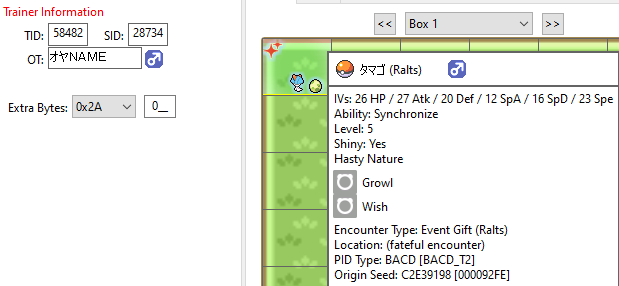
-
> moemon star emerald PKHeX does not support ROM hacks. Hacks modify the structure of the save data, and thus any checksum regions it may solve for are not the same as the modified game is expecting. Restore a backup of your unmodified save data.
-
You'll need to be more descriptive. You cannot expand the amount of boxes within the save file, as the amount is capped based on the save file structure. You can fill up any amount of the save file's boxes with external PKM files, and you can create Pokemon -> set to slot.
-
1. "Jump" is for jumping ahead/backwards a specific amount of bytes. Each instruction consumes a variable amount of bytes based on the amount of arguments it may have. The scripting execution environment just reads the script file, and based on where the current command is, it jumps somewhere else to continue executing next. https://en.wikipedia.org/wiki/JMP_(x86_instruction) 2. Scripts are self-contained, so there can be multiple scripts if the file header is updated to have the relevant count & offsets to tell the game where to find script # 7, for example. 3. Not all script commands are well understood/documented (at least at the time a post may have been written/updated). If no script commands had function names, only their command # (e.g. "6"), the only way to infer what they do is to observe how the game carries out the script code and how the if-else logic results in an observable effect in-game. Logic06 is basically "this command does something with boolean/comparison logic, and is script command 06, therefore we'll call it Logic06 instead of Command06".
-
https://github.com/kwsch/PKHeX/discussions/4355#discussioncomment-10534491
-
As mentioned, there is no legitimate transfer method/algorithm for Gen2->4. You can turn on the "allow incompatible transfer" setting, but it's not going to result in anything legal. Best you can really get is recreating via the encounter database.
-
Use PKHeX's encounter database to generate from template. If you want someone to trade it to you, just use a trade bot instead.
-
PKHeX finds a valid HGSS footer in the second save file (0x40000), which is somewhat true as evident by the box data containing PK4 data (not PK5 data). Use a hex editor and zero out the byte at 0x4F620. That will invalidate the build timestamp for the HGSS save, and PKHeX will then recognize the save data as White. You likely imported your HGSS data into the emulator and restarted it, which doesn't actually clear out that incorrect save data file. Thus, the old save data lingered in the unmanaged area and is causing your issue.
-
When was the event first available, and when was the program last updated?

