



theSLAYER
-
Posts
22963 -
Joined
-
Last visited
-
Days Won
1016
Content Type
Profiles
Pokédex
Portal
Technical Documentation
Pages
Tutorials
Forums
Events
Downloads
Gallery
Blogs
Everything posted by theSLAYER
-
Gee, I wonder why.
-

PKHeX won't accept save file after the DLC
theSLAYER replied to Irina's topic in Saves - Editing Help
Gee, I wonder why. -
Maybe your skin is too complex, maybe there’s too many colours?
-
Checkpoint no longer working
theSLAYER replied to patsworld's topic in Systems, Flashcards, and Emulation
Keep a backup of the stuff on your SD. then, delete the folders on your SD, and paste over the stuff from the new Atmosphere. Then, combine some folders that isn’t used by Atmosphere during boot up, like Nintendo or Switch/Checkpoint etc. -
These are the errors you have. 1. Change the nickname to "Egg" (for that language) 2. Change the egg moves to that exact order.
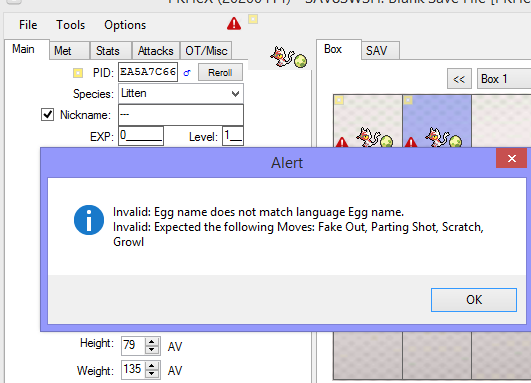
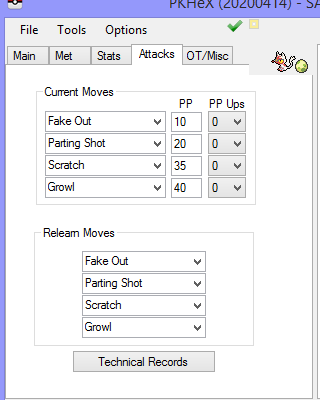
-
Upload the file.
-
Checkpoint no longer working
theSLAYER replied to patsworld's topic in Systems, Flashcards, and Emulation
Based on the version ID, it appears OP's Atmosphere is updated (as time of writing), but indeed it's possible it wasn't a clean install. >< -
Checkpoint no longer working
theSLAYER replied to patsworld's topic in Systems, Flashcards, and Emulation
No clue. Not an issue with PKHeX. Report it to Atmosphere's git (if they broke something) or checkpoint's git. -
Anything that is obtained using a modified device, even without cheat codes, is not legit. In any case, everything here in Gen 8 is obtained by me, without cheats, and they're legal as heck. https://projectpokemon.org/home/files/category/85-in-game-series/ This isn't a trading forum, so don't expect trades. If you're capable of injection, it means nothing you have is legit. Might as well just add these files in.
-
Real life events: In-game event: These are the only gen 3 Celebi events. There is an unused Celebi overworld sprites in FRLG (no subroutine known) and an unused Celebi in-game event for non-Japanese Colosseum, but none of them are "TIMEFLT". Probably just a way for people to get Celebi without Colosseum or external events..


-
Read the link you just quoted me. There's literally a tutorial called Using Emulators
-
Maybe try melonDS? Commication between NDS games are possible (tho not reliable), and that has worked for me for Poketransfer (tho pretty unreliably)
-
You can use PKHeX for as many core series games as you like. "Main" is a save. Where to get save files? Dunno if you are on Citra or 3DS, but basically: https://projectpokemon.org/tutorials/save-editing/managing-3ds-saves/ (extracting the saves on 3DS [digital or physical copy of the game] will require a hacked 3DS)
-
Watchtower Lair's Den Copperajah
theSLAYER commented on Project Pokémon Bot's file in Sword & Shield (Base Game)
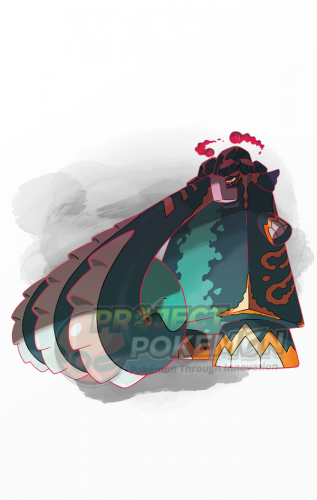 https://projectpokemon.org/home/forums/topic/57232-why-is-this-is-this-illegal-mon-didnt-exist-edition/
 -
so yup, it's an encrypted save indeed JKSM is for modded 3DS, nothing to do with whether you mod your SD. If anything, how does one mod their SD card? XD well as long as it's the same 3DS (and hasn't been formatted since), it should work. Also, to clarify (in case the question pops into your mind): installing CFW in-between won't matter. All that matters is the 3DS is the same 3DS, and has not been reformatted since. To explain: encrypted saves require the specific cart (if extracted from cart) and specifically the same 3DS (if encrypted save is taken from the 3DS) to be decrypted. So moving an encrypted save to another 3DS will render the save useless. Reformatting the 3DS also makes it as tho "it's another 3DS'. So while decrypted saves will work on any other device or cart, encrypted saves are not so simple. So as long as your 3DS is the same 3DS, and has not been reformatted since, it should work :3
-
Well then, the OP could just trade them as a PK8? Unless you're telling me the botting program (or what not) only accepts EK8, then ouch. Well, if OP was a seller, surely the OP has time to individually convert them to EK8 then sell them. It's the OP's (supposed) livelihood after all, gotta put effort into it.
-
If you injected the event, you need to talk to the delivery person at the second level of the Pokémon center first.
-
It sounds like your original .sav is in fact not a decrypted .sav file. If you managed to save properly in-game and JKSM extracted it properly, no reason PKHeX wouldn't read it. As was said above, how did you obtain the .sav from the old game? Is it a 00000001.sav file you found on the SD? If so, it is an encrypted save. (PKHeX deal with decrypted saves). If you have not formatted your 3DS (not SD card) between the old game and the present load out, you should try decrypted the old save (by placing the save back on your 3DS, then use a save manager to dump it), before placing it onto your cart: Note: if it is indeed an encrypted save, the 3DS has to be the same 3DS. It cannot be reformatted between the time of the time the SD card corrupted, till now. If it's not the situation I described, kindly answer the original question: how did you obtain the .sav from the old game?
-
pk3DS: Pokémon 3DS ROM Editor and Randomizer
theSLAYER replied to Kaphotics's topic in ROM - 3DS Research and Development
erm, it wasn't necessary to uninstall and reinstall CFW. Looks like you gotta buy a NDS flashcart for NTRboot. And if there weren't a titles folder, you could have just created it yourself That was clearly indicated on the wiki: In any case, I'm sorry to hear you patched out your CFW. It still can be reinstalled using ntrboot. Hope you get it done.
-
pk3DS: Pokémon 3DS ROM Editor and Randomizer
theSLAYER replied to Kaphotics's topic in ROM - 3DS Research and Development
Since you have a 3DS, that apparently runs Luma, just use Luma3DS' overlay FS. Just google how to do that. (An example should also be on their github documentation.) Note: you cannot link the files on our site. -
Just a list of potential in-game gifts (and some static encounters), that I will need to focus on. Kubfu Urshifu (Single Strike) Urshifu (Rapid Strike) Alolan Diglett Bulbasaur Squirtle
-
Yes, originally the collection is in April, however only the Celebi was supposed to be available at that point. Zarude would then be available later in June. However, the redemption of tickets was delayed (due to ongoing pandemic). So now the new info: Collection of tickets, and redemption of gifts using the code, are the same day for both mons. As I've said: If I had to clarify: one serial code is for Shiny Celebi, other serial code is for Zarude.
-
pk3DS: Pokémon 3DS ROM Editor and Randomizer
theSLAYER replied to Kaphotics's topic in ROM - 3DS Research and Development
@Molten based on what you said, I see you have a 3DS. Instead of using a PC tool to try to decrypt the game, use GodMode9 to simply get the folders from within the game. Tutorial here. Also make sure you're using the latest pk3DS. -
I can only assume the OP used Citra's menu to make save states. OP, please save in-game (you know, press X to open menu then Save) twice, before you attempt to modify the save. Also make sure the emulator is closed when you make edits. If my assumption was wrong, please answer BlackShark's question then. (and if it was right, still just answer, let us know )
-


