



theSLAYER
-
Posts
22962 -
Joined
-
Last visited
-
Days Won
1016
Content Type
Profiles
Pokédex
Portal
Technical Documentation
Pages
Tutorials
Forums
Events
Downloads
Gallery
Blogs
Everything posted by theSLAYER
-

Sword & Shield (v1.1.1) | Live RAM Encounter Edits
theSLAYER replied to AliceTheAlice's topic in RAM - Switch Cheats
If I'm being honest, I completely forgot that option is a thing XD Now to talk about codes: No shiny codes for 1.1.1 (or does the 1.1.0 one work?) -
Sword & Shield (v1.1.1) | Live RAM Encounter Edits
theSLAYER replied to AliceTheAlice's topic in RAM - Switch Cheats
No worries, I think I fixed it. In the future, maybe paste into a notepad first, then copy from there. That should clear the formatting. :3 -
Sword & Shield (v1.1.1) | Live RAM Encounter Edits
theSLAYER replied to AliceTheAlice's topic in RAM - Switch Cheats
Hey @AliceTheAlice, good work! Anyway, be careful when pasting over content from another post. You may wanna copy into a notepad (to clear formatting) before copying over >< I can only assume you're using the dark theme. The Copied content would have a black background in any theme that isn't the dark theme >< Example Anyway I hope I've been able to edit the post properly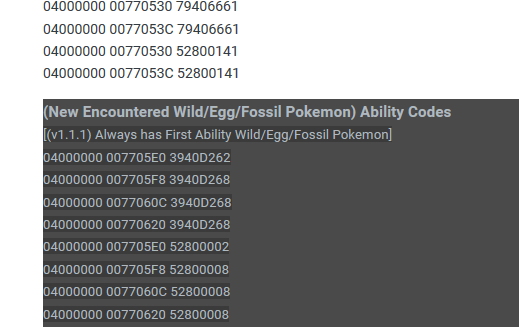
-
pk3DS: Pokémon 3DS ROM Editor and Randomizer
theSLAYER replied to Kaphotics's topic in ROM - 3DS Research and Development
I don't. Have no reason to. I guess we'll wait for the devs to look into this issue, if they ever. -
pk3DS: Pokémon 3DS ROM Editor and Randomizer
theSLAYER replied to Kaphotics's topic in ROM - 3DS Research and Development
Nevermind, I get the same error when attempting to rebuild as 3DS. -
pk3DS: Pokémon 3DS ROM Editor and Randomizer
theSLAYER replied to Kaphotics's topic in ROM - 3DS Research and Development
mind showing a screenshot of your PK3DS? Also, does it even load up UM files, and just editing is the problem? (for example, I have it loaded up)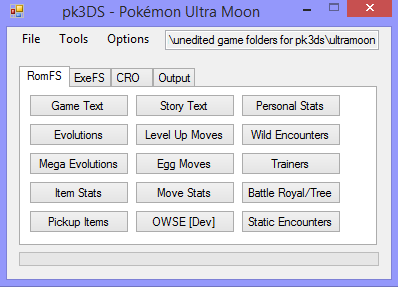
-
pk3DS: Pokémon 3DS ROM Editor and Randomizer
theSLAYER replied to Kaphotics's topic in ROM - 3DS Research and Development
1. Make sure you're using the latest version of PK3DS (can follow first post to download latest version) 2. Get a proper ROM dump. Best results is if you dump with GodMode9. (Tutorial here) -
Pokémon Mystery Dungeon Red Rescue Team Pro Edition
theSLAYER replied to ZappedAmpharos's topic in ROM - GBA ROM Hacks
A kind reminder that asking for ROMs, or files from within ROMs, is against our rules. If the same person asks for it again, they'll earn infraction points. -
Is it necessary to reply a thread made in March (presently writing this in June). XD In any case, they are up as of recently (as time of writing). I'm locking this thread, since the PK8 files are up.
-
Met date when trade between gen4 and gen5
theSLAYER replied to LieboOSBA's topic in Saves - Editing Help
Given that it follows the DS date, and the date can be set to be virtually anything, it does not matter. -
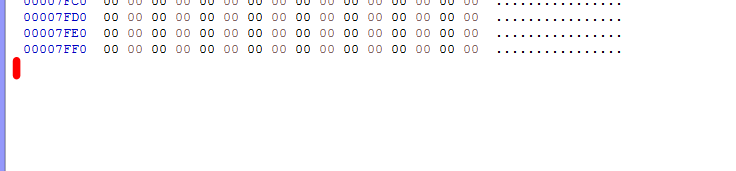
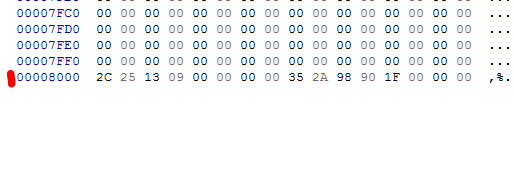
Use a Crystal save, then use Hex editor to copy the last file lines over to your save. The last few lines are for RTC, and emulators and VC deals with it differently. Read:
-
All the saves will work for VC Crystal. You just gotta convert them.
-
After season 1 of the DLC (Isle of Armor and Crown Tundra), some would think that a second season of DLC will begin. Others think it's a DPPt remake, and some will think it's DPPt in the form of Let's Go (since the legends were already in Crown Tundra, no need for a serious remake, but instead go the lighthearted route.)
-
Our upload: https://projectpokemon.org/home/files/category/216-pokémon-home/ (Yes, I'm focusing entirely on HOME. The 3 HA starters should be noticeable) Someone else's Spanish upload: https://projectpokemon.org/home/files/file/4177-scorbunny-grookey-sobble-hidden-ability-habilidad-oculta/
-
You know the image above. Do you see the button that says "Import current block"? yes yes. only if you know what you're doing, then you can manipulate your own block. Else, just take the block from a save that has what you want. Anyhow, while it doesn't showcase what you want, maybe the steps here can help you:
-
 English forum, please use English. I think we don't have that event, thus wasn't uploaded.
 -
Depending on how the Max Soup worked, it may give Pokémon from Past Gens the ability to Gigantamax. Ignoring the entries for any species that is capable of Gigantamaxing, let's take a look at interesting entries, Specifically, balls that cannot be used in Sword and Shield. Species Location Notes Sports Ball Caterpie HGSS National Park: Bug-Catching Contest To be evolved to Butterfree Sports Ball Metapod HGSS National Park: Bug-Catching Contest To be evolved to Butterfree Sports Ball Butterfree HGSS National Park: Bug-Catching Contest Safari Ball Pikachu RSE Safari Zone Cherish Ball Pikachu Any event that has Cherish Ball Safari Ball Machop HGSS Safari Zone: Morning/Day To be evolved to Machamp Safari Ball Machoke HGSS Safari Zone To be evolved to Machamp Safari Ball Machamp Evolved from Machoke Cherish Ball Machamp Any event that has Cherish Ball Safari Ball Gastly HGSS Safari Zone: Night To be evolved to Gengar Safari Ball Haunter HGSS Safari Zone: Night To be evolved to Gengar Safari Ball Gengar Evolved from Haunter Cherish Ball Gengar Any event that has Cherish Ball Safari Ball Krabby HGSS Safari Zone To be evolved to Kingler Cherish Ball Krabby Any event that has Cherish Ball To be evolved to Kingler Safari Ball Kingler Evolved from Krabbly Safari Ball Lapras HGSS Safari Zone - Surfing Cherish Ball Eevee Any event that has Cherish Ball Cherish Ball Snorlax Any event that has Cherish Ball Cherish Ball Munchlax Any event that has Cherish Ball To be evolved to Snorlax (Also for non-Cherish Ball entries, it'll be fun to breed the ball and HA onto them ) Additionally, if Gigantamax Melmetal continues to be not distributed by any raids (events or otherwise), this may be the only way to get Gigantamax Melmetal. (By feeding a Melmetal from PGO the Max Soup)
-
pk3DS: Pokémon 3DS ROM Editor and Randomizer
theSLAYER replied to Kaphotics's topic in ROM - 3DS Research and Development
read the bottom of the very first post. Look at the pictures, if that kind of thing helps you. even if they do, sharing those files (files from inside ROMs) is against our rules. -
@Aldarion Our forum already have two uploads, one English and one Spanish. Given that the way HOME distributes them, they're effectively clone (besides OT/TID), there's no reason for extra uploads. Thanks anyway, but it really isn't needed
-
yeah. >;D And also (for any other confused parties):
-
I don't want a link, cause that link updates. Take a screenshot of your PKHeX, look at the date (as I mentioned in my previous post), what date is your PKHeX? :3
-
what about your copy of PKHeX? :3 You normally can find it here

-
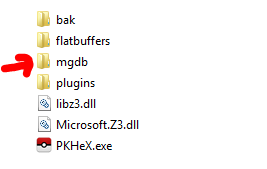
Check the release date of the PKHeX you're using. Then check the release date of that event. In all likelihood, that event did not exist when PKHeX pushed the update. (Example, PKHeX was released before the event was released) So wait patiently for Stable Release PKHeX to be updated. (Or download the development build at your own risk. Make sure you keep additional backups if you do so. There's no guarantee the development build you downloaded has added the event data in their registers. It is also possible that the development build has possible bugs introduced, where these bugs would usually be removed by the time of a stable release.) If the dev build didn't work, and you cannot wait for when an updated stable build is released, try this: Create a folder named mgdb at where the PKHeX.exe is located, and store the new wonder cards in that mgdb folder. Example: The wonder cards can be found here: https://projectpokemon.org/home/files/category/2-event-gallery/ PS: Don't ask anything related to "when will PKHeX be updated." It'll be updated when it is updated.
-
- 2
-

-

-
Exact dates please.
-
In order to answer your question, I first need you to answer these 2 questions: 1. When was PKHeX's most recent update? 2. When were these released?

