



Kaphotics
-
Posts
8128 -
Joined
-
Last visited
-
Days Won
504
Content Type
Profiles
Pokédex
Portal
Technical Documentation
Pages
Tutorials
Forums
Events
Downloads
Gallery
Blogs
Everything posted by Kaphotics
-

Gen 4 Japanese Trainer Name + Nick on English cart?
Kaphotics replied to Kaytwo's topic in Pokémon Legality
There aren't any entered-character sanity checks, so cross-language incompatibility isn't checked. -
Invalid Relearn Move 2: Not an expected Relearnable move.
Kaphotics replied to StrangeGuy999's topic in Pokémon Legality
https://github.com/kwsch/PKHeX/commit/15121c294594bd0e5d53a3e6e7f308406b41cb36 -
Ignore it if you aren't editing a SWSH save file / pk8 files. It should be hidden for prior format editing, but we missed it before pushing the last release.
-
Having duplicate/wrong tracker values wouldn't raise flags either? HOME auto-deletes cloned tracker value Pokémon when they're stored on your account at the same time. HOME auto-assigns a new tracker value if left empty. It's better stewardship to let HOME manage things rather than fail to trick it. Edit: As of time of edit, HOME tracker assigns a fresh tracker to any entries entering HOME, that bear a duplicate tracker when compared to an entry already in HOME.
-
Introduced in the middle of February 2020, Pokémon HOME allows for importing from Bank and Let's Go Pikachu / Eevee, and bi-directional connectivity to Sword & Shield & future titles. When a Pokémon is transferred from Bank or Let's Go Pikachu / Eevee or their games of origin into HOME, the Pokémon is assigned a unique 64 bit number by the official cloud server to differentiate it from other uploads stored on the cloud server. Pokémon that have not yet visited HOME do not yet have a HOME tracker. Pokémon that are traded in-game (online/local trades) do not get assigned a tracker. Pokémon that must travel thru HOME to reach the game it resides on must have a HOME tracker (origin->current). Pokémon that are uploaded in the same batch are not guaranteed to have a similar tracker (sometimes incremental). Pokémon that are missing a HOME tracker that should have one, or have a fake one, are rejected for upload (error 10015). Trackers are only a concern in PK8+ formats. Pokémon that aren't yet in the PK8+ (2019) do not have a field for this data. What exactly is this value be used for? Storing data for each game visited outside of HOME (ex. SW/SH, PLA, BD/SP, S/V...) Tracking how Pokémon are traded between users. Detecting if a Pokémon has been modified/cloned from the original upload. Detecting if a Pokémon is newly entered into the HOME system (having a value of zero). HOME trackers will be changed each upload, so a tracker value is not a permanent value. Only HOME can determine if a tracker value is valid. Only HOME can create valid trackers. Best practice is to let the server assign you a tracker, rather than assigning a blatantly wrong tracker. For local/online gameplay, GameFreak does not check this metadata, so having arbitrary/lacking tracker values does not matter. Validating a HOME tracker requires API access to HOME, and is not something the hacking community will ever have access to. GameFreak does not validate HOME trackers for online play, but for officially sanctioned VGC events, they do -- you shouldn't be using hacked Pokémon in tournaments anyway (against our rules). Due to the described behavior, here are our recommendations: When creating new Pokémon that are from generations prior to Sword & Shield, transfer into HOME via Bank first. When Bank closes, see below. When creating new Pokémon that can be uploaded from their game of origin, leave the tracker blank. When creating new Pokémon that will reside in a game different from their origin, generate and transfer them from their game of origin. When modifying any (that have already visited HOME) immutable values (PID, IVs, etc), zero out the tracker then transfer starting from their origin games. Why not create a random tracker value? Again, only HOME can determine if a tracker value is valid. HOME will check tracker values to see if the details match the original upload (modified data). HOME will check tracker values to see if the details are on another user's account (cloned data). HOME will disallow uploads if the tracker doesn't match the data on their server (error code 10015). Uploading to HOME without a tracker value will automatically assign a new one (note: only when entering from their native games). You can receive Pokémon that lack a tracker value from other players via trade (in addition to a game's natives). Using an invalid tracker may fool checking tools (like PKHeX) that do not have access to HOME's API, but can still be checked by trying to upload to HOME manually. Do not be deceitful. What happens when Bank shuts down? Any Pokémon that must have traveled from Bank->HOME will not be able to receive a tracker from the HOME servers, and thus will never be able to enter even if manually injected into a Switch game. Even if some side games like SW/SH currently allow skipping Bank and directly injecting to HOME, it is expected that this "loophole" will no longer exist once the transfer route from Bank->HOME is removed when HOME is updated. Additionally, this has never been an advised path to "inject" Pokémon, as a past-generation Pokémon entering via SW/SH instead of Bank is detectable by the server (athough not currently actioned). If it does persist, it is an easy way to get your Switch banned if they ever decide to swing the ban hammer at the obvious hack. You'll still be able to use PKHeX and other community applications to move Pokémon between your save data, but you must accept the fact that they will never be able to enter HOME (or online-only connected games like Champions) or be considered legitimate. What happens if someone clones my Pokémon with a tracker? When uploading to the server: The server fetches the existing details of that tracker. The server checks for cheating: if any property that is impossible to be legitimately changed has been changed, the server then rejects the upload. The server creates a new entry on the server with the revised data and assigned a new tracker for that revised entry. The upload now has this "new" tracker. The original tracker and its data are retained by the server. The clone is essentially diverged from the original; by retaining the original data, the original Pokémon (or any other clones) can still be uploaded by anyone who possesses a copy, undergoing the same divergence process. PKHeX's default settings are to require tracker values (should be on every non-Gen8 origin Pokémon that is residing in Gen8+, etc), but has a toggle setting to opt-out of strict checking. This is to allow users to create the most-legal data without forging an INVALID tracker value, for in-game play.
- 112 replies
-
- 15
-

-

-

-
Leave it blank on anything you create, and clear it for any clones.
-
Online Rulesets are different than raw legality checks.
-
It's not a great idea to create your own value. It's recommended to upload it to HOME once and get a unique tracker for each and every 'mon separately.
-
The WC8 logic sets a random EC/PID if the value is zero, so I'll have to have some workaround for HOME. Just a minor complication Case D : need to debug cross-region variants; annoying stuff!
-
Case A: Gen8 doesn't have alolan evolution methods, so it fails to reverse evolve it to the base form. Need to figure out how to handle these alolan-only evolutions... Case B: Fixed https://github.com/kwsch/PKHeX/commit/f62b6e33f3934da86ecc238c6ee798d6abc838a6 Case C: It's more like a Wonder Card since it has a fixed OT/ID, kinda like Magearna and Ash's Greninja. The EC and PID are set to zero, so I'd have to have some special logic if we decide to treat it as a (fake) mystery gift. I can also add another type, but idk how different future HOME gifts will be.
-
Transfer them from gen7. HOME doesn't assign duplicate trackers, so clones will automatically be differentiated when assigned a new tracker.
-
Anything that has been stored in HOME will have a tracker value assigned to it by the server. Anything that must have been stored in HOME before arriving at its current format (eg PK7->PK8) must have a tracker value assigned. Creating a random tracker will not match what the server has (it's not in its database), and files without a tracker get one automatically assigned. Pokemon with the same tracker are deleted; only the first one is kept. It is recommended to let HOME assign you a tracker for all your custom creations, and to clear it from anything you clone.
-
Read the changelog or the source code for an exhaustive list of batch editor details There's a way to SuggestAll
-
There's a Raid button in the main window.
-
PKHeX requires decrypted save data. Can't be used without a decrypted save.
- 1 reply
-
- 1
-
-
ty https://github.com/kwsch/PKHeX/commit/87bb4c41385d5fc8e28e84aa0f2e94d84420098b
- 1 reply
-
- 1
-
-
Use the Trainer Info editor.
-
Bulbasaur and Squirtle unlocked today for SwSh?
Kaphotics replied to richmFTW's topic in Miscellaneous Help
It's still not legal. Wait for HOME to be available (assume it'll be out in the next couple days). -
https://github.com/kwsch/PKHeX/issues/2693#issue-562246175
-
Thanks; fixed in latest commit. https://github.com/kwsch/PKHeX/commit/b94430a89ff5dd5be0dce1ea422a38d8d193295b I've updated the exe in the downloads section with other fixes too
-
ty, hotfixed == redownload! https://github.com/kwsch/PKHeX/commit/239b2f4b52624db0f00433704ad32ceae8c4f323
-
ty https://github.com/kwsch/PKHeX/commit/e9e1e5e16672cc39eb98bb48c2b9bb4cd0182f70 hotfixed, redownload
-
What is the difference between Zygarde 10%, and 10%-c
Kaphotics replied to pkhexquestion's topic in PKM
Notice they have different abilities in the drop-down. The -C are "cell" based, which are the power construct variants.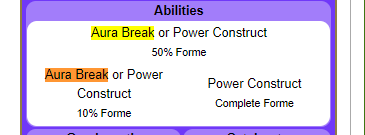
-
Stop dropping files onto the executable. Drop them in the window of an already open PKHeX.
-
Drop the pcdata into the PKHeX window, like you can do for any prior save. Keep in mind the error message is meant to be read and understood; you can't use pcdata files from different (past) versions.