



theSLAYER
-
Posts
22865 -
Joined
-
Last visited
-
Days Won
1001
Content Type
Profiles
Pokédex
Portal
Technical Documentation
Pages
Tutorials
Forums
Events
Downloads
Gallery
Blogs
Everything posted by theSLAYER
-
Just to be sure, the Mon OT details matches yours? Including origin game? Also, I’ve got to check, you’ve definitely set the Mon into the save, exported the edited save, restored the edited save into your game?
-
 And what was it?
 -
There’s no tool for that. You literally got to look at the files and figure it out.
-
They supposedly don’t delete your box after your sub ends. so you’re outta luck, if you plan to do that to remove bad eggs. unless there’s a way to directly manipulate HOME (which prior 1.3.0 was possible and not publicised, and now not known to be possible yet), you can’t get rid of the eggs. 3 slots out of 200 boxes, it’s frankly not that bad. Learn to live with it
-
what format save is your emulator expecting. not a .sav? Mind sharing an example of that Pokemon save here? (and only the save, mind you.) Also, please be a proper save. not a state save.
-
can't you use that save with the emulator? Does it expect something different? I just don't understand the situation here
-
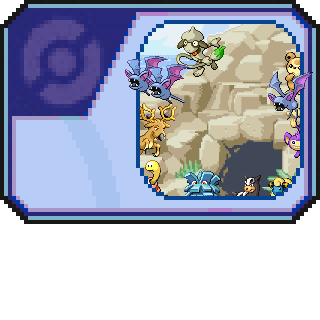
PK3/WC3: Unreleased Altering Cave Pokémon
theSLAYER commented on Project Pokémon Bot's file in Unreleased/Beta PKM Gallery
 The first and most important main difference is international FRLG and Emerald doesn't support e-Reader. Does that help?
 -
There’s probably gonna be a format change but nothing is concrete at this moment
-
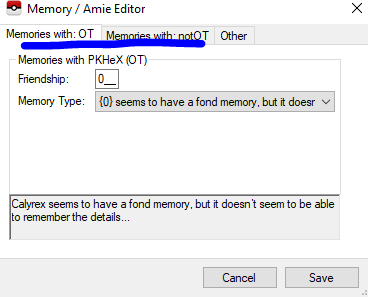
It can have memories with OT, and also memories with a trainer that isn't an OT.
-
I've not checked, but whether the trades can be done online depends on whether the server whitelists them (which is same scenario as HOME supposedly). So only time would tell..
-
I just edited my post with pictures of what I'm talking about. Anyhow no worries :3
-
Well they have a specific pattern they already have. They just wanna convert it from BDSP to USUM (because HOME locked BDSP Spinda out)
-
It is how HOME works currently. They're not good with edge cases. The same thing happens when you take a PLA Origin Mime Jr, bring it to SWSH, evolve to Galarian Rime, and place it back into HOME, then try to trade.
-
WC5: Distros - Hidden Debug Wonder cards
theSLAYER commented on Project Pokémon Bot's file in Unreleased/Beta PKM Gallery
 Hope that helps :3
 -
Temporary holding, until I find a use for them.
-
-
From the album: Technical Screenshots
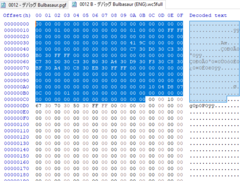
Literally the highlighted data is the PGF/WC5 Area. -
You could give me the EC can do it for you. I could try to do something in the mean time..
-
PK3/WC3: Unreleased Altering Cave Pokémon
theSLAYER commented on Project Pokémon Bot's file in Unreleased/Beta PKM Gallery
I don't think there's any e-reader methods to send WC3 mystery gifts, so no. -
>= Gen 6, you're supposed to be using EC. PID is for Gen 3 - Gen 5. My bad. Once PKHeX supports transfers, if you engage PKHeX in hax mode, you should be able to drag that file into another PKHeX window with a Gen 7 save loaded. Over there, you can change the met details. Finally, change the EC. (Note: New EC = Original EC xor 0xFFFFFFFF) Alternatively you can modify a Gen 3 Spinda (in SM/USUM presumably. maybe get one from the encounter database), then give it the New EC.
-
If you know the PID of the Spinda of BDSP, we can just reverse it to become the Spinda you want.
-
So, What Cool Combos. of Pokemon Can Be Put Into HOME Now?
theSLAYER replied to PLAFiles's topic in Generation 8
The image I shared, those are preevos that can evolve to Hisuian variants. Are you unable to see it? -
So, What Cool Combos. of Pokemon Can Be Put Into HOME Now?
theSLAYER replied to PLAFiles's topic in Generation 8
Shadow Stantler can't be transferred from GO into HOME. Only the purified ones get through, and they end up as regular Stantler. Probably all the cross Gen evolutions. Or getting a permanent Sky Shaymin in your HOME. -
Bringing old Event Mons into Bank->Home
theSLAYER replied to CaptainBen10's topic in Miscellaneous Help
Not event news, thread moved. Also, obtaining SpaceWorld Pokémon is likely something only done via piracy, so we can’t legally assist with that query -
Please stop multi-posting. If no one responded to your latest unanswered post, edit the new info into your latest unanswered post, and continue to wait for a response. It's possible no one that continues to browse here has the information you want. Or maybe someone with the info wouldn't be here until a few days later. So instead of asking every day, just wait, alright? :3
-
Yes. Not every encounter can be shiny. Certain encounters have the details behind their generation mapped out, and those encounters can't be shiny. More details: I think values Poketransporter assigns is random enough. The issue would be "how did you obtain them", which some people may be able to figure out based on transferred level.
