



theSLAYER
-
Posts
22960 -
Joined
-
Last visited
-
Days Won
1016
Content Type
Profiles
Pokédex
Portal
Technical Documentation
Pages
Tutorials
Forums
Events
Downloads
Gallery
Blogs
Everything posted by theSLAYER
-
 Yup, glad that you had it worked out
 -
@Eagleye116 could be an issue how applications interact with your drive. Save from PKHeX to your computer's desktop first. Then without PKHeX, use your computers cut/paste function to replace the one in your drive. Let me know how it goes.
-
can't open any 3ds pokemon saves in pkhex
theSLAYER replied to jennychoo's topic in Saves - Editing Help
I mean you could have dumped your game file to a ROM then installed it afterwards. But smashing it with a mallet seems like overkill. -
can't open any 3ds pokemon saves in pkhex
theSLAYER replied to jennychoo's topic in Saves - Editing Help
I'm hoping you aren't pirating the game. Piracy isn't allowed on our forums. You gotta back up every time if you want to edit a save with the latest progress you've made. You've gotta restore every time whenever you make an edit. Remember: it ain't magic. Progress you've made on your 3DS/2DS, and edits you've made on your computer, won't magically transfer between devices if you didn't initiate the transfer. -
We don't have publicly accessible information relating to how to create your own custom raids. If you have any background in hex editing, you probably can do that to the event raid files, but there is no tool nor guide relating to how to do it at this stage.
-
can't open any 3ds pokemon saves in pkhex
theSLAYER replied to jennychoo's topic in Saves - Editing Help
or you can insert the earlier 00000001.sav back into the same location. Dump save from 3DS/2DS using Checkpoint/JKSM Edit save in PKHeX. Export edited save from PKHeX Restore said edited save into 3DS/2DS using Checkpoint/JKSM. We have tutorials on our forums. Times have changed. Console companies continue to beef up the security of their devices. These steps aren't as complicated as you make them out to be, you just ain't used to them yet -
can't open any 3ds pokemon saves in pkhex
theSLAYER replied to jennychoo's topic in Saves - Editing Help
You thoroughly misunderstood the post you've linked. The whole point is to inject said save into your game. (Example being you've backed up an old SD card, and you've backed up all the content, without using CFW to make a proper save backup) But it only works if: a) that save came from an SD card made on the same device, and b) you're playing the digital versions of the game, and c) you've not reformatted your device. If you want to open saves normally, use JKSM/Checkpoint on your CFW'd device, and dump the saves normally. 00000001.sav is an encrypted save and PKHeX doesn't read that. Using the dumping method I've mentioned above, you can get a decrypted save that PKHeX can read. -
Yeah I’ve never heard of using PKHeX changing the texture of only a mon. Try the save in your 3DS
-
You need to drag the wonder card into PKHeX with a Gen 8 save loaded.. If you just want to grab the Pokémon out of the wonder card, dragging the wonder card into the left side of PKHeX with the correct save loaded works. If you want to redeem the card in-game, gotta use the BCAT method. Once again, gotta load a Gen 8 save before checking the database. Only then would it show the Mystery Gifts of Gen 8. as I explained, no transfer mechanic, hence it won’t show you Gen 8 gifts stuff in a Gen 9 save. (Your PKHeX loads a blank Gen 9 save by default)
-
Responded to you in the other thread. Please refrain from posting multiple of the same content everywhere.
-
You’re not understanding this correctly. This is for how to use data extraction to grab local wonder cards when they’re being shared via local wireless from a distributor. Why are you trying to load a generation 8 wonder card into a generation 9 default save? There’s no Gen 8 -> Gen 9 transfers yet, so PKHeX won’t allow it.
-
Gen 3 - Emerald - Change the boolean 'Japanese' from 'False' to 'True'
theSLAYER replied to Millenials's topic in PKHeX
There are potentially other bytes and flag set by different languaged games, hence why it’s not entirely a good idea to change it. However if you must, you can browse the PKHeX code on their GitHub page. As you said, it’s definitely there. -
Gen 3 - Emerald - Change the boolean 'Japanese' from 'False' to 'True'
theSLAYER replied to Millenials's topic in PKHeX
Are you using a non-Japanese save on a Japanese game? Yes, the game runs, but the point is that you shouldn't just *do that*. I suggest you start the a new game in a Japanese Emerald. -
Gen 3 - Emerald - Change the boolean 'Japanese' from 'False' to 'True'
theSLAYER replied to Millenials's topic in PKHeX
? Any reason why you can't ?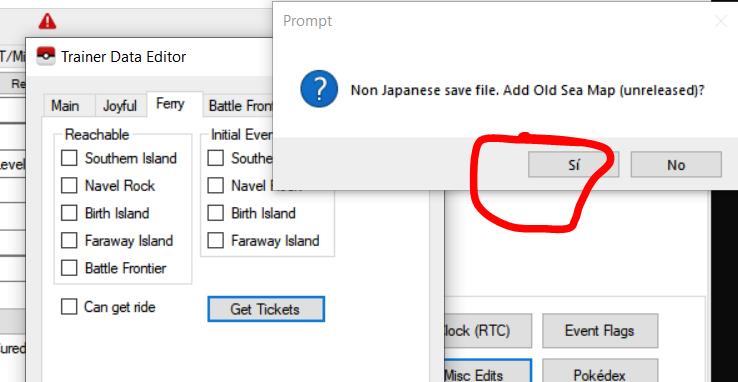
-
What you could do is first keep a backup of the source save. Then use batch editor on an extra source save, to filter by species (or something rather, set what you don’t want to .species=0). After that, you can export all remaining mons to a folder, then subsequently import the mons in a folder into your target save
-
Save sharing for PLA and SV are not allowed here, due to GF/Ninty adding save file verification for online use.
-
GEN 2 NYC PC EVENT POKEMON TO GEN8/GEN9
theSLAYER replied to requiemthegod's topic in Pokémon Legality
Gen 2 NYC events can’t legitimately be transferred to future games. -
Gen 2 JP and EN Pokemon are not compatible nor convertible.
-
Yup. https://discord.gg/66PzPgD
-
Tera raid Pokémon PID are correlated to their IV, HT/WT, EC, Nature. so don’t go modifying any of those values.
-
Backup. Encounter Power Lv.1 Sandwiches Simple combinations, uses only 1x ingredient and 1x condiment Sandwich powers, relating to tossing slices of lettuce on the table For funsies
-
We can’t provide you the guarantee that you won’t be banned. There’s always a chance. I’ve brought my CFW Sysnand V1 Switch and used it online for years, and not banned. But I’m just a guy. You can minimise the risk, but can never mitigate it. Don’t install stuff that aren’t normally possible on a Switch, don’t pirate stuff, only use external homebrew apps via homebrew launcher (don’t install to your Home menu), and follow the variety things on our Discord pins, and you *probably* would be okay.
-
you shouldn't
-
 IIRC CTRTransfer files are dumped from a different user’s console. It is possible to argue that as piracy. The demo, if obtained from external sources, are also piracy. (Doesn’t count as one if you obtained it from your own dump). Granted, I find it interesting and would at some point rephrase the language used to describe the scenario, thanks.
 -
Fair enough. Tho it doesn’t matter either way if you’re doing it without piracy.

