theSLAYER
-
Posts
22960 -
Joined
-
Last visited
-
Days Won
1016
Content Type
Profiles
Pokédex
Portal
Technical Documentation
Pages
Tutorials
Forums
Events
Downloads
Gallery
Blogs
Everything posted by theSLAYER
-
just rename it. The .bak file is just the save file (.sav) with the extension renamed (.bak) However it must already be a functional save file.
-
Just to make it clear, there’s no official shiny variant of these images. Gen 1 Gen 2 Gen 3 Gen 4 Gen 5 Gen 6 Gen 7 Gen 8 Gen 9
-
 Try this
 -
Well you can link it to any other app, not just gallery/album. Yeah. I use homebrew launch -> JKSV. and FTP to transfer saves. And then use official local save transfer method to transfer saves between switches. All done on Sysnand + CFW. I don't have Emunand on my regular setup. In any case, even if you're confident that you've done nothing wrong on your Sysnand, all at your own risk.
-
you can access Homebrew via the homebrew launcher. Just don't install homebrew like an app that appears on your home page. Do it all at your own risk
-
Receive the gift via faked BCAT
-
You can, provided you have nothing illegal or bannable on your Sysnand. No piracy, no installed apps (homebrew or otherwise), no illegal themes, nothing. I have been using SysCFW with online for years. Transferred edited saves between 2 Switches.
-
how do i make the main file so i may edit the save
theSLAYER replied to NinjaXD's topic in Saves - Editing Help
Then as things stand, you won’t be able to extract your saves sadly. Wait for your Switch to become hackable -
Lack of Gen 7 Legendary QR codes?
theSLAYER replied to SaltedNeos's topic in ROM - 3DS Discussion & Help
yeah that's the issue right there. - even when illegitimately obtained, those dex entries won't show the QR code - hacked variant of such QR codes were never made - as they weren't intended to be revealed, such shiny Ga-Ole QR doesn't exist. There pretty much isn't any options at the moment.. don't know what you meant be 'exception', but there are ways around the region locking without hacking. Simply get someone with a JP 3DS to scan them, then transfer from your Bank to your HOME. You can do coded transfers from Bank to HOME, not just direct Nintendo account transfers. Also also, you can hack any 3DS. After you hack it (effectively jailbreak/install CFW), you can region change your device. Well he's onto bigger things now, so I doubt he's even aware that people are curious. I could try asking him, but I'm not sure if he'll even respond frankly >< No worries! -
Lack of Gen 7 Legendary QR codes?
theSLAYER replied to SaltedNeos's topic in ROM - 3DS Discussion & Help
Edit: For context, the page that is being discussed is linked here. Legitimately, you can only get QR codes from a Pokédex of someone that owns said shiny. Since the given mon is shiny locked, no one can legitimately have the QR code, thus a shiny dex entry would be illegal. Ninty/GF probably don't care. Probably. Tho it isn't new for them to restrict people's access due to illegitimate dex entries; back in Gen 4, before the Arceus event, anyone with Arceus dex entry could not get onto the GTS. The game does not generate QR codes for certain UB/legendaries, as you've explained. As for why the game can't be bypassed to generate them, I simply don't know. The game reads Gen 7 UB/legendary QRs just fine. If you could get your game to run in JP 3DS, you'll see that it can scan these: https://projectpokemon.org/home/gallery/album/809-special-pokémon-jp-consoles-only/ Not sure you'll ever hear a positive response relating to this. As far as I know, only one guy made it, and no one else seemed to have cracked the code (publicly), and I've not heard anything about these. Also, interest has died down so I'm unsure we'll hear anything about this Also I think converting the QR to hex then back won't work. I believe it needs some kind of decryption and encryption so can't make them via simple hex editing. Edit: Info I could find related to signing the QR. -
how do i make the main file so i may edit the save
theSLAYER replied to NinjaXD's topic in Saves - Editing Help
Install CFW on your device. Install a save manager on your device. There’s no website out there to convert this kind of ‘save’ for you. For 3DS/Switch, any save you just rip out of your SD card without using a save manager, would be encrypted and not usable. -
how do i make the main file so i may edit the save
theSLAYER replied to NinjaXD's topic in Saves - Editing Help
Because it’s not. Extract your save with a save importer/exporter -
Piracy is a no-no.
-
Trying to pkhex nintendo ds games
theSLAYER replied to Animatorjames's topic in Saves - Editing Help
https://projectpokemon.org/home/tutorials/save-editing/managing-nds-saves/ -
Roamers in RS and FRLG cannot have perfect IVs. Read here (under Ruby Sapphire FireRed LeafGreen)
-
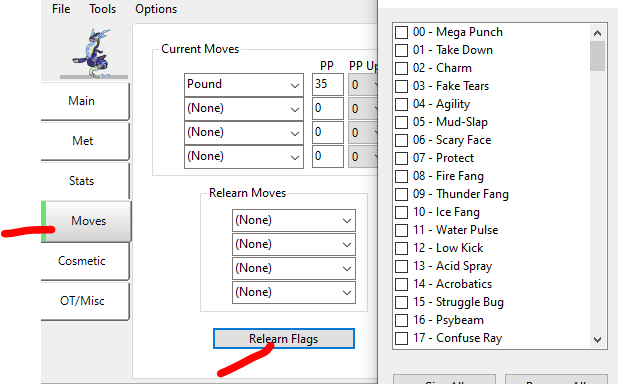
Did you give the appropriate TM relearn flag?
-
-
Trade it via 3DS VC, instead of using a combination of emulators and PKHeX. (it sounds like an issue I experienced in the past)
-
No worries. You won't necessarily have to delete the game update, just modify the code.bin from the update instead (I have steps for that too)
-
do you have a game update installed?
-
@Jmscheuer follow the instructions as per the last step, and make sure it is named code.bin
-
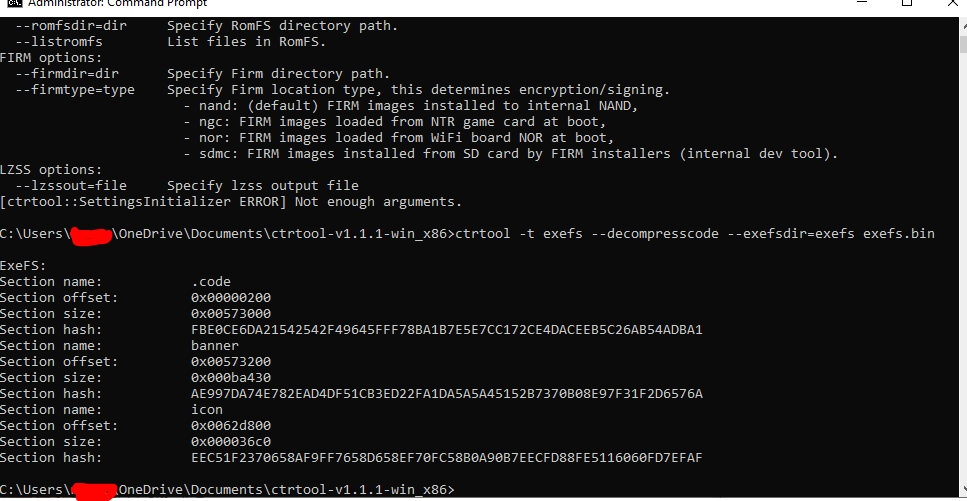
open it in HxD and try finding the pointer edit: also, try moving those commands around based on what you see in the ctrtool response.
-
what game are you playing?
-
I dumped for me.. Anyhow, try extracting .code.bin from the exefs in GodMode9, as opposed to copying the exefs.bin I just tested on Pokemon Moon, ignored all the ctrtool steps.