



theSLAYER
-
Posts
22961 -
Joined
-
Last visited
-
Days Won
1016
Content Type
Profiles
Pokédex
Portal
Technical Documentation
Pages
Tutorials
Forums
Events
Downloads
Gallery
Blogs
Everything posted by theSLAYER
-
 That statement is partially true; the wondercards *aren’t* stored in saves. The part that is outdated is the “not usable by users”
 -
I thought it follows Switch time, and changing the console time resets to Fancy. Make sure the save is using the current console time (basically make the save 'today', then don't change the time, and make sure you restore the save 'today')
-
Ah maybe when you first link to GO something else changes. I’ll check it out when I get home
-
*byte fsys_vivillon or something similar to that name. (can’t recall exact name cause not on PKHeX atm, but pretty sure it’s something close to that)
-
For the record, yes. Still hacked. While we use descriptors like 'legal, illegal', it just describes how well it was hacked, and whether it is distinguishable. Does not remove the hacked status. Loosely, hacked = created via user intervention, normally via unintended methods, whether third party or not. Okay, report noted. Now, let's keep this topic on track. Anything unrelated to the topic of this thread, create your own thread, thanks!
-
Requests are good and all, keep in mind we aren’t a buying/selling forum. Also shifted your thread as you weren’t actually contributing an event
-
There's no official transfer methods from PLA to SV at this time, hence PKHeX will not allow such a transfer
-
Help PLEASE PkHex wont open my save (Input file is too large)
theSLAYER replied to SwampySauce's topic in Miscellaneous Help
The patch isn't the DLC. Also use the *latest* PKHeX. It can read SV 1.2.0 saves. -
pk5 Potentially Corrupted .sav file
theSLAYER replied to Irritated Spork's topic in Saves - Editing Help
We can’t unempty it. Data must exist in the file. Perhaps you saved incorrectly. Or grabbed the wrong file. Check your backups and hardware. -
Yup. There’s no legitimate Poké Ball form shiny. PKHeX is working as intended.
-
All the results you see are manually calculated from a single value, the seed. Pikachu uses a different (custom) scale range, which isn't account in the calculation formula in the software revision of Tera Finder you're using.
- 1 reply
-
- 1
-

-
documenting my findings on Japanese distribution cartridges
theSLAYER replied to rockaedward's topic in Event Contributions
Not just about the font, also about the fact it’s distributing a funfest event. Those carts haven’t been seen in the wild at all. -
If someone could help my friends save to be fixed
theSLAYER replied to Donti's topic in Saves - Files and Requests
In this scenario, rather than use GodMode9, try using Checkpoint. And also TWLsavetool. -
If someone could help my friends save to be fixed
theSLAYER replied to Donti's topic in Saves - Files and Requests
Not a save file. It shouldn't be a file with nothing but names of folder directories. Get your friend to do a proper dump, or use a different homebrew to dump the save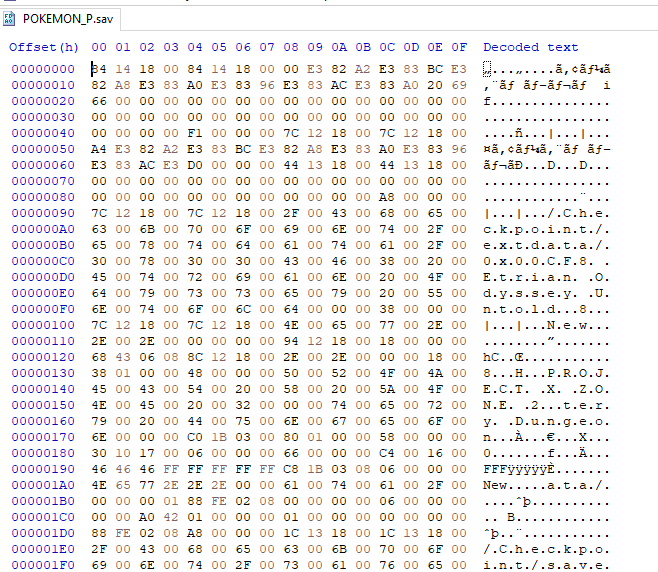
-
If I understand correctly, not happening. iOS - has a bunch of restrictions, limitations, and TOS stuff that I don’t think it can get accepted onto the store Android - there’s a old proof-of-concept copy that can be compiled into an APK, but it hasn’t been maintained and doesn’t look like it would. no idea what iOS copy you came across but I probably wouldn’t even try to use it.
-
Not that I know off. I know people have been fiddling with it cause it’s made in Unity, but I’m not sure if an actual editor was made. I think there’s a randomiser somewhere out there tho.
-
Problems with my Ultra Moon Save Data
theSLAYER replied to G.Foxy1985's topic in Saves - Editing Help
Any 2DS/3DS unit can be hacked: https://3ds.hacks.guide/ Once CFW installed, tutorial relating to actual extraction of save: https://projectpokemon.org/home/tutorials/save-editing/managing-3ds-saves/ Cheers! -
Pokémon Emerald flash memory corruption
theSLAYER replied to Misdreavus's topic in Systems, Flashcards, and Emulation
@needszeebs good details and finds, and I’m sorry that it happened to your cart too one note tho, for the last image, that can also happen with using too many cheats, and/or saving and shutting off at the wrong time. Could also happen with importing the wrong save into the wrong game (like RS into Emerald for example. Tho to some extent, related to which map the player saved on). I’ve personally seen something similar to that screen before (same tileset/area/NPC corruption but different map). -
Actually does pkNX even support BDSP?
-
Problems with my Ultra Moon Save Data
theSLAYER replied to G.Foxy1985's topic in Saves - Editing Help
Looking at the save name, I would think it’s the encrypted copy ripped out directly from the SD card. please don’t do that. Use a save manager to dump the save first, as per the tutorial in the reply Skylink98 made. -
Extract the rom with your Switch. Else how did you manage to get it for Yuzu at the first place?
-
Just catch a bunch of Unown, then change the TID/SID to make it shiny.
-
Pokémon Rising Ruby and Sinking Sapphire
theSLAYER replied to Drayano's topic in ROM - 3DS ROM Hacks
Link removed cause contains ROM files. -
@Foxed please upload directly to our site.
-
Asking for a meloetta for Pkmn scarlet and violet
theSLAYER replied to Monkeyhead45's topic in Pokémon Requests
No worries
