



theSLAYER
-
Posts
22961 -
Joined
-
Last visited
-
Days Won
1016
Content Type
Profiles
Pokédex
Portal
Technical Documentation
Pages
Tutorials
Forums
Events
Downloads
Gallery
Blogs
Everything posted by theSLAYER
-
Yeah. Many people create fakes by just making sure a method 1 PID is created, but they neglect various crucial things such as location or trash bytes XD
-
Cartridges for Switch don’t hold save files. I don’t know what caused the split (assumingly your OFW and CFW both have the same profiles, but they’re treated as separated on the sysMMC and emuMMC now) and I doubt I know how to merge them back into one, aside from only using CFW and bringing CFW online. (could be related to updating game or firmware of CFW, and leave OFW unupdated) [I don’t use emuMMC, so my CFW is on sysMMC and I bring CFW online. Don’t use injections on my save tho] basically, you want to use your hacked save on OFW, I understand that much. However given your profiles are separate now, as I’ve said, no clue how to remerge them. Maybe someone with more experience with this would come along. In any case, this isn’t a PKHeX issue.
-
Long story short, certain PIDs are essentially impossible because JEREMY mons were known to be in-game encounters. Factoring encounter route, encounter slots, known natures and IVs, certain donated Slowpoke (even the pk4) would appear to be fake. It also brings into question certain known natures and IV spread. Really, any entry has to be checked case by case. also, we looking for gen 3 entries, since route data is intact.
-
Your first few lines explained the problem to me. Your OFW and CFW isn’t linked. Try making progress in your OFW save, then boot up CFW, you’ll see that they’re really 2 different saves.
-
It’s hard to imagine any mon (OT side) not having any memory at all. ill do a few checks later
-
This thread was started before the function was implemented into PKHeX. You’re replying to the thread after the fact.
-
If you can’t figure it out, maybe you shouldn’t mess with it. Also: Basically you know how Serebii gives you the encounter chance? place stars for the raid, and input the randroll. all those values kinda originate from the Randroll. Just play around with it. I set my the randroll to 99 and stars to 4 for gmax encounters. If you want, work backwards from there.
-
 We have the wonder from SWSH server, not a clone from Let’s Go, however it’s as you say I think when PKHeX converts it, it doesn’t assign the memories
 -
I didn’t get the notification, so I guess you didn’t quote/tag me properly. Type “@“ and the rest of our names and it should pop down a drop down with usernames you can click on. yup, I noticed the Den location thing yesterday. Anyhow thanks for the info Also @Kaphotics for event Pokémon lacking memories.
-

Homebrew Switch to PKHeX Sword
theSLAYER replied to TravisT51's topic in Systems, Flashcards, and Emulation
Don’t think such a page or service exists. granted you can boot into OFW, but “remove all traces of the hack” isn’t something that’s exists, I think. -
Yeah, strawberry. So the most default of defaults.
-
Any form can G-max (evident if you played through the story; Opal's G-max Alcremie wasn't Vanilla Cream). However... Presently, only Vanilla Cream. I've not checked if forms are restricted from raids. So far, I only know raid Polteageist can only be phony.
-
@Nelex5000 don't multipost. if any new info, and no one replied you, edit into your latest post. And sheesh, I'm not always around, wait patiently. Also, those 2 baks, you can load them straight into PKHeX and they work. Just export as .sav in PKHeX, then import into Desmume using the Import Battery or Import Backup Memory option (named something like that) edit: There's also the method of making a copy of those baks, then renaming them to .dsv, but I'm unsure how well that would work..
-
Upload all the save files involved, we'll see if any of them have any usable data.
-
In the screenshot, you're using the one from 5th July. The latest one is 26th Dec. Let us know how it goes. If it still fails, upload your save here.
-
yes, the game has a low bar for legality. also yes, trading away illegal mons (even if the game doesn't stop you) is against our forum rules.
-
is hidden ability antique polteageist not possible?
theSLAYER replied to arcray's topic in Saves - Editing Help
Raid Polteageist can only be phony. Egg Sinistea (and polteageist) can only be phony. That means there's no way to find a HA one (usually by raid) or breed one. edit: source that raids provide phony: -
so you surprised traded a PKHeX'd mon to yourself then. lol. do note that the others you generated are probably illegal. With the progression of the raid RNGs, it is possible to tell it some mons are bad hacks. Even if it is flagged as Legal on PKHeX, if the IVs, PID and EC doesn't yield a Seed for the seed finder, It means you hacked in the mon.
-
Looks like it was modified. The stats all maxed and no Encryption constant. Also OT/HT same name as the save file. Highly suspicious.
-
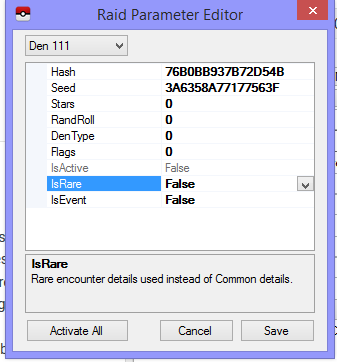
Use the plugin or raid finder to find a shiny seed, then you probably edit that seed in. No clue if the hash needs to be fixed. edit: From what I can tell, you edit the DenType and Flags to set the options below. If Dentype is 1, Dentype is active, if Dentype is 2, it's active and it's rare. If DenType is 3, it's event raid and active. For event raid, recommend setting flags to 3 to. As for Randroll, it control what species appear. Species that are typically 5% encounter chance, are the last 5% from 0 - 99. Meaning they'll be 94 - 99.
-
Randroll - No idea DenType - Mostly 0, but I've got a 4 here. Flags - Maybe wishing piece related? Most entries I have are 0, but the one that had (4) for DenType was 1 here IsActive - If it's active (has light coming out), then it'll be True IsRare - Whether the rare den is active (purple light). IsEvent - Whether promoted event raids are active (Instead of standard mons, you'll get G-Butterfree, G-Snorlax etc) edit: Clicking on the various cells explains it to you
-
Drag all the pokemon in that box to another PKHeX window perform your batch edit on the other PKHeX window Drag the pokemon back into your save. (you can also use the import/dump box feature) edit. Apparently as seen on the batch editor guide page (which I know you've seen), there is a box function. You could try: =Box=1 (when box is box 1) insert your code here
-
try doing this first: .PID=$rand Randomized the PID Then set it to shiny .PID=$shiny0 maybe it doesn't work if it is already shiny, so need to unshiny first
-
Read this ^, an explanation from the dev. I'm locking this thread.
-
No clue. Try conditional statements !Species=0 .PID=$shiny0 (If species not zero (species exist), change PID to square shiny) Don't mistype it. There's a "!" there. Also keep a safe save backup before you do this.
