



theSLAYER
-
Posts
22961 -
Joined
-
Last visited
-
Days Won
1016
Content Type
Profiles
Pokédex
Portal
Technical Documentation
Pages
Tutorials
Forums
Events
Downloads
Gallery
Blogs
Everything posted by theSLAYER
-

Gen 4 & 5 - Shiny Rate Modification
theSLAYER posted a tutorial in NDS Pokémon Games Hacking Tutorials
Disclaimer This guide would require some way of playing edited ROMs (such as a flash cart, NDS emulator etc). This guide assumes you already know how to dump your own ROM legally, and how to play the edited ROMs. As such, this guide will not entertain such questions, as it is not the point of this guide. This method works for any language'd variant of Diamond, Pearl, Platinum, HeartGold, SoulSilver, Black, White, Black 2, and White 2. Note: the shinies obtained via this guide will only appear shiny. When the save is viewed in PKHeX, and when shiny Pokémon (resultant of this modification) is transferred forward, chances are they will not be shiny. Additionally, this guide will not give you 100% shiny encounters. However, the shiny odds for these fake/temporary shinies are still higher than base rate, and may interest people that do not intend to transfer forward nor trade to vanilla games. Anyhow, we will not be providing any arm9.bin or modified ROMs, as linking to or providing data files extracted from ROMs are against our forum's rules. However do not fear, as the steps regarding how to extract the arm9.bin from your own dump and then re-injecting them, are included in this guide. The 3 easy steps: 1. Extracting the decompressed version of the arm9.bin 2. Performing the edit 3. Injecting the edited arm9.bin back into your game Extracting the decompressed version of the arm9.bin Performing the edit Injecting the edited arm9.bin back into your game Extra: Testing whether the modification works FAQs and Explanations: Sources (that I remember): Bond697's original work to increase the shiny xor threshold on Pokemon Black 2 Me expanding on Bond697's work to find a working offset for Black/White My explanation for why the shiny is fake/temporary Bulbapedia's page on Shiny Pokémon -
Having an Issuse with changing Pokemon's Memory.
theSLAYER replied to DayDreamerTori's topic in PKHeX
So here's an answer I got from a dev: Sysbot doesn't write memories, however receiving a mon via trade does update it's memories. So the memory you got is probably due to you receiving it via trade.. edit: I was told how trading updates memories is how the game behaves normally. So if you want a specific memory, you gotta save edit. -
Having an Issuse with changing Pokemon's Memory.
theSLAYER replied to DayDreamerTori's topic in PKHeX
If you uploaded the correct file, then it is probably sysbot that messed up memory. I'm unsure if it's limited to the server you are using, or the issue is present in all current versions of sysbot. In any case, this isn't a PKHeX issue.. -
Having an Issuse with changing Pokemon's Memory.
theSLAYER replied to DayDreamerTori's topic in PKHeX
I injected the Charmander you sent me, and the memory correctly says it grinned. Try receiving another one from Sysbot. -
Having an Issuse with changing Pokemon's Memory.
theSLAYER replied to DayDreamerTori's topic in PKHeX
perchance could your next response contain the pk8? :3 -
Having an Issuse with changing Pokemon's Memory.
theSLAYER replied to DayDreamerTori's topic in PKHeX
Just a few lines of questions that needs to be answer: What is the origin game of that mon? Did you set the edits into the PC? Did you export the edited save from PKHeX? Did you restore the edited save into your game? Are you using EmuMMC/Emunand? -
Invalid Encounter Type for Dialga from Go
theSLAYER replied to MoldyCantaloupe's topic in Pokémon Legality
No worries. I made another minor edit. You can refresh the page and read it if you want -
Invalid Encounter Type for Dialga from Go
theSLAYER replied to MoldyCantaloupe's topic in Pokémon Legality
Hi, I guess I was editing my post while you were typing this. Refresh the page and read the edit I made, thanks -
Invalid Encounter Type for Dialga from Go
theSLAYER replied to MoldyCantaloupe's topic in Pokémon Legality
The latest version of PKHeX already supports GO Shiny Dialga. Your GO Dialga must have the correct date. PKHeX verifies dates. The range is literally in the error message. Make sure dates and levels and other details match the encounter details. Also, rather than make things from scratch, import from the encounter database. Also ensure you're at the latest version. edit: I reread your post, and it appears the issue you have is with Sysbot, not PKHeX (as in NOT issues related to making a legal shiny Dialga on PKHeX), my bad. I'm keeping my old content up for context (maybe it'll help others) Anyway, we have no control over the various copies of Sysbot out there, after it was downloaded by server owners. The server owner has to update their own version of PKHeX.Core (and various DLLs) that Sys-botbase relies on, to get the updated legality checks. So your file is legal, and PKHeX is working fine. It is just that the server owners need to update their system that runs legality checks. Alternatively, find a server that turns off legality checks.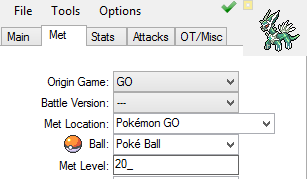
-
@flaming.brockoli Same junk. Are you perhaps launching the game through another app or something? If one were playing the game normally, it should not be this sized, and that's the only explanation I can come up with..
-
Based on what you said, and a look at the garbage data, I doubt you ripped the save out properly. Read:
-
Need help with claimed mystery gift list
theSLAYER replied to Tadtu05's topic in Saves - Editing Help
I find it hard to imagine that the game would randomly edit that data into your block. Are you absolutely sure only you played the game? Maybe someone claimed it in your absence? Yeah if you could get PKHeX load the save, and dump the block, I could help with its removal. -
Need help with claimed mystery gift list
theSLAYER replied to Tadtu05's topic in Saves - Editing Help
No worries. I know how to do it. Dump the Mystery Gift Block, then hex edit it, to remove the entry. I then asked you why do you want to do it. -
well what we said handles the file you uploaded specifically. for anything else it may need different solutions. Anyway for other stuff just import from Encounter Database, then mess with the stuff from there. Don't create stuff from scratch
-
that wasn't the file you uploaded don't know what you are trying to imply. What we referred to is the file you uploaded.
-
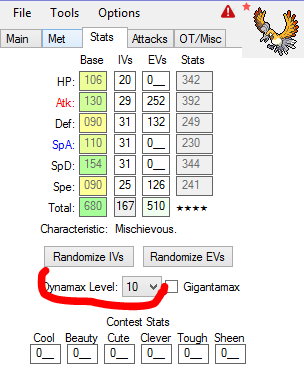
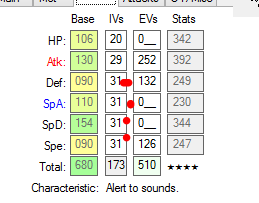
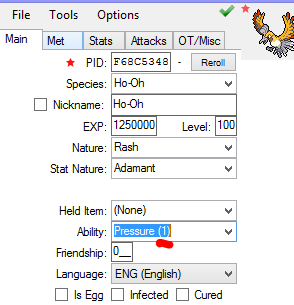
I don't know why you mentioned Encryption constant, when that's not the issue with this Ho-Oh. a) Mons obtained from Max Lair have a certain Dynamax level. Just max it out. b) Max Lair legendaries have a minimum of 4 Perfect IVs, so just max one IV out. You can choose it at random. c) For Max Lair Legendary, abiltiy is 1. Also as Kaphotics said, the PID/IVs/EC/HT/WT are correlated, however not checked by PKHeX at the moment. So it appears legal, but ain't legal. I don't think there's a tool that acts like RNGReporter and gives correlated stats for Max Lair mons yet.
-
@ghost. could you just upload the files that has issues? maybe like provide 3 different kinds obtained from different methods? not everything needs properly correlated ECs.
-
The only ways are a) make sure you truly own them (all their details match the save, origin game match the save etc) b) Progress far enough through the game. As I've said prior: Consider reading outsider Pokémon and obedience.
-
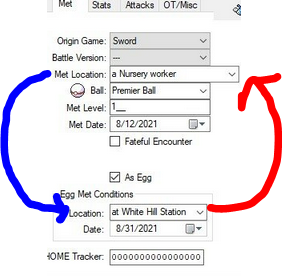
@ghost. To clarify, you can perform the act of creation in PKHeX, it's just that they are illegal, right? If so: looking at your screenshot, you're attempting to receive an egg at the train station, and hatch it by the nursery couple. That location data is completely wrong. Try reversing it. (See image I attached) PKHeX's error message of unable to met an encounter from origin game means there is no such encounter possible in the encounter game. It means the encounter is not known to exist. Which in this case, it means you hacked it wrongly. PKHeX is acting as intended. Image: Additionally, if you're trying to edit wild mons from Gen 8, keep in mind they have a known PIDIV correlation. What this means, is that you cannot haphazardly edit their PID, EC, Height, Weight. More reading relating to PID Mismatch: Overworld8 here. Edit: I've edited the title to reflect a somewhat more accurate representation of the issue. Your original title may give the wrong impression that the issue is with PKHeX. If so, that would not be true, as PKHeX is flagging due to incorrect details. Thus, it is working as intended.
-
Egg move issue - USUM Save file edit
theSLAYER replied to JovianGuard's topic in Saves - Editing Help
@JovianGuard Bank and HOME has almost has no legality checks, so you're right about their checks being garbage. Bred Pokémon's egg moves follow a somewhat specific move order. You probably just haphazardly threw moves into the Egg Move section thinking that's enough. Let the PKHeX suggest moves, that should set it into the correct order. Alternatively upload the file here. Or just follow this image: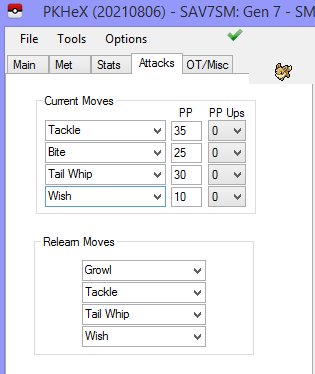
-
Need help with claimed mystery gift list
theSLAYER replied to Tadtu05's topic in Saves - Editing Help
That's not an icon. Anyway, from what I can tell, there was no real reason for you to create another thread. If no one replied, just wait patiently alright? Since you're new, let me teach you about forum etiquette, don't go around posting multiple times asking about the same thing. Just wait for people to reply :3 Anyhow, I've merged your threads :3 Back to the question, yeah, you can edit your Mystery Gift Block, and remove the data via hex editing. The question is: why? There is no real need to do that. What is your purpose for wanting it deleted? Bringing this up just in case you had these thoughts: 1) You can receive another Poke Ball Mew, even if the record still shows in the gift album, as long as you buy another Poke Ball Plus. Explanation: This gift is set to be multi-receivable. For every ball you purchase, you can redeem another Mew from it. 2) Deleting the record won't allow you to receive another Poke Ball Mew from the same Poke Ball Plus you used to redeem this Mew. Explanation: think of the redemption as a one time serial code; the serial code was used when you redeemed it the first time round. Since it's a one time serial code, you cannot reuse it once it is used.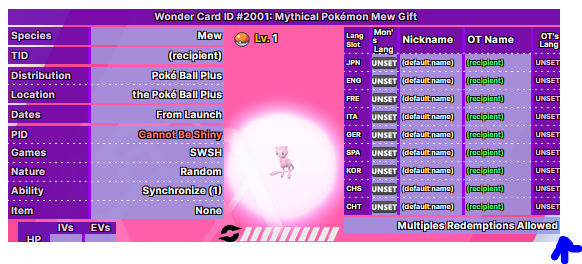
-
Need help with claimed mystery gift list
theSLAYER replied to Tadtu05's topic in Saves - Editing Help
Icon? what icon? -
If the Pokemon fully belong to you (OT name, OT gender, TID and SID same between mon and save), it would obey, regardless of progress. Make sure they fully belong to you. No. There isn't a byte that controls obedience. That's probably a leftover from when fateful encounter flag was called obedience flag in Gen 3. (To give context, back in those days, any Mew and Deoxys will never obey, even if you defeated E4)
-
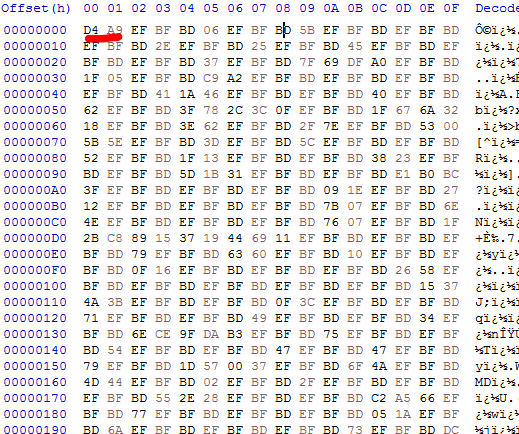
your save is too big. it doesn't even look like a proper save, it just cuts of randomly. One other thing I would like you to try, is launch the game, go past the continue screen, then launch EdiZon (while the game is launched), then dump the save from there. What happens? Also, quick question, how are you transferring the save to your PC? Looking at your save in hex, The does seem to have a proper header (at least the copies I own have that same value infront). And while it's normal for SWSH saves to look like junk cause they're encrypted, I don't think the values BF BD is supposed to appear that frequently. It's like appearing, every other other byte.
-
I'm under the impression those mons you edited did not belong to the trainer of the save, and the progress of that save is not far enough. You want to edit "outsider's Pokémon" and have them obey? Increase your trainer progress. (Basically earn more badges/trial stamps) There's no other way..

