



theSLAYER
-
Posts
22865 -
Joined
-
Last visited
-
Days Won
1001
Content Type
Profiles
Pokédex
Portal
Technical Documentation
Pages
Tutorials
Forums
Events
Downloads
Gallery
Blogs
Everything posted by theSLAYER
-
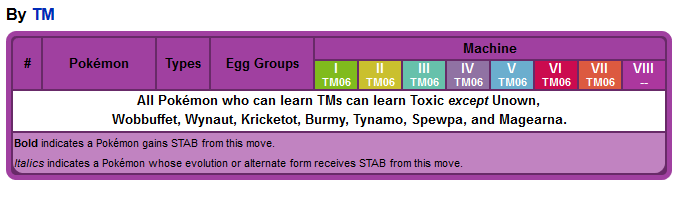
yup I messed up. I went to the Toxic page, couldn't search for Umbreon and called it a day. In any case, Umbreon originating from Gen 8 can't learn Toxic.
-
In any games, Umbreon doesn't learn Toxic. That's why.
-

How do I load up wonder cards (wc8) on PKHex?
theSLAYER replied to Irina's topic in Saves - Editing Help
Doesn't store the wonder cards itself, but probably does store the wonder card records (which is why you can check mystery gifts in your game). Well you can receive the mon via trade, so that's a thing. (I know the save has a poke trade file tho, but so far they don't see to update) Whatever the case, use at your own risk. -
Update Physical Games in hacked switch?
theSLAYER replied to Hellionlucifer's topic in Systems, Flashcards, and Emulation
not that I know of. that's what I do, but I don't pirate games or install impossible themes etc. I have no idea what your Switch has, so I'm just gonna say it's usually safe if you don't have impossible/illegal, but ultimately use at your own risk. -
Mod double post: Make sure you downloaded the latest PKHeX. We got a version up that now should be able to handle it.
-
There's no need for your own compile. Thanks for your help, but we already got a version up.
-
unrelated to this old post. This has been reported multiple times. Wait for PKHeX to support it. Locked.
-
already reported. edit: by you. lol.
-
it's a new update that added stuff, how bout waiting for it to get supported :X
-
probably not supported yet then.
-
 The file came straight from the server. Be that as it may.
 -
set flags and dentype to 0 deactivates them. More info here
-
Watchtower Lair's Den Jangmo-o
theSLAYER commented on Project Pokémon Bot's file in Sword & Shield (Base Game)
 unless you have other information sources regarding this, it's flagged as such on the wonder card. As such, I have no reason to believe it isn't capped. Unless you have any other information that can prove the redemption isn't capped, my reason from before stands. (while you may doubt my program, I'll like to point out that the byte is the same for other type of not just items, but pokemon, and it's been correct thus far. It properly identifies types of redemptions, such as Mew card, birthday redemptions, Curry card etc) If you can't obtain more from trading, and their redemption is capped, there is no legitimate way to obtain more than the ones you get from the Mystery Gift Serial Code, which is presently just 2. (Tho I am expecting a third event to pop up, cause g-Butterfree is now tied to a Dynamax Crystal) Yup, I KNOW this information. It's the reason why I perform rephrased my file description in such a way. (I know the info from here) As for the remainder of the points you laid out, if true, then $ is the limit. But your points hinges on whether the event is unlimited. And as per the card straight from the server, it is not. Additionally, the restart your game portion was included in my rephrase, as you can see up there. I'm under the impression you didn't read the file description after I rephrased that portion. Please read it and lemme know if it is clear enough
 -
Watchtower Lair's Den Jangmo-o
theSLAYER commented on Project Pokémon Bot's file in Sword & Shield (Base Game)
Frame advancement for this den, so far known is only by using another Dynamax Crystals. The Crystals can't be traded, and at best you only redeemed 2 Crystals on hand (Larvitar and Jangmo-o). So as I said, it is unlikely you would get the shiny. perhaps I should have reworded this to: Frame advancing via VS or Invite method is presently not possible, and it's unlikely you'll get more than 2 crystals, as they cannot be traded. As such, getting the shiny would be highly unlikely. The only way (besides by chance) is to restart your game, and use a save editor to check whether you're 2 frames away from shiny. Only then, redeem the serial code and encounter them. edit: I reworded it to prevent confusion of other readers. -
delete core.dll from the folder.
-
Check Misc Edits and Trainer Info on PKHeX. If it's not there, then it wasn't implemented (presumably because no one did the research on the offsets in the save)
-
Yup, the Magikarp events aren't in the latest PKHeX. Any future events that are dated after the latest PKHeX release will have the same issue too. It's the same with event mons after all.
-
Managing 3DS Saves: Using JKSM
theSLAYER replied to NinFanBoyFTW's topic in Saves - Guides and Other Resources
This homebrew manages data, ie allow you to import and export save data. If you accidentally deleted save data from cartridge, but kept a backup, then you can safely restore it. If you had no backup, and accidentally deleted the cartridge data, then you're screwed. In order words, the existence of this homebrew doesn't keep you safe. You are in-charge of keeping you safe :3 AFAIK, this homebrew doesn't "dump the entire game". Probably just a different option that leads to the same result, ie the save being dumped. No clue I think most Pokémon games don't outright use this? Maybe it is related to battle videos? I don't recall if Battle Videos were stored here (I don't remember how I extracted Zeraora pk file from the video data, nor how I got the data). There might be other games that use it that may have compatibility with this feature, I don't know. Keep the JKSM folder safe on your computer, then delete it from your SD card. The JKSM folder may contain saves that will be useful in the future. Beyond that, sure, follow the steps in the future -
Do you have any 3DS at all? The 3DS is easy to crack, and relatively risk free. If you're not willing to purchase any additional hardware that supports dumping IR games (NDS phat/lite and EZ flash 3in1 so that the program can be used, or the r4i save dongle [I think that works?]), hacking a 3DS you own would be $$$-free option. (provided you don't screw up the procedure) What I've linked you beofre, shows that it is possible to get the save files off NDS carts. However, you're gonna need the prerequisite hardware in order to do so
-
When I said plugin, I meant for PKHeX, not for your com. @Kaphotics any ideas?
-
@Khodor Salame32 I see you posted another thread with the same content. A legal shiny Hoopa doesn't exist. All Hoopa were distributed as shiny-locked. Please stop asking for something illegal, especially if you want a legal copy that can be used online. Just because it can be used online, doesn't mean it's legal. Don't use the online hack checks as the basis of legality. Since it's a duplicate thread, I've deleted it.
-
@InsaneNutter is right, don't risk bringing the save with hacked mons online. Wait for HOME to be released. I'm locking this thread.
-
On PKHeX and the various parameters Den IDs for Gigantamax (usually 5 stars, 5% in Rare Den [randroll 95 to 100]) Galar mainland Physical dens and the species within: Isle of Armor Physical dens and the species within: This link pretty much compares dens and their in-game values, to the nests (which Serebii uses as Dens). Important to note that Serebii's nests comes from datamining, so it too uses in-game values. https://leanny.github.io/seedchecker/index.html#/dens/
-
Did you try unblocking it under properties Did you make sure there’s no Core.dll in the folder did you unblock in properties for the plugins (if any) as well?
-
that's what I was suspecting.

