



theSLAYER
-
Posts
22865 -
Joined
-
Last visited
-
Days Won
1001
Content Type
Profiles
Pokédex
Portal
Technical Documentation
Pages
Tutorials
Forums
Events
Downloads
Gallery
Blogs
Everything posted by theSLAYER
-
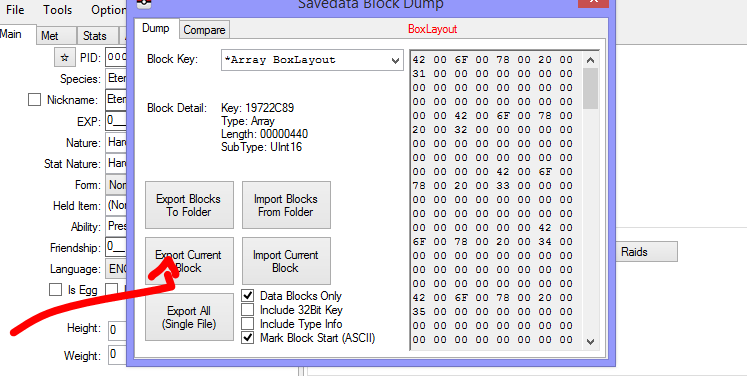
Clothes editing aren't documented (until now). I don't think it'll be a thing. You could get clothes by importing the Fashion block from a donor, or learn editing those values from here. edit: I've prepared male and female blocks, those can be obtained here.
-
Before you can edit them, you need to export them from their save. It would be the Export Current Block, provided you're at the right block. Then to import them, it is as per the tutorial.
-
Don't understand what you're talking about. Are you getting your own PKHeX from the git or something. Every release of PKHeX.exe thus far has been "merged": they've all just been PKHeX.exe Anyway I am using the Raid plugin, and it's presently not working. It'll probably update in due time. Anyway, an older version can be downloaded here: https://projectpokemon.org/home/files/file/1-pkhex/?do=download&version=2999&csrfKey=85990c5bfd17bcd630b8fcc88e01a390 Else, just wait for the plugins to update.
-
PKHeX didn't merge with your previous copy, it replaced it thoroughly. (assuming you copy-pasted the PKHeX from the zip over the existing PKHeX) In any case, download the older PKHeX version. Alternatively, report issues on the github of those plugins, wait for them to update.
-

Gen 8 - increasing shiny chance.
theSLAYER replied to Hellionlucifer's topic in Saves - Editing Help
Using PKHeX to increase shiny chance? Only for wild encounters: adding in the shiny charm. For the fossils? Not possible. That'll require a ROM hack, not a SAV hack. Just hack a shiny one in. (and before you ask, no, I do not know how to do so with a ROM hack. Done it one previous games, just not SWSH. Maybe try pkNX.) -
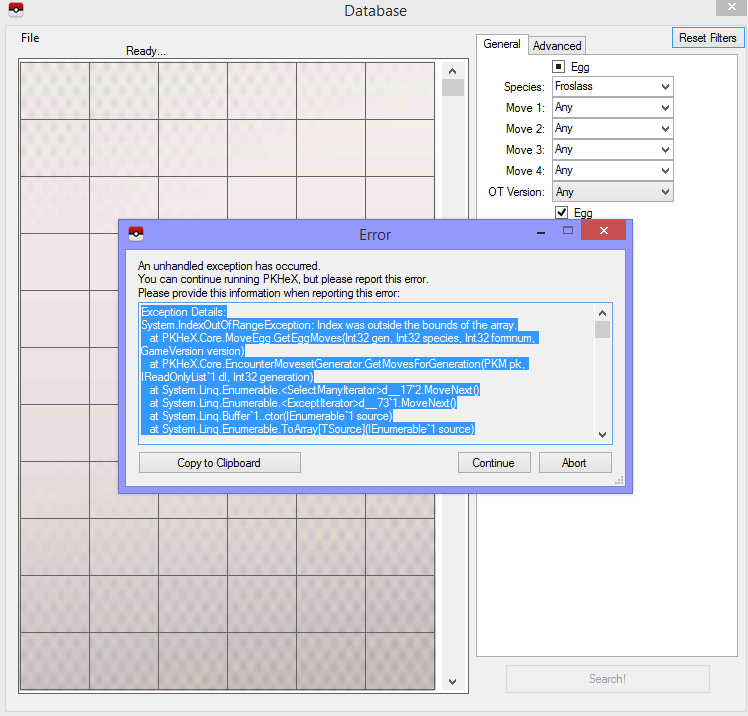
@Kaphotics same error appear when I try.
-
Importing Black 2 arm9.bin back into ROM
theSLAYER replied to ChaosHorn's topic in ROM - NDS Discussion & Help
Not sure it nitroexplorer can be used to export and import arm9.bin. We have NitroExplorer here. -
How to turn romfs file folder into a playable ROM on Citra?
theSLAYER replied to BigChickenMan's topic in ROM - 3DS ROM Hacks
Download ROMs is and talking about so is against our rules on our forum. If you don't want to use files from a 3DS SD card, you're likely talking about piracy, and that is a no-no here. Don't create a thread about this again. -
Only to change them all to one name, not to random names. Check OT_Name spoiler in first post.
-
Importing Black 2 arm9.bin back into ROM
theSLAYER replied to ChaosHorn's topic in ROM - NDS Discussion & Help
I've never used Crystaltile2 to extract my stuff before. Only used NitroExplorer. Also, don't multipost. Just edit in the information to your latest unanswered post. -
I’m guessing you’re using a translator? “Sun and Moon” didn’t translate right. Anyway we have saves for download in our downloads section, just go there.
-
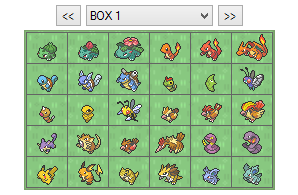 Which one? Did you extract the .rar. Did you rename then to only main (for gen 6-8 files) before importing?
 -
Gigantamax Toxtricity
theSLAYER commented on Project Pokémon Bot's file in Sword & Shield (Base Game)
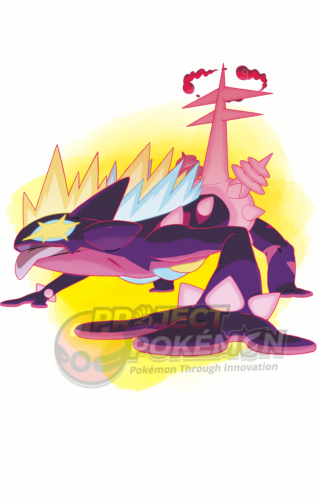 My Switch’s date appears to be incorrect, as I was RNGing shiny for my own saves. Incorrect date isn’t and issue, since anyone can change their Switch’s date then perform a capture. Also the location is correct. It’ll specify the part of the wild area, unless you weren’t the host, which in that case it’ll only say in Wild Area den. I definitely caught these in a den (picture above), and I was the host (thus specific wild area in location).
 -
@Robwake$8 please don’t multi-post. Any new info, edit into your latest post, thanks.
-
What is the difference between Zygarde 10%, and 10%-c
theSLAYER replied to pkhexquestion's topic in PKM
Zygarde with Power construct can be traded, so doesn’t matter if it’s sent to you before you collect all 100. Also the 100 you didn’t collect are still there. Trades don’t effect the event flags. -
why switch shut down the software after I do Block Editing
theSLAYER replied to bravo361307's topic in Saves - Editing Help
The new main you sent me won't even open in PKHeX. This is reminiscent of the issue PKHeX had when this update was released. It's been fixed ever since. To fix this issue, redownload the latest PKHeX, then try again with a copy of your unedited save. -
why switch shut down the software after I do Block Editing
theSLAYER replied to bravo361307's topic in Saves - Editing Help
I've imported the 4 files into your save, and the game loads up just fine. Also, here's a look at your save: So I've shown you that the save does work. From what I can see, you've imported the files correctly too. Can you show me a screenshot of the folder on your SD card, before you restore it into the game. (after editing via PKHeX) The folder with "backup" and "main" Yeah, send me the save after you edited it..thumb.jpg.2bc009cb1fb954b27893d0d4cb1af40b.jpg)
.thumb.jpg.b2766c7fb9d514880117cfe5057cce60.jpg)
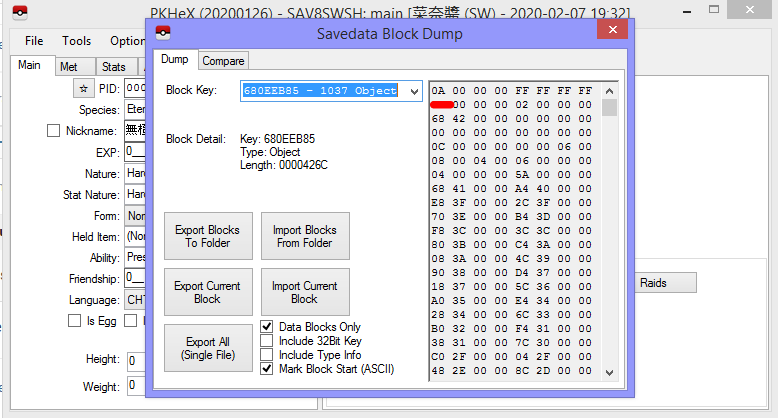
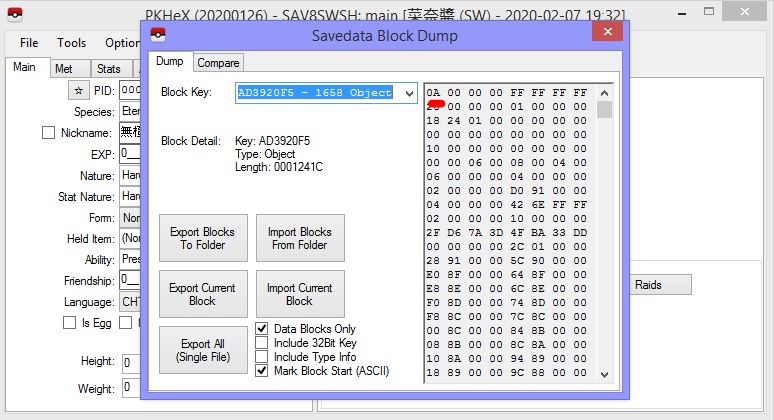
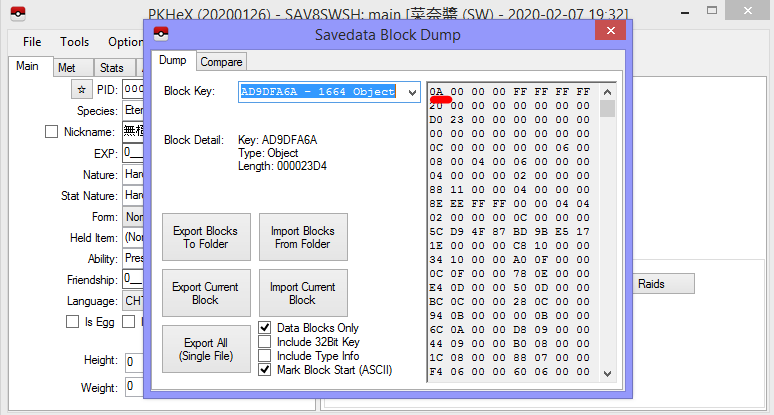
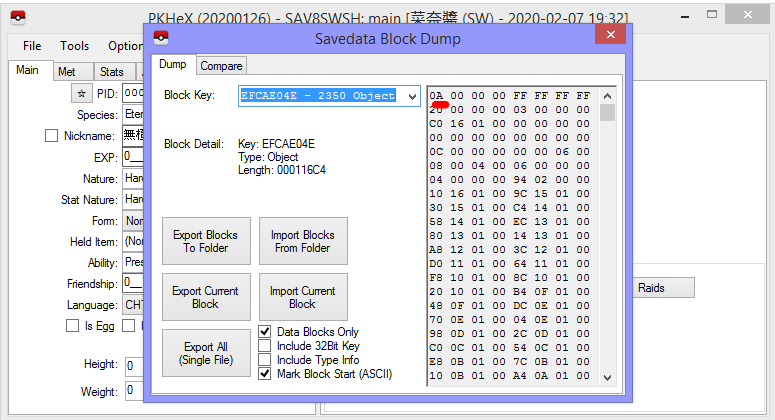
-
why switch shut down the software after I do Block Editing
theSLAYER replied to bravo361307's topic in Saves - Editing Help
can you a screenshot of the importing, preferably the window that shows the selecting of the files? -
why switch shut down the software after I do Block Editing
theSLAYER replied to bravo361307's topic in Saves - Editing Help
Okay, I just confirmed you save isn't corrupted. Just to be sure, are you importing the 4 files into these block key IDs? -
why switch shut down the software after I do Block Editing
theSLAYER replied to bravo361307's topic in Saves - Editing Help
yeah just upload it here. When making a post, just drag the main to this part of your new post:
-
why switch shut down the software after I do Block Editing
theSLAYER replied to bravo361307's topic in Saves - Editing Help
can you upload an unedited save? one that does not have any block editing done to it? -
Gigantamax Toxtricity
theSLAYER commented on Project Pokémon Bot's file in Sword & Shield (Base Game)
PKHeX will flag them as illegal (until an update comes), but PKHeX doesn't stop you from inserting them into your save, and saving the changes. These are two I caught in game (as seen with some of the screenshots), so just go ahead and use the Pokémon files. -
editing help Trouble loading Emerald backup save on pc
theSLAYER replied to Aero9371's topic in Saves - Editing Help
Maybe the save is encrypted or something. If so, you gotta find a program that converts the save to a usable state or something. I've never used your setup before so I can't give much advice on that. Also, I doubt the issue is with the link cable; if that link cable could be used for trades (i.e it's transferring the correct data to and fro), it is probably fine. -
Codes caused corruption. It happened to me before. Open a PKHeX window, click Open sav in PKHeX, and then load the save (holding Ctrl while selecting the file). A window will pop-up for you to choose game type. Alternatively, hold down Ctrl while dragging and dropping a save into PKHeX.
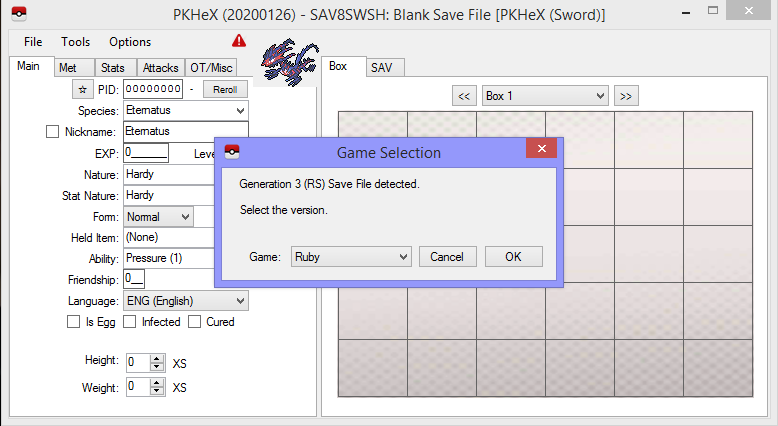
-
editing help Trouble loading Emerald backup save on pc
theSLAYER replied to Aero9371's topic in Saves - Editing Help
It's not a supported binary. In hex it's just random data, can't seem to load it into VBA.

.jpg.66a8b0f62db9bb6b580489d5cb3e4fae.jpg)
.jpg.4e292f44b6e6c13de369c2738a0299b2.jpg)
