



theSLAYER
-
Posts
22961 -
Joined
-
Last visited
-
Days Won
1016
Content Type
Profiles
Pokédex
Portal
Technical Documentation
Pages
Tutorials
Forums
Events
Downloads
Gallery
Blogs
Everything posted by theSLAYER
-
As in the save? I do not think there's any changes in the save beyond V1.0.0 to V1.1.0 Why don't try try starting up the game in V1.1.0 and see if that works?
-

PKHeX corrupting Pokemon Let's Go save
theSLAYER replied to TrainerMaster's topic in Saves - Editing Help
I tried what was said above, except done via an emulator, no corruption. OP, can you: 1) specify how you transfer back to Switch (FTP? SD in computer?) 2) Show us a screenshot of the folder containing your save? (place the screenshot inside a spoiler in the post, before you post it) -
Not that we know off
-
Can Pokemon HOME be accessed on a hacked switch?
theSLAYER replied to Tesvey's topic in ROM - Switch Discussion & Help
Erm, if you're sending over the user profile (that has info on the game save + play hours), that fulfills the point that you have played it before. Unless you're saying you pirated the game. In that case I would not recommend it. You can use CFW to import the save into a fresh new profile that is clean from whatever illegal stuff you had installed on the other user profile, but once again, I can't comment on whether HOME needs you to have played the game. (plus, I would think having a save, and 0 play time in the logs, is another dead giveaway that you had CFW) -
Can Pokemon HOME be accessed on a hacked switch?
theSLAYER replied to Tesvey's topic in ROM - Switch Discussion & Help
have your EVER played SWSH on either Switches that has the user profile? I never tried to import a save into a Switch that has never played the game before, so I can't answer that. same answer as before. -
Can Pokemon HOME be accessed on a hacked switch?
theSLAYER replied to Tesvey's topic in ROM - Switch Discussion & Help
I need to preface this by saying: I don't own a banned Switch. As such, I cannot be certain that verification by Nintendo servers is needed for the transfer process to succeed. Now, onto my main point: I've done two things before, which is (a) akin to sharing/cloning (via official methods) of my user profile. That means I have the same user profile on both Switches. I can transfer saves (locally) between the Switches (one of the benefits of sharing user profile). I've done another thing before, which is (b) transferring user profile. This is more permanent than (a), in the sense that the user profile is permanently sent from one Switch, and only resides on the receiving Switch. Now, why did I mention all of this? It is to note, that the user save is part of the user profile. If you used (b), any saves will be transferred over, even if you never played the game on the receiving Switch. (because once again, saves are part of the user profile. If you're transferring the user profile, the save will have to go along) If you used (a), you can also opt to use the Save Data transfer to transfer between both devices. Do note you wanna ensure which device has the save you want to keep, cause you wouldn't want to overwrite your save with a blank copy. [Note: since I have the same user profile on both devices, that means buying the DLC for one effectively means I have both on both devices. Buying the subscription for HOME always means I have it on both devices. After all, these things mentioned follow user profile, not device. Though sadly, I cannot go online on both devices; I have to go online on one or the other.] -
Can Pokemon HOME be accessed on a hacked switch?
theSLAYER replied to Tesvey's topic in ROM - Switch Discussion & Help
If you only have one banned Switch, and wanna transfer from that Switch to HOME, it is hopeless. Mobile HOME does not connect to your saves on your Switch. If you at least had another Switch on hand, you may be able to transfer the entire profile to the unbanned Switch, then use that to connect to HOME.. -
what version are you using, and what are you trying to do?
-
Own Tempo Rockruff cannot be traded to SM. Own Tempo Rockruff is actually a different form of Rockruff (just that looks the same), and it's just that the form doesn't exist in SM. You can't trade over mons & forms that don't exist in SM.
-
In your first post, the image shows your Cottonee is an egg. I don't have data for an egg, but presumably there's only relearn data after you hatched it. (basically relearn moves is cloned from the learned moves after the egg hatches.) Give that a try.
-
Yup, that's the case for LGPE 1) HAS to be named savedata.bin 2) HAS to be the only file in the folder Just glad it's worked out :3
-
Yup, my edits are working. I have a hunch. Can you send me a screenshot of the insides of the folder, after the edit was done (but before launching the game)?
-
I wonder if it's yuzu version or something. I had a save, opened it in PKHeX, cloned a mon, then launched it in Yuzu, and it continues just fine. If you like, send me your unedited save and I can give it a test.
-
are you sure you have the correct folder. 1) play through the game till you can save 2) save. 3) close the emulator 4) keep a safe copy of that save somewhere on your computer 5) delete that save you located from the yuzu emulator 6) load up yuzu and the game. are you able to continue from where you saved? If you can, you got the location wrong
-
Sorry I don't use mac. The main gist is once you get get your save from your 3DS (requires a CFW 3DS), you need the PKHeX for Mac. Won't be able to help, sorry
-
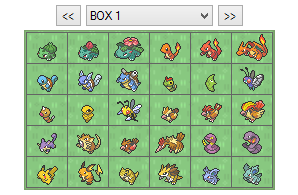 they don't fit into the save usually, hence why I split them out.
 -
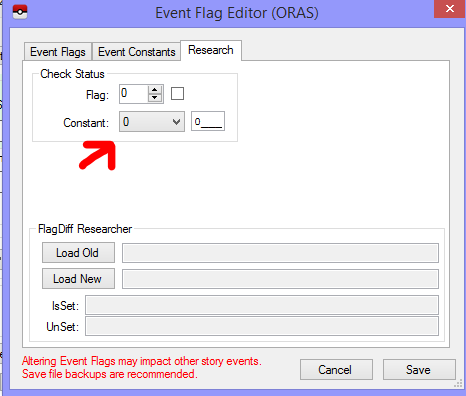
after you hex edited those values, did you open the save in PKHeX, then save the save in PKHeX (even if you did nothing in PKHeX), so that PKHeX fixes the checksums? edit: Also, what you're referencing appears to be Event Constants. (highlighted, bolded, underlined and color changed for your consumption ) No idea why the representation is in hex, since PKHeX uses Decimals, but maybe it's that? edit again: That post was made when an older PKHeX, displayed event constants as hex values. Bringing your attention to this post:
-
you joined a raid, that someone else hosted you hosted a raid at that den. Not sure what you're asking. Maybe it's level at lake of outrage doesn't match the level found at the den normally. (level is different because it's an event raid) As I said, just wait for a PKHeX update. No need to create a workaround that may cause your mon to become illegal.
-
Erm, the location "in a Pokémon den" is a generic location, and that appears if you entered a hosts raid. So in other words, changing to that location works, simply because the original Duraludon (or the other gmaxes) can be hosted, and you can join. But that won't work for other event raids, cause the caught level may not match in-game encounter. So while your 'solution' may work now, it may not work in the future. For example, using the context of "fixing a mon with PKHeX that has yet to receive an update for wild area news", if you are using a version of PKHeX before Pokémon Day 2020, this method will not work for fixing Kanto Starters and their evolution, cause there is no raids containing them in the base game. This is just one example. So instead of trying to make workarounds and risk delegitimatizing your caught mon, just wait for PKHeX to update.
-
 read the text in red, thanks.
 -
1) what does this have to do with the original post? 2) If you just added the moves to the TR list, the met location won't change. What did you do? 3) upload the file
-
X Static Encounter and Gift Tables
Images added to a gallery album owned by theSLAYER in Pokémon X & Y
-
-
From the album: X Static Encounter and Gift Tables
-
From the album: X Static Encounter and Gift Tables
-
To make your life easier, as opposed to creating it from scratch (where you'll likely get it wrong), import said Electrode from here, then perform your edits:
