theSLAYER
-
Posts
22961 -
Joined
-
Last visited
-
Days Won
1016
Content Type
Profiles
Pokédex
Portal
Technical Documentation
Pages
Tutorials
Forums
Events
Downloads
Gallery
Blogs
Everything posted by theSLAYER
-
 As per our tutorial for GBA games: Looks at the options on the left. There is Using GBA Backup Tool and Using Emulators. Since you're on retail cart, we agree that Using Emulators doesn't apply to you, right? Thus the only option would be to go to Using GBA Backup Tool. Next, do you have a DS/DS lite and a DS Flashcart? Those are required for one method to dump GBA games (as seen in the first paragraph of the tutorial.) If you don't, you need to get a Retron 5. Now tell me, do you have either?
-
The index are basically file versions. They seem to update the old versions on the save file, with a newer version, that is basically old version ID +1. How the decide when to release updates? No idea, these are the files dumped from the saves. I basically dump them whenever they're updated. I don't keep a comprehensive list regarding each update, since sometimes they have 2 versions for the same event in the same timeframe. (Maybe the made a mistaken and pushed another file to cover the mistake, who knows really) For your wild area event to correct, all 4 files loaded into your save need to be of the same index.
-
Try using Suloku’s tool (check our save editing tool), it should be just one byte to activate Pokémon link, and I think that tool may have it.
-
Check our Event Gallery. We have them. Example here.
-
Yeah, since we didn't calculate the checksum, it wouldn't be correct. However just save in PKHeX. PKHeX recalculates the checksum for all sectors, so it should work. I'm assuming you have yet to test the edits on your X/Y. Have a safe unedited save backup, loaded the edited one into your game, then let me know.
-
Why don't you start with one device first, tell me which device that is.
-
I don't think so. I don't think there's any documentation for those either.
-
https://projectpokemon.org/tutorials/ The save editing portion of our tutorials has "managing x saves", where x is the device the game run out, then inside the link it'll show you what you need. There's usually multiple ways to dump a save, so it really depends on what you have on hand, or what you're willing to buy.
-
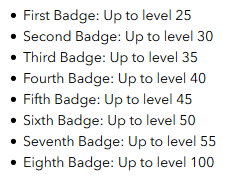
On top of Lv 20 being no badges, it's this: source: https://www.gfinityesports.com/article/2528/pokemon-sword-and-shield-how-do-i-catch-very-strong-looking-pokemon Also note, for your own raid (you are the host), if your badge count (level can be caught) is lower than the level of the mon you encounter (before it is reduced), that encounter is shiny locked.
-
As long as you can dump your saves, and copy them to the PC, regardless of the save originating from emulators or physical carts, PKHeX will read the save. Of course, we are talking about standard Pokémon games. PKHeX won't be 100% functional when it comes to saves from ROM hacks.
-
While it is true that Gen 8 split shinies to Square shiny and Star shiny, the transferring methods (HOME etc) doesn't limit shinies from older games to one or the other. In other words, any mons you transfer over can be either shiny. Not a bug. Referring to the part you had in brackets: you're right and wrong: You're wrong in the sense that: PID is not a thing for Gold/Silver. What determined shininess is the DVs, and the DVs were retained when traded to RBY, which is why the same mon when traded back to GSC, retained shiness. Tho in the sense that you're right: Yup, the PID stays exactly the same. So it could be either shiny, depending on what PID it had at the first place. Yup. Let's say the raid host was hosting a Gmax Toxtricity raid, and one of the participants had absolutely no badges, when said participant catches the Toxtricity, it's level (current and met) would be reduced to 20. Also not a bug. (Note: the levels reduced to, are the same levels enforced by the story, which is the "what level can you catch" level)
-
Have you even considered: Not everyone has a hacked Switch can go online, not everyone with a hacked Switch WANTS TO RISK going online, and not everyone that can go online has a hacked Switch. You're asking for someone to help you, at the risk of having their Switch banned. They took up the expense and risk to hack their Switch, and you couldn't be bothered to risk or hack your own Switch (or search and buy a unit that can be hacked). There is not any real need to act this way in front of the whole community, other than to soothe your ego, I suppose. Hopefully you remember next time that there isn't any real need to be rude. Speaking of remembering, people here will remember the entitled attitude you displayed. Perhaps they'll think twice about helping you when "you're asking something similar". In any case, giving you a verbal warning to watch your words. People have the freedom to choose whether to help you or not. It's not like you have any right to force them to help you, and they absolutely have every right to not help you. Regardless, there is no need to be rude to the community. Anyhow, there's no need to keep this thread open. If you harass anyone (via PM or otherwise), or continue to be rude, prepare to receive infractions. I'm locking this thread.
-
In Gen 8. Use .PID=$shiny0 It'll make them all Square Shiny.
-
send your save over
-
Hey, this one thread is enough. I'm removing the other one.
-
Save twice in-game, then make edits on PKHeX, and import the battery file and give it a try.
-
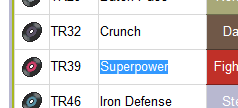
It's a TR move. Make sure you check it in the Technical Records segment.
-
Bootleg With Save Chip
theSLAYER replied to sobbingsobble's topic in Systems, Flashcards, and Emulation
Right now a "Quick Search" works for you (the current version). I'll be adding a "Full Search" option in the next version (Full Search is much slower tho) -
hmm, how were you doing it? by holding Shift while pressing the Star? From what I know, the option doesn't work on lower gens. Also no idea why it freezes. In any case, since Gen 6/7 Shiny Jirachi (admittedly I forgot which gen) has Fateful Encounter flag, you don't even need to change the PID: SWSH treats any Fateful Encounter shiny as square shiny.
-
If I'm not mistaken, there's very limited PID that allows WISHMKR to be shiny. I rather you try to make a gen 6 or 7 shiny Jirachi to be Square Shiny.
-
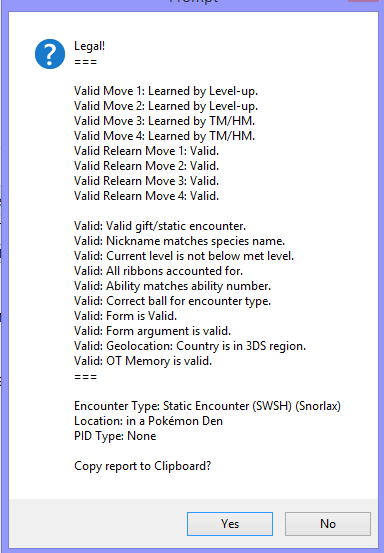
By checking whether the location you caught matches a raid from the base game. It might be more easy, for stuff like Gigantamax Snorlax or Gigantamax Toxtricity, since those don't exist in the base game. Other stuff, like Gigantamax Duraludon or Gigantamax Charizard, may need more attention on your part. Checking whether the location, moveset or levels is right etc. @Kaphotics I'm not sure how easy or tedious it is to implement, but maybe have mons from Wild Area Events display a different message? Maybe instead of Static Encounter, indicate as Wild Area Event Static Encounter or something?
-
Bootleg With Save Chip
theSLAYER replied to sobbingsobble's topic in Systems, Flashcards, and Emulation
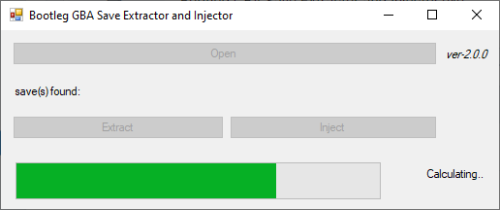
Update: I created a mini-program that hopefully rips saves out from the bootleg ROM. Program here. So far, it works on your copy (from what I can tell). The saves dumped by the program is also more accurate then the ones I sent you; the saves I sent you doesn't work when imported into an emulator, but the ones this program dumps does. -
Version 2.0.4
13058 downloads
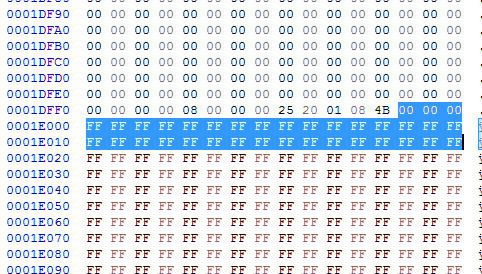
Introduction Normally, save dumps from bootleg GBA carts are not usable on emulators nor save editors. Instead of the designated save location (which is where regular homebrew for retail carts pull data from), the actual save is typically stored within the ROM data. This means that players would need to dump their ROM data, then somehow figure out how to manually extract the save. This program is an attempt at automatically extracting, and also injecting saves into bootleg Pokémon GBA ROMs, without the need to mess with hex editors. Additionally, while it is not the main purpose of this tool, this program can also dump .sav files from .xps or .sps files. [I can't find a working copy of XPS2SAV or SPS2SAV] Usage You can drag and drop the game (.gba/.bin) onto the program, or open the file with a click of the button. The save (if available) is then dumped into the same directory as where the game is. You can extract the save for editing, and then choose to inject back the edited save. If you were to dump .sav files from .xps or .sps files, the program will default to and enforce Full Search. Technical Explanation Quick Search This program checks every 0x1000 of the save file, starting from 0xFF8. (if it's a save, the initial 2-words at every 0xFF8 in the save are identical to each other, and the initial 2-words at every 0xFFE in the save are the same, that being blanks) Image example: Full Search This program goes through every byte in the file, and looks for the first instance of 0x2025. Once it finds the first instance of 0x2025, it checks 0x1000 away to see if that byte is also 0x2025 - this is to determine if the position contains a save. It then checks 0x10000 away to see if this save contains a backup. Tests done. Tested on a copy obtained from here, as well as on an owned bootleg cartridge. -
@Ludovic Okay, I'm assuming this Duraludon is from the wild area event, yes? As far as I can tell, it has the exact same moveset as the event one. The PKHeX you're using doesn't have Wild Area Events data added to it's legality checks yet.

-
Bootleg With Save Chip
theSLAYER replied to sobbingsobble's topic in Systems, Flashcards, and Emulation
I used the these bytes to try to find the save from here Once I find that part in your save, I take the first address of the 0xFF, and minus 0x1E000 from said address, so that I find the starting address of the save. That's how I got the two locations in prev post. (not sure you saw it, but I added in a part that both saves seems to be the same) I'm also not sure that the saves are in fixed spots. Any further dumps may have them in a different point, so you can use that method to search. Anyhow, the two files test.sav test2.sav