-
Posts
22821 -
Joined
-
Last visited
-
Days Won
991
Content Type
Profiles
Pokédex
Portal
Technical Documentation
Pages
Tutorials
Forums
Events
Downloads
Gallery
Blogs
Everything posted by theSLAYER
-

By checking whether the location you caught matches a raid from the base game. It might be more easy, for stuff like Gigantamax Snorlax or Gigantamax Toxtricity, since those don't exist in the base game. Other stuff, like Gigantamax Duraludon or Gigantamax Charizard, may need more attention on your part. Checking whether the location, moveset or levels is right etc. @Kaphotics I'm not sure how easy or tedious it is to implement, but maybe have mons from Wild Area Events display a different message? Maybe instead of Static Encounter, indicate as Wild Area Event Static Encounter or something?
-
Bootleg With Save Chip
theSLAYER replied to sobbingsobble's topic in Systems, Flashcards, and Emulation
Update: I created a mini-program that hopefully rips saves out from the bootleg ROM. Program here. So far, it works on your copy (from what I can tell). The saves dumped by the program is also more accurate then the ones I sent you; the saves I sent you doesn't work when imported into an emulator, but the ones this program dumps does. -
Version 2.0.4
11076 downloads
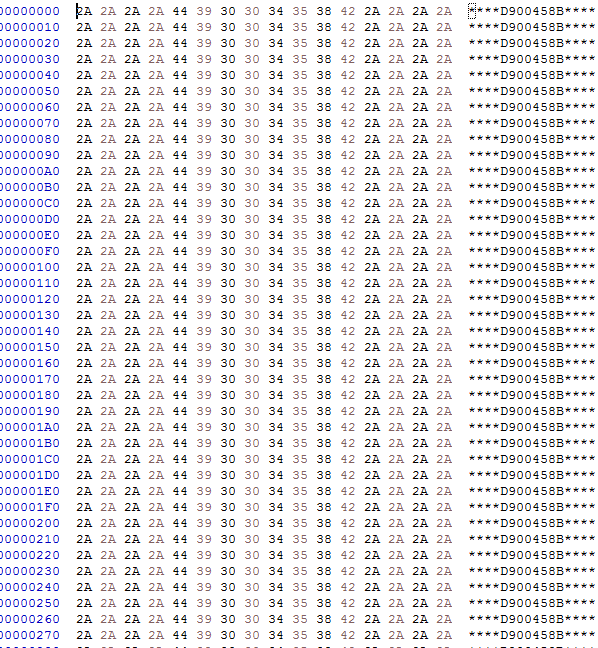
Introduction Normally, save dumps from bootleg GBA carts are not usable on emulators nor save editors. Instead of the designated save location (which is where regular homebrew for retail carts pull data from), the actual save is typically stored within the ROM data. This means that players would need to dump their ROM data, then somehow figure out how to manually extract the save. This program is an attempt at automatically extracting, and also injecting saves into bootleg Pokémon GBA ROMs, without the need to mess with hex editors. Additionally, while it is not the main purpose of this tool, this program can also dump .sav files from .xps or .sps files. [I can't find a working copy of XPS2SAV or SPS2SAV] Usage You can drag and drop the game (.gba/.bin) onto the program, or open the file with a click of the button. The save (if available) is then dumped into the same directory as where the game is. You can extract the save for editing, and then choose to inject back the edited save. If you were to dump .sav files from .xps or .sps files, the program will default to and enforce Full Search. Technical Explanation Quick Search This program checks every 0x1000 of the save file, starting from 0xFF8. (if it's a save, the initial 2-words at every 0xFF8 in the save are identical to each other, and the initial 2-words at every 0xFFE in the save are the same, that being blanks) Image example: Full Search This program goes through every byte in the file, and looks for the first instance of 0x2025. Once it finds the first instance of 0x2025, it checks 0x1000 away to see if that byte is also 0x2025 - this is to determine if the position contains a save. It then checks 0x10000 away to see if this save contains a backup. Tests done. Tested on a copy obtained from here, as well as on an owned bootleg cartridge. -
@Ludovic Okay, I'm assuming this Duraludon is from the wild area event, yes? As far as I can tell, it has the exact same moveset as the event one. The PKHeX you're using doesn't have Wild Area Events data added to it's legality checks yet.
-
Bootleg With Save Chip
theSLAYER replied to sobbingsobble's topic in Systems, Flashcards, and Emulation
I used the these bytes to try to find the save from here Once I find that part in your save, I take the first address of the 0xFF, and minus 0x1E000 from said address, so that I find the starting address of the save. That's how I got the two locations in prev post. (not sure you saw it, but I added in a part that both saves seems to be the same) I'm also not sure that the saves are in fixed spots. Any further dumps may have them in a different point, so you can use that method to search. Anyhow, the two files test.sav test2.sav -
Bootleg With Save Chip
theSLAYER replied to sobbingsobble's topic in Systems, Flashcards, and Emulation
Erm, that's if we assume the data you sent isn't an encrypted save. Otherwise, the data you sent is garbage data and isn't the save. If you can hex edit the rom, try looking for the save inside. or screenshot any area that have blank spaces and data at the end, that might be the footer of the save. Also take a look at the bulbapedia link I sent you, to help you figure out if it is or isn't a save. edit: Your save is in the game you uploaded (but I removed). Location.. This is your save, right? Edit again: location of another save: Both seems to be the exactly same tho. -
Bootleg With Save Chip
theSLAYER replied to sobbingsobble's topic in Systems, Flashcards, and Emulation
its looks like complete garbage data, though there is a chance it's encrypted. Gen 3 save structure has recognizable "blocks", that can be seen at the footer of the block. (my save) However your file is filled with non-0 values, so it doesn't look like any block footer can be seen.. -
Bootleg With Save Chip
theSLAYER replied to sobbingsobble's topic in Systems, Flashcards, and Emulation
@sobbingsobble I removed the gba file, because ROMs, even ones from bootleg games, are against our rules. The save you uploaded doesn't seem to have a save partition in it. -
If I understand you right, you're saying "from GO (the mobile app) to PK7 (save)", as opposed to GO -> GO Park (save) or GO -> Home -> save If so, "integrating GP1 editor" and "removing GP1 entirely" would not deal with this. And if so, you're out of your mind. Would require figuring out how to hack to GO (their servers) first. Thus, unrelated to PKHeX until that time. Until any external developers figure out how to hack into GO servers, what you're asking for is nothing short of magic. that I agree with. I actually had a response for something similar to this on the first segment of this post, but I shifted it down cause it is more appropriate here: If you're asking for "recreation based on stats" type of thing, where you can just use stats from GO for PKHeX to recreate a mon, then what I can say is: I am not sure what the summary screen shows on GO is enough. Purely for the sake of accurate recreations: the height and weight there is truncated/rounded, you need to use another mobile app to figure out the level of the mon. Whatever floats your boat, I guess XD Though, I can see why gp1editor being merged into PKHeX would make the above be doable. Except, I've got no idea how to program in C# (gp1editor was made in VB.net), nor do I know how to create a plugin for PKHeX. Given such a thing isn't one of the features where the demand is a high priority, I'm not certain it'll get done. Well, one can dream (and request it) As what was once mentioned for generation of legal PIDs for Gen 3/4 or handling of Gen 3 Mystery Gift importing, there's no need to add support for it when... (also related to adding features)
-
But why would you need to do that? Besides being able to view the stats when dumping, PKHeX can also dump GP1 straight, and can import the GP1 into the box. If you replace GP1 with PK7 for the statement I just said: Doesn't it sound exactly the same as how PKHeX normally works? To be clear, when I said "GP1 files can be dragged into your PC box/viewer" in my previous post, I literally meant it goes into your PC, not that it goes back to GO park to be caught... Or what else do you want. Press a button and everything in GO Park gets magically imported into your PC? I know you said "you wanna cut out the requirement of needing GP1", but how is that any different from PK7? Ultimately, it's just a file format that you export out so that others can use it. As a matter of fact GP1 has more uses, since it can be inserted into GO Park, or inserted directly into the box... As the creator of GP1 Editor, I can safely say I have no idea how to do that. Plus having an extra editor in PKHeX, doesn't that sound more like introducing a middleman?
-
In this case, 0x10B9 is an address. (I also give locations in their hexademical representation, cause most hex editors have the locations represented as hex values by default) So go to that location, then change the value at that location. If you are using HxD, Control G should pop-up a window that will direct you to that location
- 4 replies
-
- 1
-
-
- hex-editing
- generation 7
-
(and 1 more)
Tagged with:
-
While the rest looks like interesting requests, this is one you need clarification on: GP1 files can be dragged into your PC box/viewer, and PKHeX will convert them to mon. That functionality already exists. You can then change the IVs however you want, as long as the combination you change to are legal. Also, attempting to hijack into GO via Bluetooth has absolutely nothing to do with PKHeX. I do not think it has been done, probably because it really depends on what needs to be sent to GO's servers from the Switch. If it requires authentic certificates from the Switch, I doubt it would be done. Let's stop going off topic now
-
Erm. What? Simply put, the values are 0 or 1 in hexadecimal. there is no "value with "x" in it". The "x" in 0x00 or 0x01 is a representation, to show that the value is in hexadecimal. For example, if I simply type 16, I could confuse some, as 16 in decimal isn't the same as 16 in hexadecimal. The fact that I had to explain what I meant, let's just chock if up to that XD Also, the thing about hex editing, if you're modifying the values, each half byte/nibble has the range of 0 to 15 in decimal (which is 0 to F in hexadecimal). Hex values don't have an "x", and will not present as an "x" in the hex values portion
- 4 replies
-
- 1
-
-
- hex-editing
- generation 7
-
(and 1 more)
Tagged with:
-
you probably didn't name it right, or have extra stuff in your save folder. Show us a screenshot of the save inside the folder.
-
??? The only shiny Metagross in Cherish Ball I remember, is the one from ORAS. Since it comes with the Fateful Encounter flag, the game will display it as Square Shiny when transferred up, regardless of shiny PID. (it's how the game handles Fateful Encounter shinies) Also, PKHeX allows for shines to be square, if you hold down Shift when clicking the Star (for Gen 8 saves).
-
@TheeMegalodon I was hoping there'll be a 01 hiding in the block, and that'll be issue, but that's clearly not it. I'm out of ideas. Maybe try importing the poke_trade file from here. Basically, players can only get that file if they've been online. Maybe that was the thing that is being checked. Ultimately, your save folder will look like this: Give it a shot, let me know if it works.
-
Alright, thanks for the information Perhaps there is another location in the save file that checks whether you've gone online before, or another location the logs the index of the file. I'll run a check now. Right now, I'm under the impression it is some kind of check on whether you've been online before, as I have been able to share the wild area event news via injection, but that save has been online before. For the record, you imported all 4 files right? edit: I'm presently doing some preliminary checks, you mind showing me this block of your save in PKHeX?
-
I should have worded it more clearly: Did you do any edits to the wild area news, or did you merely import the ones we had? It doesn't matter if you edited your boxes etc, I just want to know whether you imported the Wild Area News as is, or made modifications to them. File versions. Typically the first byte:
-
The way Wild Area Event works, other participating Switches need to have the same files, in order to join locally. So for example, if the player A's file is Index one, and a player B's file is Index two, doesn't matter who hosts, the other won't be able to see it. Did you merely inject the appropriate Wild Area News, or did you also perform some modifications?
-
just drag a legal Arceus pk4 file into a PKHeX window with gen 7 save loaded. PKHeX will emulate the transfer process for you.
-
@sobbingsobble stop multi-posting unnecessarily. Any new information, edit it into your latest unanswered post. Also, stop cursing. Read our rules.
-
@rbz2005 I removed them, cause as I said in the comments about 24 hours ago, we have them in the gallery. PKHeX can support wonder card -> Pokémon conversion, so no need for seperate event uploads. Removing the reuploads.