theSLAYER
-
Posts
22825 -
Joined
-
Last visited
-
Days Won
991
Content Type
Profiles
Pokédex
Portal
Technical Documentation
Pages
Tutorials
Forums
Events
Downloads
Gallery
Blogs
Everything posted by theSLAYER
-
You need RNG reporter programs to add a XOR=0 function. Else get the spread of PIDs from it, then manually calculate which PID is XOR=0, then RNG that.
-

SWSH - Dynamax Crystal for Gigantamax Copperajah
theSLAYER replied to theSLAYER's topic in Event Pokémon News
Fixed. -
read this: https://github.com/kwsch/pk3DS/issues/297
-
@Kaphotics if I'm not mistaken, .PID=$shiny0 doesn't work on some entries that do not originate in SWSH. (PKHeX's batch editor stops functioning. Using Shift+Star freezes PKHeX completely. I initially thought it was TID/SID related, but other mons with the same TID/SID can have it done..)
-
Megas' reverting after battle, is enforced behavior by the game. Unless there's documentation regarding what to change, there's no way around it. I could be wrong, but from what I know, this documentation doesn't exist.
-
what did you use, .PID=$shiny0? It shouldn't eat up CPU. It doesn't even do seed checking or RNG checking or anything, it just gives Square Shiny by PID (basically XOR 0)
-
Then try to find the Reswitched Discord or something, it's beyond our expertise. Let us know how it goes after you contact them.
-
Keep it. It's where your user profile and saves are stored. If you look at the folders in the zip, you'll know what folders to delete. Note: Checkpoint and any other homebrew should be in the Switch folder. Make sure you backup the folders before deleting them. I doubt it's a format issue. I've had both on my SD card before. Just make sure everything else works.
-
Going into RCM, and using your bootloader to inject a payload, are two different things. RCM, short for Recovery Mode, is the black screen you get when you use the jig and various button combinations (auto-RCM also goes straight to RCM when you boot up). I know TegraRCMGUI says you were successful in injecting a payload, but I don't know if TegraRCMGUI were to throw an error if Switch is not on RCM. (in essense, I don't know when and how it throws errors) With my explanation out of the way: once again, are you able to get to RCM? Fully delete the folders and the bin you have (maybe keep safe backups elsewhere on your computer). Then, redownload the Atmosphere folders into your SD, and redownload the bin for your bootlooder. [I'm asking you to delete the folders, cause sometimes people just combine folders, and that could be bad. Some contents are not meant to be mixed and matched] Speaking of bootloaders, try using the latest TegraRCMSmash instead (to see if that makes a difference). It's real simple to use: 1. Have your Switch on RCM 2. hook up the USB-C cable between your Switch and your PC 3. Drag the fusee-primary.bin onto the file icon, and it'll inject the payload for you.
-
Wall of text; just a chunky paragraph: hard to read. If you want people to help you, be as concise and informative as possible, thanks. A few questions: 1. are you able to boot into RCM? 2. are you absolutely certain the files on the SD card are the files from the latest Atmosphere zip? 3. are you absolutely certain that the fusee-primary.bin your bootloader uses is the latest version?
-
so is this an idea you randomly pulled out of nowhere? If you can't prove how your mon "has extra bytes", it makes it sound more like a fantasy and less like an actual phenomenon.
-
Max Soup - SWSH DLC 1: Interesting combinations
theSLAYER replied to theSLAYER's topic in Generation 8
What I meant is the Starters presently don't have the Gigantamax Flag (). (Also not talking about obtaining them in raids. I'm talking about the literal starters you start with) At this point, creatures Gigantamax (instead of Dynamax) only if they have the flag. [There's also exceptions that they won't be able to Gigantamax if the model don't exist, like Leon's Charmander (no Gmax Charmander) or event raids Milcery (no Gmax Milcery)] So the question is how to give Starters the Gmax Flag, when they didn't originally have it. In base SWSH, there was no way for an existing mon without the Gmax flag, to gain the Gmax flag. It would suggest that there's some kind of in-game mechanism introduced to give it to them (which we now know is Max Soup).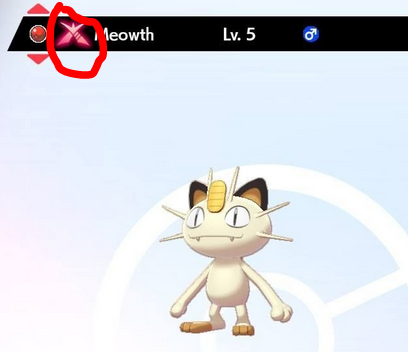
-
you've yet to explain to me what is your determination of "there's extra bytes"
-
how do you determine there's extra bytes to begin with. You physically counted them with a hex editor? also, I assume this is gen 7 data file? Also, unused bytes in a set format does not matter. All of the pk7 follows the same template. I guess it'll only be an issue if your Lurantis has extra bytes above other mons..
-
Max Soup - SWSH DLC 1: Interesting combinations
theSLAYER replied to theSLAYER's topic in Generation 8
The Japanese page for Max Soup was apparently ignored by your all assertion; that page gives the appearance that it is not limited to starters. I was saying not entirely true to the portion of your line that says all Japanese content. edit: I know you were expressing concerns based on the dialogue from the Japanese Direct, but the English page says the same thing at the bottom Plurality is there. The "mo" particle has been translated as well. This translated line by them captures it all. It does make it sound like it's not only the starters. Tho how are they going to validate "already been traveling with"? In terms of "already been traveling with", is it before the DLC? Is it before consuming the soup (one assumes)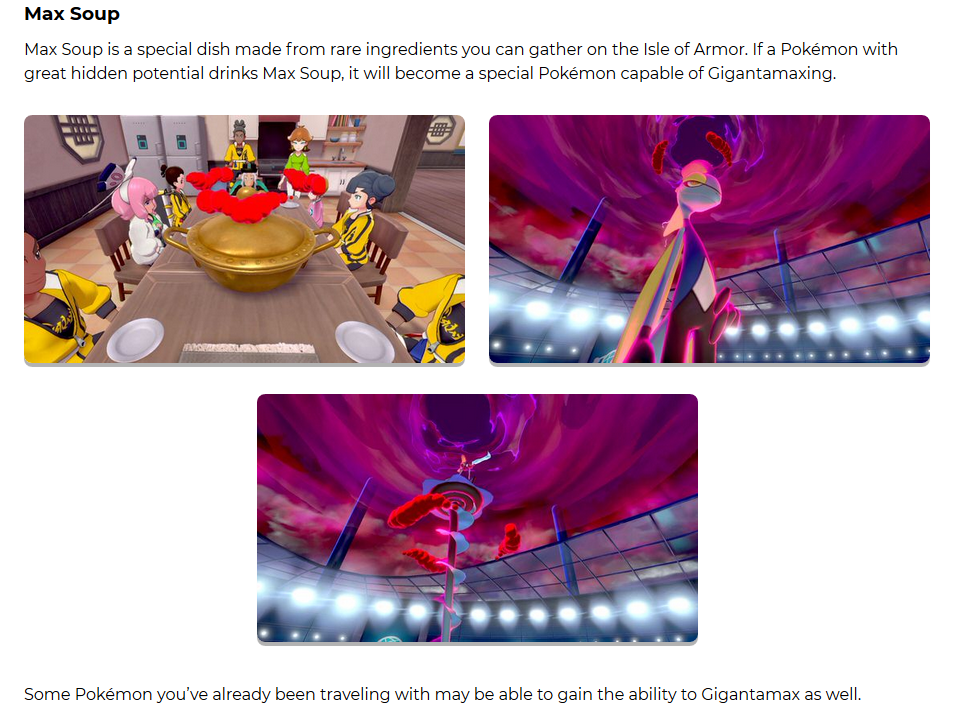
-
There's already size/height bytes for Pokémon. The unused bytes are presently, well, unused.
-
Why are you responding to a post made in 2016?
-
Max Soup - SWSH DLC 1: Interesting combinations
theSLAYER replied to theSLAYER's topic in Generation 8
Actually not entirely true. While I agree that the images at this portion seems to imply that only starters use the feature. (and the text on the top in no way mentions it is only the starters) The text highlighted in blue roughly translates to: "Pokémon who have adventured together can also gain Gigantamax." Important words: Pokémon - In Japanese, they used ポケモンたち (pokemon-tachi) which is the plural form (like ore-tachi or watashi-tachi). While English translation don't seem to differentiate between singular and plural, this plural usage is kinda obvious. Also - In Japanese, they used も (mo) particle, which usually means also, again, too. So together, what I can gather, is that multiple Pokémon also can qualify for the usage of the soup. Perhaps only high friendship Pokémon can use max soup? How else will they check the criteria of "adventured together"? indeed.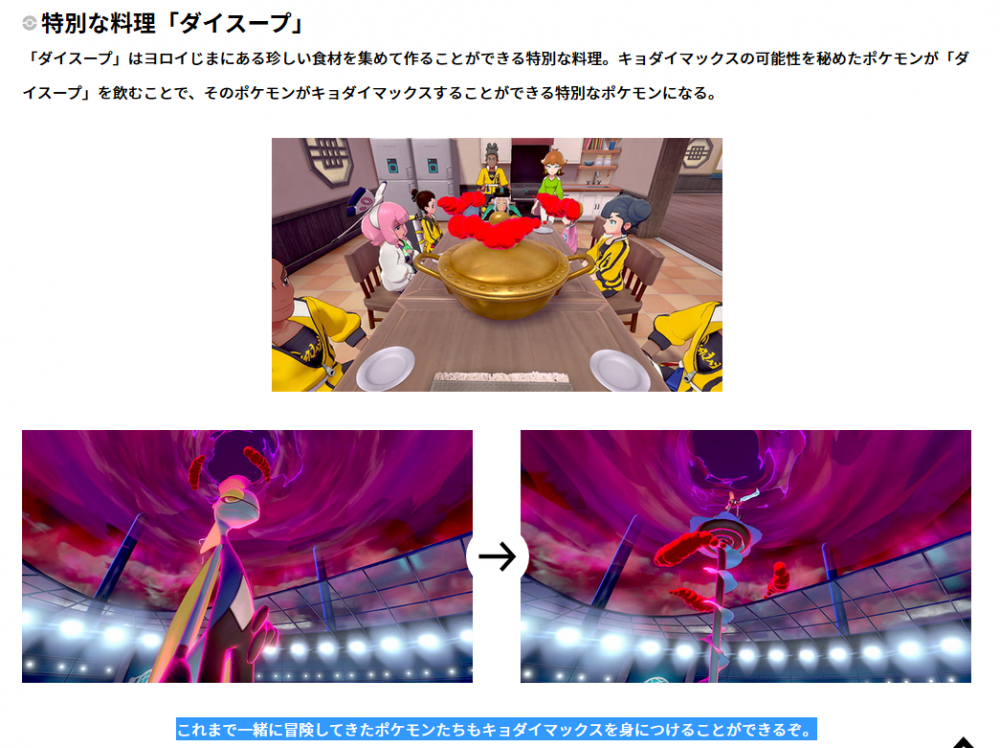
-
well you can trade for it online. While I agree most events seem focused on the whole "Japan only", well Japan is the country that birthed Pokémon after all. Besides, doesn't change the fact that it is legally available now. Deoxys can be shiny in Gen 3. Granted, not easy to come across a real one, but once again it doesn't change the fact that it is legally available now. no clue. I don't develop PKHeX.
-
Maybe it is a last effort to keep the gen alive. Maybe it is to make sure everything is available for that gen (mostly) before they move on the next gen. No one in public really knows for sure, if we are going to continue to doubt every press release they make. Shiny Xerneas and Shiny Yveltal was pretty much at the end of gen 6. Zygarde was probably for a second installment of Kalos, but we wouldn't know. In any event it was kinda in the story for gen 7. To that end, a shiny Zygarde was released halfway through. Shiny Solgaleo/Lunala/Necrozma was at the end of Gen 7 tho. As for shiny mythicals in recent Gens, I think Gen 5 had Genesect, Gen 6 had Diancie, Gen 7 had Meltan/Melmetal. It's not complete, but it's something ><
-
There will always be people that find a way to be pissed off about something. If they were to distribute it as shiny, people will be pissed that it's an easy shiny. If they were to distribute it as not shiny locked, people will be pissed because shiny odds in these games have improved compared to the gen 3/4, so it's in their mind it is pretty likely others will get it as shiny. If they were to distribute it as shiny locked, people will be angry that it will be hidden for 5-10 years. There's simply no pleasing everyone. While the company should please as much people as possible, they should do it in a way that ensures the quality in their minds. As an interview once revealed, they started shiny locking stuff so that shiny legendaries will be more special. With that in mind, that decision makes sense..
-
★And337 - Gigantamax Corviknight
theSLAYER commented on Project Pokémon Bot's file in Sword & Shield
 Probably. You should start your own thread. If people know they'll get back to you.This isn't the place to discuss that.
 -
★And337 - Gigantamax Corviknight
theSLAYER commented on Project Pokémon Bot's file in Sword & Shield
Either use the steps I listed in the file description, of use the steps you're quoting me. (For file injection method, use the files that I've uploaded on site here . The files must be from the same download). CFW Switch doesn't stop either of these method. I would know, cause I have a CFW Switch. -
Pkhex unable to open Invalid Trainer Info
theSLAYER replied to WindMaker396's topic in Saves - Editing Help
mind uploading the save? -
those flags don't exist for PK7.