



theSLAYER
-
Posts
22962 -
Joined
-
Last visited
-
Days Won
1016
Content Type
Profiles
Pokédex
Portal
Technical Documentation
Pages
Tutorials
Forums
Events
Downloads
Gallery
Blogs
Everything posted by theSLAYER
-

Dumb question about Switch hacking, but I need to know.
theSLAYER replied to stringDTD's topic in General Gaming
The common public method of getting CFW on a "unpatched" Switch is using a hardware vulnerability to access the Recovery Mode (RCM), then sending a payload into the device via the USB-C port. That hardware vulnerability has been patched for newer models, thus "patched" models. It is important to note that a hardware mod (soldering on a chip basically) allows for the Switch Lite to obtain CFW, however the producers are now all behind bars or missing. Hope this answers your question. -
If my assumption is correct, you made an illegal edit, which you failed to mention. (I'm assuming you changed it's PID to make it shiny) Read: edit: You modified the IVs illegally (your IV edit broke overworld8). PKHeX is working as intended. It appears you may have followed my template for changes without realizing it has etc in that section. I changed up that line to hopefully make it more obvious :3
-
How to undo Block Editing for Wild Are Events?
theSLAYER replied to Darkmaster's topic in Saves - Editing Help
Yes. -
How do I (properly) edit starter Pikachu in Yellow?
theSLAYER replied to stringDTD's topic in Saves - Editing Help
Give this a try (and rename the file correctly before importing it) sav(2).dat -
How do I (properly) edit starter Pikachu in Yellow?
theSLAYER replied to stringDTD's topic in Saves - Editing Help
It's like that your Pikachu's OT isn't the same as your OT. Not just the visible OT, even the trash bytes. -
If you already have a save, consider using this: If you don't have a save, download one of the many saves uploaded to our site, then use the Flag importer.
-
Trying to salvage my "Corrupted" Pokémon Red Savefile
theSLAYER replied to Francistein's topic in Miscellaneous Help
Possibly. Just drag a mon around then set the mon, then export the save. -
I've merged your posts. Please don't multipost. Any new information, edit it into your latest unanswered posts. Now, regarding "nothing found", did you load a save first? Did you search the correct database? As you can see, mine definitely showed results for Alakazam in an LGP save. As for step by step guide, check the tutorial link I've given. If it's not there, then it's not there. Well, as long as you can get the mon from the database, I could try to walk you through other steps. Then you can figure how to reapply the steps to other species.
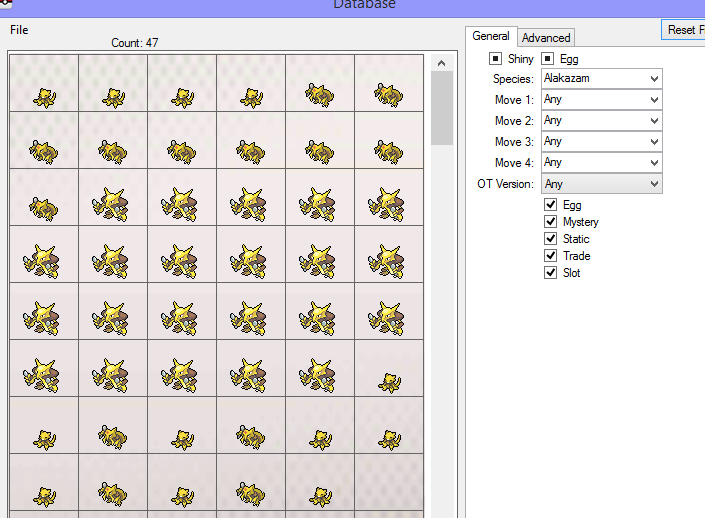
-
Don't make a Pokémon from scratch. Load up your save. Then search up any species you want to add in Encounter Database. Then set the mon into a PC slot. Then export the save from PKHeX. Then inject the save back into your game. Also, we have a whole list of guides for PKHeX: https://projectpokemon.org/home/tutorials/save-editing/using-pkhex/ And no, there isn't a "one page guide for PKHeX" that has everything in it, because PKHeX has so many uses. I hope what I've said can be of some help. :3
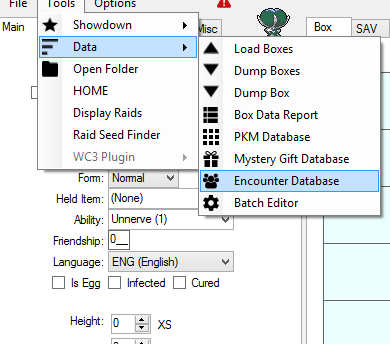
-
LGPE Vaporeon with Eevee Special Partner Moves
theSLAYER replied to thethorlanes's topic in Generation 7
@thethorlanes I would think the important thing isn't relating to your GO Vaporeon, but rather your party members at that time, or any other actions you've taken since you've booted up your game. -
Trying to salvage my "Corrupted" Pokémon Red Savefile
theSLAYER replied to Francistein's topic in Miscellaneous Help
no worries, in reality I did nothing at all. The save was usable from the start, it's just that the checksums were probably incorrect, hence why the game would refuse to load it. PKHeX recalculates the checksums on save export, so PKHeX did all the heavy lifting :3 -
Trying to salvage my "Corrupted" Pokémon Red Savefile
theSLAYER replied to Francistein's topic in Miscellaneous Help
The save loads fine on my end, after I saved an edit in PKHeX, Try loading this copy: PokemonRed.sav -
For the case of Gen 3 and above (except Gen 4 KOR games in particular), you could just restore your save into a different languaged game of the same version. Do note there might be issues: in particular with the OT of your save, in Gen 3, when you do cross language transfers. The font may screw up, and retyping it may not resolve the issue. Make sure you keep safe backups before attempting such a thing, and remember, it is all at your own risk.
-
I was also hoping there would be some remnant data, enough to retrieve at least parts of them. No worries, good luck with your efforts at recreating them. :3
-
I'm sorry what? Are you responding to someone?
-
I've got sad news, and it is your save being not salvageable. Rough explanation of what is left in your save, if you desire: The condition of your save is a whole lot worse than the condition of the save in that fella's wordpress. So nothing can be done to properly salvage the mons from your save. Usable data must exist in some form, for it to be able to be extracted. That was the case for that person, and not the case for you My advice is to give up on this save and just start playing a new one. At this point it is less of a save, and more of just garbage data, sadly
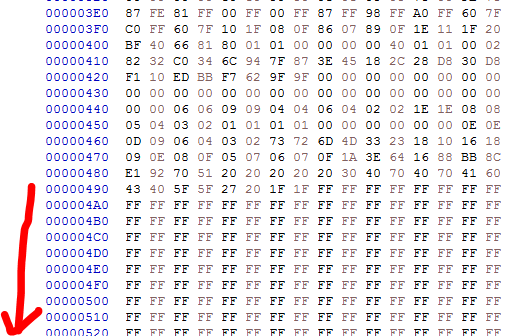
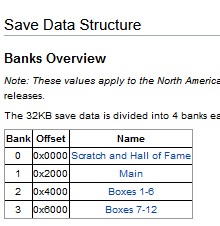
-
@DinkyUniverse For now, upload the save here, and let us take a look. We can try to see if the save is fully corrupted, or if there are salvageable parts.
-
event archive Gen I - V Event Contributions Thread
theSLAYER replied to theSLAYER's topic in Event Contributions
My long response to @Sakisoap (in the spoiler below) Final thoughts: Anyway, please don't respond to this thread any further, unless you have a wonder card or event file to contribute. This is not a thread for Q&A nor discussion.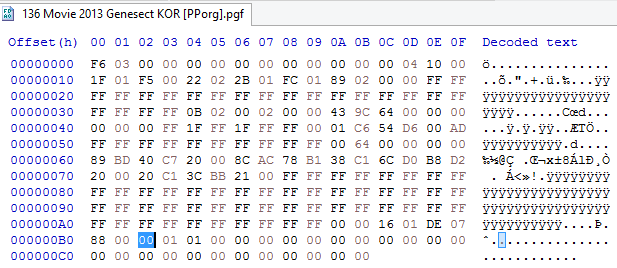
-
Can shiny genesect jpn event exist with english name?
theSLAYER replied to ArceusGOAT's topic in Pokémon Legality
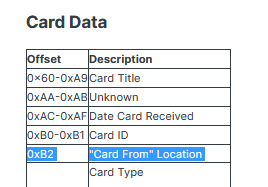
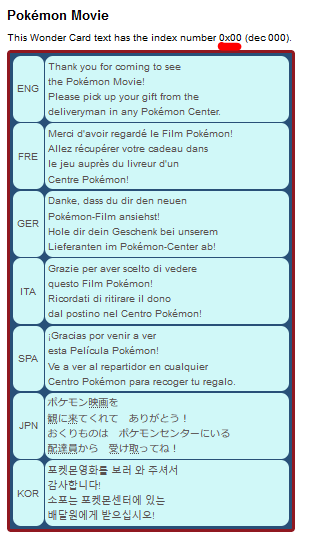
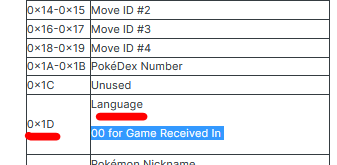
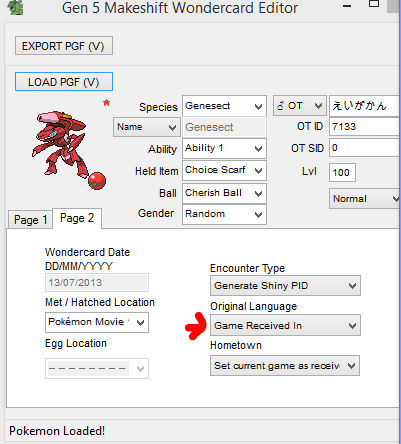
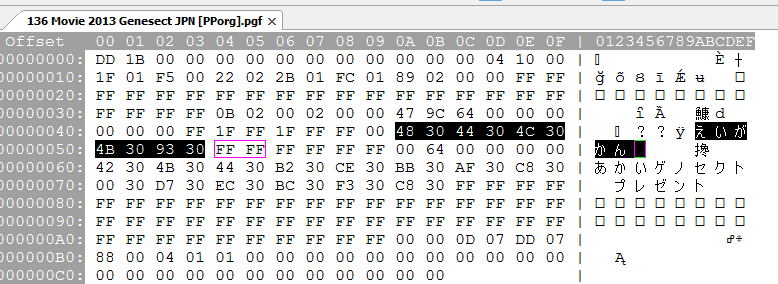
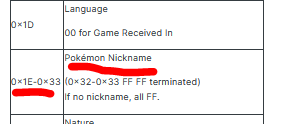
Do not take offense, but your lack of understanding of how wonder card redemption works is shown in this statement. Here's a visual that is based on the data of the card: You're right to say that OT will remain the same. That is because it was preprogrammed into the card. But your statement about the language it would be (hence the nickname) is wrong. If the wonder card was redeemed on a different game save language, the mon's language would be different. I'm not disagreeing that the case OP brought up was probably hacked anyway, I'm disagreeing with how you think those scenarios I've listed (besides DNS spoofing; I've yet to test that for myself) would not possibly bring about an English redeemed Genesect.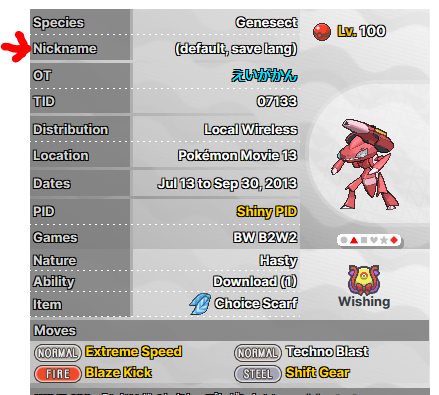


-
you can but you risk damaging your pins and/or rail. Hence why jig is the better option for beginners. It's 3D printed to fit exactly, and it contacts with the correct pins. Little room for user error.
-
if you're talking about my "increases your chances of destroying your right joycon rail" statement, IIRC it doesn't brick the Switch. I think it just makes unable to use the right joycon while slot in. Of course, if you use the wrong pins who knows if you can blow the fuse or short it incorrectly or something. Hence why jig. Yup, I have performed the hack on two different Switches are two different points in time. I used the same jig for them both. Only had to use the jig once each effectively. (I have Auto RCM turned on after that) Frankly the short version is (if your device is compatible): 1) Enter Recovery Mode on your Switch (which would require a jig or some alternate way to enter RCM) 2) Connect USB C cable between Switch and PC 3) Send payload from PC to Switch. 4) Congrats, you're now on CFW. When you boil it down to that, it's not really that complex. It's just that the guide is very very detailed, so that people don't make any missteps. So yeah, make sure your device is okay (using the serial ID of your device on the link posted earlier in this thread), is so, follow the guide thoroughly. Do note it is all at your own risk, of course :3
-
For the most part, if your Switch is a hackable model, you probably only need to buy the jig. You can do without buying the jig, but it increases your chances of destroying your right joycon rail. Frankly, I'll rather you not follow any video guides, and follow this word guide to the letter: https://nh-server.github.io/switch-guide/ Make sure you read through it a few times before attempting anything.
-
Wrong Origin Game. Try Moon or Ultra Moon. I also shifted your post. It look like you're trying to make one from scratch. Don't do that. Go into Mystery Gift Database, and load up a shiny Solgaleo from there.
-
a) Extract your save from your CFW'd Switch (Using updated Checkpoint or JKSV), use PKHeX to edit that save, then import that save back into your CFW'd Switch b) Use sysbot (normally hosted on various Discord servers) to trade you a pk8 file (which was crafted in PKHeX, or downloaded from the site). [you will need an active NSO subscription for this]
-
 Details for Index 75 of normal_encount and normal_encount_rigel1 and normal_encount_rigel2 (minor differences, in raid chance) Rewards for Index 75 of normal_encount and normal_encount_rigel1 and normal_encount_rigel2 (minor differences, in raid chance) Details for Index 75 of dai_encount Rewards for Index 75 of dai_encount
