theSLAYER
-
Posts
22962 -
Joined
-
Last visited
-
Days Won
1016
Content Type
Profiles
Pokédex
Portal
Technical Documentation
Pages
Tutorials
Forums
Events
Downloads
Gallery
Blogs
Everything posted by theSLAYER
-
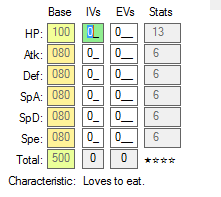
I must have missed it. Also, this response you gave implies you don't understand hyper training works. Hyper Training doesn't actually change a mon's IVs. It simply sets a flag on the mon, to indicate it went through hyper training. In PKHeX, it'll appear as a green IV. This can be achieved by Shift + Left Click on that IV.
-
Edit: placed my answer in a spoiler, so that I don't stretch the page.
-
 check the personalinfo file. I'm not going list out the steps to get to it and how to check.
 -
Data wise, TID/SID isn't known to be generated based on OT. It's legal when you catch the mon in the correct area, and leave the caught data unchanged (for the most part). Long story short, we know how the games calls the EC, PID, IVs, HT, WT sequentially. These values are all called from the same RNG seed. While it's presently not implemented into PKHeX, cause the checks for it are not immediate (takes like 30 seconds to a few minutes), it is possible to be manually checked. [We basically take those stats, throw it into a program, and see if it returns a seed] If you edit anything incorrectly, it breaks the correlation, and we can tell it's hacked. [basically at this point, no seed is returned] (Same thing occurs to mons with PID type overworld8, except it is a lot faster to check, and PKHeX checks for it) Yes and no. If the mon doesn't bear any PID type, then it'll still be legal. If the mon bears a PID type (like Overworld8 mons), then it won't be legal. Also, keep in mind that changing any stats, could be legal at the moment, but illegal in the future, which means the edit was never legal to begin with, just that people didn't know. Case study: editing overworld8 mons were thought to be legal 1 year ago, cause at that point overworld8 was not discovered. Anyhow, as of now, to be safe, it's fine changing OT/TID/SID, but not everything else. Overworld8 type details. (Also, it is RoC, not RoG. ReignOfComputer, not ReighOfGomputer) Just write in random numbers. If you're so concerned about it, start a new game, then take the numbers generated by that save. As of now, there is no known correlation regarding the TID/SID generation. Catch the Pokémon yourself In all seriousness, just changing the OT/TID/SID is probably enough. Without hacking and viewing the data, it's not like people will see the PID/EC pair.
-
It depends on whether the personalinfo of Gen 5 stores Unfezant female as a different form.
-
Well, if no one is able to help you, all you gotta do is catch that Guzzlord, and then leave and try to get back there.
-
I wish you best of luck :3
-
why don't you test it and find out for yourself? I've never tried it, so I don't know.
-
As long as your save data is on a hacked console, hacked device, emulator, then it's not legit. Only legal at best. Well, I still have doubts about the Citra they use. All I can say is "use at your own risk".
-
For all the variants I've seen, no.
-
No. There's no 'tradeback NPC' (using a term that was popularized by ROM hacks. Technically I'm not "causing a trade". If you think about it, all the games do is swap data around, and play the trading animation. (and if it evolves, play the evolution animation) So all I did was do the data swapping by hand. There's no way to spoof a trade without ROM hacking, with the sole exception being using emulators that are capable of trading.
-
that's literally what the game does, just change the species. The only difference is they initiate a cutscene.
-
Just dragging between windows won't make it evolve. Just change the species to simulate evolution. (For gen 6 and above: also make sure to fill up the data for handling trainer)
-
Using PKHeX: Importing Wondercards
theSLAYER replied to evandixon's topic in Saves - Guides and Other Resources
they just appear in the store, as obtained. Doesn't matter. Just know that date manipulation on the Switch will probably cause a 24h lockout, where date/time events in-game won't occur. Stuff won't magically appear in the Mystery Gift menu (to be precise, it's referred as the Mystery Gift Album). The Mystery Gift Album stores the Wonder Card Records, where it shows records of what was obtained. The Wonder Card Records has a storage limit, but I can't recall what that limit is. While it's possible to convert the Wonder Cards to Wonder Card records, there is no tool for that presently. If you're bothered by the appropriate Wonder Card Records not existing in your save, then don't import all the miscellaneous stuff. That said, it probably shouldn't matter for single person play. (Who cares what is legal or not, if it's single person play. It sounds like one would care for it, if they're trying to show off and lie to their fans/friends. Why be a liar tho ) Any other questions, you should start you own thread in the appropriate sub-forum. :3 -
Wild Area News: Common Questions and other info
theSLAYER replied to theSLAYER's topic in Event Pokémon News
All SWSH mons. I advise you to not do that. Also from this point onward, I'm only answering wild area related questions. This isn't the right thread for all the legality questions you may have. capturing imported wild area events is fine, as long as they are in the right areas. Changing their stats haphazard is not. how to manipulate wild area raids in your save file, and encounter what you want in game. -
Using PKHeX: Importing Wondercards
theSLAYER replied to evandixon's topic in Saves - Guides and Other Resources
no. Saves no longer store wonder cards. The wonder cards are there for archival purpose (and maybe future distribution apps) For items, just place them in bag. For fashions, load the fashion block. date doesn't matter. It follows the date you set on your Switch. -
Wild Area News: Common Questions and other info
theSLAYER replied to theSLAYER's topic in Event Pokémon News
depends on location it was caught in, it can be legal. For example, you could have grabbed a wild area event from the network once, and never updated your Switch wild area news ever again. Updating your game version won't change your wild area events. So for example, if you're on the Delibird event, it would be legal as long as it's cause in Galar Wild Area. Also, the date doesn't matter: it follows your Switch date, and you could have set it to any date... I explained it in the last line above :3 I don't wanna go through all the hoops to describe every situation. Basically, just catch stuff you can get legally, and you won't have to worry ever. If the mon is on a game save that can be dumped, it is automatically not legit. I think the word you're looking for is "legal". There are a few shinies that can happen with den manipulation (RNG or save editing) 1. Seed manipulation. If you manipulate the "seed" which the game uses to call the Pokemon's stats, it would appear Legal. 2. PID editing. Editing the PID can make the mon look shiny, however if you check closer to try to match all the stats generated from the seed, it may end up being illegal. PKHeX doesn't check for this just yet because the seed -> EC/PID/IVs/HT/WT process takes a while. If you didn't understand what I just said.. well, I don't know how to make it clearer. This isn't the right place to clarify that. Your usage of "dumped into a save" baffles me. I'm guessing you meant restored into a save. Dumping usually mean the extraction of data to create a file. Given you're asking about putting files into the save, it's not the act of extracting. Officially, you can have 1 set at a time. In theory, you probably could have 3 different sets at a time, (1 for Galar Mainland, 1 for IoA, 1 for CT), but I'm not fully certain it'll function properly. -
Help with island scan..
theSLAYER replied to RedRick_MarvelDC's topic in ROM - 3DS Discussion & Help
There's a Citra that has QR scanning feature. Also, make your Citra region Japanese, then scan the Ga-ore images (those are worth 20 points, instead of the usual 10 points). So you only need 5 scans. -
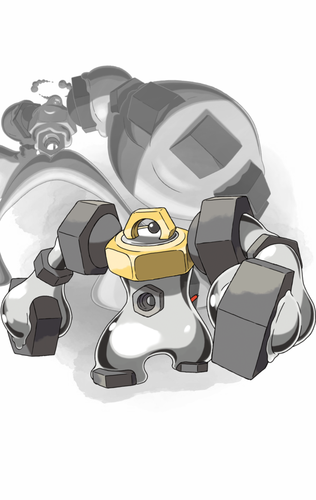
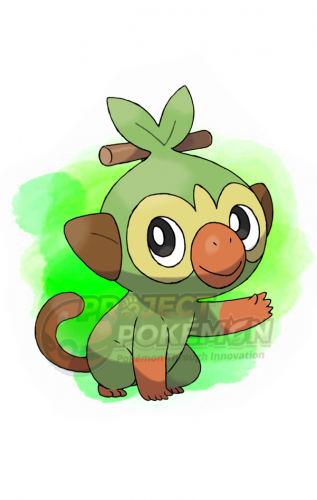
 https://www.pokemon.com/us/pokemon-news/get-bulbasaur-and-squirtle-capable-of-gigantamaxing-in-pokemon-home-this-june/
 -
 https://www.pokemon.co.jp/info/2020/06/200630_gm01.html
 -
 https://www.pokemon.co.jp/ex/pokemonhome/promo/2020/0929_01.html
 -
 https://www.pokemon.co.jp/ex/pokemonhome/promo/2020/0602_01.html
 -
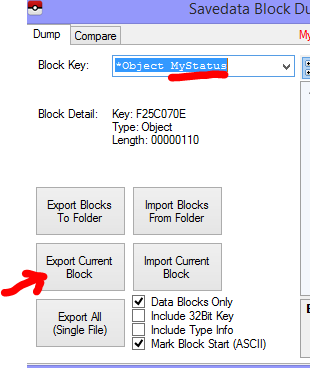
Export it to a file. Then open it in a hex editor. Also, no need to post the same thing somewhere else. I've hidden that other post. Here's an image, of how to export it (extract it), in case you didn't know how to do that. Then, open the file in a hex editor. (For example, I use HxD. It's a program that allows you to view hex data of files) Once you figured how to do all these, refer back to my previous response. It has the steps regarding what you're supposed to do.
-
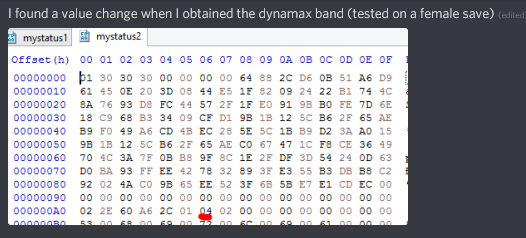
(from: https://discord.com/channels/343093766477053953/367479180398428170/823116547970826260) Extract the mystatus block from your save, using PKHeX. Then, open the mystatus block in hex editor, change the value as per my image to that. Then, import the edited block into PKHeX. (my answer in this post differs from the original post I made, cause I've since searched and found a value)
-
Change your save size settings, then try again.