theSLAYER
-
Posts
22961 -
Joined
-
Last visited
-
Days Won
1016
Content Type
Profiles
Pokédex
Portal
Technical Documentation
Pages
Tutorials
Forums
Events
Downloads
Gallery
Blogs
Everything posted by theSLAYER
-

Withdrawing mons from HOME not writing to save
theSLAYER replied to Snackedfor's topic in Saves - Editing Help
I can't think of any place that may help. You may have to search the net if anyone had a similar issue. Anyhow, if you don't mind, I could run through some questions and try to troubleshoot with you. 1. How did you delete the save in Emunand? 2. After the save deletion, if you use Checkpoint to do a save back up in Emunand, does it actually produce a usable save? 3. While using HOME in OFW, after withdrawing a mon, while still in the boxes screen, did you press the + button and chose Save changes and exit? 4. After step 1 to 3, try booting the game in CFW, what message is displayed? -
It should work, it normally does. Make sure your Japanese copies of the games are real retail carts, not bootlegs.
-
I need ultra sun save file before kiawe trial
theSLAYER replied to Knnmji's topic in Saves - Files and Requests
Step 1: Find a save Step 2: Use the program I linked you to import the flags so that it is before Kiawe's Trial Step 3: Use PKHeX to fix the checksum Step 4: Restore that edited save into your game. -
I need ultra sun save file before kiawe trial
theSLAYER replied to Knnmji's topic in Saves - Files and Requests
Our site has a bunch of saves, check the downloads section. -
Unlock all funfiesta missions
theSLAYER replied to jojo12100's topic in RAM - NDS Research & Development
I've given up on trying and won't be working on it anymore, cause it wasn't going anywhere. Only post here if anything is found, I suppose. -
Unlock all funfiesta missions
theSLAYER replied to jojo12100's topic in RAM - NDS Research & Development
well, even if details are wrong, being able to send a slightly different mission due to hacks is a good place to start. Right now, we've yet to crack it in any form. -
Unlock all funfiesta missions
theSLAYER replied to jojo12100's topic in RAM - NDS Research & Development
Well, they won't have to post it on youtube. Just video and private DM the file.. Well the text is in the game. We can just replicate the species and the change the identifier. Changing the species in Single player RAM worked. Are you certain it's an IR one? In the video, the guy didn't seem to line up the two cartridge ports.. Look pretty wireless to me. -
Unlock all funfiesta missions
theSLAYER replied to jojo12100's topic in RAM - NDS Research & Development
This video has popped up periodically over the past year, and Gridelin even left a comment on it. I'm guessing you missed it Well, from what I can see, the UI seems to appear the same as the standard distro Gen 5 cart. So perhaps all we had to do was replace the wonder card with the communication signal of a funfest signal on the B2W2. I tried to do that but to no avail. An alternative would be a RAM code that changes the kind the of mission you're sending out from your B2W2 game, but I've got no clue how to do that. Given that this video was posted 2 years ago, on a throwaway account, with a name that conflicts with popular poketubers, I can see why the video may be hard to find.. -
Unlock all funfiesta missions
theSLAYER replied to jojo12100's topic in RAM - NDS Research & Development
that cartridge has been in the wild for years. Probably through a connection or someone living in Japan or something. In any case, here goes waiting another 20 years -
I need ultra sun save file before kiawe trial
theSLAYER replied to Knnmji's topic in Saves - Files and Requests
As long as you have a save (either your own from an earlier state, or one you downloaded from the internet), you can use this tool: Make sure you read the description and follow the steps. -
Unlock all funfiesta missions
theSLAYER replied to jojo12100's topic in RAM - NDS Research & Development
Thanks for sharing! We've seen this video before. Given this person is using a throwaway account and a name that is the same as a famous Pokemon influencer, it seems pretty clear this fella is trying to hide their own identity and not want to share. (Heck, we've tried to contact him but gotten no response). -
This page exists as a capture point for all possible methods, past or present. Tutorials for these have not been made on our site. https://github.com/RattletraPM/gbaxxdumper https://github.com/FIX94/gba-link-cable-dumper https://wiki.no-intro.org/index.php?title=Game_Boy_Advance_Dumping_Guide Dumping the save using an Action Replay or Game Shark. (You slot the GBA cart into the device, connect the USB cable between the GBA/AR device and your PC, use the dedicated GBA/AR program to connect to the device and dump the save) View full tutorial
-
This page exists as a capture point for all possible methods, past or present. Tutorials for these have not been made on our site. https://github.com/RattletraPM/gbaxxdumper https://github.com/FIX94/gba-link-cable-dumper https://wiki.no-intro.org/index.php?title=Game_Boy_Advance_Dumping_Guide Dumping the save using an Action Replay or Game Shark. (You slot the GBA cart into the device, connect the USB cable between the GBA/AR device and your PC, use the dedicated GBA/AR program to connect to the device and dump the save)
-
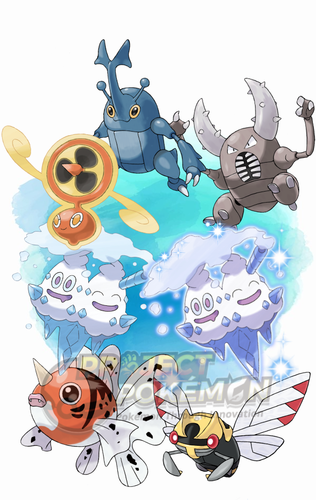 Details for Index 79 of normal_encount and normal_encount_rigel1 and normal_encount_rigel2 (minor differences, in raid chance) Rewards for Index 79 of normal_encount and normal_encount_rigel1 and normal_encount_rigel2 (minor differences, in raid chance) Details for Index 79 of dai_encount Rewards for Index 79 of dai_encount
 -
Version .
767 downloads
This is a Wild Area event held by Sword and Shield. This event is themed around Summer, such as catching bugs, eating snowcones, using a fan to cool off, bunch of Cicadas everywhere, and catching goldfish at a Summer Festival. This event also has a guaranteed 2% Shiny Vanilluxe slot in the 5-star raids. To import these files into your save, use PKHeX's block importing function. Our tutorial should guide you through it. Our first post of this page contains some data relevant to the importing stage. There's info and some common questions regarding Wild Area Events here. To see other Wild Area Events, here. -
Creating Gen 8 pokemon and transferring through bank to home
theSLAYER replied to ForTheWin00's topic in Generation 8
No. Such a method only worked when HOME was first introduced. Has since been patched. -
Yeah I get it. Was just answering your question + providing additional context.
-
Doesn't matter whether there's any demand, as the lead developer does not intend to include it. My (probably incorrect) base assumption is that it would be extra work when they're doing it for free, yadda yadda, etc. As inaccurate as it would be, you get how it's unfair to the lead developer to do something they don't wanna, right? Tagging me here won't be of any help; I don't use macOS. Find some way to boot windows somehow, then boot PKHeX. Most, if not all, of present day methods, revolve around that.
-
I just wanna say your save size is incorrect. It's clear you're using Nocash. And that line only appears when your settings is incorrect. We cannot render any more assistance, as it is evident that your save is from a pirated game.

-
Event Japanese GW Flying Pikachu in PkHex is invalid
theSLAYER replied to Kev-randar's topic in PKHeX
As for the Pikachu, whether it gets added to PKHeX depends on whether there’s any documentation to confirm the various relationships to its RNG seed, like PID, IVs and OT gender. -
Event Japanese GW Flying Pikachu in PkHex is invalid
theSLAYER replied to Kev-randar's topic in PKHeX
Have you tried to hatch a nonshiny one? -
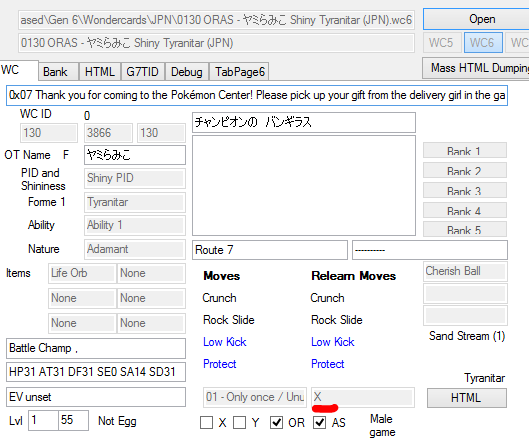
Yup, most gifts do not have preset origin game. And it's not something a "normal person" can identify too, unless they transfer the mon away (cause only then origin game would be identifiable, as region name). Most gifts do not have preset origin game, and they normally just follow the received game. The ones that *might* have a preset origin game, are usually copies of mons belonging to real life trainers, like champions of VGC and stuff. That's why the Met location in Gen 6 is Route 7. It imitates the fact that it was a bred Tyranitar. (In the wonder card, you'll see there's an Egg Level and Met level. If you look at my app near the bottom left corner, it's the 1 and 55 respectively) edit: anyway, some of the info (in a more visual format) can be seen here:
-
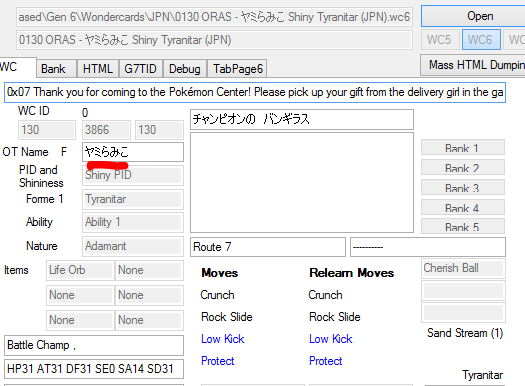
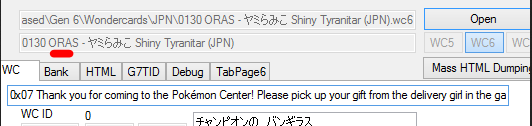
Bulbapedia presumably never mentioned it has the origin game locked to X, because that's data one would normally not get to see unless one transfers out. They only mention games that can receive it, not origin game the file was preset too. Also, it's not confused with those two you linked. Look at the OT on my app. I'm looking at the right wonder card. Assuming you're referring to this. For the record, this is my app, not PKHeX. Also, the filename says "ORAS", because that is how the nomenclature for our files work. ORAS is the only pair of games that can receive this event. However origin game is preset to X, regardless of what game you receive it on. That is all there is to it. I've already given you the accurate recounting. It should be Kalos, since origin game is preset to X.
-
Event Japanese GW Flying Pikachu in PkHex is invalid
theSLAYER replied to Kev-randar's topic in PKHeX
The shininess would normally depend on the hatching TID/SID... -
Looking at the wonder card, the Pokémon was distributed with the Origin Game locked to X. Hence, when transferred up, it'll say Kalos. So PKHeX is working as intended.