All Activity
- Past hour
-
The reply is correct and direct—PKHeX is warning that those Pokémon were created with impossible origins or moves, so the errors are doing their job, and the real fix is to rebuild them from legal encounter data instead of expecting one-click auto repair.
- Today
-
Hey! Sorry for the late response. I'm not sure. You can try removing the quarantine thing using terminal command xattr -d com.apple.quarantine [app_path] If that doesn't work then you can try installing Sikarugir with brew. I don't believe there are prerequisites, but if there are then installing Sikarugir would install them. Hope that helps!
-

PKHeX new update legality errors (contribution page)
Azazel Ameri replied to theSLAYER's topic in PKHeX
thanks for looking into it! I'm in my 2nd attempt of completing the Dexes in LeafGreen and Emerald but was hoping I could cut down on time by using existing saves modified to my liking to catch the ones I'm missing. Turns out JP saves (for Mew and a 2nd Clamperl evo) are more complicated to deal with than I expected so I'll make a fresh save and then speedrun it instead then -
Trash bytes are invalid because of this. I've added a bypass for evolving=>nickname unchanged for the Huntail, but again, all 3 Japanese mons are detected as tampered because the save file OT trash bytes were modified and not matching an untouched Japanese save file. voltorb: ty, added a static encounter definition, now is recognized as a static encounter rather than slot: Gen3: encounter legality tweaks · kwsch/PKHeX@3d7a371
-
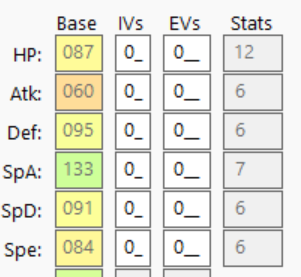
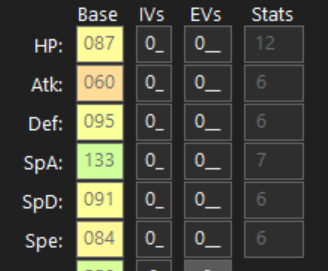
That's the standard way of indicating a disabled textbox; the text is slightly faded out. If the font/color were the exact same, then it would cause an opposite frustration. I wouldn't pay much attention to stat values; pay more attention to the IVs/EVs and the stats will be what you expect
-
Hello I love the dark mode in pkhex so easy on the eyes but the only thing I've noticed was the stats in the Pokemon is barely legible every thing else is highlight in white. I Know you can't Edit the stats but I would like for the numbers to be more legible like the IVs and EVs are if possible thanks.
-
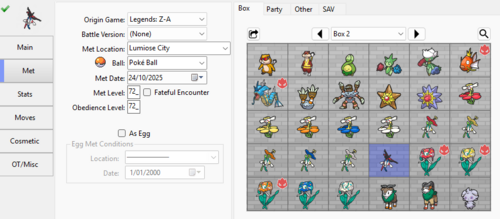 I'm terribly sorry, but for the pk1/2/3/4 files in your pokemon go file, which game do I inject them into?
 - Yesterday
-
PKHeX new update legality errors (contribution page)
Azazel Ameri replied to theSLAYER's topic in PKHeX
I caught a Clamperl (the 366 file) in JP Emerald and traded it with the Tooth immediately to my main save to fill out the Dex. The Clamperl's shown by PKHeX 20260411 as legal but the Huntail (the 367 file) it evolved into isn't of the 2 errors, the trash-byte one I once encountered when I tried to edit a Mew's OT but I got around that by editing the save's OT before injecting the Old Sea Map. I then used that same save to catch the Clamperl. But then when I traded both over, the Mew (as attached) still came out legal. I've never seen the 2nd error though also, I've noticed PKHeX deeming my Voltorb as "fishy" since 20260306, which I assume is because mine came from 1 of the 3 stationary Voltorbs in New Mauville and PKHeX doesn't have such in its encounter database like with Electrode/Kecleon up to today in 20260411. It never bothered me that much since it's just a Voltorb and still got a legal from the program, but I think might as well bring it up now that I'm actually making a comment 0367 - パールル - 124202AC6D56.pk3 0366 - パールル - 130102AC6D56.pk3 0100 - VOLTORB - D23A3B1246EC.pk3 0151 ★ - ミュウ - 9CD655CC5BD7.pk3 -
 Making an account to leave feedback and ask a couple of questions. First off- love the hack. The difficulty spike was surprising in places but appreciated. I’ve had to change my playstyle, and I’m having to make full use of the game’s systems, which I love. 1. I’m 55 hours deep and just unlocked Marine Resort and I was excited to evolve. Disappointed to find out I can’t, but I understand it’s a known bug. It seems like you’re still active here- I’m just wondering whether you think the fix will come this year or what kind of schedule you update this on. 2. Are you also aware of a bug unlocking Destiny Tower? A dungeon unlock event triggered (got the text for it at the café) pre-Darkrai, but it didn’t actually give me a new unlock. I just burned like 80 gummies from storage trying to make it happen post-Darkrai and used ALL of them. I fear I may be locked out of Destiny Tower for this playthrough because the event triggered too early. Do I have to wipe my save and play around that if I want to unlock all the content? EDIT: assuming you know about this bug as well, but neither the lists nor ID selector options will let me choose other forms for starters.
 -

Pokemon Mystery Dungeon: Explorers of Fortune
SnailorMoon replied to WindchildWhimsy's topic in ROM - NDS ROM Hacks
Does anyone know what the requirements are to evolve the starters? I beat the game, found manaphy, and just finished team charm mission beating the Reggies. -
Everything's Great now but why can't I select Z-moves in Gen-7 as I used to before. Wud be great to have that feature back!
-

Poké Transporter GB v1.2.0 released!
LarryEnticer75 replied to The Gears of Progress's topic in Saves - Tools
Quick question regarding the PCCS element of this transfer: There are four methods described in the library but it seems like the tool only uses the Original method. Is there a way to select say the Legal or Faithful method instead? If not doable within the transporter tool, is there another tool which can be fed a pokemon to process it by one of those methods? Just trying to take some of the headache out of processing each pokemon individually with PKHex and RNGReporter if possible but want to avoid them all having the Fateful Encounter flag as well. Thanks! -
-
 Hello, I hope I'm posting this in the right section. If I'm not, please redirect me to the proper location. I’m trying to recreate the original RSE NPC in-game trade mail on Switch FR/LG using ACE, as faithfully as possible. I want to try to recreate these NPC-made messages as a small preservation project with the help of ACE, considering we might not get the Hoenn games on Switch. Pkhex shows the message (as the proper values representing the easy chat words), the author data, and mail type/ featured Pokemon. However, under Author, I can't figure out the two-number pairing that PKHeX shows for an extracted mail message. For example, looking at RoC's github Ruby save file (which has both the NPC Skitty and Mailbox message data- see below), the message for DARRELL's Skitty holding Glitter Mail shows the paring 0 and 54024. These are not the TID/ SID pairing for said Skitty- those are 02259 (TID) and 00000 (SID). I suspect 0 and 54024 are some kind of separate hidden author ID/ mail record data, but I'm not sure. Does anyone know exactly what those two numbers represent, and whether there is a way to reproduce them through ACE on the Switch ports of Fire Red/ Leaf Green? I want create a replica of in-game trade NPC mail, but can't fully do so without accounting for this mystery. Thank you for your help and clarification! Screenshot for reference:
 -
The green one is for nickname, and the red one is for OT name. Probably because the messages have drifted, but it's still flagging the OT name being unexpected. Refer to the encounter database for what an unmodified trade OT would look like.
- Last week
-
ty a lot
-
There's a conflict with the validation of an in-game trade of Golem in Japanese Blue. Invalid: Unable to match an encounter from origin game. Invalid: In-game Trade OT has been altered. Valid Move 1: YW-Learned by TM/HM. Graveler Valid Move 2: YW-Learned by TM/HM. Graveler Valid Move 3: YW-Learned by TM/HM. Graveler Valid Move 4: YW-Learned by TM/HM. Graveler Valid: Valid in-game trade. Valid: In-game Trade OT and Nickname have not been altered. Valid: Current level is not below met level. Valid: Valid Type A, matches species type. Valid: Valid Type B, matches species type. Valid: Catch rate matches a valid held item from Generation 2. Encounter Type: In-game Trade (Graveler) Version: BU PID Type: None Encounter Type: In-game Trade (Graveler) Version: Blue [JP] Level Range: 15-100
-
PKMDS Update — March 26 to April 21, 2026 Hey everyone! It's been about a month since my last update and a *lot* has landed. Here's the rollup. Major new features - Cross-save trading: open two save files at once and drag Pokémon between them. PKMDS handles format conversion, runs a legality analysis on the converted Pokémon before committing, and — when a transfer succeeds — returns each side's held item back to its own save's bag. If the bag can't hold the item, you get a warning up front and can cancel; if the transfer is blocked (conversion error, or you cancel the legality prompt) everything reverts cleanly. - Auto-Legality engine: a new "Legalize" button uses the Auto-Legality Mod engine to automatically fix illegal Pokémon. Event / Mystery Gift properties (ribbons, met conditions, etc.) are preserved. - Batch legalization: from the Legality Report tab you can legalize every flagged Pokémon in one go, with a cancel button if you need to stop mid-run. - Pokémon Bank: store PKM files directly in your browser using persistent local storage. Bank Pokémon survive across sessions, no manual export needed. - Batch Editor: apply bulk edits (nature, shininess, etc.) across many Pokémon at once. - Teams tab: view and edit battle box, battle teams, and rental teams in one place — clear, lock, and unlock teams. Battle-team membership now shows as indicators on box grid sprites. - Showdown / PokePaste import & export: import from Showdown sets or PokePaste, export to PokePaste. Lots of edge cases handled — HOME-transfer species, fixed-nature encounters, DLC moves, obedience level. The import preview now shows per-Pokémon legality indicators and blocks species that aren't available in your target game. - Batch Pokémon import/export: dialogs for importing / exporting multiple .pk* files to or from box slots, with control over whether to fill boxes or party first. - Save file tools (three new ones in the save file menu): - Backup Manager — automatic save backups with restore - Save Info Viewer — encryption status and technical details - Save Repair Tool — attempts to repair corrupted or malformed save data - In-app bug reporting: report bugs directly from the app; your save file is attached via a private, time-limited link so I can actually investigate. Editor and UI improvements - Info popovers on moves, items, abilities, and balls throughout the editor — descriptions, flags, secondary effects, priority. - Move secondary effects in the UI: stat changes, status conditions, flinch, drain, multi-hit, etc. - Ability info now shown alongside move info in the Moves tab. - Type-colored TM / HM sprites in the Bag tab, with correct resolution across generations. - Origin mark sprite now shown in the Met tab. - Spinda spot pattern dialog — view and edit Spinda's unique spot pattern with an editable hex field and an accurate preview. - Trainer sync: changing trainer name, ID, or gender now automatically updates all matching Pokémon in the save (including received Pokémon via HT sync), with a loading overlay. - OS drag-and-drop: drag Pokémon files out of the app to your desktop, and drop external files directly onto the editor. - Party stats: current HP and status condition now shown for games that store per-Pokémon party data (Let's Go, Legends: Arceus). Current HP is preserved on stat recalculation, and status conditions (poisoned, burned, frozen, etc.) appear as overlays on party and box sprites. - Trash bytes auto-fixer in the Legality tab, plus a manual trash bytes editor — useful for certain name-encoding legality issues. - Legality indicators on box/party slots refreshed — solid glyphs on a colored disc for clearer status at a glance. - Legality Report: tri-state filter toggles for Legal / Fishy / Illegal, and "Fishy" reasons now appear in the "First issue" column. - Badge display: shows names and sprites in a responsive grid; Brilliant Diamond / Shining Pearl badges now appear, Unova badges now render correctly. - PID / EC generator consolidated into a single button with constraint checkboxes, and a new "Force Shiny" option. - Trade tab: previous / next box navigation, slot count display, consistent nickname handling, improved crash recovery. - In-app browser warning: the app now detects WhatsApp / Telegram / WeChat / etc. in-app browsers and warns you up front — they block file system access. - Non-exportable save detection: saves that can't be exported (certain emulator formats) are flagged at load time instead of silently failing later. - Bug report form: name and email required and validated; form now detects when you've loaded a save *state* and points you at the correct file. - PKHeX.Core bumped to 26.3.20. - Updated embedded Pokémon and item sprites. Notable bug fixes - Emerald trainer tab (including Japanese versions) no longer blank. - Trainer gender changes no longer cause invisible player models in Sun/Moon, Ultra Sun/Moon, or Sword/Shield. - Clearing a move in Legends: Arceus - Z-A no longer crashes. - iOS save file exports now use the correct extension and download properly (including Manic Emu round-trips preserving the .3ds.save extension). - Chrome no longer shows a blank filename in the "Save As" dialog. - Held Item field can now be cleared. - Horizontal scrolling and clipping fixes on mobile and iPad across the Legality Report, Encounter DB, Bag, Bank, and Teams tabs. - Blank move display fixed for DLC moves beyond a save's move ID range. - Text selection on Pokémon slots while dragging on iOS Safari fixed. - Legality analysis in the Trade tab now correctly checks against the destination save file. - Illegal moves are now properly replaced during legalization instead of being carried over. - Drag-and-drop no longer prefers stale internal state over external file drops. - Party and Gen 1/2 box data now stay packed correctly after every save write. As always, try it out at https://pkmds.app, and if you hit anything weird please use the in-app bug reporter so the save file comes along with the report.
-
PKDen is a .pk file extractor, viewer, organizer, and backup tool for Pokémon data across all main-series games (Gens 1-9). The goal of this project is to have an easy to use local Pokémon storage system for all mainline Pokémon games. I am not a coder, I do not know how to program. Full disclosure: this project was only made possible by Claude AI. For years I wanted a simple PK viewer/pokemon storage solution that was similar to HOME/BANK. PKHEX has a database system, but it doesn't have the feel of an organizer. PKVault is quite good, but I wanted something a little more simple, without all the bells and whistles. PKDen is a very, very simple and easy to use program. Load your save files or .pk files, backup your Pokemon, organize them to your liking, export the .pk files as you please. That's it. Please report any issues or glitches or suggestions for improvement in this thread. PKDen hasn't been extensively tested. I've tested importing/exporting .pk files from every generation and every language, but I haven't done extensive testing with the loading of different gens/languages save files.
-
- 1
-

-
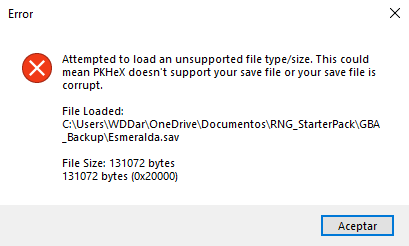
Hi, I can't open my Emerald .sav file in PokeHex. It's my first time extracting a save file; I didn't use any glitches or anything like that until now. I just want to know my SID, and now it says it might be corrupted. What can I do? Esmeralda.sav
-
Edit: never mind, I think I solved it. Hatched eggs will have the hatcher's OT anyway, so it should be fine if I give the traded egg the new trainer's OT instead of putting them as the HT (?) I just finished breeding a couple pokemon eggs in ORAS, and I wanted to pass them on to a new save file by simulating a link trade (because it's otherwise impossible to trade an egg, afaik.) But I'm getting these three errors: 1. Invalid: Handling trainer does not match the expected trainer name. 2. Invalid: Untraded: Current handler should not be the Handling Trainer. 3. Invalid: HT Gender invalid: 1 Error 2 went away simply by opening memories, and then saving. Error 1 and 3 would not go away. I have: 1. Changed Current Handler to HT 2. Made sure HT name and gender is the same as in the Trainer Data editor But the legality checker would not accept the new HT at all. What am I doing wrong?
-
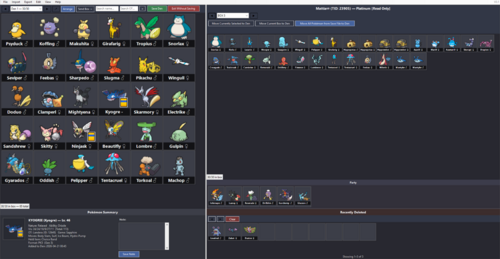
Version v0.1.0
30 downloads
PKDen is a .pk file extractor, viewer, organizer, and backup tool for Pokémon data across all main-series games (Gens 1-9). The goal of this project is to have an easy to use local Pokémon storage system for all mainline Pokémon games. PKDen was created in full by Claude A.I. PKDen remembers window size and in-program formatting between uses. Adjusting window size, sprite size and view preferences to your liking is recommended for the best experience. It’s recommended to place PKDen.exe in a Programs folder, since PKDen creates files in the same folder where the executable is located. What PKDen CAN Do: • Import Pokémon from any save file into PKDen for long-term storage • Import .pk files (all formats pk1 through pk9) from folders or individual files • Organize Pokémon across unlimited custom-named Dens (30 slots each) • Export Pokémon as PKHeX-compatible .pk files (filenames match PKHeX's naming scheme) • Export by generation • Search across all Dens by species name or Original Trainer • Sort Dens by National Dex, Species, Level, IVs, shiny status, OT, and more • View detailed summaries: nature, ability, IVs, moves, held item, origin game • Add personal notes and transfer timestamps to each Pokémon IMPORTANT: PKDen is NOT a save editor. Your Pokémon game save files are opened in READ-ONLY mode. PKDen cannot and will not modify, overwrite, or inject data into your original save files. To edit Pokémon or save files directly, use PKHeX or another dedicated save editor. What PKDen CANNOT Do: • Modify, edit, or inject Pokémon into save files • Edit any attribute of a Pokémon (moves, IVs, stats, etc.) • Check legality or flag illegal Pokémon • Generate or breed new Pokémon • Modify trainer info, Pokédex, items, money, or anything else in a save file For those features, use PKHeX directly. Using PKDen Alongside PKHeX: PKDen and PKHeX complement each other: • PKDen is a library. Think large-scale storage and organization • PKHeX is a workshop. Think editing, injection, legality checking, breeding etc Data Storage: PKDen stores everything in two files next to the executable: • PKDen.den: your Pokémon collection (custom binary format) • PKDen.settings: your view preferences (sprite size, labels, etc.) - PKDen remembers window size and in-program formatting between uses. Adjusting window size, sprite size and view preferences to your liking is recommended for the best experience. A "backgrounds" folder is created if you set custom Den backgrounds. No registry entries, no hidden AppData files. The program is fully portable. Credits: PKDen uses PKHeX as its backend for reading, writing, and rendering Pokémon data. • PKHeX Version: 26.04.11 • PKHeX Repository: https://github.com/kwsch/PKHeX • PKHeX License: GPL-3.0 All sprite assets, species data, move/ability strings, entity parsing, and save-file format handling come from PKHeX. PKDen Version: 0.1 created in full by Claude A.I. Download Grab PKDen.exe below. It's a self-contained single file. No installer. It’s recommended to place PKDen.exe in a Programs folder, since PKDen creates files in the same folder where the executable is located. GITHUB: https://github.com/ScoopDunk/PKDen/releases -
Check to see if it is running in Task Manager.
-
Sorry if this is the wrong tag or smth, but PKHeX isn't starting anymore. Yesterday it loaded once, let me edit a save (it was a Z-A save if that changes anything), and then wouldn't load anymore when I tried to open it again later. Even if I delete and reinstall it won't start.
-
 LANXCASTEER changed their profile photo
 -
You will set the TID/SID up as another trainer, OT as another trainer, and handling trainer as you. relating to your second trainer, no correlation is known currently, but to be safe, just start a new save on another account, then copy Trainer details from there.