Search the Community
Showing results for tags 'bug'.
-
Hello and apologies for being a total noob, but I can not figure this out. I created and hatched a bagon with pokegen, and gave it rage and earthquake as attacks. It now has learned bite through leveling. The problem I am having is that every action I use does a little recoil damage to bagon, which is odd because he has the ability Rock Head which should prevent ALL recoil damage. Not to mention the moves Bite and Earthquake aren't suppoed be doing recoil damage to any pokemon. If someone smart could clear this up for me I'd be very grateful. :cool:
-
Hi! When copying QR Code to Tabs (ALT + Clicking "QR!"), the ribbon isn't copied to the pokemon. The ribbon stays the same just like the previous one loaded on the Tabs. So for example, if I just open up PKHex (the Tab is still blank), then copy QR Code to Tabs, the other pokemon info will show up. But when I check the ribbon, it's all empty. I also tested adding one or two ribbons (different from the ones on QR code) to the tabs, then copy the QR Code (ALT+Click) after that. The ribbons from the QR codes don't show up. The existing added two ribbons are still there. Sorry if my explanation is hard to understand. English isn't my first language. Thanks!
-
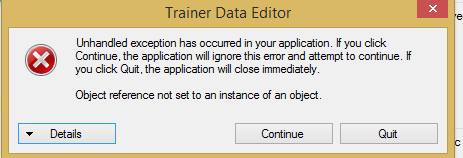
I was on PKHeX Today and I noticed Something. When I went on Trainer Info > Stats, I went to change one of them for eg. Battle Wins to 999,999: It would come up with the message: "Unhandled exception has occurred in your application. If you click Continue, the application will ignore this error and attempt to continue. If you click Quit, the application will close immediately." "Object reference not set to an instance of an object." This is on the most recent update 24th March (I believe) With the Copy and Paste From Showdown/Smogon sets and then Ctrl and clicking species, and Also the QR For Wonder cards Update. This does not work at all with any Stats in the Trainer Info. The Update before this (03-1-15) Works perfectly fine with the Trainer Info> Stats. So I believe this is a Bug of some sort.
-
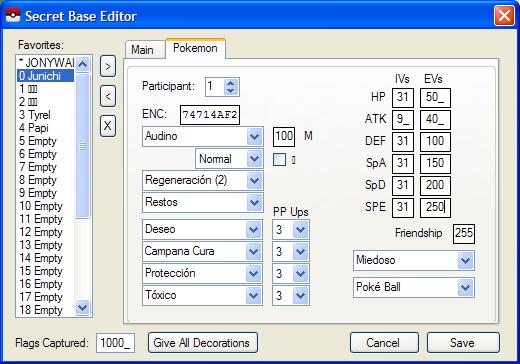
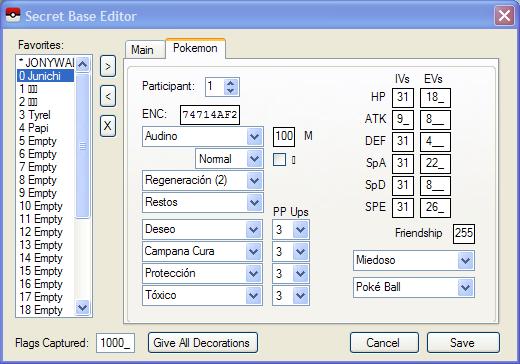
When I try to change EVs of a secret friend's pokemon (It doesn't matter what of them) PKHeX treat them as IVs: Only saves until 31, and if upper value is written, it save a random value (Obviously lower than 31) What I try to save: What I saved: Also I have problems editing some pokemons of my team. I can view data and delete it, but i can't change it. There are: Druddigon (RAJOY) (M) @ No object Ability: Rough Skin Shiny: No EVs: 88 HP / 85 Def / 85 SpD / 252 Spe IVs: 31/31/31/1/31/31 Nature Jolly - Outrage - Iron head - Crunch - Fire punch Golurk (K-T) (No gender) @ No object Ability: Iron fist Shiny: No EVs: 100 HP / 100 Def / 100 SpD / 210 Spe IVs: 31/31/31/24/31/31 Nature Adamant - Drain punch - Ice punch - Thunder punch - Fire punch punch Audino (TANYA) (F) @ No object Ability: Healer Shiny: Yes EVs: 80 HP / Atk 10 / 120 Def / 120 SpD / 180 Spe IVs: 31/28/31/14/31/31 Nature Jolly - Secret power - Refresh - Thunder wave - Entrainment Hydreigon (MALASOMBRA) (F) @ No object Ability: Levitate Shiny: No EVs: 120 HP / 120 Def / 70 SpA / 120 SpD / 80 Spe IVs: 31/7/31/31/31/31 Nature Timid - Dark pulse - Dragon breath - Roost - Flash cannon Any response will be appreciated
-
It is possible to have a legal Hoopa with Hyperspace Fury as when you move an unbound Hoopa to the box, it changes back to its normal form. Hoopa unbound can learn Hyperspace Fury throught the Move reminder. However in the PKHeX it is marked as invalid move: [ATTACH=CONFIG]13597[/ATTACH] Also the PKHeX sais Invalid: Not a valid wonder card gift: [ATTACH=CONFIG]13598[/ATTACH] However if you have Hyperspace Hole instead of Hypespace Fury with the same hoopa, both problems disappear: [ATTACH=CONFIG]13596[/ATTACH]
-
I found an error while exporting pokemon party set to showdown clipboard: Exception Details PKHeX 04-07-2024.txt And another one when accessing the pokemon database when a gen 1 save is open on latest pkhex: Exception Details PKHeX 04-07-2024 (2).txt Using an older version (example: 20-01-2024) is fine.
-
I NEED RARE CANDIES I tried to edit my bag on the pokegen to add rare candies I put in just one, saved it, ran it, everything was smooth. But when I tried to use the rare candy it said that I used my last rare candy and when I tried to throw it away nothing happens the one rare candy stays in my bag (note: this was early in game so I have not yet found rare candies in game yet). Even if I put in 999 it says that. I tried it on some other items it worked fine (tried it on different pokeballs all of them worked fine). I just want some just to quickly evolve some pokemon who need high happiness and different locations and time to evolve
-
Version .
2273 downloads
Thanks to GlitchCity researches we discovered in Gold/Silver an unused map called DA00 in Kanto that generates wild Pokemon. Chances of corrupting your save with it are very high and Pokemon are over lv100. Apparently another like that exist also in Crystal but it was not documented. -
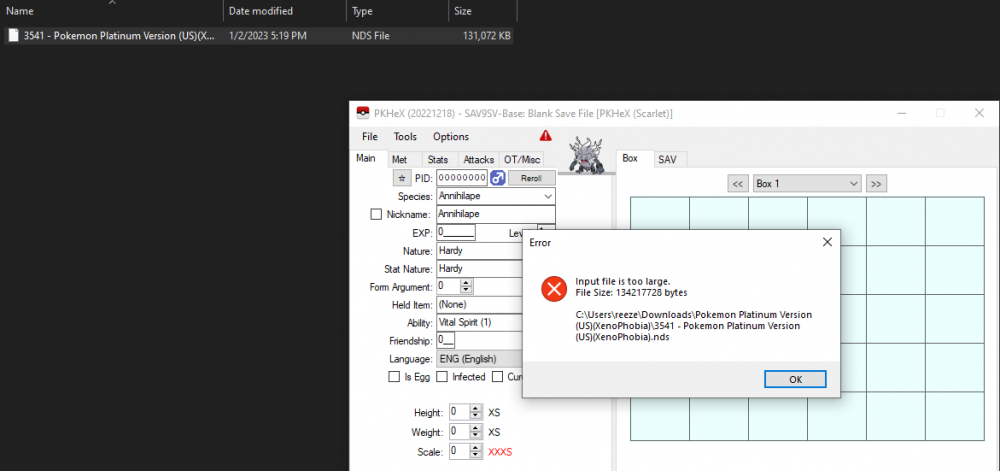
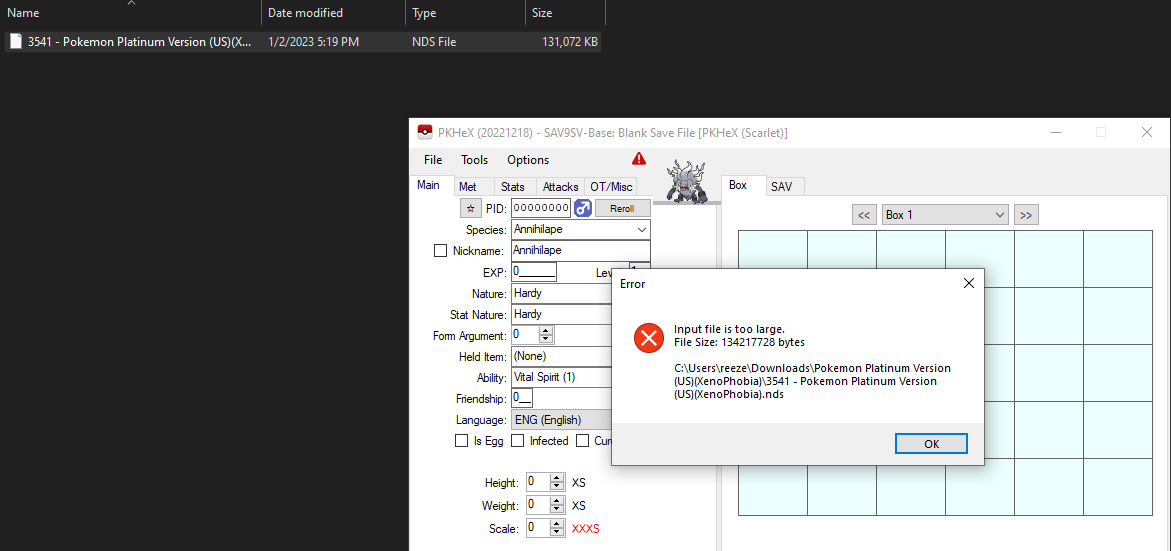
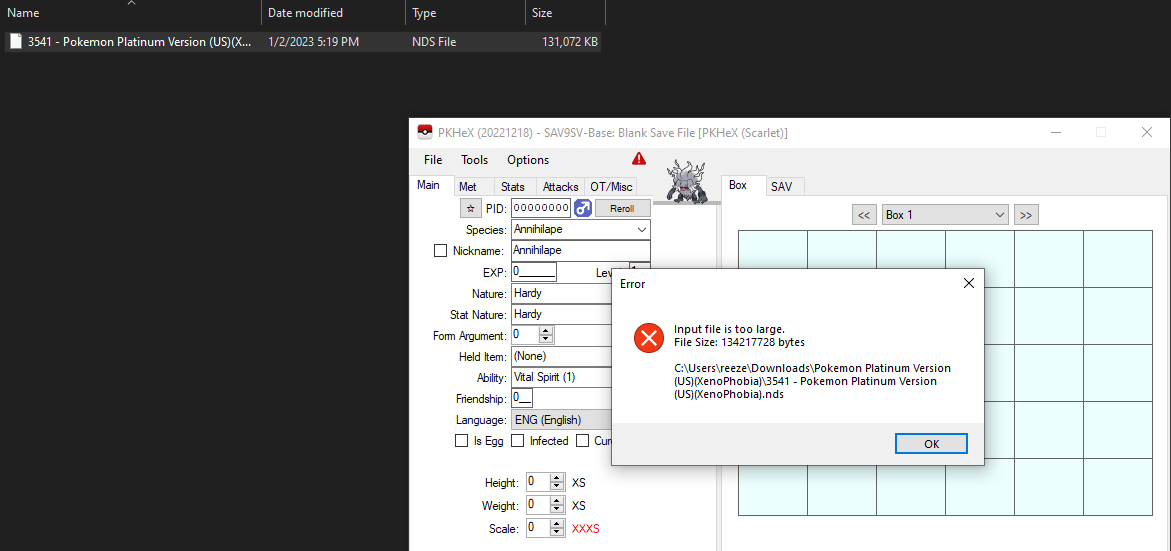
Hello! I've begun a new file of Platinum and I am confused as to why it states that the file is too large.
-
When choosing to complete pokedex in sword & shield, a broken pokedex entry showing pikachu genderless and normal type without any text is added. This apparently was supposed to be the partner pokemon from pokemon let's go pikachu, but obviously you can't actually transfer the partner pokemon out of their respective games
-

bug PKHeX always reports invalid checksum after scrolling PC box view
ageispolis posted a topic in PKHeX
For any save file with valid checksums, PKHeX can be made to report an invalid checksum by viewing a different box in the "Box" tab. To reproduce: 1. Open any save file with valid checksums in PKHeX. 2. Go to the "SAV" tab and use "Verify Checksums" and/or "Block Data" to see that PKHeX calculates matching checksums upon opening the file. 3. Go to the "Box" tab and view a different box. 4. Repeat step 2 to find that PKHeX now reports problems such as "Large block checksum is invalid" for Gen 4 and "Invalid: 00 @ Region 0000 SAV: 73/74" for Gen 5. This happens even though the data is entirely unchanged to my understanding. This occurs in ver 221218 for all games I tested from Gen 4, 5, 6 and 7. They are real cartridge save files that I dumped using Checkpoint. Of course, the games load all of these save files with no complaints. This issue seems low-hanging, so I'm sorry if it's reported already or no one cares. -
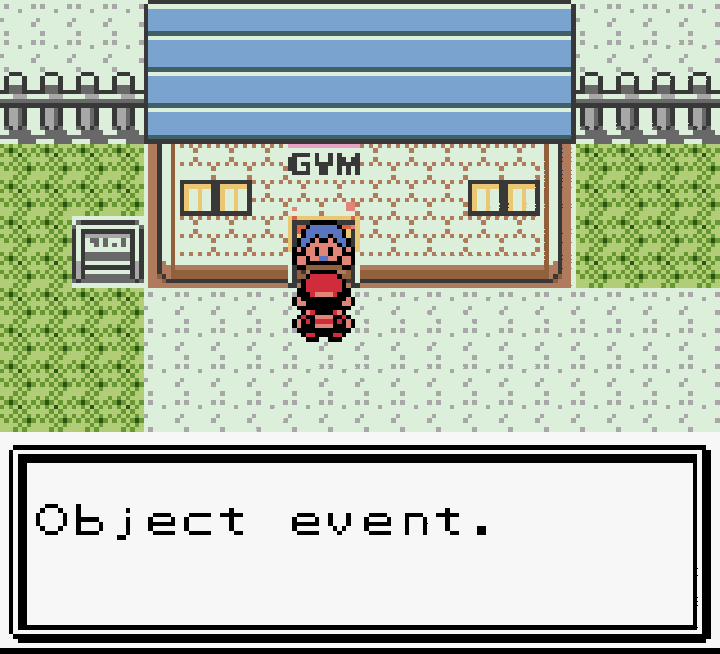
Hi all, not sure if this is the best place to post something like this but im not quite sure where else to turn. The story is as follows: I boot up pokemon silver after a long hiatus and go to defeat Jasmine in the Olivine City gym. I white out because its been a while and leave to get my pokemon healed up. later I return to the gym after remembering how pokemon works lol but am greeted by someone at the door saying "Object Event" and am not let into the gym. As far as I understand this happens when the game doesnt quite know what to do, its just a placeholder. Being stuck, I continue to try and get through as much of Johto as I can, defeating all the other gyms and kicking team rocket out of mahogony town imagining maybe that will move the game to a state where I can get in to fight Jasmine again. But no dice, still Object Event, still shut out. Im not quite sure what to do at this point and so am very open to any suggestions. This is all that I think is keeping me from progressing the story and It would be a bummer to have to start from scratch :/
-
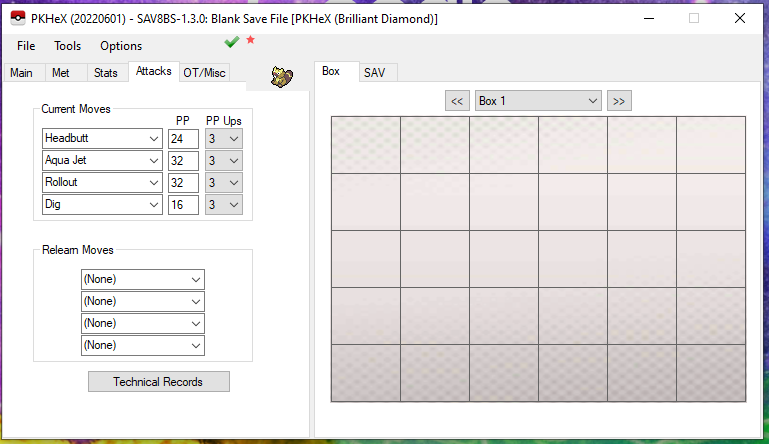
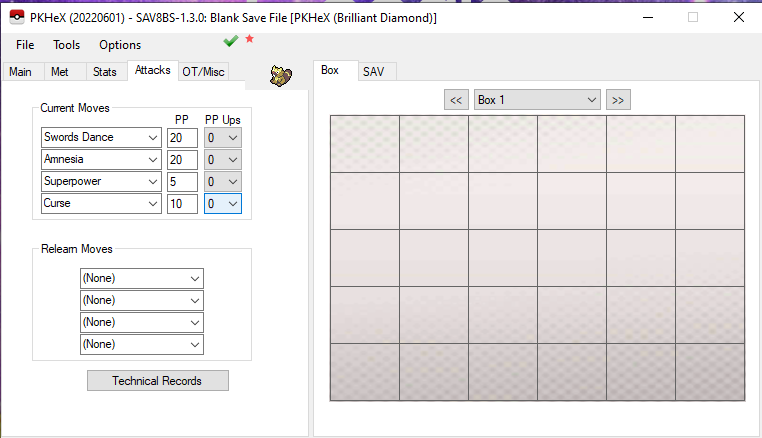
I found a glitch in pkhex that happens when trying to save a transferred pokemon as a pb8. When saving the pokemon as a pb8 any changes to it's moveset will not be remembered, even if those moves can be obtained on the pokemon in BDSP. Only changes to the moveset will not be saved, everything else will be. This glitch makes it impossible for any pokemon transferred to BDSP to have it's moveset changed using pkhex. I have a before and after screenshot of the pokemon's moveset, along with the pb8 of the pokemon I tested this with. Before is what the moveset looked like when I saved the pokemon as a pb8 (I altered the moveset while pkhex was set to BDSP) and after is what the moveset looked like after opening the file. Glitched bibarel.pb8
-

savefile My Pokémon Black save file wont work
dashcheetah posted a topic in Saves - Files and Requests
I don't know why, but every time I try to load this save file in pokemon black, all i get is a black screen. I have 40+ hours in this game and would really like to not have to restart at this point. Can anyone figure out how to make the save work and tell me what the issue is? Pokemon - Black Version (USA, Europe) (NDSi Enhanced).sav -
HI there got an error trying to run pkhex and I cant seem to resolve it Exception Details: System.ArgumentException: Destination array was not long enough. Check destIndex and length, and the array's lower bounds. at System.Array.Copy(Array sourceArray, Int32 sourceIndex, Array destinationArray, Int32 destinationIndex, Int32 length, Boolean reliable) at System.Array.CopyTo(Array array, Int32 index) at PKHeX.Core.SAV2.Initialize() at PKHeX.Core.SAV2..ctor(Byte[] data, GameVersion versionOverride) at PKHeX.Core.SaveUtil.GetVariantSAVInternal(Byte[] data) at PKHeX.Core.SaveUtil.GetVariantSAV(Byte[] data, String path) at PKHeX.Core.SaveUtil.GetVariantSAV(String path) at PKHeX.Core.SaveFinder.<GetSaveFiles>d__8.MoveNext() at System.Linq.Enumerable.FirstOrDefault[TSource](IEnumerable`1 source) at PKHeX.Core.StartupArguments.ReadSettingsAnyPKM(IStartupSettings startup) at PKHeX.Core.StartupArguments.ReadSettings(IStartupSettings startup) at PKHeX.WinForms.Main..ctor() at PKHeX.WinForms.Program.Main() Loaded Assemblies: -------------------- mscorlib, Version=4.0.0.0, Culture=neutral, PublicKeyToken=b77a5c561934e089 C:\Windows\Microsoft.NET\Framework64\v4.0.30319\mscorlib.dll PKHeX, Version=22.2.14.0, Culture=neutral, PublicKeyToken=null C:\Users\zaysq\Documents\pkm stuff\pkhex\PKHeX.exe System, Version=4.0.0.0, Culture=neutral, PublicKeyToken=b77a5c561934e089 C:\WINDOWS\Microsoft.Net\assembly\GAC_MSIL\System\v4.0_4.0.0.0__b77a5c561934e089\System.dll System.Windows.Forms, Version=4.0.0.0, Culture=neutral, PublicKeyToken=b77a5c561934e089 C:\WINDOWS\Microsoft.Net\assembly\GAC_MSIL\System.Windows.Forms\v4.0_4.0.0.0__b77a5c561934e089\System.Windows.Forms.dll System.Drawing, Version=4.0.0.0, Culture=neutral, PublicKeyToken=b03f5f7f11d50a3a C:\WINDOWS\Microsoft.Net\assembly\GAC_MSIL\System.Drawing\v4.0_4.0.0.0__b03f5f7f11d50a3a\System.Drawing.dll System.Configuration, Version=4.0.0.0, Culture=neutral, PublicKeyToken=b03f5f7f11d50a3a C:\WINDOWS\Microsoft.Net\assembly\GAC_MSIL\System.Configuration\v4.0_4.0.0.0__b03f5f7f11d50a3a\System.Configuration.dll System.Core, Version=4.0.0.0, Culture=neutral, PublicKeyToken=b77a5c561934e089 C:\WINDOWS\Microsoft.Net\assembly\GAC_MSIL\System.Core\v4.0_4.0.0.0__b77a5c561934e089\System.Core.dll System.Xml, Version=4.0.0.0, Culture=neutral, PublicKeyToken=b77a5c561934e089 C:\WINDOWS\Microsoft.Net\assembly\GAC_MSIL\System.Xml\v4.0_4.0.0.0__b77a5c561934e089\System.Xml.dll PKHeX.Core, Version=1.0.0.0, Culture=neutral, PublicKeyToken=null PKHeX.Core, Version=1.0.0.0, Culture=neutral, PublicKeyToken=null System.Memory, Version=4.0.1.1, Culture=neutral, PublicKeyToken=cc7b13ffcd2ddd51 System.Memory, Version=4.0.1.1, Culture=neutral, PublicKeyToken=cc7b13ffcd2ddd51 System.Runtime, Version=4.0.0.0, Culture=neutral, PublicKeyToken=b03f5f7f11d50a3a C:\WINDOWS\Microsoft.Net\assembly\GAC_MSIL\System.Runtime\v4.0_4.0.0.0__b03f5f7f11d50a3a\System.Runtime.dll System.Runtime.CompilerServices.Unsafe, Version=4.0.4.1, Culture=neutral, PublicKeyToken=b03f5f7f11d50a3a System.Reflection, Version=4.0.0.0, Culture=neutral, PublicKeyToken=b03f5f7f11d50a3a C:\WINDOWS\Microsoft.Net\assembly\GAC_MSIL\System.Reflection\v4.0_4.0.0.0__b03f5f7f11d50a3a\System.Reflection.dll System.Runtime.InteropServices, Version=4.0.0.0, Culture=neutral, PublicKeyToken=b03f5f7f11d50a3a C:\WINDOWS\Microsoft.Net\assembly\GAC_MSIL\System.Runtime.InteropServices\v4.0_4.0.0.0__b03f5f7f11d50a3a\System.Runtime.InteropServices.dll System.Runtime.Extensions, Version=4.0.0.0, Culture=neutral, PublicKeyToken=b03f5f7f11d50a3a C:\WINDOWS\Microsoft.Net\assembly\GAC_MSIL\System.Runtime.Extensions\v4.0_4.0.0.0__b03f5f7f11d50a3a\System.Runtime.Extensions.dll Newtonsoft.Json, Version=13.0.0.0, Culture=neutral, PublicKeyToken=30ad4fe6b2a6aeed PKHeX.Drawing.PokeSprite, Version=1.0.0.0, Culture=neutral, PublicKeyToken=null -------------------- User Message: An unhandled exception has occurred. PKHeX must now close.
-
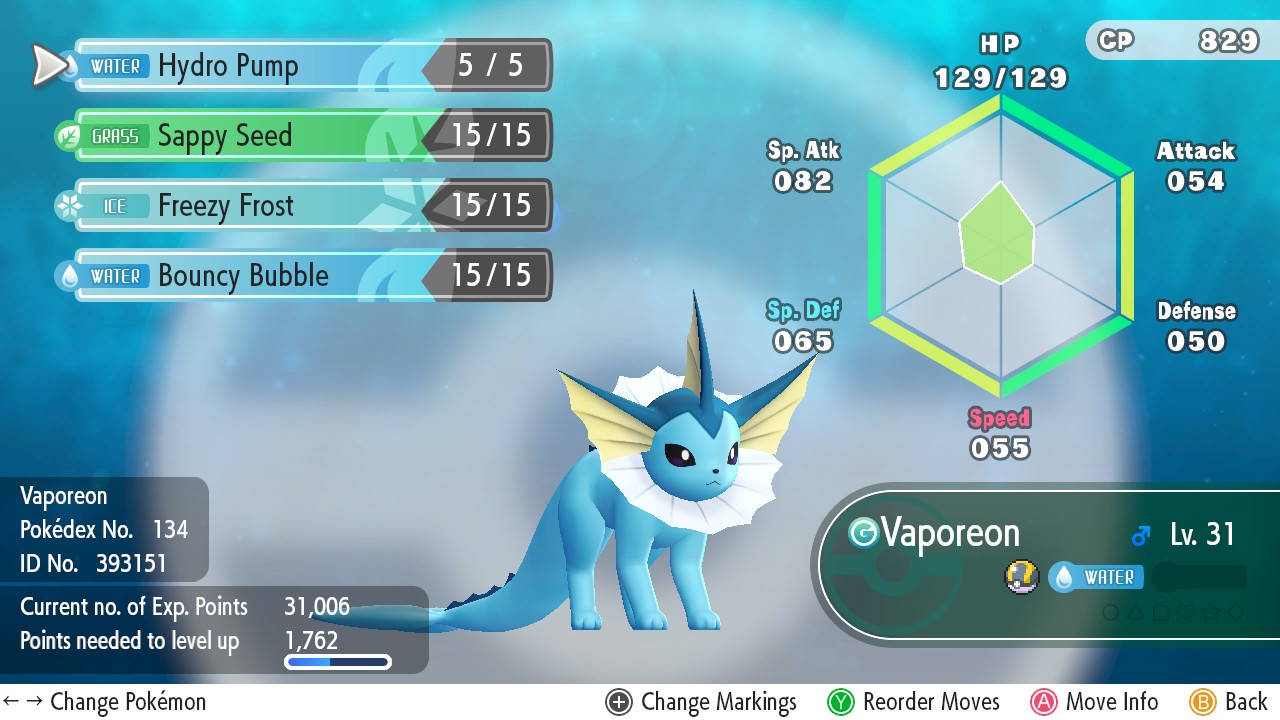
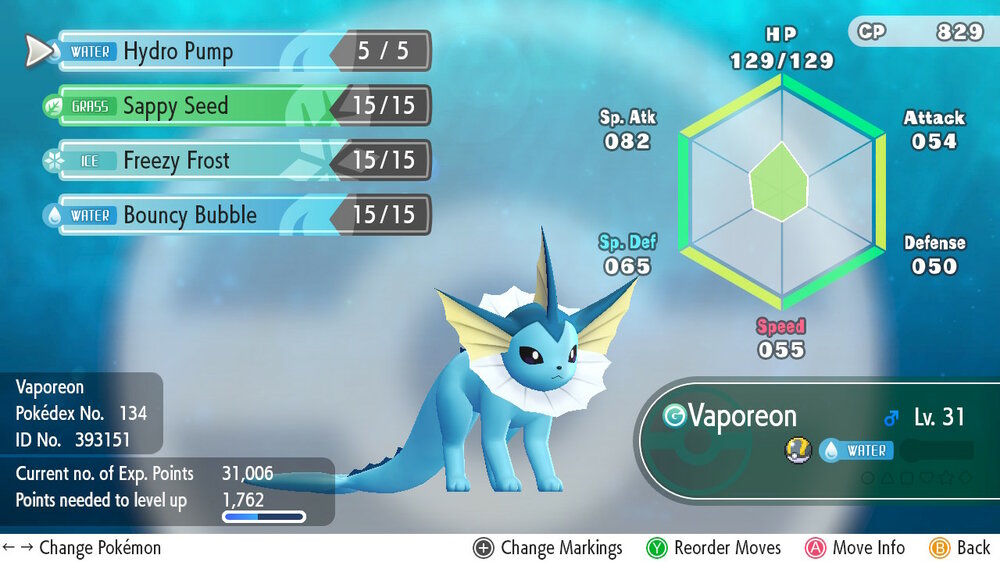
I just want to share here this rare bug I have encountered while playing Let's Go Eevee. I had this Vaporeon from my Pokemon GO and had just migrated them to the GO Park. Having them added on my party in Fuchsia City, I went in to the Poke Center for my partner Eevee to check-out new moves and to my surprise the move tutor asked to train Vaporeon instead. At first I had no idea that the moves are exclusive but I was amazed that this happened. Unfortunately it won't train Jolteon and Flareon and cannot be done again. Here is a screenshot of it. I wonder if there are other players who experienced this bug. Mod edit: Standard disclaimer - this information is presently neither verified nor replicated, and should not be deemed as material fact.
-
Hello, - When I open my save, my legit Eevee (starter) load with 0 moves (all 4 are its signatures moves) and show as legal until I click the V, and it will then show as illegal saying empty moves. https://nsa40.casimages.com/img/2019/07/17/190717123728397935.png https://nsa40.casimages.com/img/2019/07/17/190717123728845100.png - My legit Arcanine and Raichu show as illegal saying CP doesn't match stored value, no idea if it happen with other Pokémon. https://nsa40.casimages.com/img/2019/07/17/190717123727799117.png https://nsa40.casimages.com/img/2019/07/17/190717123727888944.png - I can't manage to get the batch editor to make all Pokémon shiny working. .IsShiny=True is not working
-
Trading using a bot, while having the latest (not OT) handler language as anything but ENG causes it to be seen as Hacked by Hack Check. I need a fix. Does anyone know how to change this in batch or setting?
-
Hello, when I press the None button, under Give All, in Item Editor, PKHeX show a pop-up "Items cleared" but when I save and re-open, nothing was changed.
-
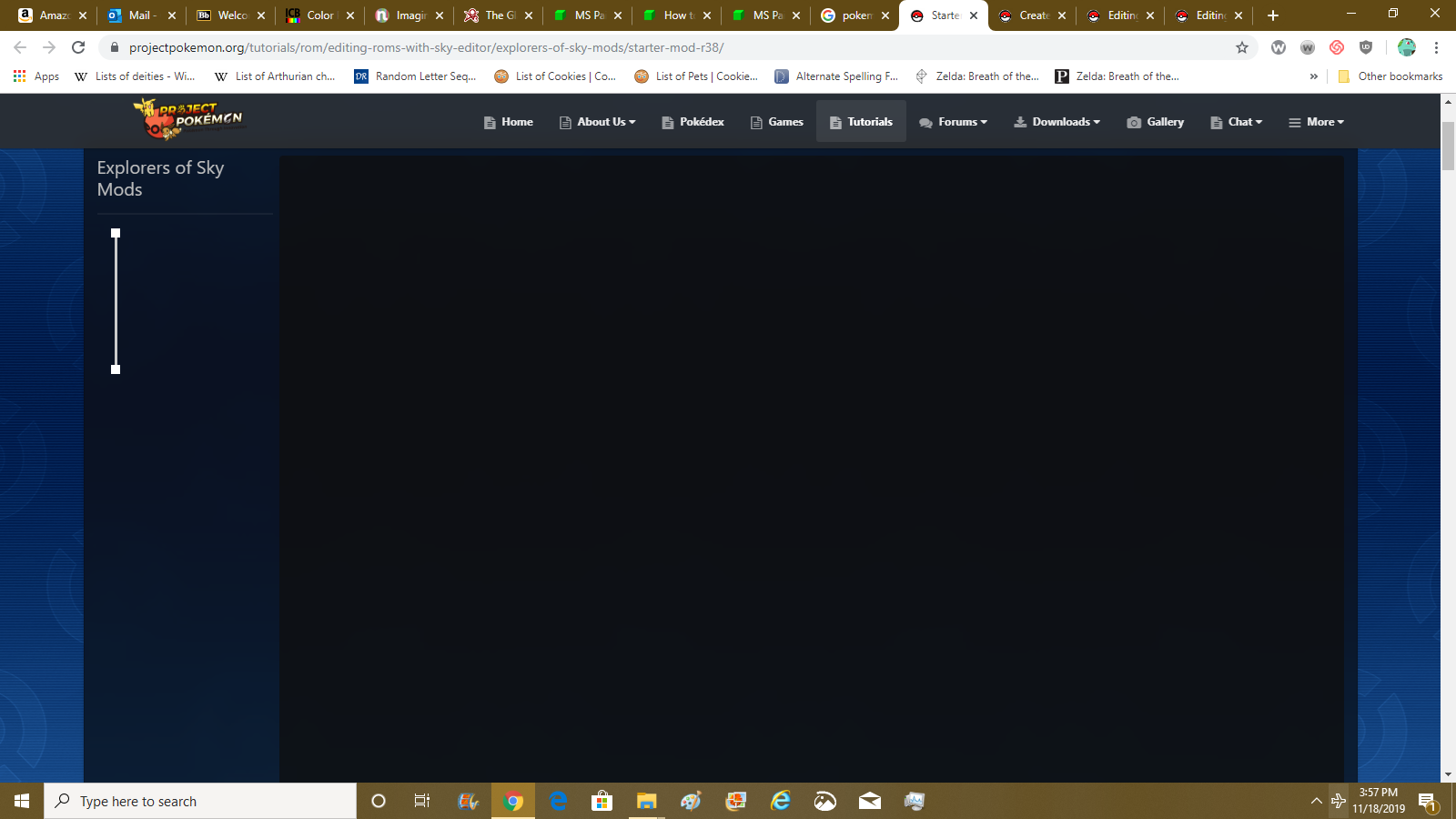
In the tutorial forums, the posts aren't showing up. It's just a blank screen. The first chunk of the tutorial is just no there. How do I fix this?
-
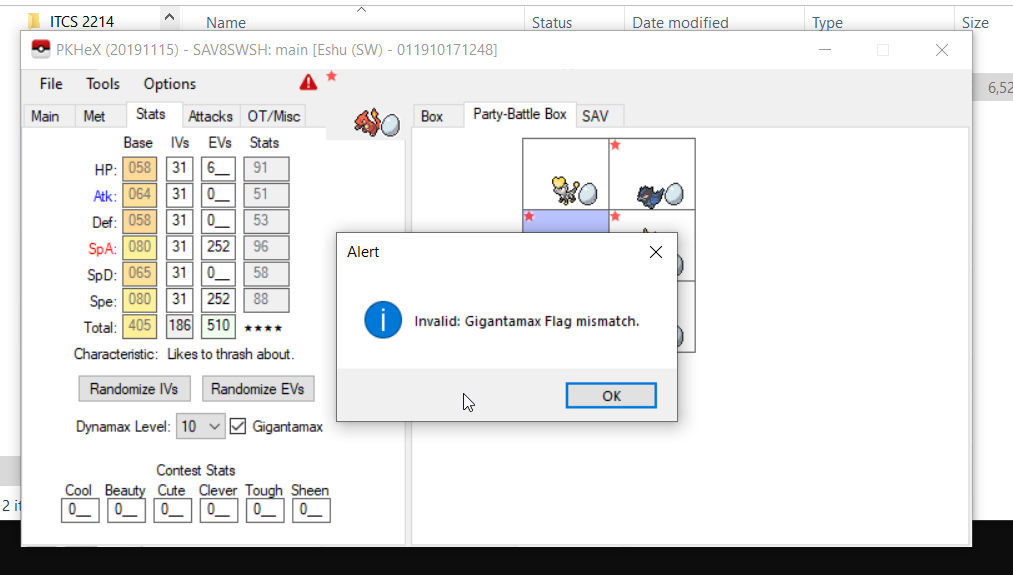
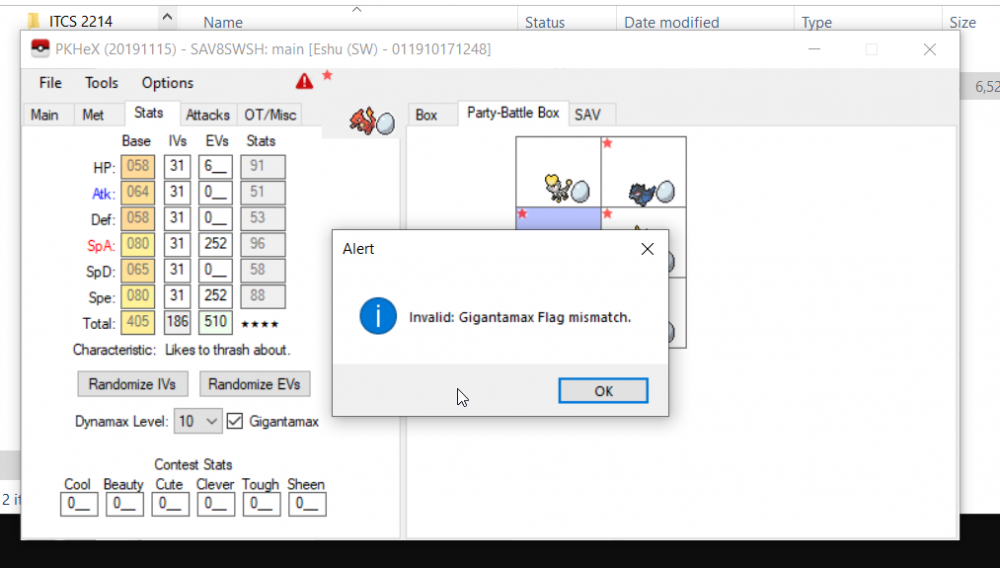
If I check the gigantamax tag in PKHEX, I get this error constantly. I have attempted to look at the free gigantamax Pikachu and Eevee you get and that is the only tag checked on it so I am not sure why I keep getting this error. Any help would be appreciated.
-
Error: Input file is too large. File Size: 1513089 bytes C:\bla\bla\bla\main I have this error, I hope someone knows how to solve it. Thanks. main
-
So today i tried to PKheX some Pokemon, and weh n iexported the main. i couldnt open up the software, it says that an error has accoured and that the software is closing, i really need your guys' help
-
I’m thinking maybe its because I’ll click the teach all TRs for my pokemon instead of individually pickig the TRs and maybe thats the issue? But I find that I can teach a flygon or manectric water moves and noticed when I couldnt use them online anymore that I had been teaching some pokemon moves they should never have been able to learn.
-
Hello all. I am trying to put a Jittery Mark on my Antique form, wild caught shiny Sinistea. My goal is to make the game announce 'Sinistea the Anxious' when I throw it out into battle. The problem is, I notice that the mark disappears every single time I click save (In the Ribbons list). It just won't stay by itself. I tried every single mark, and none disappeared like Jittery did so I assumed the Jittery mark might have been impossible for Sinistea. However, I got the Jittery Mark to stay - ONLY after I also checked the Smiley Mark. I tried every single mark+ribbon, and noticed Jittery stays then. Then I narrowed it down to it disappearing when I uncheck the Smiley Mark. Are two marks on a wild pokemon even possible, or have been observed before? Is this a bug? It doesn't seem like only these two marks would be linked to each other like this on purpose. Please let me know if i'm missing something. Thanks. If you're unsure what I mean, Marks give pokemon 'titles' when they're thrown into battle. Here's more info: https://www.serebii.net/swordshield/marks.shtml EDIT: More info. When I have both marks: Once I unclick Jittery mark(and keep Smiley), both marks remain. Once I unclick Smiley mark(and try to keep Jittery) and save, both marks disappear. When I have no marks: Once I click Jittery mark and save, it disappears(doesnt apply). Once I click only Smiley mark w/ a blank slate and save, I get both Jittery and Smiley mark without touching Jittery.








.thumb.jpg.3f629b5238de1df9f162abadb120e4bb.jpg)