



Kaphotics
-
Posts
7957 -
Joined
-
Last visited
-
Days Won
476
Content Type
Profiles
Pokédex
Portal
Technical Documentation
Pages
Tutorials
Forums
Events
Downloads
Gallery
Blogs
Everything posted by Kaphotics
-
Remove any plugins and try again.
-
ALM's intent is to create battle-ready things, and to not necessarily retain input values. You're likely trying to generate something with a PIDIV-correlation, which means that changing it to be shiny after the fact is modifying the PID, and thus breaking the required correlation of values, making it not legal. If you've set up the trainers folder, ALM will regenerate with encounters according to the order of encounter type specified in its settings. Often times you'll need to use an external app to search for a PID combination that satiates your need for predefined trainer data & stats.
-
 Can't know unless you're more descriptive on what you're trying to load. A screenshot of the message would help.
 -
Check the change log for encounter slot checks. The program requires more than just a valid PIDIV, as it also determines the encounter trigger seed/frame that started the full generation routine. The PIDIV is calculated last.
-
Can't get the legal check because of OT/HT error.
Kaphotics replied to Zadekian's topic in Pokémon Legality
The program gives you a blank save file to act as the holder for whatever mons you import/create. That OT is indicated at the top of the program. As indicated by the popup, the handling trainer is expecting PKHeX, because that is the handling trainer. The original trainer is from Gen4, and you are editing in a Gen9 context (Violet), so the OT could never be handling it anyway. If you want to be in a different context, load your save file, or change the program settings to change which blank save file context is loaded. Plugins not updated by the original plugin author may still be maintained by others who have made a fork. -
not legal; doesn't have an RNG slot correlation (as indicated by the X when you hover) future updates will indicate it is not legal in gen4. the program is correctly flagging it in gen5+.
-
Can't get the legal check because of OT/HT error.
Kaphotics replied to Zadekian's topic in Pokémon Legality
You're changing more than just the OT name. Can't tell what else you're doing wrong because you're not descriptive enough. -
Be sure you are transferring your save file correctly. If using ftp, be sure you are transferring binary format so the file is not truncated. If that didn't change anything, plug in your SD card directly and move the file manually.
-
Use the drop-downs to build a set of commands. PK8 do not have WeightAbsolute & HeightAbsolute.
-
pk3DS: Pokémon 3DS ROM Editor and Randomizer
Kaphotics replied to Kaphotics's topic in ROM - 3DS Research and Development
Fixed on latest, although there's no real need to rebuild ROMs since cfw can use layeredfs. -
If a plugin is causing issues, go look for an update to the plugin. PKHeX is not responsible for plugins misbehaving after an update.
-
Gen4 events are distributed with fixed version IDs. They do not match the recipient's version.
-
pkNX: Nintendo Switch ROM Editor & Randomizer
Kaphotics replied to Kaphotics's topic in ROM - Switch Research and Development
pkNX does not do anything special with its text entry fields. If the game does not render the characters you are trying to use, then they're not available in the font. -
The text resources are the same. https://github.com/kwsch/PKHeX/blob/0bbba81fca3dca5d84b5f800a3496cbf4c9a1b45/PKHeX.Core/Resources/text/items/text_Items_en.txt Games that use different lists (like Gen2) have a separate list.
-
Then it needs to be handled by the currently loaded Save File (probably is PKHeX). Don't disable the setting that automatically updates the handler data when you set it to a slot. Try setting it to a slot in the save file, and check again.
-
Commonly happens when you reuse trainer data between games. Trainer name/ID should be unique, not the same (eg Sword and Scarlet should be different). If it has a handling trainer set and the current handler is the HT, then the HT must match the save file. If it matches the trainer data for the save file, then it should be handled by the OT, not the HT.
-
Which trainer have you set the current handler as?
-
Confirm that the file exists and that you dumped your ROM correctly.
-
If they are from Kalos, then they are not from your Ultra Sun trainer. Re-read the popup and my message.
-
No? Read the error message. Why is the current handler the OT, when it is being handled by a save file that is not the OT?
-
PKHeX.Core is available on NuGet and can be used to create whatever you want with the API it exposes. Iterate through all save files from a folder, dig through the box data and party data, and rip out whatever information you want, or just dump the pkm files to a folder. PKHeX already has a pkmdb feature where you can search for any file from your backups / external folder.
-
Need help pls stuck and nothing will work
Kaphotics replied to tcals96's topic in General Development
Save in game so that the console flushes the content to storage. Stop using save states to back up your save data. -
Can't Open Gen 2 Save Files on PXHex - Keep getting error message
Kaphotics replied to Mike Gordan's topic in PKHeX
No they're not. Your emulator is saving the file as an irregular size.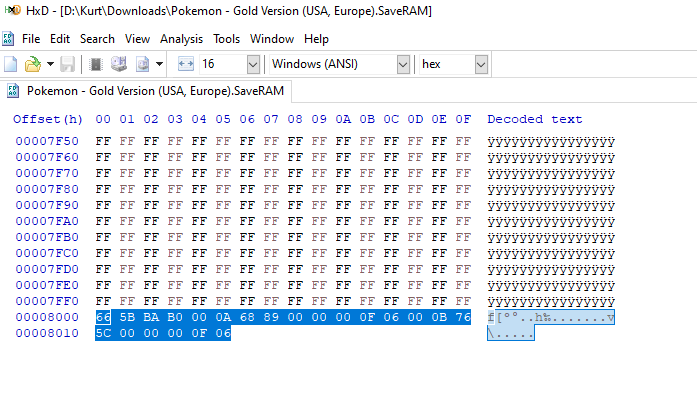
-
PKHex not exporting file as .sav, only as SAV5BW
Kaphotics replied to RandomGuyThatExists's topic in Saves - Editing Help
Not sure what you mean. Exporting the save will use whatever filename you loaded, which is `nuzlocke1.sav`. You can also name it whatever you wish. SAV5BW is the save file type, which is "Generation 5 Black/White save file". -
Blindly following old posts isn't a good idea. Did you install .NET 8 or .NET 7?
