



Kaphotics
-
Posts
8128 -
Joined
-
Last visited
-
Days Won
504
Content Type
Profiles
Pokédex
Portal
Technical Documentation
Pages
Tutorials
Forums
Events
Downloads
Gallery
Blogs
Everything posted by Kaphotics
-
Do you mind sharing the before/after save files? (pm); also does it disappear in-game or only in PKHeX?
-
What was the initial state of the box before you moved things into it?
-
If the save file exists, it's stored somewhere on the phone's storage. The save file can't not exist and still be used by the emulator.
-
Fixed in latest commit, thanks for reporting https://github.com/kwsch/PKHeX/commit/279c9d4665e3e0ed5aec4d5da54192e274a03630
-
Should be fixed in the latest commit, thanks for reporting https://github.com/kwsch/PKHeX/commit/30a614484e1ae74f9a6dc7b87b71bf7e423ff04f I've reuploaded the exe zip, so redownload if you'd prefer to not ignore the error
-
Uppercase vs lowercase
-
Use pk3DS, there are numerous tutorials on YouTube
-
You can run multiple "set value" instructions at the same time.
-
It's probably fine, just a common gen3 japanese mew event gift. PKHeX doesn't have a complete internal event database (there's no serialized database put together by the community atm), so it's just hand-checking for now.
-
Thanks, fixed in latest commit https://github.com/kwsch/PKHeX/commit/19a897923d9c04864b7473116a1902f7f3bcc97a
-

pk3DS: Pokémon 3DS ROM Editor and Randomizer
Kaphotics replied to Kaphotics's topic in ROM - 3DS Research and Development
https://github.com/kwsch/pk3DS/issues/335 -
Edit the ROM's "Personal" data; base stats are not stored in the save file.
-
You'd have to do a similar process to determine what flags need to be messed with for other events; have fun digging around the disassembly 773 is used by the other "RAYQUAZA" entity, so you can try that. SkyPillar_Top_EventObjects: @ 8537170 object_event 1, EVENT_OBJ_GFX_RAYQUAZA_2, 0, 14, 7, 3, MOVEMENT_TYPE_FACE_DOWN, 1, 1, 0, 0, 0x0, 773 object_event 2, EVENT_OBJ_GFX_RAYQUAZA_1, 0, 14, 6, 3, MOVEMENT_TYPE_FACE_DOWN, 1, 1, 0, 0, SkyPillar_Top_EventScript_239722, 80
-
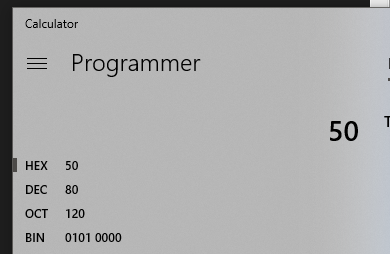
bruh, "80d" is shorthand for "80, in decimal notation" flag 80 is the same as flag 0x050
-
https://en.wikipedia.org/wiki/Hexadecimal The prefix 0x is used in C and related languages, which would denote this value by 0x2AF3. 80d = 0x50, 448d = 0x1C0
-
Refer here. checkflag / setflag / clearflag do exactly what their names imply: checkflag: is flag set (on/off) setflag: sets the flag (on) clearflag: un-sets the flag (off) The script that Rayquaza uses should be obvious based of what is highlighted: SkyPillar_Top_EventScript_239722:: @ 8239722 lockall waitse playmoncry SPECIES_RAYQUAZA, 2 delay 40 waitmoncry setwildbattle SPECIES_RAYQUAZA, 70, ITEM_NONE setflag FLAG_SYS_CTRL_OBJ_DELETE special BattleSetup_StartLegendaryBattle waitstate clearflag FLAG_SYS_CTRL_OBJ_DELETE specialvar VAR_RESULT, sub_8138B80 compare VAR_RESULT, 1 goto_eq SkyPillar_Top_EventScript_239768 compare VAR_RESULT, 4 goto_eq SkyPillar_Top_EventScript_239771 compare VAR_RESULT, 5 goto_eq SkyPillar_Top_EventScript_239771 setflag FLAG_0x1C0 releaseall end Flag 0x1C0 is set when you're done battling, hence preventing him from appearing further. If you search the name of the script, you can see which entity uses it.: https://github.com/pret/pokeemerald/blob/24f6484643ed3d7115fd4ebd92f254f224f1ca97/data/maps/SkyPillar_Top/events.inc#L3 SkyPillar_Top_EventObjects: @ 8537170 object_event 1, EVENT_OBJ_GFX_RAYQUAZA_2, 0, 14, 7, 3, MOVEMENT_TYPE_FACE_DOWN, 1, 1, 0, 0, 0x0, 773 object_event 2, EVENT_OBJ_GFX_RAYQUAZA_1, 0, 14, 6, 3, MOVEMENT_TYPE_FACE_DOWN, 1, 1, 0, 0, SkyPillar_Top_EventScript_239722, 80 If you look at the last parameter for the entity that uses the script (as already described here), it appears its spawn flag is 80d (0x050), this flag is used to hide the entity. Again, like the linked thread, play with the event flags (0x50 & 0x1C0) until you get a result.
-
Someone has to figure out how to do that first; then it can be added. This sub-forum is not for research requests.
-
It's already there, for all versions.
-
There seems to be a problem with one or more of your pokemon
Kaphotics replied to SonicTheGamerHog360's topic in PKHeX
O wow another hacked team trying to play online This forum section is NOT for getting help on why you can't get a Pokemon into online battles. -
pk3DS: Pokémon 3DS ROM Editor and Randomizer
Kaphotics replied to Kaphotics's topic in ROM - 3DS Research and Development
The common method of 'adding' megas is to overwrite the data (sprite, model/animation, learnset, cry, etc) of another species and its mega form. They're usually only done for single use battle hacks, since it effectively deletes existing content. -
Remove the Sinnoh Champ ribbon and you should be good to go; the ribbon names were just swapped https://github.com/kwsch/PKHeX/commit/d19705f5a9c54cebbc0e4e5e837efdcab53981b0
-
kay, added: https://github.com/kwsch/PKHeX/commit/91f39d74db50266d862e24c3839270aa4d765bb0
-
You must be mis-remembering; there has never been scrolling while the box dropdown is not focused. If the Box dropdown has focus, you can use the arrow keys, or you can hover over it and use the scroll wheel. I've checked various versions up to 2 years ago and none had the 'scroll' to switch boxes without focus
-
Would like a Ultra Sun or Ultra Moon save
Kaphotics replied to tguy4001's topic in Saves - Files and Requests
Can always play through that part on your own 3DS & game, then move it to Citra to play on your dumped ROM. -
Nothing has been changed that would impact this; be sure your mouse is currently hovered over the Box dropdown. Can only scroll when it has focus, never had otherwise.
