



theSLAYER
-
Posts
22961 -
Joined
-
Last visited
-
Days Won
1016
Content Type
Profiles
Pokédex
Portal
Technical Documentation
Pages
Tutorials
Forums
Events
Downloads
Gallery
Blogs
Everything posted by theSLAYER
-
upload the save
-
What version is your PKHeX. Make sure it is updated. If you still have issues, attach said save here.
-
 Research allows you to load old and new save to compare. it'll show differences. Best if the save is from directly before and after.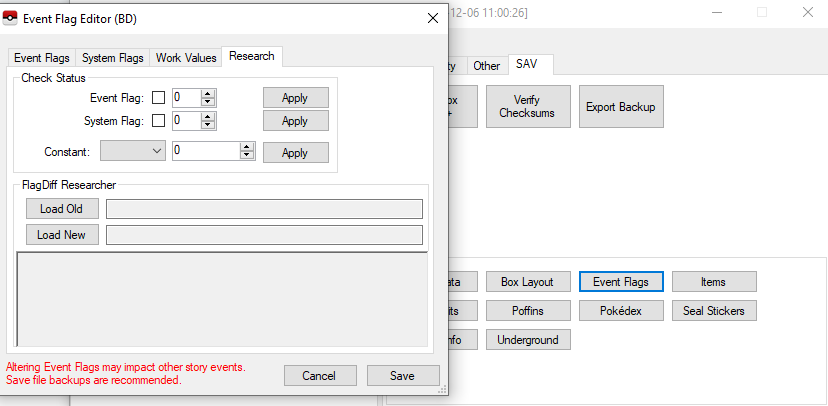
-
I imagine a flag or event constant controls what dialogue should be displayed below. Use a different save to find out what flag/constant it is, then apply the value to your original save.
-
Wild area stuff can roam to the edge, which can bleed over if the player is on the edge. Whether it can bleed over depends on whether Mantyke is model or wild spawn. I’ll check later :3 edit: This specific case has been replicated, It would be in the dev build until ready for stable release.
-
Those are presumably SWSH mons? yeah, the new update is more accurate. Changing the PID and stats randomly breaks the correlation called overworld8. Read this:
-
Piracy. One look at your description and the file and I see piracy. I’m sorry but we can’t legally assist with piracy related questions. Consider buying the game off the eShop, playing the game directly off your home screen, then using JKSM/Checkpoint to back up the save. I’m afraid I have to have the thread locked, as nothing else relating to this can be discussed.
-
Where in Pokémon League did you find it. Before the waterfall? After the waterfall?
-
There’s no Mew wonder card. Also, the legitimate wonder cards are on site. If you can’t use those, then you’re potentially doing something wrong. If in doubt, try using Suloku’s tool for Gen 3 event injection. Should be in our downloads. (I’m out, so can’t link atm)
-
Mod Moon to have Zeraora? Potentially possible but definitely would not be easy. You’re gonna have to go beyond the bounds of existing tools. add via PKHeX to Moon? Not possible as Moon is. Zeraora doesn’t exist in SM. It’s like trying to add non-existent species into SWSH, they won’t show up right. Going back to modding, one of the “slightly easier ways” would be replace an existing mon, as opposed to adding an entirely new one (one that doesn’t exist in the games data). So modify the personalinfo, and replace the 2D sprite, character models and animation. Go with something unused or something you feel is too plentiful, like Eternal Floette or Ash Cap Pikachu. (I said “easier”, but you’ll still have to end up going beyond existing tools)
-
Make sure you’re injecting the right language wonder card into the correct language save. Gen 3 has a very clear difference between non-JPN and JPN wonder cards. The size and formats are different.
-
Confirm what? Using Wild Area News files to make event raids appear? That’s literally why they’re dumped or is that not what you’re looking for?
-
Just download everything in our files/download category. also shifted your post away from event contributions cause you’re personally not contributing anything.
-
yeah if you restored the save and it shows broken, then it is probably hopeless
-
yeah if you do try again, make sure the save is named exactly the same as the one you're replacing in the folder. Delete secure value, then replace the save, then try to delete secure value again. If it cannot be recognized, then it is lost. In the future, using homebrew (JKSM/Checkpoint) to back up the save. Those obtained this way are decrypted, and can go on any device. Don't have to worry about device unique encryption.
-
well I just tried, and PKHeX is not allowing edits to that slot. Guess you gotta stick with Advanced Save then
-
Well PKHeX won’t support saves from hackroms, cause the data can be radically different. Also, just a personal guess unrelated to the devs, if you allow one hackrom, it’ll open the floodgates and everyone will want their hackroms/favourite hackroms supported. It’s just cleaner to stick to official games. thanks for the link, I’ll check it out later. also, you mentioned something about types? Types aren’t in the Pokémon data outside of Gen 1/2, so you can’t edit that via save editing.
-
Can you just upload an image that is directly viewable, like jpg or png? edit: had to use a converter program to view it on my phone (I am out). Sheesh, don’t try to replace the file in your Switch immediately. export onto your Desktop or something, then move it in. Maybe with SD reader, maybe with FTP. Maybe with RCM GUI launching the Switch as drive. Just export onto desktop first. If you read the error message, the issue is with the place you’ve chosen to write to...
-
Just to clarify, from what folder did you get the original 00000001.sav from? and that is the name when you placed it back in right? No asterisk no renaming no nothing?
-
Here’s something you could try. use batch editor to edit the species of that exact slot, to make it an already existing Pokémon. Then check if the other stats/moves show up. better yet, upload the save so I’ve got something to play around. In the future, just upload the image to our site, rather than use a different service. :3
-
Form Count is out of range. Expected <= 0, got 1.
theSLAYER replied to Ash Greninja Fan247's topic in PKHeX
Just grab one from the wonder card (you can drag it into PKHeX) or from the mystery gift database. -
Form Count is out of range. Expected <= 0, got 1.
theSLAYER replied to Ash Greninja Fan247's topic in PKHeX
@Ash Greninja Fan247 Here’s a response from a fellow helpful member on Discord: In conclusion, don’t try to make your own from scratch. edit: I also see you’ve changed your upload? -
Form Count is out of range. Expected <= 0, got 1.
theSLAYER replied to Ash Greninja Fan247's topic in PKHeX
I’m away from the computer at the moment, so I’ll check it later. In the mean time, mind telling me what’s the origin game under met details? -
Wouldn’t they show up as a red square, as opposed to not showing up?
-
Form Count is out of range. Expected <= 0, got 1.
theSLAYER replied to Ash Greninja Fan247's topic in PKHeX
Can you upload the file of said Greninja?
