theSLAYER
-
Posts
22961 -
Joined
-
Last visited
-
Days Won
1016
Content Type
Profiles
Pokédex
Portal
Technical Documentation
Pages
Tutorials
Forums
Events
Downloads
Gallery
Blogs
Everything posted by theSLAYER
-
 Check your %appdata% folder.
 -
Check if the modded cro is saved to somewhere else, that is what pk3DS looks at.
-
I think modifying statics/starters require an exeFS edit? It's been quite a while since I've looked at ORAS files. To be sure, it doesn't stick when you checked via decompile/recompile or via loading the ROM?
-
Oh, was your save at the very beginning of the game? Yeah there's a few fixed encounters sprinkled here and there, and the Wurmple is one of them. If I recall correctly, it is shiny locked, so that your first encounter won't be an impossible shiny (one that you couldn't catch). Well hopefully it is all good for ya now :3
-
I don't think Citra would secretly store a copy of the unedited ROM and read from it. There could be more than one encounter table for the Route. There could be a table for standard encounters, and another for DexNav. Maybe there's one for before the legendary event. It's hard to say, I'm no expert in encounter table editing, but all those seem like possibilities to me, hence why I suggested performing a different change. Or perhaps, go the randomization route, this way all tables are changed.
-
then I got no clue. Maybe try making a different edit. Maybe your edit isn't as unique/noticeable as you think. Perhaps start with performing an edit on a mon. Do a personalinfo edit and change Bulbasaur's type or something. Or maybe change the model of a species.
-
For future reference: 1. Don't make a Pokémon from scratch. Use one from the Encounter Database. 2. When you get PID Mismatch, follow the guides: Anyhow, here's a fixed version: 641-01 ★ - Tornadus - A3116F6598D0.pk8
-
what is no. Neither? Anyway, try using Add New Game Directory. Select the folder that only has your edited game in it. And also, remember to remove all copies of the unedited game from your computer. Give that a try, see if it works.
-
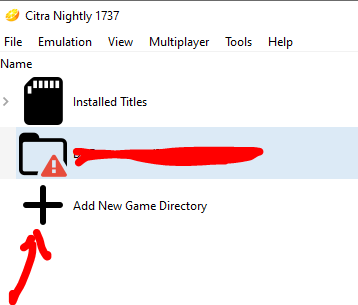
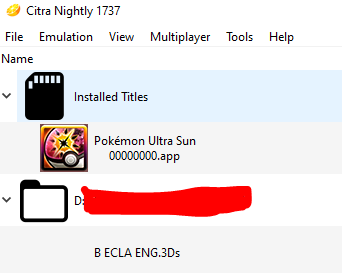
Consider updating to the latest Citra. Also: Does your game fall below installed titles or a <folder name>? (look at my image for reference)
-
Remove the unedited ROM from your computer. Like shift it to an external hard drive or an SD or something. Then remove it. Make sure there's only the edited ROM on your computer, then launch it with Citra. Also, make sure you didn't already install the ROM into your NAND. (maybe a CIA install or something)
-
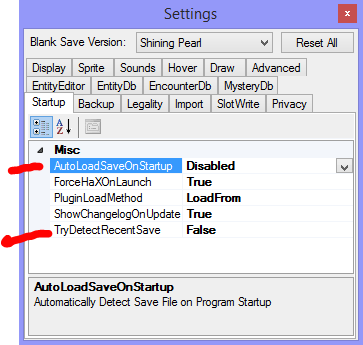
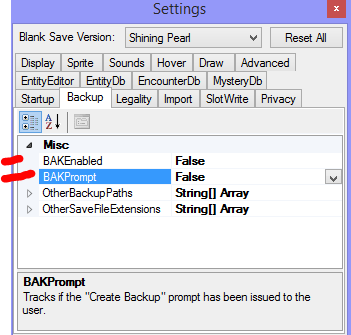
I think these: and maybe
-
Before going big, make a singular noticable change. Then make sure packhack is recompiling the files that pk3DS touches and edits. If you have doubts, get packhack to re-decompile the ROM that was recompiled, in a different spot, then open it up with PK3DS to confirm the change is there. Then, when you're happy that the change is indeed there, get Citra to run the game. Something has to be wrong with one of your steps, gotta figure out which one it is.
-
Stop pinging people. They'll answer if they feel like it. No need to keep pestering them. Save edits cannot edit the ROM. Enough said.
-
Can you inject the save from an emulator into a cart?
theSLAYER replied to DaseR's topic in Saves - Editing Help
As long it is an actual save and the data size is correct it is all good. Also, for future reference, no need to have all caps for titles. -
My rayquaza type become normal not dragon/flying
theSLAYER replied to RaidenRex's topic in Saves - Editing Help
Vanilla. A ROM I dumped. What other Ultra Suns are there? Are you playing on a hacked ROM? Mind taking a photo of your 3DS at a specific spot? Turn it off. Then turn it on. While turning it on, hold down Select. You should see a Luma configuration menu. Take a photo of that. -
My rayquaza type become normal not dragon/flying
theSLAYER replied to RaidenRex's topic in Saves - Editing Help
Did you perform some kind of ROM edit? It loads fine in my game: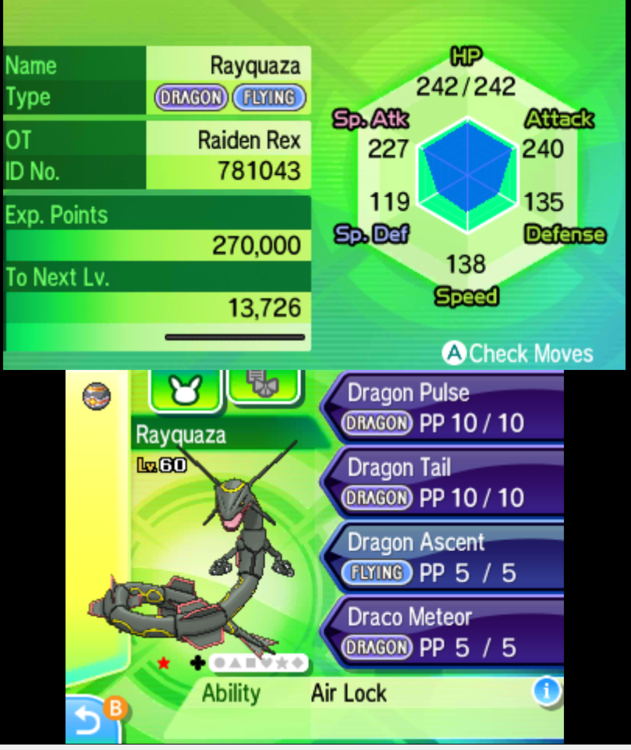
-
My rayquaza type become normal not dragon/flying
theSLAYER replied to RaidenRex's topic in Saves - Editing Help
Standard save editing don't edit types for Gen 7. Mind uploading said pk7? -
Maybe if you read it as "this is not released as a held item", it might make more sense. Well, PKHeX appears to be working as intended. You made it an held item when it couldn't be. Problem solved, for the most part. @Kaphotics just in case you wanna make the error message less ambiguous/different for the Dynamax Crystals.
-
Those items can't be held.
-
Yes. Those species you mentioned weren't in 1.0.0. They were only added in after patches. Update your game.
-
Upload the save. I got a sneaking suspicion you're on version 1.0.0 of SWSH
-
Is it not possible to use PKHeX with an OFW Switch?
theSLAYER replied to Noxillio's topic in Saves - Editing Help
you could just inject the stuff via PKHeX... Functionally the games puts the stuff immediately into the PC/Bag/Underground Bag, so it's the same.. -
Well, you’re creating a new folder cause you’ve never backed up a save before. For the record, those folders aren’t the exact save the game uses. You’re merely “making a copy”. so you can replace the file in “the copy”, then select restore, and bababoom For VC Pokémon, just replace the sav.dat with a valid sav.dat of your choice, and restore. That’s it. For Gen 1, and save file that PKHeX can read should be valid and can be renamed straightaway to sav.dat. for Gen 2, you might need to hex edit the footer bytes; the time stamp stored by emu and cart/vc slightly differs.
-
Yeah can use either. JKSM has a 'Reload Titles/Refresh Titles' option, which helps if certain games don't show up. While Checkpoint is more updated it seems, if installed titles don't show up, may need to perform extra steps to get them to show up.
-
Homebrew. Use JKSM/JKSV (I forgot is it M or V for the 3DS) /Checkpoint to dump and restore saves on the 3DS. Yes, you'll be able to use it. The only thing about your 'colorized' version is that they changed the color and sprites. The save still functions as is. I know, cause I played a colorized Red and imported the save into my VC game.