



theSLAYER
-
Posts
22959 -
Joined
-
Last visited
-
Days Won
1016
Content Type
Profiles
Pokédex
Portal
Technical Documentation
Pages
Tutorials
Forums
Events
Downloads
Gallery
Blogs
Everything posted by theSLAYER
-
 Don’t place the 00000001.sav into JKSM. That file an encrypted and wouldn’t work for JKSM. Also if it’s encrypted it won’t load in PKHeX etc. JKSM import/exports decrypted saves. consider trying this: (Read and follow every step) for the step that requires you to “place the 00000001.sav” into the folder: which language or Pokemon blue are you playing? The ID will be different.
 -
Unlock all funfiesta missions
theSLAYER replied to jojo12100's topic in RAM - NDS Research & Development
Since I came around back to this, I probably should give an update: Background: I forgot which leak (Freak?), but Pokémon Black 2 and White 2 source files were leaked. My understanding is that the files were similar to using GitHub; a repo with a bunch of raw disassemblies, with detailed changes across the entire developmental timeline. To obtain a ROM from those file, one got to check out the files at the wanted phase within the development process, and to compile and build them into a ROM. Among them, a "fes rom" was found; it was a way to distribute funfest missions via Local Wireless. The original rebuilt game only appeared to work with other B2W2 debug ROMs. Unclear if this was an issue due to the revision or due to the way it was built, as another copy named "SWAN r59981 2012.06.11 [fes rom]" could communicate with retail carts just fine. fes rom is a branch from partway of the development timeline. Observations (from what I could gather online): -- I think that's about it for now. I've not seen anyone try to share/load Funfest missions via a RAM hack or with a custom ROM (using Binaries not obtained from the leak), and I don't expect much development from looking into this. The only other things I've seen are: (1) the existance of an English patch (technically useless to us so not sharing), and (2) unrelated to fes rom, it appears some missions were possibly meant to also be distributed as wonder cards. Independant finding from theSLAYER and Eclipse (Files from Eclipse: Berry Festival! (Funfest Mission).pgfGifts from Pokemon Center Women! (Funfest Mission).pgfEndless Battles! (Funfest Mission).pgfPokemon Quiz Championship! (Funfest Mission).pgf). Reminder to not ask for any ROMs, not allowed here. -
And the first post was updated in 2017. We still do have user ranks/badges.
-
HOME Menu Sprite Index is missing Bloodmoon Ursaluna
theSLAYER replied to NeoBones's topic in General Development
done, thanks -
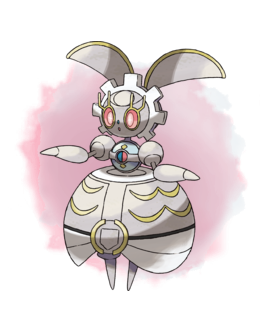 These weren’t distributed in Bank. you take the game, scan the QR code in-game, and an NPC gives it to you. as long as a copy of the game exists, and the QR exists, there’s no end date.
 -
I don't know where else to ask Master Balls
theSLAYER replied to erick6740's topic in Saves - Editing Help
As far as I’m aware there hasn’t been bans for basic item manipulation in SV. -
Is this the original corrupted save?
-
Yes you won’t be the “true OT”. Do note that’s shinification via TID/SID is easier and more likely to work. if you’re still interested, any Shinification, follow path (1) instead of (2). Do not aim for flawless IVs or anything crazy.
-
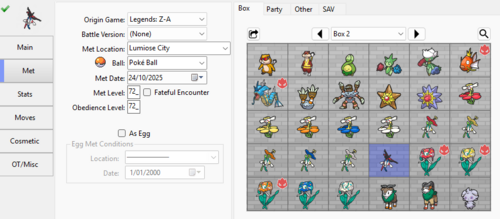 It will. Part of the point of doing it
 -
I lost my save on Emerald (GBA) due to corrupted data
theSLAYER replied to BugBoi's topic in Saves - Editing Help
Start with extracting the save file from your game. https://projectpokemon.org/home/tutorials/save-editing/managing-gba-saves/ Read through the options. If you’re sure it’s a reproduction card, use options to extract the ROM instead of the save. once you’ve extracted the relevant data, we can move on to the next step. (I’ve also seen you’ve gotten responses on Discord) -
As mentioned ID is wrong. Also IV boosting incorrectly can cause hacks, this thread isn’t for helping you with hacks.
-
there should be a battery folder in your desmume folder.
-
On our Discord server, you were permabanned for piracy
-
removed the nds filem as that is likely the ROM. To edit the save, you need to drag the .sav or .dsv into PKHeX, not the nds.
-
You shouldn't change the OT cause the data was saved to HOME servers.
-
 The seed used by the game/distro to generate stats for the mon.
 -
Switch saves are not allowed to be shared.
-
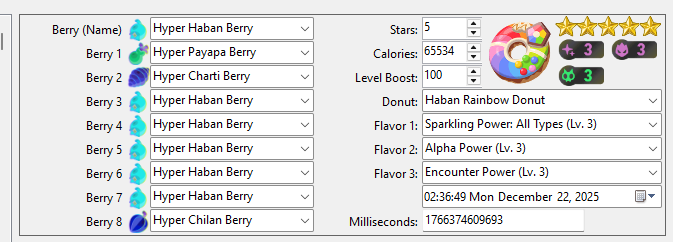
As a follow-up, I've hacked a donut to be this, and it stayed as such in-game.
-
Interesting; I wonder if it’s a game mechanic where only certain calories or type of donut that allows for all types (provided PKHeX is working correctly)
-
Usually having a mismatched main and backup wouldn’t cause issues. Did you happen to rename the files? Did you give big amounts of a particular item? And how were transferring the files from Switch to PC?
-
So, there’s a thing with clothing, where unlocking the flag isn’t enough, you’ve got to visit the shops that sell them too, for them to show up in game. While I don’t expect this to be the case (I’ve set mega stones into my bag before), maybe there’s something similar. Visit the Stome Emporium and Quasartico, then check your bag.
-
Just a few questions for clarity: did you edit items correctly? (To test, add some other item to satchel) [asking cause I was able to do it one PKHeX version prior] are you at the correct version update of the game? (What mega stones were you trying to add, etc)
-
Should be the ID here https://fxtwitter.com/Sibuna_Switch/status/1999377573713985633

