theSLAYER
-
Posts
22959 -
Joined
-
Last visited
-
Days Won
1016
Content Type
Profiles
Pokédex
Portal
Technical Documentation
Pages
Tutorials
Forums
Events
Downloads
Gallery
Blogs
Everything posted by theSLAYER
-
Hold the buttons in-game at title screen.

-
@Giazardon There’s actually really limited data in the Hall of Fame. The tool basically re-genning/recreating the Mon (it is nothing like rescuing the Mon from some long lost corner of the save) Without much valid info, (and given my code isn’t that smart nor am I motivated enough to deal with odd cases) that tool incorrectly (for this case) gave IVs that would lead to Method 1. You could use Pokefinder to find the correct IVs it should have (I don’t remember the algo for PIDIV 10ANNIV should have, but looking at a copy from the mystery gift database should inform you)
-
 As long as it works, it’s all good! :)
 -
Hey, so after hours of head scratching, I've got something up. During my tests, it don't seem to work fully properly for Japanese saves, but it should work. Also, the auto legality isn't fully working. In most scenarios, it appears to work, but there's always something that trips it up. Best if that is done manually Tested to (mostly) work on the latest PKHeX Dev build. BattleTower.dll
-
 If you look at the top of the window, it says you’re on blank save for USUM (generation 7) I don’t remember what the location should be (probably Event), but that correct event location only shows when the mons are in the original generation; you got Johto cause PKHeX simulated the transfer process and that’s the location it would have gotten (the location gets overwritten naturally during the transfer process) To see the correct location; you gotta load up a Gen 2 save (or change your default blank save to Gen 2, in options for PKHeX)
 -
Are you opening the PK2s/PK3s in the default save? it sounds like you’re opening the PK2s in Scarlet/Violet.
-
To rephrase what was said, PKHeX makes an educated “best guess” of the original encounter, and doesn’t actually write anything to file.
-
Pokemon GO legendary collection
theSLAYER commented on TiffanyDarlet's file in User Contributed PKM files
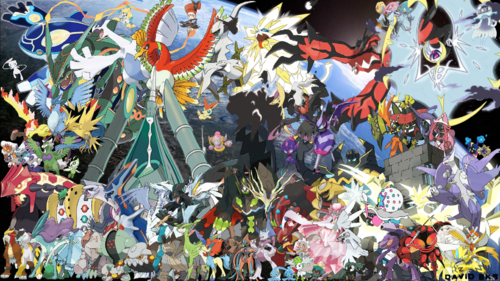 GO transfer restrictions.
 -
This is just for you to test whether you actually injected the save into the ROM. As per the other thread, your FlashGBX appears to be able to write to ROM in carts. So maybe make sure the the save edit is actually edited into the ROM first
-
Just to make sure I'm not misquoting or misremembering, I went through the videos, and found the information stating that the NR reader and Writer (the other device I was talking about) being needed is at this timestamp and can be read on screen. This is the timestamp for the other video with the portion describing what happens when they tried to emulate the program on a non-NR GameCube and a Wii, and also what happens without the reader, and eventually him dumping a regular GBA bios (the confusing part). Yes, I do hope the memory cart surfaces. Hope these timestamps can better provide the answers you need
- 56 comments
-
- 1
-

-
- pcny
- pokemon center new york
- (and 19 more)
-
So what you should do is delete any save (for that game) in the VBA directory. Load the VBA game with the edited ROM. Do NOT continue the game with state saves; once the game launches, just let it naturally run and reach the continue screen.
-
I had a feeling your question was related to that. I hope you don’t take this the wrong way, but I would like to correct the misconception that having the memory card is enough: (1) one will need an NR reader device to be able to do so [and I’ve last heard that emulators weren’t willing to add NR functionality due to litigation risk], and (2) IIRC there’s an extra piece of hardware that is needed for the game to fully load, and it remains a mystery; I recall it being confusing when the dump of the data showed it contained nothing more but a regular GBA BIOS (as seen on Hard4Games’ video) Therefore, ignoring the fact that the memory card dumps aren’t public (would be interesting to preserve if they were, and I’m all for them being public), while it is true that data is needed, having it alone isn’t enough. Also, I sincerely hoping you weren’t actually talking about piracy, cause else And lastly, the user left the community and quit Pokemon. It’s unlikely you’ll get a response.
-
It appears that save injection may not have worked, but we do not know for sure; I'll recommend using a different name to test on VBA (in case VBA dumped the save separately and is reopening the game referencing that, do not use state saves when continuing the game, and will probably have to re-extract another save from the edited ROM and check it with PKHeX to confirm whether it actually got overwritten. As for general advice on the steps to do the "flow", to be honest, not everyone has the same repro cart, nor interest in extraction/injection, so you may never get a proper answer. At the very least for now, you probably won't need anyone other tools besides GBFlash and my tool. Whatever you intend to do, make sure you have a safe unmodified back up stored separately. Also make sure you keep a record of all the details, like the save type, SRAM location, cartridge type etc (in case you ever need to try to restore it). Whatever you do, it'll be at your own risk
-
Pokemon Emerald Bootleg cart help
theSLAYER replied to Kittfox's topic in Saves - Files and Requests
So I've read your other thread, you used this thing called "GBFlash" Is it unable to reflash roms? I've read on GBFlash, and looks like it was created with FlashGBX in mind (even your screenshot appears to show that) It looks like you can choose the type of cart, and choose to write ROM, those does not work? (remember, anything you test would be at your own risk)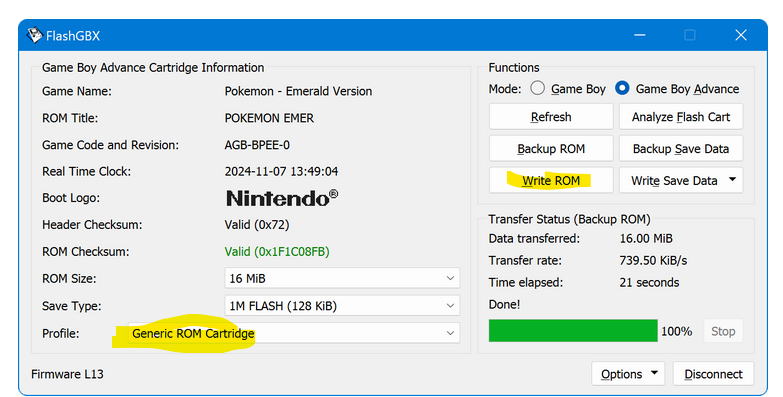
-
Quick question, what good would be loading just that memory cards? I’m curious.
-
Also, illegal material. Locking this thread.
-
Can't help you with the list, but: 1. We have a hub showcasing images we could gather. 2. If I recall correctly, eBay has been trying to get rid of these stolen entries. They still show up from time to time, though. 3. However, you probably shouldn't buy them anyway. There's public tools to replace data on a dev cart with a publicly leaked ROM. Meaning, anyone can fake Gen 3 event carts.
-
HOME is not known for rigorous checks, nor is it known for banning accounts with blatant hacks (for example, I’ve seen Shiny Victini remain undetected). For the most part it appears like it’ll be fine However, anything else in your setup or process could get your Switch profile or HOME account banned. I can’t give guarantees, and can only advise you that you’ll be doing it at your own risk. (keep in mind that they can take action retroactively if they so choose, and they pretty much log everything)
-
This code can be bypassed, but you’ll need a encrypted OTP from another device. https://gbatemp.net/threads/release-luma3ds-mod-to-unban-a-console-with-022-2812.565173/ For now, try unlinking the NNID step, and see if you’re get past it via making a new one (without OTP swap) edit: this seems to be more current: https://gbatemp.net/threads/release-luma3ds-mod-to-unban-a-console-with-022-2812.565173/page-4#post-10371677
-
What is the full code? Anyway in the meantime, being able to access eShop is probably good news. Go to your System Settings and try to set up a new NNID (I assume there isn't one) You also may need to update to latest firmware, make sure you update the CFW files first
-
Have you tried connecting to eShop recently? Or booting Bank? Checking just to check whether the ban is still enforced on your unit.
-
Your limiting factor would be an authentic HOME tracker on each mon. Only way to obtain it (for those mons) would be to legitimately go through bank and into HOME. Try to find ways to unban your 3DS (use an unblocked Local Friend Seed for connectivity) and pray that is enough to connect to Bank [provided you have connected before] (they appeared to be lax with some old ban criteria and some units can be unbanned this way). if your modded Switch and Switch 2 share the same Nintendo Account profile, you can transfer mons easily consoles easily, as both will connect to the same HOME account.
-
Can a cloned Zeraora shiny go to HOME without issues ?
theSLAYER replied to Darby's topic in Pokémon Legality
While detectable by HOME (if they specifically look for the info) right now if you insert something with a cloned tracker, it just assigns a new tracker. They could do anything retroactively but right now it doesn’t penalise the player. All at your own risk (and the risk of the accounts) -
Filling Pokemon Home without finishing the game
theSLAYER replied to KwassiMD's topic in Pokémon Legality
Yeah, champions being in 2026, you’re not pushed for time. It is considered slow, but I only replayed scarlet over the past week (I think 2 hours per night) and I’ve cleared the true ending (excluding DLC), in order to fight 5 star raids (for Shiny Wo chien) Having the DLC helps, and also a having a second Switch with a completed save helps. Even before the first gym, locally invited my new scarlet save to do some 5 star raids so that I have some level 75 (not that they’ll obey outside raids, but good to have), as well as obtain some EXP candy. Then went to the DLC maps to try to catch some stuff (also for EXP). At Blueberry academy, you’ll have the ball vending machine, which pretty much unlocks balls that would have been stuck due to story progression. Went to Medali to get Amulet Coin. After all that, attach the Amulet Coin to your starter, EXP candy it till level 60-70, then breeze through the game.