



theSLAYER
-
Posts
22959 -
Joined
-
Last visited
-
Days Won
1016
Content Type
Profiles
Pokédex
Portal
Technical Documentation
Pages
Tutorials
Forums
Events
Downloads
Gallery
Blogs
Everything posted by theSLAYER
-
 Could you provide the results of what you’ve acquired too?
 -
Mew legallity between game languages with same Trainer ID
theSLAYER replied to rukkun's topic in Pokémon Legality
Possible in theory but chances are so so low that it would have to be faked. What you could do is just start a new Japanese game, to get the TID/SID/check what possible OT you could type out. Then use replace the trainer details on the copy of the ENG save you’ll use in a JPN game, then to catch the Mew. -
Mew legallity between game languages with same Trainer ID
theSLAYER replied to rukkun's topic in Pokémon Legality
In its own bubble it will be legal (and PKHeX will flag as legal), but when you account for everything in the save/in the world we live in outside of the game, then it’s actually illegal (have the Mew in the save with *any other Eng Pokemon that shares your TID/SID*, then use Verify PKM button, and the output would flag it.) However, nothing stops you from keeping the Mew, even if it’s illegal. If your OCD stops you from owning anything illegal, then RNG the TID/SID. This way, even when it is flagged illegal/fishy, you can rest easy. -
Modifying dynamax raids to choose what pokemon to spawn.
theSLAYER replied to Bryansouza87's topic in PKHeX
To be honest once you get used to it it’s not hard. Time consuming, potentially but not as bad as actual max lair. I mean anything can OHKO anything, even your partners. if you’re stuck with certain party members, you can always raid something else first, to get it to refresh on next run. -
Have to use Scarlet for Miraidon. tho you could always inject it then switch the origin version after
-
Maybe give this a try first
-
Pokémon from Go with Home Trackers
theSLAYER commented on Jacs26's file in User Contributed PKM files
 Try importing this drag to the left side of PKHeX
 -
Modifying dynamax raids to choose what pokemon to spawn.
theSLAYER replied to Bryansouza87's topic in PKHeX
To my understanding, hacking the team is a pain. It is much easier to use a cheat that guarantees 1 hit knockout with any attack, but keep in mind the raid boss can OHKO you as well. So the entire Dynamax lair becomes a different game, where you try to get rental's with high speed or moves with priority. -
It’s not that the extractor failed, it’s that Gen V hall of fame doesn’t contain all the data.
-
Does anyone have the data for Japan's “Mysterious Gift Shiny Koraidon”?
theSLAYER replied to OPPAIMANKO's topic in PKHeX
-
Glad to hear it is working for you! 1. I dunno if I mentioned what you did somewhere (or if I recommended it somewhere) but yeah GM9 .code extract doesn’t work. I should state that clearly in the tutorial 2. yeah I had to ping pong between various versions of the command. I should upload it just in case. Thanks! I understand, I was playing around with the game and was happy to find SciresM’s tweet and get it to work for other games.
-
I’m assuming you’re using the ROM of your bootleg card, and maybe there’s issues relating to saving for the bootleg ROM. You’re gonna have to check that out yourself
-
I have sent them the hidden posts, and they will judge whether those were justified bug reports. Have a nice day.
-
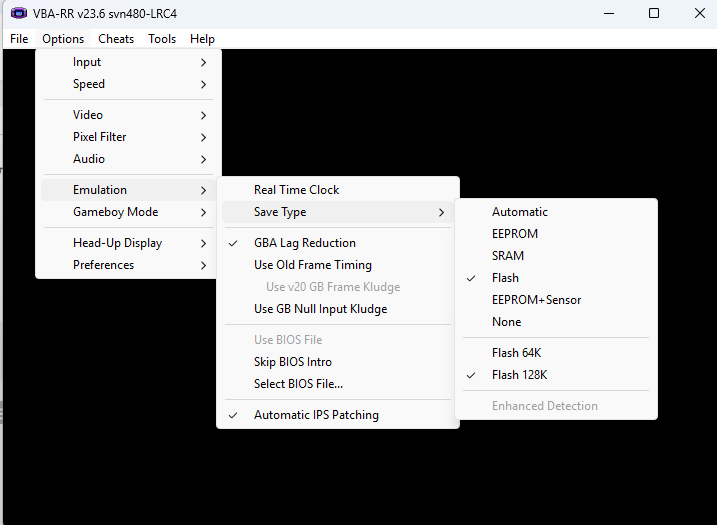
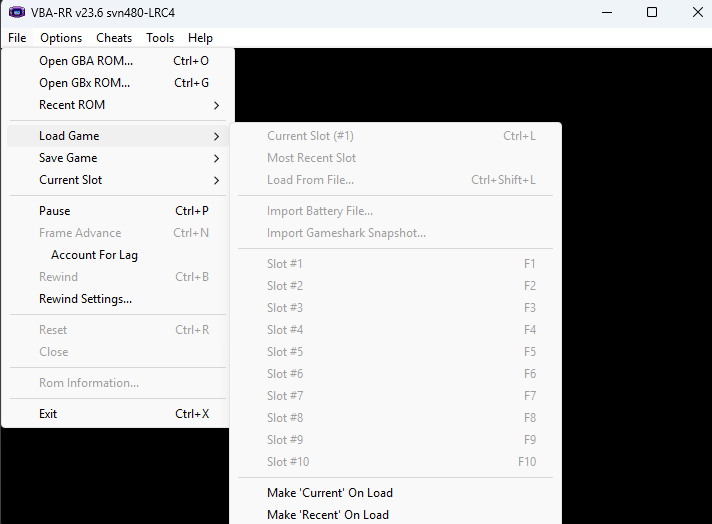
I think the size you're looking at should be right, to problem may be what save size the emulator expects. For VBA, it should be something similar to this (I'm saying similar because I'm aware there's different versions people use) Once you're done, launch the game. Even if the save doesn't launch right, select "Import Battery File" (it is currently greyed out for me as I am not playing anything) then soft reset the emulator. I don't use mGBA so can't help there, but the options should be something similar I reckon.
-
might be an issue with the settings of the emulator, or settings related to importing the save. It probably is importing the save in the wrong size (given PKHeX can read it..)
-
@Dydycrow your post has been moved to a more appropriate location. Please do not create another thread asking the same thing. Also, we aren't the creator of the ROM hack, nor have they been here in a long time, so I'm not sure you'll get your question answered.
-
Okay everyone. I have been summoned here. I don't care who started it. I don't care who retaliated. I don't want to hear any explanations. Just stop. I just have one clear message: Any further rude or aggressive behaviour, and you'll get official warnings, that can and will lead to bans. And for goodness sake, just report actual bugs and give brief words of thanks. There is no need for a wall of text; ain't nobody got time for that. @Alphadaemon sorry to hijack your thread, but it's been getting so out of hand that members have been reporting the current debacle. Anyway don't be bothered by it (I've hidden the posts), and carry on with your good work
-
so upload your save. For transparency sake, I intend to import the "spedrun save's event block", as mentioned at the beginning of this thread, into your save.
-
 Some information here: http://pokeaogtytnsy.blog70.fc2.com/blog-entry-1070.html
 -
Try saving once in PKHeX. When you use the save manager to restore the save into the 3DS, make sure it's named "main" (with no extensions) in the folder, and there's nothing else in the folder. Also keep a back up of what you have in the SD card, just in case.
-
Any chance that you’re mixing installations, or copying PKHeX.exe into a previous/existing PKHeX folder? You could already have plugins there. or maybe you didn’t install from our site? Being sincere here, PKHeX doesn’t come with plugins.
-
Not that you’re likely to get trades, but with the Nintendo NDS network down, you probably also need to mention what alt DNS you’ll be on.
-
How can I contribute to the technical documentation?
theSLAYER replied to RenegadeRaven's topic in Project Pokémon Feedback
Like.. even years after the fact, when it all seems irrelevant, people showed up and tried submitting faked cards, and tried to pass it off as real. https://discord.com/channels/343093766477053953/631819428882808833/1062301384667574342 -
How can I contribute to the technical documentation?
theSLAYER replied to RenegadeRaven's topic in Project Pokémon Feedback
If I recall correctly, I believe you’re right. It has been left untouched, partly due to my fear of people creating fakes, and partly due to inactivity on my part. I suppose for now you can leave all your findings and link to the relevant document, and I’ll review it and edit into the link, if necessary. If you need a new one I’ll create it. -
Depends on where you get the gift from. Check whether the one you're using has a tracker before you initiate the trade. Do note that some Sysbots use a setting that disable the tracker, which could be what you're using. You're going to have to source a reliable sysbot server that doesn't use that setting,=.
