



theSLAYER
-
Posts
22865 -
Joined
-
Last visited
-
Days Won
1001
Content Type
Profiles
Pokédex
Portal
Technical Documentation
Pages
Tutorials
Forums
Events
Downloads
Gallery
Blogs
Everything posted by theSLAYER
-
This doesn’t seem related to any other software hosted here, but that’s presumably why you’re posting in off-topic. Hmm, could be related you copying between two different drives? I know if an external or SD card isn’t setup to do so, deleting the file won’t send to the recycle bin, but instead get rid of it entirely. So in part I think it’s doing that. The other part is probably you shifted it from another location, so when you Ctrl-Z, which is to undo shift, it isn’t able to return to the original location, so it yeets the file. And since it deletes it, there’s recycle bin, as per first part. Of course, that is just my guess.
-
Presently no save - wonder record verification in place has been observed.
-
If you do all that, it’s OFW on Sysnand and CFW on Sysnand. It’s both Sysnand. You won’t have to worry about linking at all..
-
You aren’t supposed to link the saves. You can try by updating the Sysnand firmware to the latest (that can use CFW), then make Emunand based on your existing Sysnand. Use the same user profile on both nands.
-
You can load it in Emunand if you prefer. I’m CFW + Sysnand + online. I don’t block Nintendo servers, cause I use them. I used both at some time or another. I’m unsure which one I’m using right now; I’m assuming Checkpoint.
-

added alolan decidueye to arceus, and its showing an egg.
theSLAYER replied to smd's topic in Saves - Editing Help
To elaborate, Pokémon with moves that don’t exist, or species that don’t exist, will become an unhatchable egg -
It’s a bug. As long as you don’t pirate stuff and install nonsense it should be safe using CFW online, so you won’t have to worry about linking. I’ve been on CFW-only + online for years…
-
Seems that way. Just make sure you have sufficient time differences between connecting online with said changes
-
That’s save, not ROM. Which would be correct: PKHeX is a save editor, not rom editor. don’t use state saves. Save using the in-game menu. Make sure you’ve received your starter.
-
Yeah the party data look garbled to me
-
Give it a try, let us know which it is.
-
try finding the flag here: https://github.com/pret/pokefirered/blob/cd4462f58cce785f408af26a7a3b11ad08575a5a/include/constants/flags.h
-
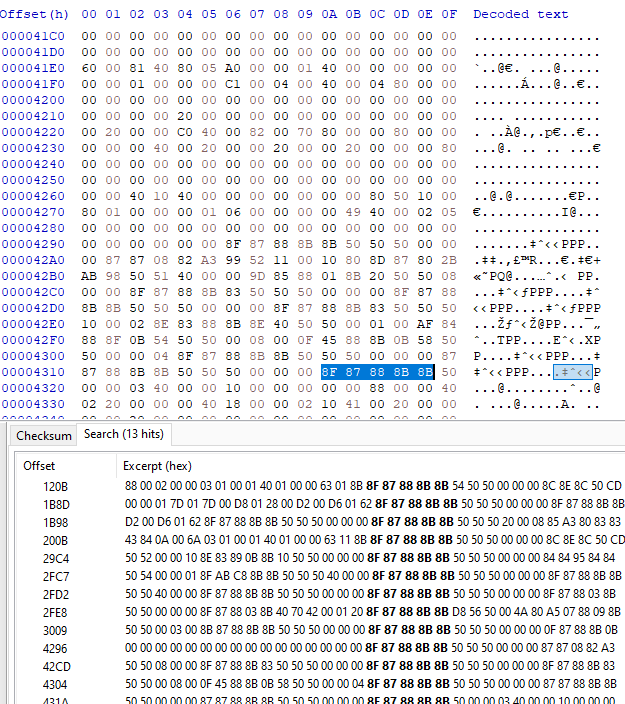
I Gen 2 encoding, "PHILL" is 8F 87 88 8B 8B I tried searching for that and: It appeared a couple of times. Some data might be in there. I'll need to dig more. EDIT: Yeah it's not looking any good. PKX extractor dumped a bunch of nonsense from your save too. Is there a Pokemon you're sure is there? Maybe I could looking for it? EDIT2: This is what you potentially could have had in your party. Is this correct? Size: 6 Member 1: Magikarp Member 2: Vaporeon Member 3: Eevee Member 4: Gyarados Member 5: Scizor Member 6: Bellsprout Data structure reference, List reference Edit again: Once again, trying to import even one party mon seems useless. It seems that all the mon data may be scrambled to begin with..

-
I'm guessing you genned them incorrectly. PKHeX can simulate transfers properly. Upload the PK3 here, I'll show an example.
-
Yeah that’s what I was saying. You asked for these 2 specific patterns and I replied to that XD Well, to reiterate a few points to clear the air: - None of GO Spinda's can enter HOME - As a result, none of GO unique Spinda patterns can be genned - Presently HOME <-/-> BDSP (For Spindas)
-
Spinda can’t be transferred from GO to HOME. Because many of such “patterns” don’t exist in the games. Thus no one can Gen them for you.
-
PKHeX isn’t an application for the Switch. It’s to be used on PC. However, you as it is a Switch lite, you won’t be able to use soft modding to grab your saves off the device, for use with PKHeX. Saves obtained in such a fashion are encrypted. Meaning PKHeX can’t read them. They thus can’t be modified. You’ll have better luck trading them to a sysbot, and getting it dumped in a format PKHeX can use.
-
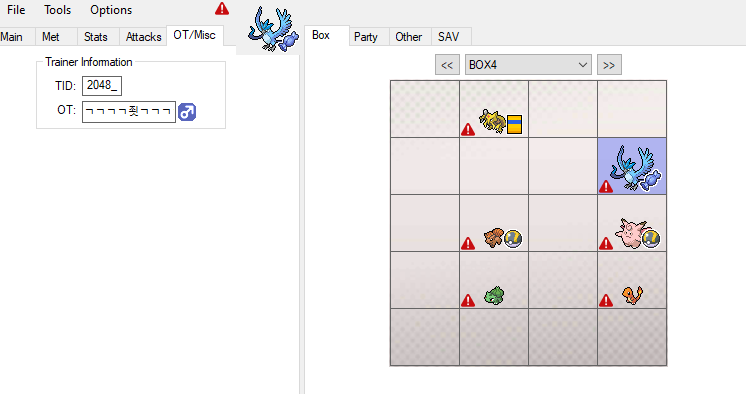
If PKHeX won’t read it, then chances are it doesn’t have a save inside it. I can take a look later, but this is not looking good Edit: Looking at the Box data alone (based on box data offsets in a regular save, then transplanted it into my save), it doesn't look right: As a last ditch effort, can you give me the exact trainer name? Including capitalization and symbols (if any)
-
Does following the steps in the tutorial I linked you in another thread not work?
-
Find Shiny Rate Offset for Black & Black 2
theSLAYER replied to Senbuza's topic in ROM - NDS Discussion & Help
I’ve already answered you twice. No need to post everywhere -
Changing the amount of Rerolls, Pokemon BW2 does
theSLAYER replied to RetroGallade's topic in ROM - NDS Discussion & Help
I’ve also answered you in Discord. Also to answer the original question, no, there doesn’t appear to be an easy way to do so right now. I’m not even sure if people attempted a “hard” way to do it. -
for what game are you reporting the issue?
-
Cheat codes are not ROM hacks. They are RAM hacks. Also, one thread for the same thing is enough. Your thread has been moved. Cheers.
-
There could be more than one flag tied to this event. Do you still have a save from before it was activated?
-
1) did you enter the Hall of Fame legitimately? 2) did you receive the National Dex legitimately? 3) did you receive the Enigma Stone from a wonder card (as opposed to directly injecting item to your bag) 4) did you bring the Enigma stone to the museum to be researched 5) and if all of the above is ‘yes’, are you playing on an emulator? Edit: you said reactivate. So you’ve already activated it before?


