theSLAYER
-
Posts
22961 -
Joined
-
Last visited
-
Days Won
1016
Content Type
Profiles
Pokédex
Portal
Technical Documentation
Pages
Tutorials
Forums
Events
Downloads
Gallery
Blogs
Everything posted by theSLAYER
-
I'm not a code dev, though I could do a few simple searches. What's the purpose of winning? For prizes or..? First page of google:
-
Edit what about a Pokéthlon? Scores? If it's editing stuff like scores or what is unlocked (stuff on saves), it'll need to be research by someone (not sure if any has been done). If no one is interested enough to do the research, then it can't be implemented. If it's stuff like changing your score partway through the game, or changing difficulty of a game, that sounds like RAM/ROM editing.
-
 No worries! Also if you unset Shauna's Traded flag ( Post game Shauna Traded: 0094 Set, as seen from here), you'll be able to trade with her
 -
Give this a try. You'll be in Geosenge City, and you need to go into Flare HQ and start the legendary cut-scene Also save must be named main to be reimported corrected Potential side-effect of my edit: Shauna trade may be not possible to do in post-game. Some NPCs may already be battled. If you play this save on Y, you'll notice the Ultimate Weapon's design is the one in X. (Encounter will still match the game you're playing tho, so no worries there) Added one Master Ball for good measure (after all, I did not buff up your team, and you'll have to fight Lysandre after the legendary battle..) main
-
How bout this: Import only one Pokémon (drag it into the box), and see if it crashes. Try this single import a few times along the story, to be sure: 1. at the beginning 2. after you reached PC and have access to boxes and saved. 3. after you received Poké Balls and caught a single mon. Presently, I do not know what point is the point where "earliest point we can import pokemon"
-
I previously mentioned this, and I'm not sure if you tried: Run all the way to the PC, access the boxes, then try to import Pokémon.
-
SM USUM - Pokémon Secret Club Shiny Necrozma
theSLAYER replied to theSLAYER's topic in Event Pokémon News
Using the past 2 generations history, shiny legend events have left Japan (Rayquaza, Mewtwo, Xerneas, Yveltal, Zygarde, Tapus), but shiny mythical events have been inconsistent (Jirachi, Genesect, Arceus, Diancie). I say chances of a Shiny Necrozma leaving Japan is mediocre, but the existence of TCG card (and it getting translated) would boost it up to likely. -
user error: legal move marks Pokemon as illegal
theSLAYER replied to shadowofdarkness's topic in PKHeX
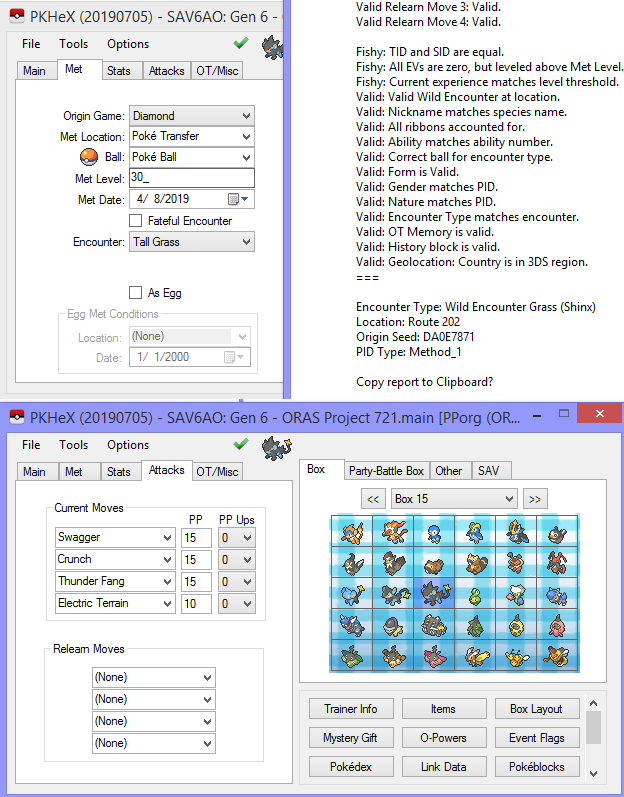
@shadowofdarkness look at it's Met Level. When transferred using Pokémon Transfer Lab, the met level of transferred Pokémon gets updated. Meaning this is now the level it entered Generation 5. Meaning, the Luxio was transferred at Lv 4. This means: 1. It was transferred as a Shinx 2. Since it was transferred at Lv 4, it could not have learnt Crunch at Lv. 29 in DP (cause it was no longer in DP at 29). PKHeX is working as intended. erm.. In Gen 5 and Gen 6 games, Shinx can learn Crunch at Lv. 33, of course changing that would make it legal lol.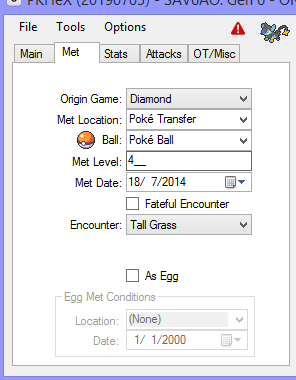
-
user error: legal move marks Pokemon as illegal
theSLAYER replied to shadowofdarkness's topic in PKHeX
upload said file, as I'm unable to replicate your issue Literally Lv. 30 Luxray with Crunch from Diamond, in a Gen 6 file.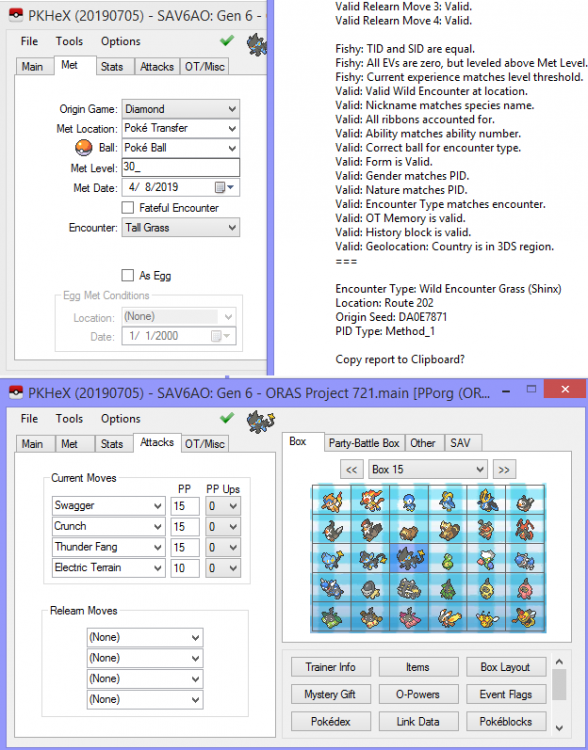
-
SM USUM - Pokémon Secret Club Shiny Necrozma
theSLAYER replied to theSLAYER's topic in Event Pokémon News
I think you talking about Bank formatted blank space data. It used Gen 5's Ash Zekrom, but had Light of Ruin and Fairy Gem. that's probably 1 scenario we can't be certain if there were going to release it.. -
If you already have an XY save, I should be able to paste in story flags at that stage.
-
 Okay, try reaching the Pokémon center, access the PC/boxes, THEN do the mons import, and see if that helps. I wouldn’t try to use a USUM save on SM. Different story flags and stuff..
 -
1. Start a new game 2. Export the new file. 3. Dump all Pokémon from this file into a folder 4. Import all Pokémon from the folder into new file.
-
SM USUM - Pokémon Secret Club Shiny Necrozma
theSLAYER replied to theSLAYER's topic in Event Pokémon News
While I am 100% on board with being realistic and not creating expectations way too high for oneself. Tho I gotta ask, what event would you be referring to? (Long post in spoiler, not entirely relevant): To end off this long post: I do agree with Hello, it's me to an extent, being: the event may not get released as it is. Maybe the OT changes, or maybe it's no longer Necrozma. Or maybe it's no longer shiny. While there is no history to back it, they may decide to scrap the entire idea (despite the fact that we know they intend to release 'secret prizes' based on registration tiers achieved) People should be wary, and be aware, that nothing is final until it is actually released.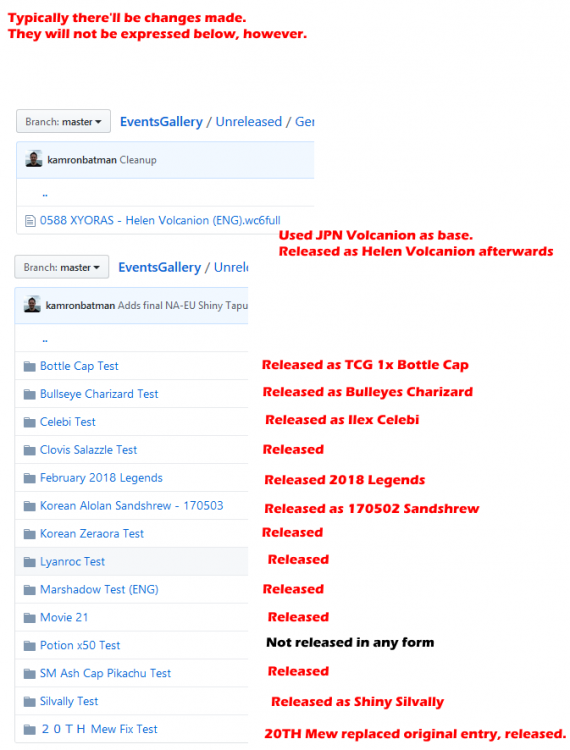
-
Version .
5125 downloads
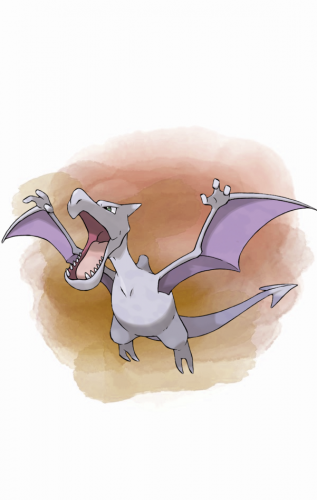
This gift was distributed via Local Wireless to players who went to the 2019 Pokémon World Championships, held at Washington, DC, in the United States, between August 16 to August 18, 2019. Species Aerodactyl Nickname (default, save lang) OT Worlds19 TID 081619 Distribution Local Wireless Location a lovely place Dates Aug 16 to Aug 18, 2019 PID Cannot Be Shiny Games All Regions 3DS: SM USUM Lv. 50 Nature Random Ability Unnerve (HA) Item Rare Bone Bundled Item None Card Per Save Only One Allowed Moves (ITALIC means Relearnable) Ancient Power Rock Polish Wide Guard Celebrate WC ID 685: 「Unearth Aerodactyl’s primeval power!」's receiving text 0x1A Thank you for coming to the 2019 Pokémon World Championships! Please pick up your gift from the deliveryman in any Pokémon Center. Event Unearth Aerodactyl’s primeval power! Watch out overhead! Leave your opponents in the dust as you soar into battle with this terror of the ancient skies. Format Ver.1.0.8-2, Post Updated Date:20190817_0034 -
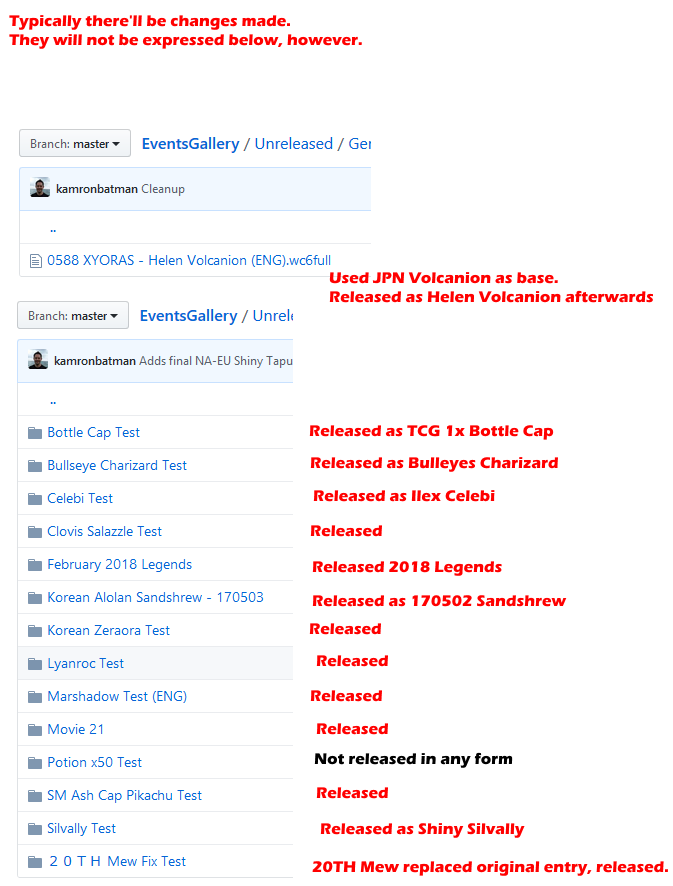
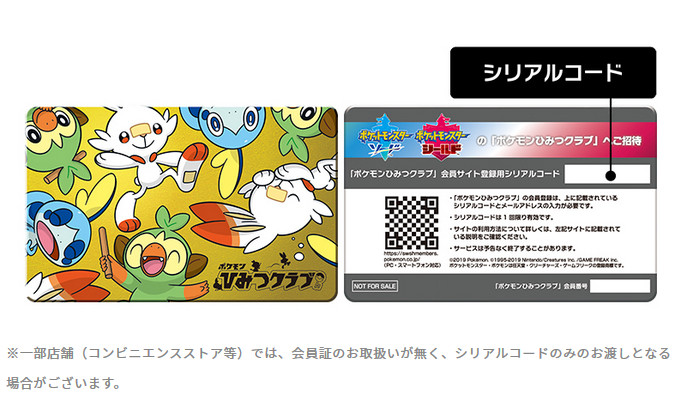
Before we spiral down the rabbit hole with various other details, it is important to note this is a file that was uploaded onto the Mystery Gift servers and subsequently removed by the Mystery Gift staff. While there has been wonder cards that has had details changed between their testing and official releases, most of the time the event itself does get released, regardless of it being fully unchanged or in some other way with some alterations. Of course, there *is* a chance they decide to change the event altogether, it is important to note that this post is to report about what was uploaded, and at the very least, they intend to have a Secret Club distribution. Edit, as of 23rd August: Secret Club is officially teasing the Shiny Necrozma, so the event being pulled is rather unlikely now. /edit Edit, as of 30th August: Officially announced /edit The event found A wonder card was discovered on the Mystery Gift servers, and it appears to have been added and removed pretty quickly, presumably to avoid detection by pesky hackers. Species Necrozma Nickname (default, save lang) OT ひみつ TID 000132 Distribution Serial Code Location a lovely place Dates ? PID Shiny PID Games SM USUM Lv. 75 Nature Random Ability Prism Armor (1) Item None Bundled Item None Card Per Save Only One Allowed Moves (ITALIC means Relearnable) Light Screen Substitute Moonlight (None) 「ひみつの ネクロズマ プレゼント」's receiving text Thank you for playing Pokémon! Please pick up your gift from the deliveryman in any Pokémon Center. Classic ひみつの ネクロズマ プレゼント ポケモンひみつクラブの かいいんが 55,555にんを こえた きねんに いろちがいの ネクロズマを プレゼント! Format Ver.1.0.8-2, Post Updated Date:20190817_0004 Rough translation: Title: Secret Necrozma Present Description: Necrozma present to commemorate the registration of 55,555 members with the Pokémon Secret Club! Also as a little tidbit, the Trainer ID 000132 appears to be a pun based on Secret Club. 1 (hi as in hitotsu) 3 (mi as in mitsu) 2 (tsu) -> Secret (himitsu) What is the Pokémon Secret Club? As reported by nintendosoup, Pokémon Secret Club is a website that features various Pokémon Sword & Shield trailers and information, has content that is only accessible by club members, holds monthly lotteries, and probably has other neat features. Presently, the only way to become a club member, is to receive a code card that can only be obtained by pre-ordering Pokémon Sword & Shield via Japanese retailers. An example of the physical code card as provided by the site: In any case, based on the event's description text, it appears that it'll be distributed to Pokémon Secret Club members. It is not known whether the event will use common passwords or unique serial codes. What I will say is: if you're able to, you probably should join the Secret Club.
-
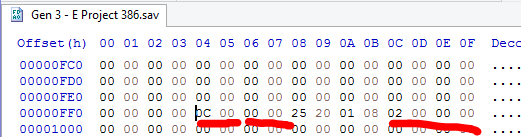
For example, let's look at the first section in my save: Section ID: 0x000C Checksum: 0x0000 (had no data in that block, so nothing to checksum I presume) Save Index: 0x00000002 Now look at the next section: Section ID: 0x000D (makes sense that it ascends) Checksum: 0xF131 Save Index: 0x00000002 Makes sense to you now? :3

-
I merged your posts. Please do not make multiple posts in succession. If no one replied you, edit the new information/question into your latest unreplied post. For known values, they're in the save structure recorded by Bulbapedia.. For unknown values, compare the save files using HxD. (note: you gotta align the blocks in correct order first) If comparison impossible, do trial and error. See which half of the save actually has the change, then keep doing halves and halves until you can narrow down which block has the value. Finally, compare that block for before and after, to see which offset(s) has been changed I feel as though the bulbapedia page explained it sufficiently I don't understand what you are trying to say. What "highlighter"? In regards to your save B consisting of nothing but 0xFF, I'm assuming you only saved in game once or something? To be completely honest, I nowadays use PKHeX to fix checksums. Once again, the checksum fixing is in the bulbapedia page: erm.. It basically means it's an area that has the data you're looking for. Whatever the data is, that's the area that has data in it. In any case, I don't understand why you're doing this. PKHeX probably is able to edit whatever value you seek. If it is for practice, sure go ahead, won't stop you. Rather than ask so many questions, you probably should take this one step at a time. Figure out for sure how to do one thing, then move on to the next point. I suggest: 1. Learn how to identify which save is the more recent save (because the game loads that one. Whether Save A or Save B is the more recent save, isn't fixed) 2. Learn how to identify the blocks. 3. For starters, locate the block for money (based on bulbapedia's guide) 4. Locate the offset for money (based on bulbapedia's guide) 5. Fix the checksum for money's block 6. Fix the checksum for the overall save. If you cannot get past these, you probably won't be able to make any other edit. As it was said that Ruby/Sapphire's Money isn't XOR'd against the Security Key, I recommend you try to edit a RS save first.
-
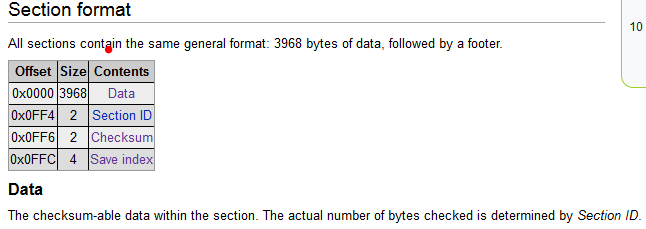
A few things I gotta add on: 1. Save block data has already been identified and recorded here: https://bulbapedia.bulbagarden.net/wiki/Save_data_structure_in_Generation_III#Save_index 2. There are 2 saves in the save file (Game Save A and Game Save B). 3. GBA save blocks are shuffled. (as in the save block won't always be in the same position) They are easy to identify once you know how to identify which block you're looking at, though. [Section ID and Save Index in the page I linked] 4. Even after modifying the slot you found, you also need to know how to correct the checksums.
-
that's kinda odd. Maybe you antivirus is really reactive. Maybe tell us the software you're using, and someone using the same software may be able to come along and give you advice
-
Yeah, gotta add them to some form of Exception list. My antivirus does that with every new download or every new update. It won't allow me to make any modifications to any files/directories without adding those programs into the Exceptions. (to prevent any viruses or malware from making changes without you knowing)
-
PK3/WC3: Unreleased Altering Cave Pokémon
theSLAYER commented on Project Pokémon Bot's file in Unreleased/Beta PKM Gallery
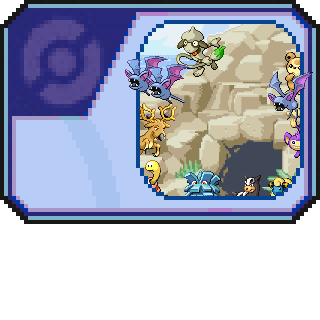 @Fubuki669 hey, this is an English speaking forum. It would spiral into insanity for our users if everyone started speaking in non-English. No, event is not legal, and was not distributed anywhere, not even in Japan. Hence the Unreleased in PK3/WC3: Unreleased Altering Cave Pokémon
 -
@Devastator432209 could be your browser. Hover over the button, and Right Click > Save target as... (or whatever the equivalent is for your browser) Also, learn that "reviews" are not comments. Reviews are not the place to ask for help. It's for.. reviews.
-
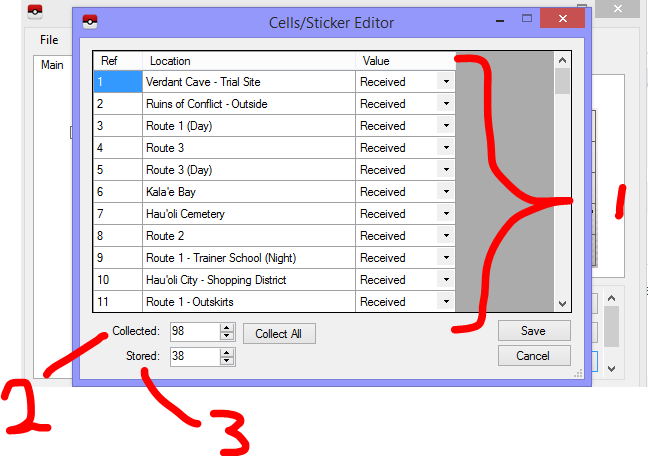
In case you didn't know, it's possible to break down other Aura Break Zygarde you received from trades into cells, hence why it's possible to have more cells than what you found. Let me explain how this works: (1) Indicates whether the cell at that specific location has been collected. (2) Shows how many of (1) + cores has been collected. In reality the game doesn't count the number of (1)'s collected; they just increase the counter by 1 whenever one is collected in-game. As a result, if not done correctly, there can be a mismatch between (1) and (2) (3) This counts how many Cells you have left in your cube. Ones that you used to form a Zygarde is deducted from here, and ones you receive from breaking down a Zygarde gets added to here. Sounds like you are talking about ORAS PKHeX editing bag bug. Wait for an update. This has been reported multiple times already.