



theSLAYER
-
Posts
22960 -
Joined
-
Last visited
-
Days Won
1016
Content Type
Profiles
Pokédex
Portal
Technical Documentation
Pages
Tutorials
Forums
Events
Downloads
Gallery
Blogs
Everything posted by theSLAYER
-

PKHex not working for Pokemon Platinum Emulator save files?
theSLAYER replied to locoman17's topic in Saves - Editing Help
Is there a Battery folder? -
PKHex not working for Pokemon Platinum Emulator save files?
theSLAYER replied to locoman17's topic in Saves - Editing Help
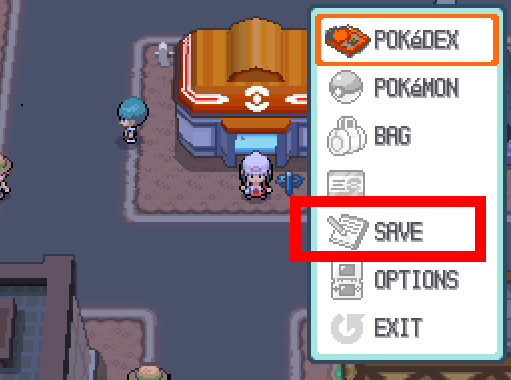
1. Check if this option matches the image below: 2. Also read our guide on how to get to the save. 3. And most importantly (I cannot stress this enough), make sure you're using the game's in-game menu to save the game. (Press X, then hit SAVE) If you don't save the game via in-game menu, no .dsv would appear, and no .sav you dump would work. (because... no save data exists. If you don't save normally, how would there be save data hmmm? )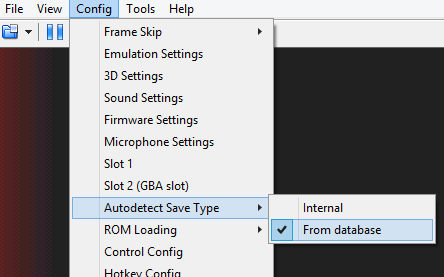
-
PKHex not working for Pokemon Platinum Emulator save files?
theSLAYER replied to locoman17's topic in Saves - Editing Help
You're not supposed to use .dst. Use a .sav or .dsv. The issue isn't the program, but more likely you're not providing the right save or a save with the right save size. If it's not recognizing a .sav, it's because the save size is incorrect. What emulator are you using? -
Detective Pikachu 3DS Pokemon Citra 3DS saves For Detective Pikachu
theSLAYER replied to JoyPikaX's topic in Pokémon Requests
If the game can't be played even with a save, then either the Citra version is incompatible, or the game simply doesn't work. We aren't a Citra support forum, so if no one else knows what can be done, then you probably should take it to a Citra support forum. -
Detective Pikachu 3DS Pokemon Citra 3DS saves For Detective Pikachu
theSLAYER replied to JoyPikaX's topic in Pokémon Requests
Can't seem to find a fresh game. Could try with this save that I found on the net https://gbatemp.net/attachments/detective-pikachu-100-complete-rar.118751/ -
Whether using CFW or Homebrew, you'll need a save manager to import and export saves from your games. Read our guide here. :3
-
glad I've been able to help
-
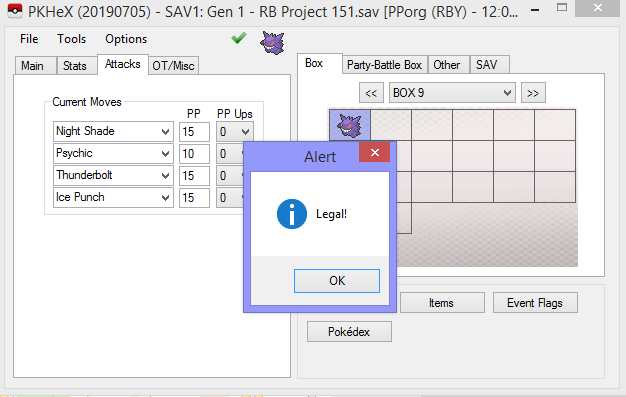
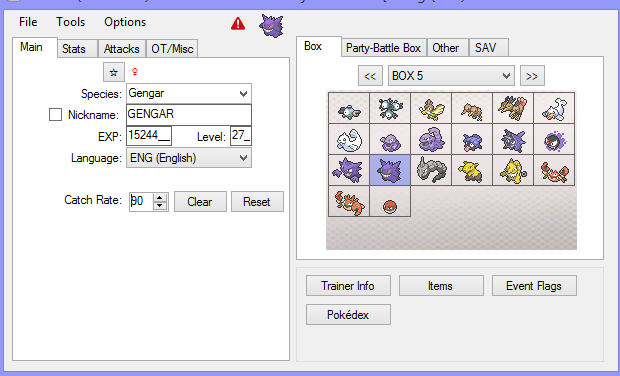
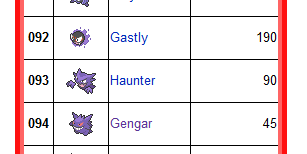
@MeterGriffin I can only assume you're doing something wrong.. Using my legal Gengar, I changed the Catch Rate to match it's original value, and it became illegal. Thus, I'm guessing that your Gengar has it's default catch rate (of either Gastly's 190 or Haunter's 90) One thing you need to know, is that Catch Rate in Gen 1 is actually used as Held Item in Gen 2. However, not every value corresponds to a possible item in Gen 2. So for the example above, 90 actually doesn't correspond to an item, so if you indeed traded Gengar to Gen 2, it's Catch Rate gets forcibly overwritten by the game. Gen 2 would force the held item to be Berry. Of course you can opt to remove the item from Gengar. In any case, it's Catch Rate would no longer be 90 when traded back. Based on that, PKHeX can tell that you didn't perform a tradeback, hence it is right to flag your Gengar as illegal. (It's the same if it was evolved from a Gastly; has 190 as Catch rate. 190 doesn't correspond to an item. List of Gen 1 held items, list of Catch rates, and big list of indexes and item) edit: if the issue isn't the catch rate, then upload the Pokémon.
-
Glad it worked out! Enjoy gaming
-
Use this instead. Then when not in save mode, import a pkm into a PCD.
-
Use a different program. Follow the guide for Checkpoint or TWL save tool https://projectpokemon.org/tutorials/save-editing/managing-nds-saves/ Note that if you have a counterfeit cart, it likely won't work.
-
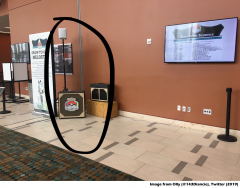
From the album: Distribution Devices
Source: https://twitter.com/143Diancie/status/1033008159365971974 -
@hmash15 you've already made this post before, no need to make another one. I'm hiding the old one, and leaving this one up. If you don't get responses, do not repost this again, alright? Now patiently wait for people with expertise relating to your problem to reply you. Also, I saw the previous one and did not reply it, as well as not answering your question on this one, because simply, I don't know. I never had issues with pkNX, and I don't recognize what issue you have. If everybody came to this thread and said "I don't know" to you, it'll be a very busy thread with no concrete information offered XD
-
Question about using LGPE save with PKHeX
theSLAYER replied to startrekmaniac's topic in Saves - Editing Help
You can opt to follow this guide (tho it’s presently outdated and is in the process of being updated; read the info on the site). You gotta need a compatible Switch to perform the hacks (typically one bought at an earlier date). Perform the Switch hacking at your own risk. -
Question about using LGPE save with PKHeX
theSLAYER replied to startrekmaniac's topic in Saves - Editing Help
Yes. A hacked Switch is required to extract the save file in some way. After you managed to hack your Switch, you can follow this guide to obtain your save. -
Then no. I was referring to hacked Switches. I won't be much help with Yuzu since I don't use it. You could try adding cheats to Yuzu. I'm unsure if they support it, but I've seen a page that seems to have it (here)
-
You're referring to the Current Catch Combo, not the Max Catch Combo recorded for a species right? Sadly the Current Catch Combo is meant to last only while you're playing, and isn't supposed to be saved. I assume it's the game forces that stat to reset upon game launch, thus that value cannot be controlled by save editing. If you load the save while the game is running using the homebrew app EdiZon, that may prevent it from being reset (since I assume it only resets upon launch, not while the game is running). [Make sure you keep an extra save backup safe on your computer, before attempting any edits] Alternatively, could run a cheat code using EdiZon. Link to cheats here.
-
Pokemon gender modifier
theSLAYER replied to Firebird2019's topic in ROM - NDS Guides and Other Resources
Pokémon caught in Gen 3 and Gen 4 games have will have this issue; Gen 3 & 4 datastructure forces Nature and Gender to be both derived from it's Personality ID (PID). (Read about that here) So when you change it's gender, you end up changing it's PID, hence nature has to change too. (Also, IVs will become invalid, forcing the mon to be illegal; IVs are associated with PID) You gotta generate a whole new PID that has the correct nature and gender. Use Pokefinder for that. -
[REQUEST] Gen 4 Cute Charm glitch saves
theSLAYER replied to HaxAras's topic in Saves - Files and Requests
plat charm test.sav -
[REQUEST] Gen 4 Cute Charm glitch saves
theSLAYER replied to HaxAras's topic in Saves - Files and Requests
Send over an existing save of yours, and I'll modify it. Alternatively, follow this guide to accomplish it yourself. -
I'm reconfirming the information on Smogon, and will update the new guide accordingly, thanks. Also, Smogon missed out Happiny's Egg in DP; they mentioned all NPC Gift Eggs being Method 1, but Happiny Egg wasn't in their list above.
-
PKHeX - Help on generating legal pokemon w/ egg move
theSLAYER replied to EthylAlcohol's topic in Saves - Editing Help
If I'm not mistaken, based on PKHeX checks for eggs, PID/IV should not have correlation. Reroll the PID, change the location and met level to match having the egg hatched, and try again. -
The first thing I did last night, was to change the options and see what data was possible (like how decchi's Azure Card could distribute Pokémon when gift type was changed) Presently, I would be more inclined to believe that it was a real Pokémon gift, if the file had any semblance of Pokémon data. It has messed up moves, messed up OT, and messed up TID/SID assigned to it. Every other field looks like junk data. Frankly, I think the species data is also just junk data; the MysteryGiftEditor shows it's Zubat cause the junk data in that offset happens to coincide with a possible species ID. Our situation is unlike the bad eggs obtained from Debug Ruby version, where the game actually gave you a pk3. pk3's in the save are actually encrypted. Without the correct PID to decrypt it, the game would see it as a bad egg. However, AFAIK pcd/pgt are not encrypted, so your "solution" does not apply here. I believe that the reason we receive bad eggs, is because the pgt data is junk, and the bad eggs were merely following the structure dictated in the pgt. I think the pgts are still worth archiving, just that I am not sure we can do anything more with them
-
edit: Took me a while to find it. It was field debug (overworld R+X buttons) > Ono (IIRC option is all the way at the bottom) > Delivery debug (second option from top). In any case, here's a save with the mons right before they're collected. When collected on a final DP game, what is received is a 2x Bad Eggs and 1 Manaphy egg.) Based on my tests, the corrupted eggs are the reason why debug DP crashes. When I remove those 2 wonder cards, the Manaphy egg that followed right after was able to be redeemed. Here's a save from before the 3x eggs were collected. The debug wondercards can also be seen using PKHeX. debug wondercards.sav (I loaded a Complete Dex Save into the debug game, then used the debug menu to get the deliveryman, then saved into it)
-
Sorry I personally don’t use it, so I won’t be of much help in that regard.

