



theSLAYER
-
Posts
22855 -
Joined
-
Last visited
-
Days Won
1000
Content Type
Profiles
Pokédex
Portal
Technical Documentation
Pages
Tutorials
Forums
Events
Downloads
Gallery
Blogs
Everything posted by theSLAYER
-

Vivilion having a different pattern than his region
theSLAYER replied to Shadoko_'s topic in Pokémon Legality
Sub region is fine. you can leave it blank when setting up your 3DS. -
Vivilion having a different pattern than his region
theSLAYER replied to Shadoko_'s topic in Pokémon Legality
3DS era, every mon must have a region. Either region caught in, hatched in, or imported in. -
Vivilion having a different pattern than his region
theSLAYER replied to Shadoko_'s topic in Pokémon Legality
@Shadoko_ It is possible to transfer a save legitimately from a cart to a cia (eshop) version across regions. (example: While EU 3DS cannot launch US game, the save data transfer tool can still read the save in the cart. With that, you can transfer a US save into an EU game.) When you transfer the save across regions, the save carries the old "expected form", but the region data updates when launched in the different region'd 3DS. ^ As you can see, the Vivillon form is already preset. Presumably to stop people from changing the encounterable form by changing the 3DS region/country. As a result, you can encounter form-region mismatched Vivillon legitimately.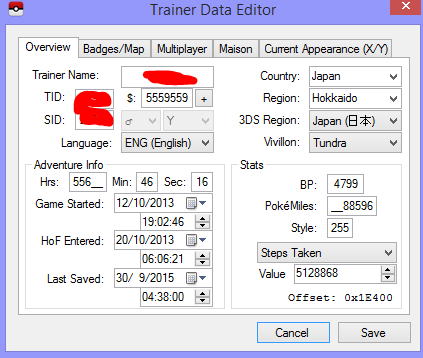
-
PK8: SWSH Uncatchable Series
theSLAYER commented on Project Pokémon Bot's file in Unreleased/Beta PKM Gallery
 Your actions seem to speak otherwise.
 -
PK8: SWSH Uncatchable Series
theSLAYER commented on Project Pokémon Bot's file in Unreleased/Beta PKM Gallery
And it's as tho you didn't read the other comments. @PkHexBoi if you weren't aware, someone already came to your defense with that exact reasoning. And... ... I've literally explained how I wasn't serious at my reply to you, and how it was a multifaceted response. It wasn't just a message having fun with ya, it also aimed to educate future readers or readers that are unaware. And frankly, I went straight to this post isn't really a good reason.. Do people really expect stuff in the Unreleased/Beta PKM Gallery to be legal? As someone who uploads a bunch of files to our main subcategories, I take offense at that Anyhow, sheesh, this is why they need warning labels on obviously hot coffee, and why I typically lock comments on uploads. -
I feel like the screenshot bears no relevance to what you are asking, for the most part. There are some situations where PID and IVs are linked in newer games, but presently the known bruteforcable methods (what I linked) are for Gen 3 and Gen 4.
-
PK8: SWSH Uncatchable Series
theSLAYER commented on Project Pokémon Bot's file in Unreleased/Beta PKM Gallery
Don't get me wrong, I'm just having a bit of fun. Don't you see the smiley I attached after the image? I wasn't seriously criticizing them. It's just.. we get this kind of question all the time. So, it was a multifaceted response; in one angle, if one received this kind of response, one'll always check the overall section before asking such questions ever again, well at least hopefully that's the case. In another angle, I actually did answer the question; I took a screenshot that spells the answer and focuses on the big bold red test, instead of being plainly rude. In yet another angle, I also taught future readers that there is an overall section header, in case they were unaware. Hopefully, they'll come to realize that various uploads are in various different sections, and each section covers their own niche. -
For both, it is probably sufficient to randomly create TID and SID. This is just something you may need to be aware of for the Platinum one: There is a known PID and IV correlation, so you can't just randomly assign values. You gotta search for the values and them type them in:
-
If it's from one of the recent Gens, you can just assign it randomly. What makes it's "Japanese", is the language dropdown.
-
PK8: SWSH Uncatchable Series
theSLAYER commented on Project Pokémon Bot's file in Unreleased/Beta PKM Gallery
Hmmm.. It's as though you didn't read the disclaimer at the head of this section.. :3 -
Save twice in-game before trying to use it on PKHeX.
-
 You're not supposed to double click on the file. You're not supposed to download and run the file. Only download it. You're supposed to import it into the correct window/form of PKHeX.
 -
Hence why you weren't infracted or anything. I just hid the post and explained my rationale, no other consequence involved :3 edit: like I said, stop putting your fakemon in a thread meant for archival. If anyone here cared about an event that never got English localization, and wants a fake recreation, they can go to your thread. If people want a fakemon "just for fun", they can go to your thread. I've hidden your post again. This is strike two. I'm trying to be nice to you. You're not making it easy.
-
Well it's a kinda odd issue to have. @Kaphotics @ReignOfComputer you two have any troubleshooting ideas?
-
I'm unsure if this is properly a PKHeX issue; many others can run it just fine. I'm equally baffled by this. In any case, let's start by trying to get proper user access for the program:
-
Sorry, was editing my post, so I guess you didn't see my other two responses, being
-
Did you extract the program from the zipped folder? Did your antivirus remove the program? Did you try to open it in a place where you don't have permissions?
-
Someone posted a mon here, and I've hidden the post. We're not looking for fakes, especially when it a "fake localization" of an event. I left your other thread intact; it's fine if you want to make it publicly available for other fans of fake stuff, but don't throw that fan-made stuff into this page trying find/archive relevant information about the real event, alright? :3
-
Gen VIII Invalid: Encounter Type PID mismatch
theSLAYER replied to mithrandir's topic in Pokémon Legality
well, to be fair, how you stay up to date is via reading the changelog. That message was only on Discord cause someone asked there first. -
Binary is not compatible with save file. Current SAV generation: 8
theSLAYER replied to Atila's topic in Saves - Editing Help
Attach your save file to the next reply to this thread. Only upload your save file. -
Plugins periodically have to be updated by their developers whenever PKHeX updates (PKHeX may use new functions, change how their existing functions work etc). The plugins are not managed by PKHeX devs. If you're having issues, create a github account, and post an issue on their github page. https://github.com/darkfiggy/dmaxplugin/issues (I think you're referring to this) Anyhow, I don't think this has anything to do with us.
-
No.
-
I need help modifying a gen 5 pokemon game
theSLAYER replied to serotonin's topic in ROM - 3DS Discussion & Help
First off, please don’t multi post. If you had new information to add, and no one had replied to your latest post, just edit into your latest post. Next, PP of moves can’t be restored by Potions, so I don’t know what you’re on about. -
Gen VIII Invalid: Encounter Type PID mismatch
theSLAYER replied to mithrandir's topic in Pokémon Legality
It’s a quote from a pin I made in our Discord server. So technically Kaphotics is correct about the handwritten part; it was written by me, just written elsewhere first. link here (you would have to be a part of our server to see the message): https://discord.com/channels/343093766477053953/367479180398428170/827821664900481045 -
Gen VIII Invalid: Encounter Type PID mismatch
theSLAYER replied to mithrandir's topic in Pokémon Legality
Based on your error, I believe it's this: It's a new legality detection added to the latest PKHeX update. This just means your mon was always illegal to begin with, just that past versions of PKHeX didn't have the check, and well, researchers weren't aware of that RNG relationship. Now that it's known, we can check for it, and expose certain hacked mons as being illegal.
