



theSLAYER
-
Posts
22962 -
Joined
-
Last visited
-
Days Won
1016
Content Type
Profiles
Pokédex
Portal
Technical Documentation
Pages
Tutorials
Forums
Events
Downloads
Gallery
Blogs
Everything posted by theSLAYER
-
There's no point dragging to and fro, it's not like trade info is stored on the mon. (pre gen 6) If you want to input a trade evolution, just change the species.
-
Open 2 windows of PKHeX. Have window (A) load a gen 1 save, have window (b) open a gen 2 save of the same language, then click and hold a pk in window (A), and without letting go, drag into a PC slot in window (B), then let it go. [you can also do (b) -> (a)]
-

Wild Area Event #44: Golden Week Meowth (2021)
theSLAYER commented on theSLAYER's file in Sword & Shield
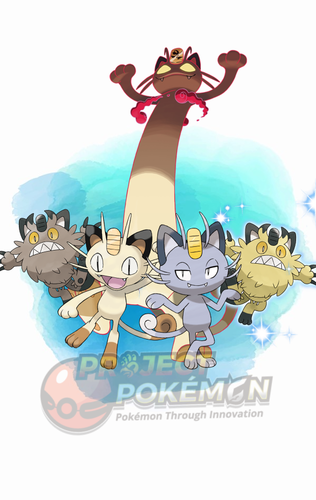 Details for Index 67 of normal_encount and normal_encount_rigel1 and normal_encount_rigel2 (minor differences, in raid chance) Rewards for Index 67 of normal_encount and normal_encount_rigel1 and normal_encount_rigel2 (minor differences, in raid chance) Details for Index 67 of dai_encount Rewards for Index 67 of dai_encount
 -
1039 downloads
This is a Wild Area event held by Sword and Shield. With this event, you get a chance to encounter Giganantamax Meowth; and with 5-stars raids, you get a chance to land on a 2% guaranteed Shiny Galar Meowth slot. You also get to encounter the various different forms of Meowth. To import these files into your save, use PKHeX's block importing function. Our tutorial should guide you through it. Our first post of this page contains some data relevant to the importing stage. There's info and some common questions regarding Wild Area Events here. To see other Wild Area Events, here. -
Hey @Kaphotics I'll like to ask you about this. Was it discovered that Pal Parked entries could bear different encounter types?
-
Are hacked ribbons recognizable in the meta data of .pkmn files?
theSLAYER replied to Farfetchd's topic in Pokémon Legality
I guess you missed my edit in the previous post. Long story short, it's usually not the program at fault, but the user. Based on your line of questioning, I'm guessing you may consider showing off to others or something. Well, whatever the case, if it's just harmless showcasing (not selling nor impacting others gameplay), research all the details about getting the ribbons and get each part of your story straight. Like I said, it's usually the user who is at fault. Maybe they put implausible dates. Or have the wrong timeline/order of acquiring the ribbon, or misunderstand some crucial fact, maybe they place some other stat that makes the mon look sus etc. Nothing much to say besides that. -
Are hacked ribbons recognizable in the meta data of .pkmn files?
theSLAYER replied to Farfetchd's topic in Pokémon Legality
1. If you're playing legitimately, or if people expect you to, then you/them shouldn't be able to view them as files. 2. Where is this meta data you speak of? if you're doing this just for your own sake, and you don't care about legitimacy.. then.. this line of questioning is goes against what you claim. In any case, it's probably fine. I'm not gonna jump through hoops to convince you it's fine. I recall it not being easy the last time round I tried to do so. -
A Collector's Guide to WC6 & WC7 Language and Region Mayhem
theSLAYER replied to theSLAYER's topic in Event Pokémon News
yes but sufficiently random. Don't need to fuss about it. -
A Collector's Guide to WC6 & WC7 Language and Region Mayhem
theSLAYER replied to theSLAYER's topic in Event Pokémon News
I'm confused. Are you saying the mon came out English, despite you injecting a Spanish file? If so, well, most events have their mon follow the game save's language. Tho it may be noticeable that it's incorrect, if you judge by it's OT (depending if it has a language variant OT) In any case, you should know which events you gotta inject at this point. Ignore the whole IVs and Seeds thing. And ignore changing the mon's date. when you receive an event normally, it follows your 3DS date. But you 3DS could be set to almost any date within reason. Therefore the date doesn't really matter in legality (within reason). So do whatever you want. -
If I’m not mistaken, they are stored as bitflags in the game, and that ordering is what PKHeX is using. If you want to order by name, push the PR to github to make the change.
-
The first step would be joining a Discord server that has the service. The next step would be providing pk8 files of the mons you wanna trade to your Switch. (tho this step is rather easy, just load all the pk7 into PKHeX with default blank save set to Sword, then export them as individual files)
-
you can't edit Pokemon Bank save file. (the mons are stored server side) You could just shift the species allowed to enter SWSH directly into a SWSH save. If you don't want to hack your Switch, use a Discord with a sysbot to trade you one mon at a time. You need to have Nintendo Subscription Online tho.
-
For the majority of Pokemon, no. They only get a TR flag set after you taught them a TR. Give allI simulates a Pokemon having learnt all the TRs before. Which for most Pokemon, they don't have access to all the TRs.
-
Hey, please don't ask the same thing in multiple locations. I've merged them into the same thread.
-
A Collector's Guide to WC6 & WC7 Language and Region Mayhem
theSLAYER replied to theSLAYER's topic in Event Pokémon News
There was an image that would show region and language but it appears to be gone right now. For Region locked events (mainly serial code/nintendo network): EU Console - Languages that can follow game save language: ENG, FRE, GER, ITA, SPA If game save language ain't one of the above: Default to ENG gift. edit: I added the image into the first post. -
 You can view you received card while having the wireless adapter plugged in. Unlike modern day games, you can only view the card you have right now, not past cards.
 -
A Collector's Guide to WC6 & WC7 Language and Region Mayhem
theSLAYER replied to theSLAYER's topic in Event Pokémon News
download the ones that match your save file language. What matters isn't your language as a person, but the language of your game. As a matter of fact, you could speak any language, and play the game in any other language. The factors are the region of your console, and the subsequently the language of your game save. -
You see this? Your save is not in a proper save format that PKHeX can recognize. Open your NO$GBA.INI using Notepad, and edit the portion of that line after == to Raw. If the line item isn't there, else add it in.
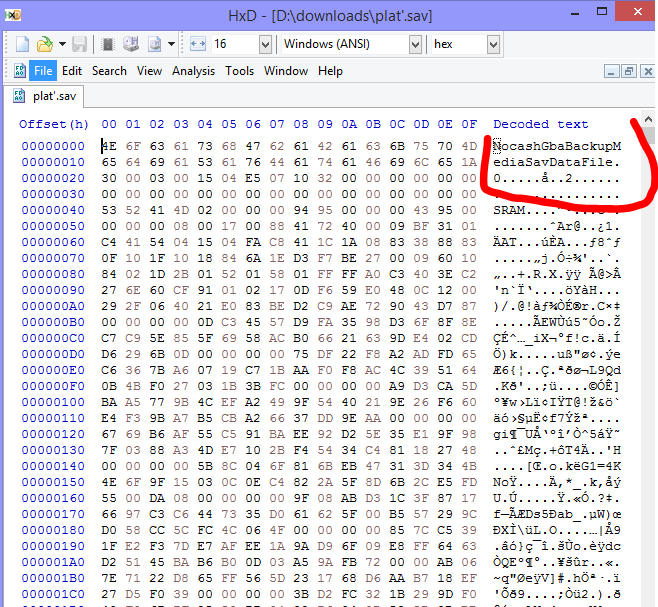
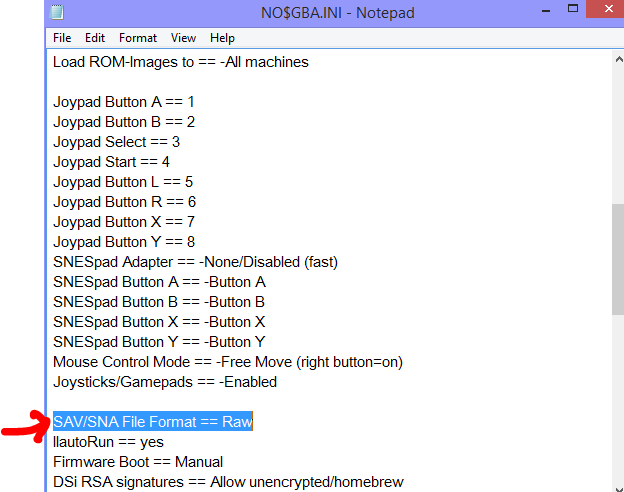
-
at the DLL (not in PKHeX, but rather viewing the file in your file explorer), right click on it > properties. You may see an unblock there. Example: Every DLL you use with PKHeX has to be unblocked.
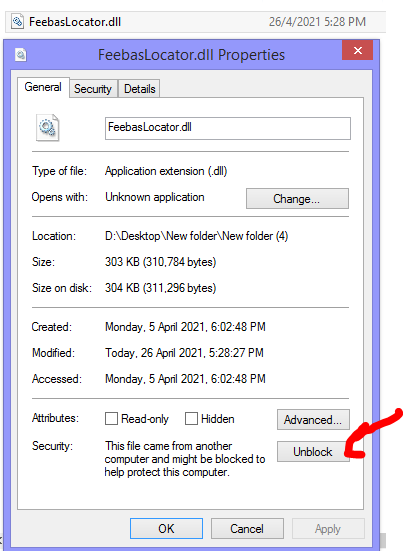
-
Pokemon ultra sun sun save file rquired
theSLAYER replied to ASH GRENINJA's topic in Saves - Files and Requests
You're not making much sense to me. Anyway, you can simply edit in the items that are missing (z-ring, z-crystal, and what not), and you can simply edit in the event flags (as per the program I recommended) for progress. -
Pokemon ultra sun sun save file rquired
theSLAYER replied to ASH GRENINJA's topic in Saves - Files and Requests
PKHeX can edit your bag tho? I don't understand what you mean by battle list empty. Did you mean party? From what I can see, your party ain't empty, so you probably meant something else. -
have you tried unblocking the plugins?
-
Pokemon ultra sun sun save file rquired
theSLAYER replied to ASH GRENINJA's topic in Saves - Files and Requests
Please don't multipost. Also, it appears there's nothing wrong with your save. Alter the save on your own. -
Pokemon ultra sun sun save file rquired
theSLAYER replied to ASH GRENINJA's topic in Saves - Files and Requests
that's not answering my question. -
Pokemon ultra sun sun save file rquired
theSLAYER replied to ASH GRENINJA's topic in Saves - Files and Requests
quick question: is the game working just fine, it you load save states?
