Leaderboard



Popular Content
Showing content with the highest reputation on 06/27/24 in all areas
-
![More information about "[PKHeX Plugin] SWSH Overworld/Max Raid IVs/BDSP Roaming8b Searcher"](https://projectpokemon.org/home/uploads/monthly_2021_10/Capture.thumb.PNG.2b75ce2e25f309264cfbcb6f532f2443.PNG)
Version 26.4.12+37
21704 downloads
PKHeX plugin to check for valid PIDIV and other correlated stats for Overworld8 or Max Raid or Max Lair mons. Once the data is found, the selected row can be sent to PKHeX's viewer, without the user having to copy the data over manually. Other small features include: - Able to update Trainer ID/Secret ID in Searcher based on Save's details or Viewed Pokémon's details - Able to update Trainer ID/Secret ID in Searcher based on viewed Pokémon's details, whenever a different Pokémon is viewed - Able to update Gender Ratio filter (Max Raids/Max Lair searching only) based on the viewed Pokémon - The TSV box updates based on what the user inputs, or the data grabbed from save/viewer. - If a modified IV stat is 31, the Hyper Training Flag would be removed Spiritual successor of IV Searcher portion found here: https://projectpokemon.org/home/files/file/4447-gen-8-ow-shiny-pid-genner/ How to use Put the plugin into the plugins folder in your PKHeX directory, then access it from the Tools menu. Tutorial, under Searching for Particular IVs: https://projectpokemon.org/home/tutorials/save-editing/using-pkhex/pid-mismatch-origin-game-swsh-r114/ Note: Win 10 might block DLL files downloaded from the internet. In that case right click the plugin file, go to properties and check "unblock" (as seen here). [You may have to unblock, reblock, then unblock again to get it to work] Example of how to unblock: Support Sword and Shield. BDSP For help and bug reporting, go here. Credits Kaphotics for PKHeX, his documentation on Github, as well as other various functions found in PKHeX.Core and PKHeX.Drawing SkyLink98 with helping me figure out how to deal with implementing changes on PKHeX's viewer Leanny's Source code for Ability and Gender determination for raid stats from seed. Admiral Fish's Raid stats generation write-up. SciresM and his Roaming8b code write-up used by PKHeX.1 point -
![More information about "[PKHeX Plugin] GP1 Editor"](https://projectpokemon.org/home/uploads/monthly_2021_09/Capture.thumb.PNG.9ef5a1bee24566777b94cf426a804777.PNG)
Version 26.04.11 (1)
7258 downloads
PKHeX plugin to edit GO Park Storage. User can click on the slot to view the content of the slot. User may edit the GP1 in the viewed slot. User can also import a GP1 into the viewed slot via the button or dragging it in. User may also delete the GP1 in the viewed slot. Given the GO CP on file isn't carried into the game visually, and appears to be unused data, GO CP calculation isn't included. (If you need it, it is here on an external program) For help and bug reporting, go here. How to use Put the plugin into the plugins folder in your PKHeX directory, then access it from the Tools menu. Let's Go Pikachu and Let's Go Eevee is supported. Note: Win 10 might block DLL files downloaded from the internet. In that case right click the plugin file, go to properties and check "unblock" (as seen here). [You may have to unblock, reblock, then unblock again to get it to work] Example of how to unblock: Credits Kaphotics for the making of PKHeX, as well as documented structure for various GP1 parts. BlackShark for his meticulous work with the Feebas Locator [Full disclosure: I've never made a PKHeX plugin before, so had to look at his work to figure it out]1 point -
![More information about "[PKHeX Plugin] HOME Live Viewer & Dumper"](https://projectpokemon.org/home/uploads/monthly_2020_12/1010354882_Logo_Pokmon_HOME.thumb.png.03fea547a14ecb04fefefd144041de82.png)
Version 4.0.0
14741 downloads
This Plugin is meant to dump and view infos from Pokémons deposited into Pokémon HOME. This Plugin is not intended to allow users to edit Pokémon Infos directly from HOME and it will never allow to. Notably, this can be used for those Pokémons that are stuck in HOME beyond the first Box, or that for some reason the owner does not want to transfer away (eg. Unique GO/HOME Symbol sticker or game-specific unavailable mons). If you need support, please write in the appropriate thread. The creators of this tool are not responsible for any adverse outcomes or side effects of using this tool. We do not condone use of cheating and modified data to take advantage of others. Trading converted files without disclosure could be considered scam. GitHub Source code These Plugins need PKHeX 26.04.11. Compatibility with other PKHeX versions is not guaranteed. During the dumping processes, the Pokémon HOME application may act lagghy. This is normal. Compatible save file formats are: LGPE, SwSh, BDSP, PLA, SV, ZA. Don't forget to unblock the DLL. Example of how to unblock:1 point -

26570 downloads
This page contains several savefiles dumped from cartridges that were distributed a plethora of event pokemon directly from the Pokemon Center New York PCNY distribution hardware that recently surfaced. Hopefully it provides enough public satisfaction for everyone, while the preservation team undertakes this grand and lengthy task of hopefully enabling the software to become usable via emulation, as well as hopefully producing hardware mods for a publicly feasible physical method of distributing. This is our most major project by a long shot and will likely take quite some time, however now that everything is permanently in Project Pokemon's possession, any roadblocks toward the final goals would be on the technical side. Luckily the best minds are at work on each aspect of this project, so without revealing any further details in regards to that, have patience and remain optimistic. -------------------- For Generation III, a full box per campaign was distributed, with the TID for each incrementing from 00001 to 00030. The Ruby savefile is a male trainer so the OT names are all blue colored, and was loaded using the PCNYc memory card in Slot B of the NR GameCube. The Sapphire savefile is a female trainer so the OT names are all red colored, and was loaded using the PCNYd memory card in Slot B of the NR GameCube. Seven Gen 3 campaigns were preserved from the Slot A memory cards obtained. Each box in both savefiles have at least a few of every pokemon from the respective campaigns. For Generation II, three full boxes per campaign were distributed, with the TID for each incrementing from 00001 to 00060. This Gold savefile was loaded using the PCNYc memory card in Slot B of the NR GameCube. Four Gen 2 campaigns were preserved from the Slot A memory cards obtained. Each box will have at least a few of every pokemon from the respective campaigns, even those with normally extremely rare unlikely odds. -------------------- Generation III: Evolution Stone Campaign: 30 Aug 2003 - 4 Sept 2003 Pikachu Lv50 - Thunder Stone 25% Gloom Lv50 - Sun Stone 25% / Leaf Stone 25% Staryu Lv50 - Water Stone 25% ----- Monster Week 1 Campaign: 18 Oct 2003 - 24 Oct 2003 Cacturne Lv50 - 25% Duskull Lv25 - 25% Shuppet Lv25 - 25% Shedinja Lv50 - 25% ----- Campaign 1: 15 May 2004 - 22 May 2004 Houndour Lv5 - 50% Mareep Lv5 - 50% ----- Campaign 3: 31 July 2004 - Aug 6 2004 Azurill Lv5 - 20% / Soothe Bell 5% Wynaut Lv5 - 25% Gorebyss Lv20 - 25% Huntail Lv20 - 25% ----- Campaign 4: 7 Aug 2004 - 13 Aug 2004 Zangoose Lv18 - 20% / Quick Claw 5% Seviper Lv19 - 25% Milotic Lv35 - 25% Kingdra Lv35 - 25% ----- Campaign 5: 14 Aug 2004 - 20 Aug 2004 Armaldo Lv40 - 25% Sableye Lv18 - 20% / Bright Powder 5% Mawile Lv18 - 25% Cradily Lv40 - 25% ----- Campaign 6: 21 Aug 2004 - 27 Aug 2004 Machamp Lv30 - 20% / Choice Band 5% Ludicolo Lv20 - 25% Shiftry Lv20 - 25% Golem Lv30 - 25% -------------------- Generation II: Silver Cave Campaign: 1 Nov 2002 - 7 Nov 2002 Synthesis Tangela Egg - Normal 17% / Shiny 3% Low Kick Ponyta Egg - Normal 17% / Shiny 3% Low Kick Doduo Egg - Normal 17% / Shiny 3% Hypnosis Misdreavus Egg - Normal 17% / Shiny 3% Rage Larvitar Egg - Normal 17% / Shiny 3% ----- Union Cave Campaign: 8 Nov 2002 - 14 Nov 2002 Twister Staryu Egg - Normal 18.5% / Shiny 3.5% Metal Claw Krabby Egg - Normal 18.5% / Shiny 3.5% Sharpen Onix Egg - Normal 18.5% / Shiny 3.5% Swords Dance Goldeen Egg - Normal 18.5% / Shiny 3.5% Future Sight Lapras Egg - Normal 11% / Shiny 2% ----- Johto Legend Campaign: 15 Nov 2002 - 21 Nov 2002 Shiny Raikou Lv40 - 33% Shiny Entei Lv40 - 33% Shiny Suicune Lv40 - 33% Shiny Lugia Lv40 - 0.5% Shiny Ho-oh Lv40 - 0.5% ----- Celebi Present Campaign: 22 Nov 2002 - 28 Nov 2002 Celebi Lv5 - 98.5% Shiny Celebi Lv5 - 1% Shiny Mew Lv5 - 0.5%1 point -
Releases now available on ProjectPokemon's Downloads page! CLICK HERE. Just a note that the latest updates will be posted to GitHub over at https://github.com/ReignOfComputer/RoCs-PC Update: We continue into 2019 and beyond! Little project I'm working on to go through all the Pokémon games and establish a library in 2016-2018. Yes, some people have done so before me - but this is more of a personal goal to well... Complete the PokeDex. Though my Pokémon journey started in ~1998, it never really took off until 2006 with the release of Diamond/Pearl. With the GTS and the going online, meeting many like-minded people from communities such as PokemonGTS, ProjectPokemon, and Secure, I can see how peaking behind the curtain got me to where I am today. Still here? Cool. In this thread you can find my collection, amassed since 2006 through my own game-play, The Global Terminal, friends, and more. This includes quite a number of 3rd Gen events (pre-PalParked, see 13 - Gen IV - Gen III Pal Park, rough file list here). I'm still digging through my archive folders so there's probably a lot more, but with the sheer amount of files this will take some time. Also as a disclaimer, it's been so long that I can't tell if any of the events are hacked (especially those GCEA, WISH, etc). I wouldn't assume everything is legit. I'm working on creating updated 2016-2018 versions of every game's PokeDex since I'm playing through everything from Gen I to VII (#completionist), but you can find my old 2011/2013 5/6th Gen files in zArchive. Lots of files belonging to other people, if I didn't credit you, let me know. Progress: Tools used: Thanks: Download:1 point
-
(V1.1)_000.thumb.png.28202ba252679cad1914c04dbe82d067.png)
Version 1.0.0
1614 downloads
This save has been RNG manipulated to receive a Shiny Jirachi when you use the Colosseum Bonus Disc. Info: Seed: 0x7236, PID: 0x2ec1608d, Nature: Lonely, HP: 31, AT: 23, DF: 26, SA: 29, SD: 18, SP: 51 point -
Version 2.0.4
13017 downloads
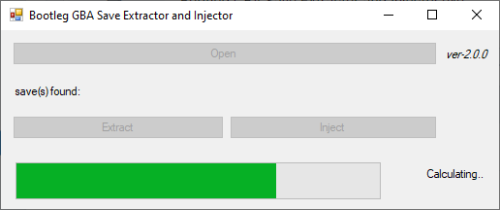
Introduction Normally, save dumps from bootleg GBA carts are not usable on emulators nor save editors. Instead of the designated save location (which is where regular homebrew for retail carts pull data from), the actual save is typically stored within the ROM data. This means that players would need to dump their ROM data, then somehow figure out how to manually extract the save. This program is an attempt at automatically extracting, and also injecting saves into bootleg Pokémon GBA ROMs, without the need to mess with hex editors. Additionally, while it is not the main purpose of this tool, this program can also dump .sav files from .xps or .sps files. [I can't find a working copy of XPS2SAV or SPS2SAV] Usage You can drag and drop the game (.gba/.bin) onto the program, or open the file with a click of the button. The save (if available) is then dumped into the same directory as where the game is. You can extract the save for editing, and then choose to inject back the edited save. If you were to dump .sav files from .xps or .sps files, the program will default to and enforce Full Search. Technical Explanation Quick Search This program checks every 0x1000 of the save file, starting from 0xFF8. (if it's a save, the initial 2-words at every 0xFF8 in the save are identical to each other, and the initial 2-words at every 0xFFE in the save are the same, that being blanks) Image example: Full Search This program goes through every byte in the file, and looks for the first instance of 0x2025. Once it finds the first instance of 0x2025, it checks 0x1000 away to see if that byte is also 0x2025 - this is to determine if the position contains a save. It then checks 0x10000 away to see if this save contains a backup. Tests done. Tested on a copy obtained from here, as well as on an owned bootleg cartridge.1 point -
Version 0.3.0
1476 downloads
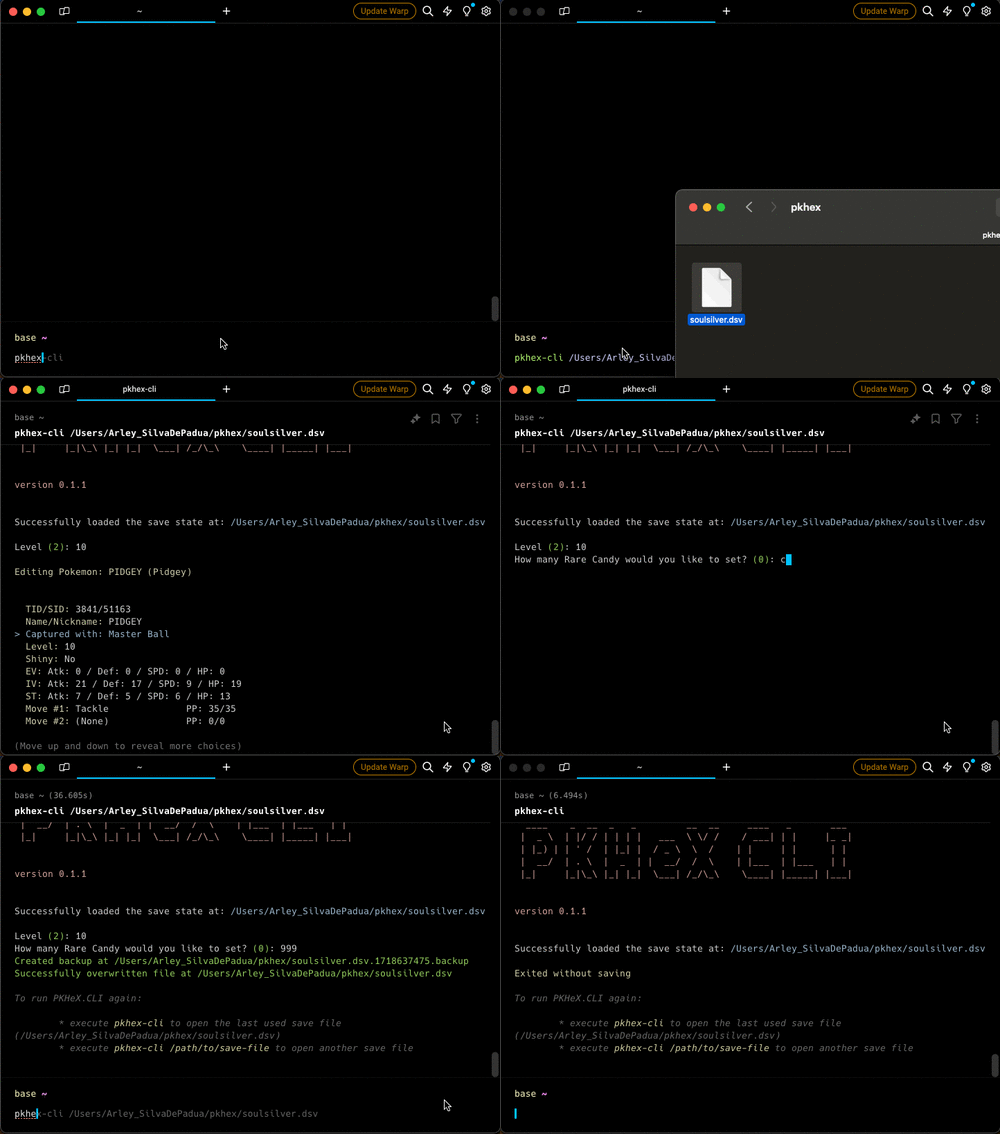
This is a cross platform Command Line Interface (CLI) tool for interacting with Pokémon save files. It provides various functionalities to manage and modify Pokémon save data. Features Load Save File: Load a Pokémon save file from a specified path. View Trainer Info: View information about the trainer in the save file. View/Edit Inventory: View and edit the inventory of the trainer. View/Edit Party: View and edit your party. View/Edit Pokemon Box: View and edit all pokemons in your box. Backups: When exiting the program, if changes were made, a backup will be created. Installation Homebrew brew tap arleypadua/homebrew-pkhex-cli brew install pkhex-cli Script curl -sL https://raw.githubusercontent.com/arleypadua/PKHeX.CLI/main/install.sh | sudo bash Compatibility with batocera PKHeX.CLI is compatible with batocera: Make sure you can access batocera with SSH. (Details here). Open an ssh session: ssh root@batocera the default password is usually linux run curl -sL https://raw.githubusercontent.com/arleypadua/PKHeX.CLI/main/install.sh | bash note that because we are accessing as root there's no need to run sudo bash You should be able to use it as stated here. Manual download Download the latest version for your system here Put the file somewhere that's visible from your PATH directory Verify the installation with pkhex-cli --version should print out PKHeX CLI: x.y.z Usage pkhex-cli /path/to/savefile.bin Command Line Options savefile: (Optional) The path to the save file. Defaults to "./data/savedata.bin". --version: Shows the version1 point -
Version 1.0.0
885 downloads
Someone else on here already has Shiny Extreme Speed Zigzagoon if you're looking for it, for Gen 7 games (aka Sun/Moon) With help from my last post I did I finally got the hunts done, I was able to get at least one of each pokemon and I thought to share since I know not everyone has the time and patience to hunt the specific PID,TID,and SID for the right ESV and TSV match up If you have an egg you want shiny hunted for these three or maybe even Zigzagoon, or a certain nature or gender other than male just send me the pokemon sav for Ruby, FR, LF, Sap, or Emerald (with the egg or a pokemon box save for Dolphin would be nice) and I'll try to get them for you to send back in game or via file^^ (The male is Naive) (Female is Brave) (Skitty is Adamant) (Swablu is Mild) 0172 ★ - PICHU - 6A1EEFC53913.pk3 0172 ★ - PICHU - A98EDA5FF2E5.pk3 0300 ★ - SKITTY - 572724F841EA.pk3 0333 ★ - SWABLU - 2B7D2E1869BA.pk31 point -
Version 1.0.0
1000 downloads
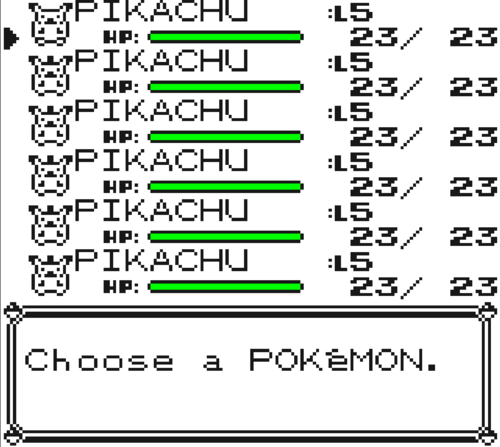
Made this file myself, if you would like to trade yourself a surfing pikachu this is the save file for you, all legal pokemon and unique TIDs. From boxes 1-10 there are Pikachu's from level 5 going up to level 801 point -
.thumb.png.f7faf91cad58f2505e235e6c8c77f955.png)
Version 2021316_17468
9840 downloads
Original Developer: @suloku Note: Downloads section mirror, will be replaced if the original developer uploads to the downloads page. Description: Multipurpose save game editor. Can edit the Entralink, Medals, Memory Link, Join Avenue, and Hidden Grotto. Original Thread1 point -
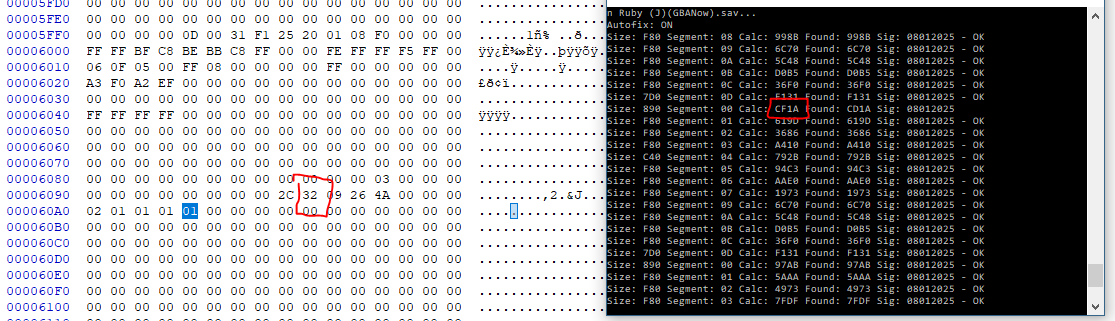
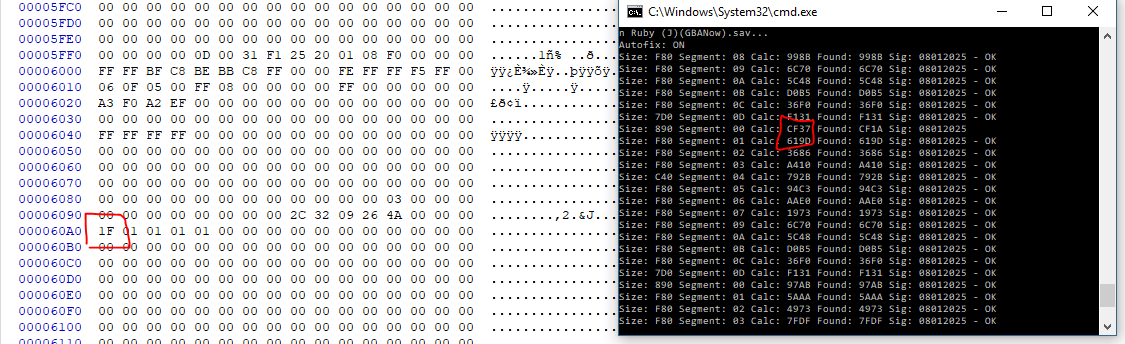
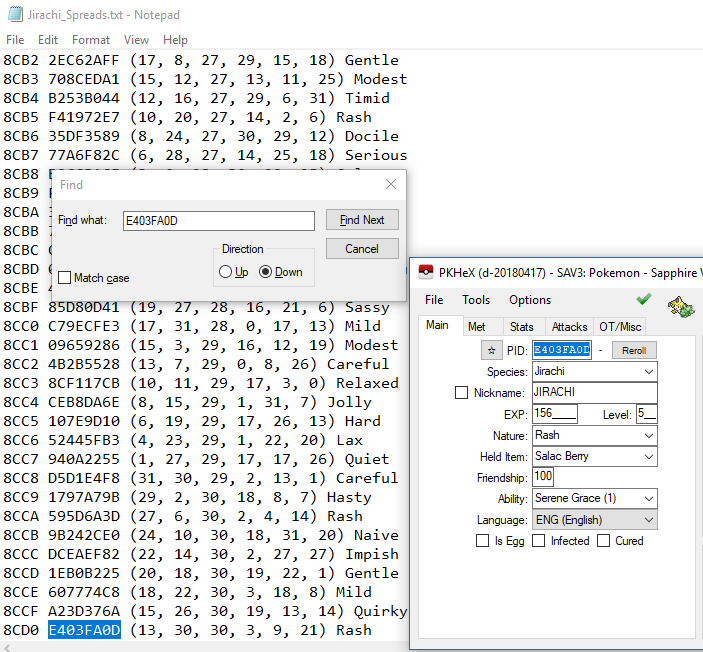
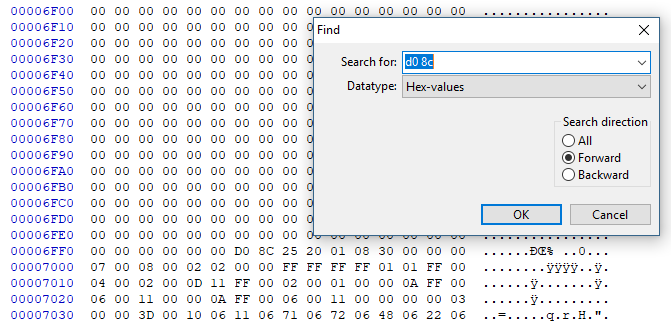
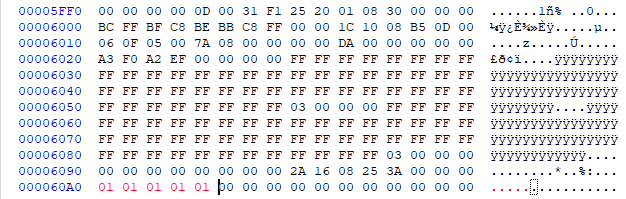
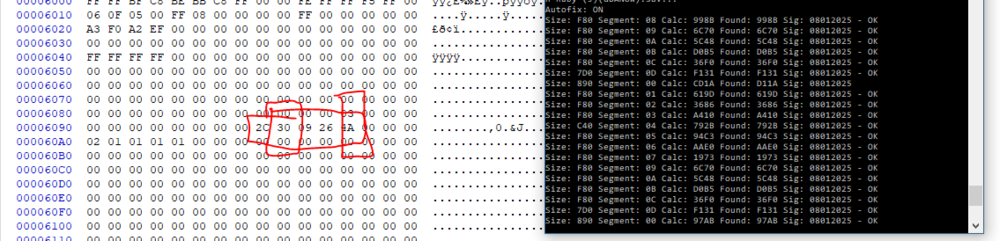
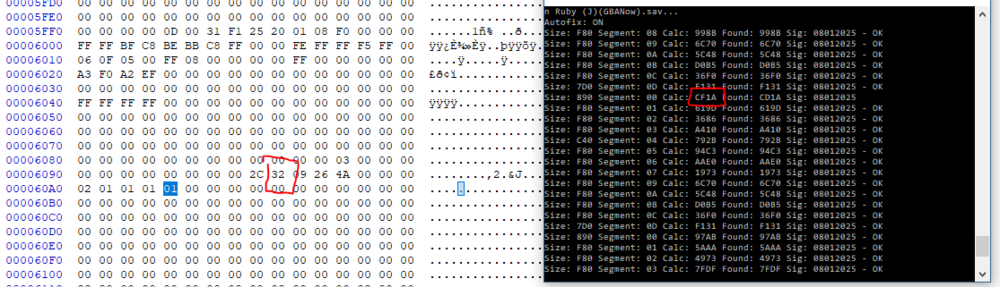
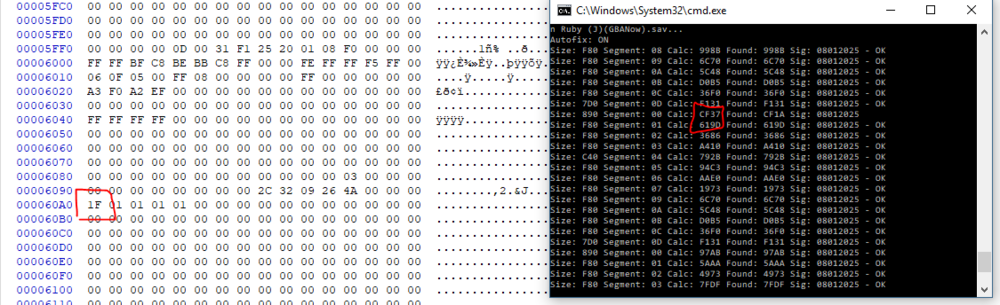
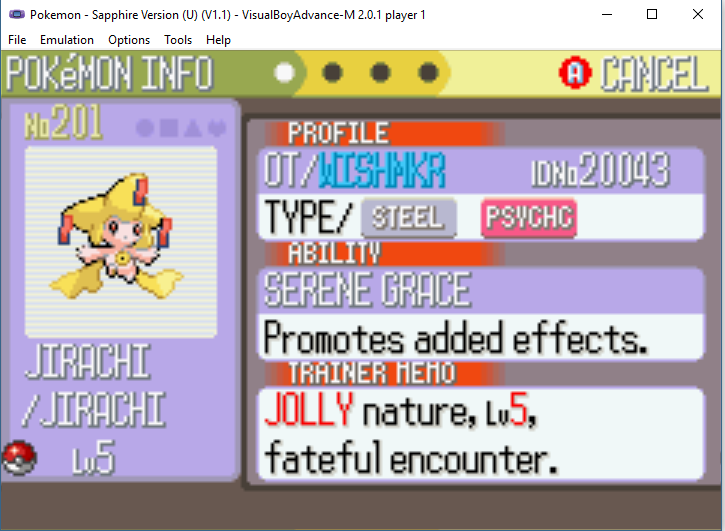
This method while it will produce a "legitimate" WISHMKR Jirachi is in-and-of itself not a legitimate method. The save file you will be creating with this method is not a legitimately obtainable save file through regular gameplay. A backup of your original save should always be stored when doing this method in-case you alter some important values outside of the relevant checksum section! For more information on how to produce a legitimate save file that will still produce your intended WISHMKR Jirachi you can read the 4th and 5th comment on this thread! I know this is not anything new, considering the first time I did it over a year ago there was already some advice as how to do it online. I've been killing time lately and decided I would write up a guide on how I personally have changed the seed for WISHMKR Jirachi in the past. For this process you are going to need: PkHex PSavFixV2 The full list of all possible WISHMKR Jirachis and their seeds A hex editor + hex calculator Basic Math Skills A target seed (for this guide I am aiming at the CF37 Shiny Jolly Jirachi) The first thing you are going to do is make a backup of your current R/S save, and store it somewhere safe. After this has been done, you want to receive a WISHMKR Jirachi from the Colosseum Bonus Disc, and then cross reference the PID of the Jirachi you received with the seed that it came from. As you can see, the seed for the Jirachi I received is 8CD0. Now I am going to open up my backed up save in a Hex editor and search for D0 8C. The location of my seed is at 00006FF0; unfortunately we cannot just edit the seed right here, we need to edit the checksum that verifies if the seed is legitimate. Since my seed is located at 6FF0, my checksum will be located at 5FF0 - > 60A0; your seed may be located at a different value, but it will always end in 'XFF0' and the checksum will always be the '(X-1)FF0'. The first thing I generally do is to start changing lots of values to 00 or 01 to see how it affects the seed value. To check how we are affecting the seed, we are going to use a very old-yet-handy tool PSavFix. The readme for the tool is pretty self explanatory, but we are going to use the tool to recalculate our seed for the adjustments we made to checksum. It is good to just mess around with values and see how it effects the outputted seed, sometimes just mindlessly changing values in this section will bring you close to your intended seed, but if not there is a general strategy. Most of the values in the checksum if increased by 1, will increase your seed by one. A couple of the values if increased by 1 will increase the first/second digit of your seed by 1; I cannot give you specific instructions for which locations do which, as in my experience the locations change save to save. After running PSavfix.exe -fix -RS savefile.sav after some of the edits I made to the checksum, I realized that the '30' value I had would increase the second digit of my seed by 1. As you can see increasing my '30' to a '32' changed my seed from CD1A to CF1A. My intended seed is CF37, so I subtract CD1A from CF37 to realize I need to increase a value in my checksum by 1D. I added the 1D to the 02 value and now I have reached my intended seed! You can now retrieve your intended WISHMKR Jirachi! Again I know this is not anything new, but I hope it is able to help someone if they go googling on how to do this!
 1 point
 -
1 point
-
Version 10.3.4
185439 downloads
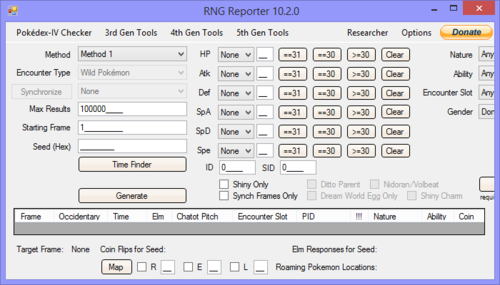
This is a program that can generate TID-SID pairs, find PID, that's tied to IV, Gender, Nature. Also provides the frame for emulator use, for tool-assisted RNG. Finished Features TogamiCalc 16-Bit Seed to Time Colosseum Time Finder Channel Time Finder Box Time Finder Wshmkr Time Finder PID to IVs Pokespot RNG Gales of Darkness Time Finder IVs to Frame Credits (as per github) Original RNGReporter dev team for creating RNGReporter. Credits to amab for all the Channel Jirachi logic and Pokespot RNG. Credits to Zari for the 16-bit seed to time logic, GameCube RNG searching logic, Pokespot RNG, and generally other advice. Credits to Kaphotics for PID to IVs (aka Find Frame) logic and Pokespot RNG. Credits to CollectorTogami for TogamiCalc. Credits to Signum21 for IVs to Frame1 point