Leaderboard




Popular Content
Showing content with the highest reputation on 05/05/18 in all areas
-
Checkpoint is a 3DS homebrew application that can backup and restore save files for 3DS cartridges, 3DS eShop titles (including GB and GBC virtual console), and NDS cartridges. This tutorial will walk you through its installation and usage. Prerequisites In order to use Checkpoint, you will first need access to CFW. A comprehensive guide on how to set it up can be found here. If you do not have what you need, you cannot use Checkpoint. What you need A 3DS with CFW The latest version of Checkpoint. A mirror of the CIA version can be found here. A mirror of the 3DSX version can be found here. Setup If your CFW is Luma 3DS, then Rosalina makes it possible to use the Homebrew Launcher as an alternative to the CIA version. You cannot use Checkpoint with the Homebrew Launcher without Rosalina's Homebrew Launcher. If you wish to use the CIA version: Download the CIA version of Checkpoint and put it on your 3DS's SD card. Use your CIA installer to install it If you wish to use Rosalina's Homebrew Launcher: Create the folder /3ds/Checkpoint on your 3DS's SD card if it does not already exist Download the 3DSX version of Checkpoint and put it the folder you just created When you are finished, you can proceed to the next step: Using Checkpoint Instructions Once you have installed Checkpoint, these steps will guide you through backing up and restoring save files. Once complete, any saves you back up will be located in /3ds/Checkpoint/saves on your 3DS's SD card. 1. (If you're backing up a cartridge save and not an eShop title) Insert your cartridge, and make sure the 3DS menu can see it. This is important because sometimes the system can't read the cartridge unless it's inserted just right. 2. Launch Checkpoint. 3. Use the DPad to select the game whose save you want to backup or restore. Then press A to select the game. 4. Use the DPad to select the save slot you wish to use (the selected slot has a blue background). If backing up the save, you can select "New..." to create a new slot. Be careful not to overwrite anything important. 5. Press either the Backup or Restore button on the touch screen. 6. Press "A" to confirm. 7. If you chose to create a new save slot, use the on-screen keyboard to give it a name, then press "OK". 8. If the save was exported correctly you should see a success message appear. 9. Your backup is complete. Exit Checkpoint, and your save should be located on your SD card under /3ds/Checkpoint/saves/(your game)/(your save slot). 10. MAKE A BACKUP OF THIS FILE BEFORE USING OR EDITING IT WITH ANY SAVE EDITORS. EXTRA. Things to take note: 1. Your file in the folder MUST be named main 2. There cannot be other files in the same folder your import from (such as main.bak) Credit to @NinFanBoyFTW for the screenshots. View full tutorial1 point
-
In order to backup or restore your 3DS saves from a cartridge or eShop title, you will first need access to CFW or homebrew. CFW is the preferred option, and a comprehensive guide on how to set it up can be found here. If you do not have what you need to install CFW, and your 3DS is on a lower firmware, check Smealum's homebrew website to see if you have a compatible homebrew entrypoint. If you do not have one, you cannot backup or restore your 3DS saves without a Cybergadget, which only works on Japanese retail cartridges and is outside the scope of this guide. Powersaves, the SMS4, and the NDS Backup Adapter Plus will not work because they export the raw save. It must first be decrypted, which can only be done with a hacked 3DS or a Cybergadget. Installing CFW There are various ways to install CFW on your 3DS. You can watch Youtube videos or other guides. We recommend this guide as it is frequently updated. Of course, use any of them at your own risk. Using CFW If you're using CFW, the recommended tool is Checkpoint. A tutorial on how to set up and install it can be found here: Using Homebrew If you're using Homebrew, or if you simply do not want to use Checkpoint, follow this tutorial to use a tool called JKSM: Using an Emulator If you're playing on an emulator instead of a console, getting your save data is far easier and requires no hardware except for a compatible computer. Read here to learn how to get your saves from Citra 3DS: View full tutorial1 point
-
The location string you're looking for is Poké Transfer, the tool used in BW/B2W2 to migrate Pokémon from DPPt/HGSS. Poké Transporter is used to migrate from BW/B2W2 into XY/ORAS/SM/USUM. Perhaps the legality check string could be updated to say Poké Transfer instead of Transporter, @Kaphotics? The list of translations for Poké Transfer is in GameInfo.cs, so multiple strings for all supported languages can quickly be changed. Edit: for whatever reason, Portuguese is Japanese.1 point
-
To begin try swapping your trainer gender. If this swaps Yancy/Curtis then there's no other way, if it doesn't then there's a flag somewhere that determines with whom you can trade.1 point
-
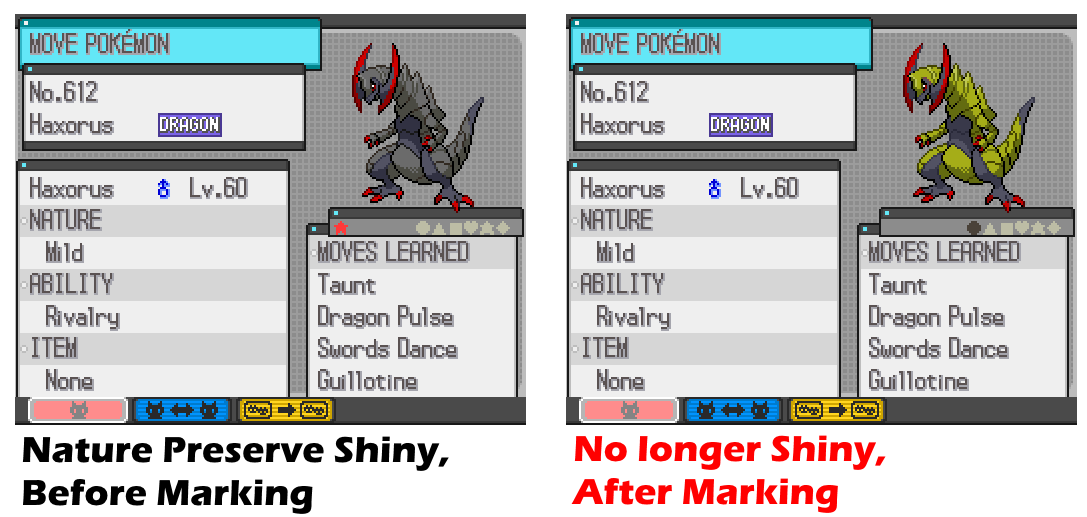
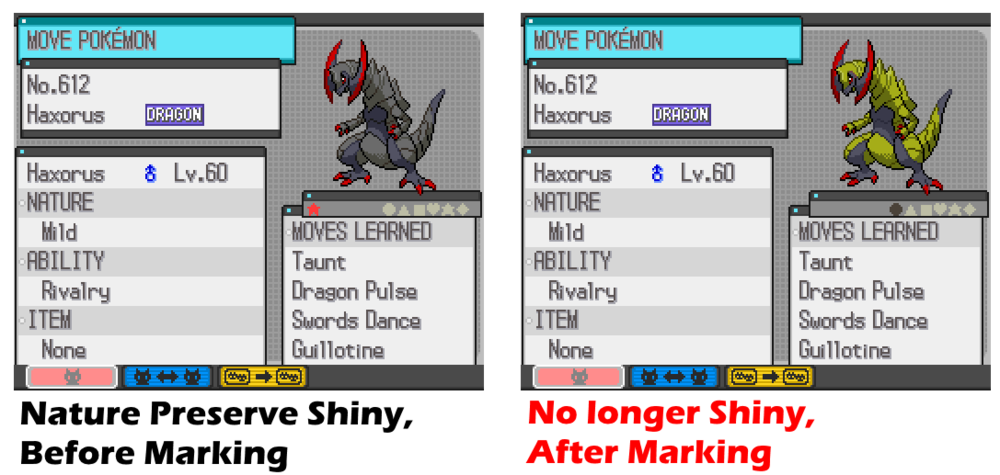
Apparently there are codes that can make a Pokemon shiny after capture, when you mark it in a PC, like the one the OP showed us. Other variations of these codes including marking to change EVs, Marking to change nature, and Marking to change ability. Most people who ask for AR codes, tend to 1. want to experience the stuff in-game (let's say ask for a shiny code, cause want to see wild sparkles) 2. don't have access to save dumping, hence can't use PKHeX That being said, there are ways for the OP to get Pokemon without save editing. For the OP, I'll say use some kind of present day FakeGTS/GTSspoofing to connect and dump the Pokemon I can't say for sure, but Pokemon Class Network (link here) might actually work for you. Anyhow, going back to your actual request: I took a version of the shiny code, and made a non-shiny version, but since I have absolutely no idea how the original code works, what I can say is: 1. It works (somehow) 2. No idea if there's any side-effects 3. Use at your own risk 4. Based on my test on an emulator, code has to be off, else the game won't launch (likely same as original code) 5. Only mark a Pokemon in PC, not party (likely same as original code) Code inside: The logic behind me changing that 0 to 1: I assumed how the original code was meant to work, was to grab your Pokemon's TID/SID, then try to generate a shiny PID based on that. So if I can screw up the TID/SID/PID xor process, it'll actually give you a non-shiny PID (which it did, lol) Using this code on a Pokemon that was caught on games pre-Gen V might turn them illegal, due to the fact that it screws up PID-IV-Nature correlations. Sorry for the wall of text; I had to reply everyone ;P
 1 point
 -
I don't think they cared. If it worked, it worked. There was also no difference between the European English and American English games as far as I know.1 point
-
Ah I forgot, the Species property is automatically remapped to national dex id, since it's not a normal species it just deletes it. You can always hex edit the file I guess, maybe I can add a rawspecies property that doesn't do the remap. edit: added! https://github.com/kwsch/PKHeX/commit/71970b3332e0a28efb171b64ac00d88ace1224241 point
-
She for sure does not have a bike or surf sprite. So defiantly a patch would be needed.1 point
-

Version .
2159 downloads
This gift was given away to players via serial code, when they purchase the relevant book that is part of the promotional campaign, demarcated by the event sticker that will be on the cover. Species Land Shaymin Nickname (default, save lang) OT 마음 TID 180501 Distribution Serial Code Location a lovely place Dates May 02 to Jul 31, 2018 PID Cannot Be Shiny Games KO 3DS: SM USUM Lv. 30 Nature Random Ability Natural Cure (1) Item None Bundled Item None Card Per Save Only One Allowed Moves (ITALIC means Relearnable) Celebrate Return Synthesis Seed Flare WC ID 1144: 「감사포켓몬 쉐이미를 선물!」's receiving text 0x2C Thank you for playing Pokémon! Please pick up your gift from the deliveryman in any Pokémon Center. Classic 감사포켓몬 쉐이미를 선물! 포켓몬을 즐겨주시는 여러분께 감사의 마음을 담아 환상의 포켓몬 쉐이미를 선물합니다! Format Ver.1.0.6-2, Post Updated Date:20180502_21531 point