

All Activity
- Past hour
-
 Does anyone know how to like get a Pokémon through Pokémon bank to home from a previous title To get a home tracker? i don't have a modded 3ds or switch but what i mostly did a few years ago was recreate some Pokémon i had in past games since my old game got stolen during high school.. but i still want to keep those three in some form (helps me feel better from what was stolen..) I am trying to figure out a way or if there like any bot that does it via 3ds to bank to home or anything similar.. would very much appreciate it. 395 - Leonard - 6032B56E5248.pb8 154 - Meggy - 34CD0526986E.pb8 154 - Meggy - 9393EB84C449.pb8
 - Today
-
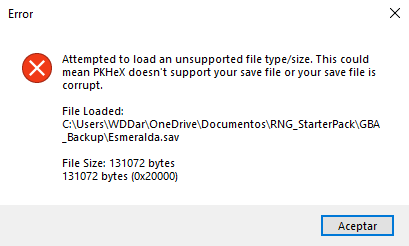
Hi, I can't open my Emerald .sav file in PokeHex. It's my first time extracting a save file; I didn't use any glitches or anything like that until now. I just want to know my SID, and now it says it might be corrupted. What can I do? Esmeralda.sav
-
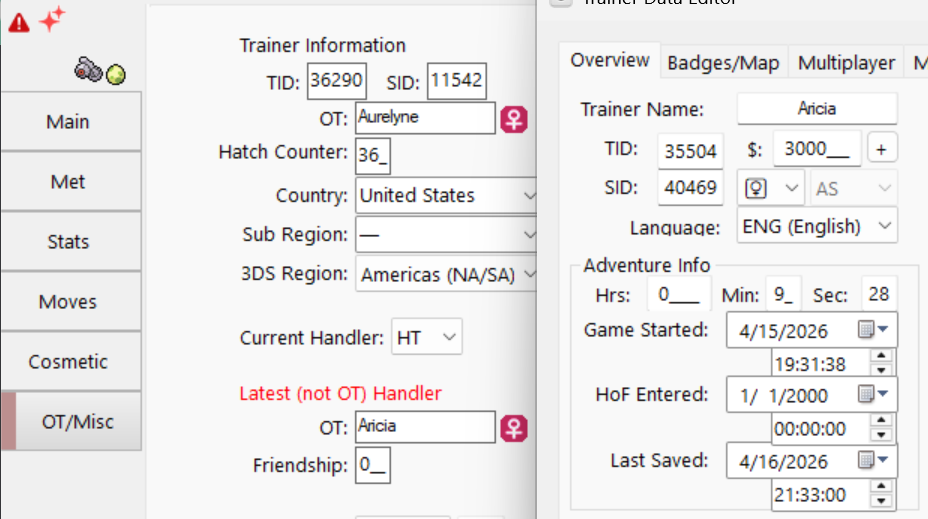
I just finished breeding a couple pokemon eggs in ORAS, and I wanted to pass them on to a new save file by simulating a link trade (because it's otherwise impossible to trade an egg, afaik.) But I'm getting these three errors: 1. Invalid: Handling trainer does not match the expected trainer name. 2. Invalid: Untraded: Current handler should not be the Handling Trainer. 3. Invalid: HT Gender invalid: 1 Error 2 went away simply by opening memories, and then saving. Error 1 and 3 would not go away. I have: 1. Changed Current Handler to HT 2. Made sure HT name and gender is the same as in the Trainer Data editor But the legality checker would not accept the new HT at all. What am I doing wrong?
-
Version v0.1.0
6 downloads
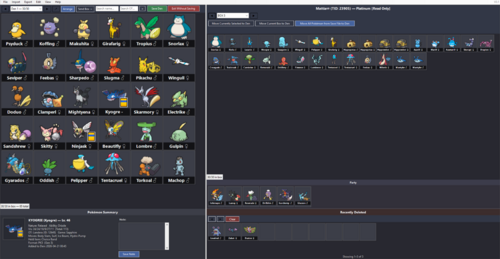
PKDen is a .pk file extractor, viewer, organizer, and backup tool for Pokémon data across all main-series games (Gens 1-9). The goal of this project is to have an easy to use local Pokémon storage system for all mainline Pokémon games. PKDen was created in full by Claude A.I. PKDen remembers window size and in-program formatting between uses. Adjusting window size, sprite size and view preferences to your liking is recommended for the best experience. It’s recommended to place PKDen.exe in a Programs folder, since PKDen creates files in the same folder where the executable is located. What PKDen CAN Do: • Import Pokémon from any save file into PKDen for long-term storage • Import .pk files (all formats pk1 through pk9) from folders or individual files • Organize Pokémon across unlimited custom-named Dens (30 slots each) • Export Pokémon as PKHeX-compatible .pk files (filenames match PKHeX's naming scheme) • Export by generation • Search across all Dens by species name or Original Trainer • Sort Dens by National Dex, Species, Level, IVs, shiny status, OT, and more • View detailed summaries: nature, ability, IVs, moves, held item, origin game • Add personal notes and transfer timestamps to each Pokémon IMPORTANT: PKDen is NOT a save editor. Your Pokémon game save files are opened in READ-ONLY mode. PKDen cannot and will not modify, overwrite, or inject data into your original save files. To edit Pokémon or save files directly, use PKHeX or another dedicated save editor. What PKDen CANNOT Do: • Modify, edit, or inject Pokémon into save files • Edit any attribute of a Pokémon (moves, IVs, stats, etc.) • Check legality or flag illegal Pokémon • Generate or breed new Pokémon • Modify trainer info, Pokédex, items, money, or anything else in a save file For those features, use PKHeX directly. Using PKDen Alongside PKHeX: PKDen and PKHeX complement each other: • PKDen is a library. Think large-scale storage and organization • PKHeX is a workshop. Think editing, injection, legality checking, breeding etc Data Storage: PKDen stores everything in two files next to the executable: • PKDen.den: your Pokémon collection (custom binary format) • PKDen.settings: your view preferences (sprite size, labels, etc.) - PKDen remembers window size and in-program formatting between uses. Adjusting window size, sprite size and view preferences to your liking is recommended for the best experience. A "backgrounds" folder is created if you set custom Den backgrounds. No registry entries, no hidden AppData files. The program is fully portable. Credits: PKDen uses PKHeX as its backend for reading, writing, and rendering Pokémon data. • PKHeX Version: 26.04.11 • PKHeX Repository: https://github.com/kwsch/PKHeX • PKHeX License: GPL-3.0 All sprite assets, species data, move/ability strings, entity parsing, and save-file format handling come from PKHeX. PKDen Version: 0.1 created in full by Claude A.I. Download Grab PKDen.exe below. It's a self-contained single file. No installer. It’s recommended to place PKDen.exe in a Programs folder, since PKDen creates files in the same folder where the executable is located. GITHUB: https://github.com/ScoopDunk/PKDen/releases -
Check to see if it is running in Task Manager.
- Yesterday
-
Sorry if this is the wrong tag or smth, but PKHeX isn't starting anymore. Yesterday it loaded once, let me edit a save (it was a Z-A save if that changes anything), and then wouldn't load anymore when I tried to open it again later. Even if I delete and reinstall it won't start.
-
 LANXCASTEER changed their profile photo
 -
You will set the TID/SID up as another trainer, OT as another trainer, and handling trainer as you. relating to your second trainer, no correlation is known currently, but to be safe, just start a new save on another account, then copy Trainer details from there.
-
Thanks for helpful answer. How do I set up a Pokemon to make it look like it was received via trade from another trainer, rather than having me as the original trainer? Are there any legality issues if I generate the SID and TID as random numbers without any specific rules?
-
Only possible for Sword and Shield because it’s technically a loophole. (PK8 was the basis for HOME) however, not recommended. They can easily track such cases (if they wanted to) and implement any changes/penalties retroactively.
-
Hello, question here. It is regarding the "Home Tracker." I heard that in SWSH, if you set a Pokemon as being brought over from Pokemon Bank from a previous generation and create it without a Home Tracker, you can move it to Pokémon HOME without getting Error 10015, and a Home Tracker will be generated automatically. Is this true? Is this only possible in Sword and Shield? How do I set up a Pokemon to make it look like it was received via trade from another trainer, rather than having me as the original trainer? Are there any legality issues if I generate the SID and TID as random numbers without any specific rules?
-

Managing GB/GBC Saves: Using Emulators
coeddie11 replied to NinFanBoyFTW's topic in Saves - Guides and Other Resources
Thanks for sharing -
 Hello. My brother beat a gym for me but i want to beat it myself. How can i edit my violet save so that I can refight the gym? it is the alfornada gym for the psychic badge. if it matters, it is my 8th badge overall and my 4th gym badge.
 -

Ribbon Count Memory Contest and Ribbon Count Memory Battle
Kaphotics replied to lxy4251326's topic in Pokémon Legality
We aren't GameFreak/ILCA. What they do is up to them. -

Ribbon Count Memory Contest and Ribbon Count Memory Battle
english09 replied to lxy4251326's topic in Pokémon Legality
Does this mean that any Pokemon sent from Bank to HOME with this error could potentially be flagged as hacked by HOME at a later point (given they entered HOME with this flag on, which could only occur if they were edited with PkHeX)? -
Thanks, fixed on latest commit: Fix g1 outsider trade evo message · kwsch/PKHeX@08178f7
- Last week
-
 Astounding. Only want I have is a way to evolve my starters earlier than vanilla. Would you know how to do so?
 -
 I am attempting to trade evolve my Haunter by dragging from one PKHex window to another. I am grabbing it from a Red save file window and dragging it to a Blue save file window and get thrown this error. I tried replicating by transferring other mons (eg. weedle, kadabra, machoke) but only happening on Haunter for some reason. Doesn't matter if I transfer to party or box. Does anyone have the knowhow to why this is happening? Error below: Exception Details: System.FormatException: Index (zero based) must be greater than or equal to zero and less than the size of the argument list. at System.String.FormatHelper(IFormatProvider provider, String format, ReadOnlySpan`1 args) at System.String.Format(String format, Object arg0) at PKHeX.Core.LegalityLocalizationContext.GetInternalString(CheckResult chk) at PKHeX.WinForms.Controls.SummaryPreviewer.AppendLegalityHint(LegalityLocalizationContext& la, String line) at PKHeX.WinForms.Controls.PokePreview.GetBeforeAndAfter(PKM pk, LegalityLocalizationContext& la, BattleTemplateExportSettings& settings) at PKHeX.WinForms.Controls.PokePreview.Populate(PKM pk, BattleTemplateExportSettings& settings, LegalityLocalizationContext& ctx) at PKHeX.WinForms.Controls.SummaryPreviewer.UpdatePreview(Control pb, PKM pk, BattleTemplateExportSettings& settings, LegalityLocalizationContext& ctx) at PKHeX.WinForms.Controls.SummaryPreviewer.Show(Control pb, PKM pk, StorageSlotType type) at PKHeX.WinForms.Controls.SlotHoverHandler.Start(PictureBox pb, SlotTrackerImage lastSlot) at PKHeX.WinForms.Controls.SlotChangeManager.MouseRestart(PictureBox pb) at System.Windows.Forms.Control.WndProc(Message& m) at System.Windows.Forms.NativeWindow.Callback(HWND hWnd, UInt32 msg, WPARAM wparam, LPARAM lparam) -------------------- User Message: An error occurred in PKHeX. Please report this error to the PKHeX author.
 -
 Cool, thanks for sharing
 -

[Sharing] Pokemon Omega Ruby Save Completed
Jonkler1023 replied to Minay's topic in Saves - Files and Requests
quick question have to caught all of the legendaries im trying to reset for them but i dont wnat to complete the game -
Por favor deem uma olhada nisso.
-
 lucraftstudios changed their profile photo
 -
 I think there's a sealed chamber with a golden mask at floor 5 and maybe you're unlucky that the shiny legendaries didn't spawn.
 -
 But why exactly? Is there any compelling reason to put DRM on a ROM hack? Is it to prevent people from inadvertently breaking their ROM and causing bugs, or is it to prevent people from making derivatives of the hack? Just in general I'm not a fan of putting DRM on things.
 -

Pokemon Mystery Dungeon: Explorers of Fortune
GhostOfSup replied to WindchildWhimsy's topic in ROM - NDS ROM Hacks
Love this rom hack, but there is no tepig, pignite or emboar in the game? kinda seems silly to have oshawott and snivy lines without the tepig line -

BlackShark's PKHeX Plugin Support Thread
BlackShark replied to BlackShark's topic in Saves - Editing Help
Update both plugins to the latest version. -

BlackShark's PKHeX Plugin Support Thread
Blood-PawWerewolf replied to BlackShark's topic in Saves - Editing Help
crashing on 20260411. both MirageIslandPlugin and WC3Plugin are causing the PKHeX to crash on startup


