
Kaphotics
-
Posts
8122 -
Joined
-
Last visited
-
Days Won
503
Content Type
Profiles
Pokédex
Portal
Technical Documentation
Pages
Tutorials
Forums
Events
Downloads
Gallery
Blogs
Everything posted by Kaphotics
-

Can a cloned Zeraora shiny go to HOME without issues ?
Kaphotics replied to Darby's topic in Pokémon Legality
Read the second half of the sentence. -
Can a cloned Zeraora shiny go to HOME without issues ?
Kaphotics replied to Darby's topic in Pokémon Legality
-
PKHeX does not support ROM hacks.
-
Filling Pokemon Home without finishing the game
Kaphotics replied to KwassiMD's topic in Pokémon Legality
the second you start editing anything, it will not be legit. play the games without cheating to keep everything legit. safest way is to not cheat do not reuse/repurpose/hijack other save files, as you are likely going to have duplicate metadata that you aren't changing, which is detectable. Champions is over 4 months away. Surely you have time. -
PKHeX/PKHeX.Core/Legality/Encounters/Data/Gen3/EncountersWC3.cs at 720ac7ead717d2d1ab1f210638d01001930a9760 · kwsch/PKHeX
-
[REQUEST] Saving a Lost Pokémon (Gen 1)
Kaphotics replied to pharos04's topic in Saves - Files and Requests
Shows up just fine when I inject it to your box.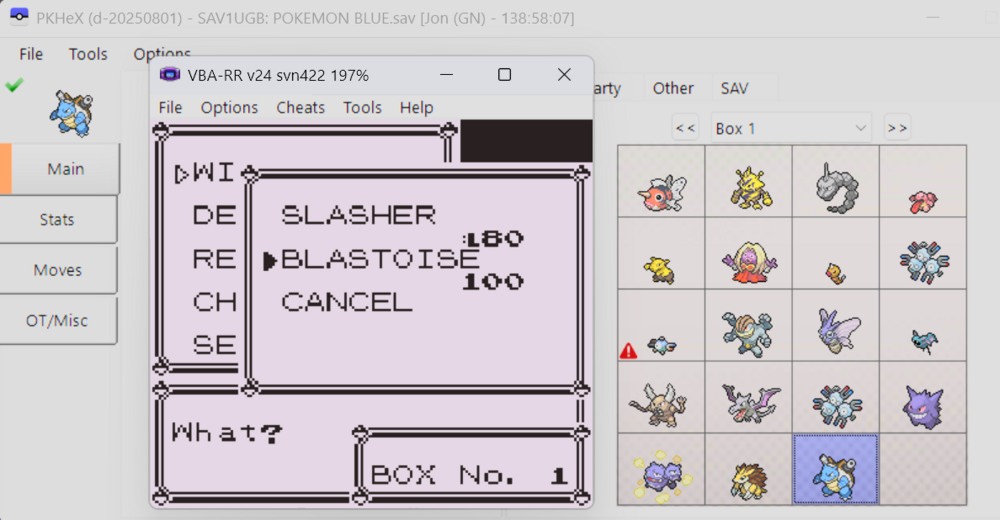
-
[REQUEST] Saving a Lost Pokémon (Gen 1)
Kaphotics replied to pharos04's topic in Saves - Files and Requests
You already have the pk1, so why not reinject it on a save file? Use an up-to-date program like PKHeX. -
PKHex doesn’t seem to update TM Materials for Scarlet and Violet
Kaphotics replied to stephenspudder's topic in PKHeX
Verify the quantities that you see when opening your save file compared to what you see in game. Quantities don't magically revert in data. -
Mankey from Gold showing as from Yellow?
Kaphotics replied to PLAFiles's topic in Saves - Editing Help
The program isn't forcing anything. Gen1/2 do not store the version the Pokemon originated from in its data, therefore the best we can do is match whatever properties available. The Mankey can be from an egg, or it can be from a wild encounter. The program has to decide which one it matches, so it stops on the first valid encounter it finds. The encounter generator is entirely separate from the legality check matched encounter. If you generate an encounter that is later in the list of everything that is possible, the program will always stop at the first valid. -
Again, it will not update the 3DS region on trade within Generation 7. The value is set when it is imported via Transporter. Therefore, it is subject to the region lock restrictions of the console. PKHeX will indicate accordingly.
-
No, it doesn't change. It first entered the 3DS era on a Japanese console. Japanese Blue can only be obtained on a Japanese 3DS, therefore it can only enter the 3DS era on a Japanese console. Gen1/2 games cannot be obtained in different regions, and Japanese games cannot trade with international games.
-
Console region does not update after it enters a 3DS environment for the first time. 3DS virtual console games are region locked, meaning that Japanese Gen1/2 can only be transported to Japanese 3DS consoles.
-
Mankey from Gold showing as from Yellow?
Kaphotics replied to PLAFiles's topic in Saves - Editing Help
Is there any reason why it shouldn't be recognized as from that version, besides the user knowing it was actually obtained on a different one? The legality checker checks for legality; if it compares the Pokemon to a list of encounters, it stops on the first one that sufficiently matches. It's not going to collect a list of every single encounter it could have originated from. -
Using PKHeX: Loading and Saving
Kaphotics replied to evandixon's topic in Saves - Guides and Other Resources
Outdated guides are outdated. Don't change the file format unless you know what you are doing. The dropdown should default to SAV3FRLG, and you overwrite the file you edited. -
There's no difference to the ones built into the program and the ones available in the event gallery, because there the same. Hence why there's no need to export them from PKHeX really.
-
SysBot.NET has settings that creates sprite files/text for what the bot is currently trading. Refer to the wiki.
-
RoC's PC - Collection through the Ages [U: 20251027]
Kaphotics replied to ReignOfComputer's topic in Event Contributions
Ignoring the fact that those EV spreads are absolutely illegal, you can just use whatever template pk3 file and use PKHeX to import the showdown set. It will then update the values of whatever is currently loaded. Creating Pokémon isn't really relevant to this thread, so please continue your discussion/questions of "how do I edit" in the appropriate forum/threads. -
Commemorative print - Bulbapedia, the community-driven Pokémon encyclopedia
-
Programs use whatever data you give it. If the data doesn't match what you're expecting, then you didn't export your data correctly from the console/cartridge.
-
An option to adjust Ogre Oustin scores / clear checks
Kaphotics replied to RandomPachirisu's topic in PKHeX
Try it and see. -
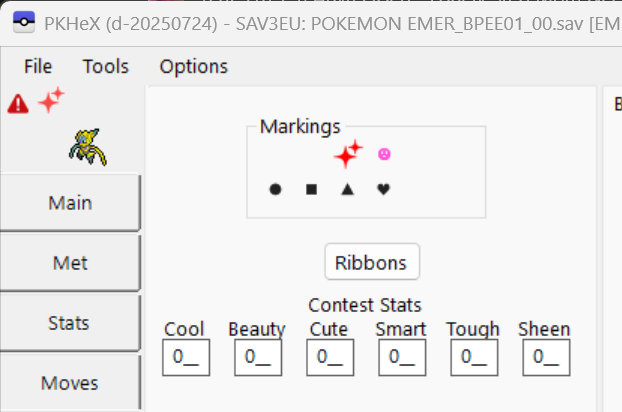
Fine... added in latest commit GUI: swap gen3 marking visual order · kwsch/PKHeX@6fd6440
-
Desmume won't read pKHex/Hax edits [Pokemon Black 2 Redux]
Kaphotics replied to Dyctinna's topic in Saves - Editing Help
You shouldn't be renaming the file when you export from PKHeX. Keep the original file name. If it was a .sav then it should stay as .sav The first option retains the file extension, and the second allows you to specify whatever file name you want. All you should be doing is opening the dsv from the folder in PKHeX, then exporting it and overwriting the original file. Alternatively, you export the .sav from desmume's export dialog menu, then import the edited file. -
thanks, fixed on latest commit: https://github.com/kwsch/PKHeX/commit/a02712e375051d3cd28595063bfe990f94961a84 https://github.com/kwsch/PKHeX/commit/747d0839751849255210fc2db5a71355f1ae7992
-
Emulators do not accurately mimic the hardware timings and can result in impossible PID/IVs that can't be found on legitimate hardware. The program is working as intended.
-
Did you save while inside the room? The NPC won't respawn if you load up the game while already inside the room. Exit the room then return.