



Kaphotics
-
Posts
7957 -
Joined
-
Last visited
-
Days Won
476
Content Type
Profiles
Pokédex
Portal
Technical Documentation
Pages
Tutorials
Forums
Events
Downloads
Gallery
Blogs
Everything posted by Kaphotics
-
Refer to CryptArray for how encryption/decryption works. You advance the RNG seed, and the top 16 bits are used to xor the data.
-
You decrypt before (un)shuffling.
-

Loading My Edited Let's Go Save Returns To Language Select.
Kaphotics replied to kokorikopi's topic in Saves - Editing Help
If you've corrupted the save archive with unnecessary files, the game is resetting the contents. Try importing the save file after clearing the savedata from your console and reaching the title screen. The attached save file is fine. -
Neither of the tools you mentioned are related to this subforum. Assuming you are referring to https://github.com/santacrab2/PKHeXMAUI It already has auto legality.
-
This isn't the place to report issues with a plugin. Seek assistance where you obtained the plugin from.
-
Attempted to load an unsupported file type/size
Kaphotics replied to anon73's topic in Saves - Editing Help
Misconfigured size. It should be 128KB, not 64KB. The recovery program works just fine at reformatting your save data. projectpokemon/RecoverSaveGen3: Try and recover a Gen3 save file via console app! Pokemon - Fire red (1).sav.fixed -
Having trouble editing Pokemon yellow save from Retroarch
Kaphotics replied to Kasek55's topic in Saves - Editing Help
PKHeX does not support save states. Just changing the file extension does not convert it into a save file. Dump the save file from your cartridge/console after properly saving in game. -
Unable to replicate. If you can upload the original file from your backups that you can confirm does expand the save file, please do.
-
The answer to your generic question is "it depends". Truly random encounters (csprng for every call): no correlation Random-enough encounters: no correlation -- examples are gen5 wilds that use a 64-bit RNG but only have 32-bit PID, nature,gender,encounter rolls Somewhat-random encounters: correlation. can figure out an RNG seed quickly (Tera/SWSH raids), or via bruteforce (shiny dynamax adventure raids, PLA captures, BDSP breeds) Others generate with fixed data (like HOME gifts), and must match what the encounter requires.
-
stadium Unable to open pokemon stadium save files in PKHeX
Kaphotics replied to Ink Dragon's topic in Saves - Editing Help
Your save file size (0x1F880) is not the same as that mentioned in the linked GitHub issue (0x1FFF0). It is 0x790 bytes too small from what has been document as "usual" save file sizes. If you are able to determine why your emulator is under-sizing the save data relative to other emulators, please share that info. Otherwise, you can try manually padding the file size in a hex editor to one of the expected sizes (0x1FF00 or 0x20000) and your file loads in the program.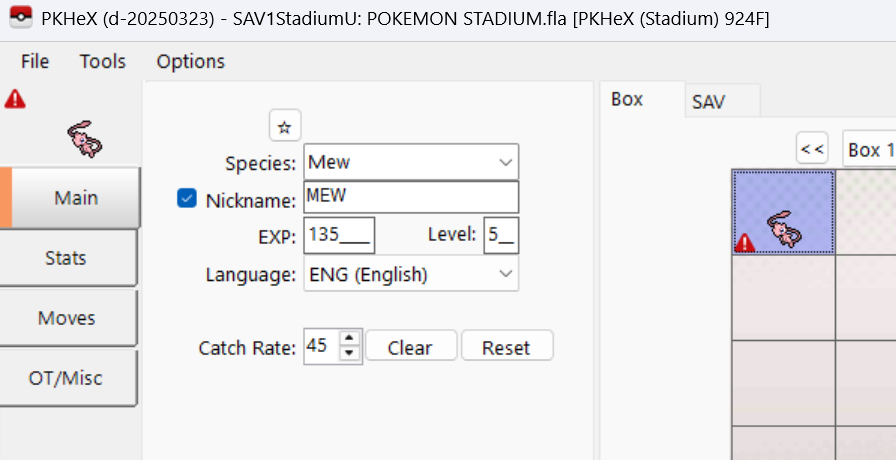
-
Thanks, fixed on latest commit: https://github.com/kwsch/PKHeX/commit/ca03311d212a7ef395a674fe8eaec6634e76a757
-
There isn't a suggestion for that. Added in latest commit: Add $suggest for friendship properties · kwsch/PKHeX@5376d44 Try on the development build.
-
The "9" character is just 0xFF, the maximum value for a byte. An ID of FFFF is 65535. Probably just data corruption that FF'd a chunk of your save data.
-
Incorrect information in the Mystery Gifts database
Kaphotics replied to a topic in Events Help and Questions
For these events with a fixed Ability/Nature/Gender, they're distributed with a specific PID. If the faked PID/PGT is giving the wrong ability, then it would need to be corrected with the right PID. -
Incorrect information in the Mystery Gifts database
Kaphotics replied to a topic in Events Help and Questions
Can't know for sure because I don't think the PCD was ever contributed. It might be a fake of a fake. The original PGT had Chlorophyll for both the PID%2 as well as the AbilityID in the pkm data. -
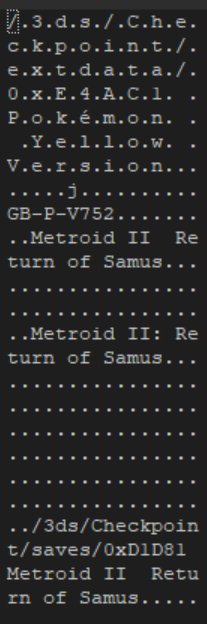
Open it in a hex editor and it's obvious it's not a Gen4 save file.
-
Incorrect information in the Mystery Gifts database
Kaphotics replied to a topic in Events Help and Questions
Moved from PKHeX, as PKHeX uses the EventsGallery to source pcd redemptions. I traced the origin of the data (originally committed as a reconstructed `pgt` file, then later converted to PCD then WC4): Adds reconstructed pikachu cafe tangrowth · projectpokemon/EventsGallery@4962acf · GitHub Was uploaded with a fixed PID and ability of Chlorophyll. I'm not sure the other sites you've referenced are correct. Serebii has no event data logged, and I found another site which indicates it is Chlorophyll instead of Leaf Guard: Viewing Event Pokémon Details - PocketMonsters.Net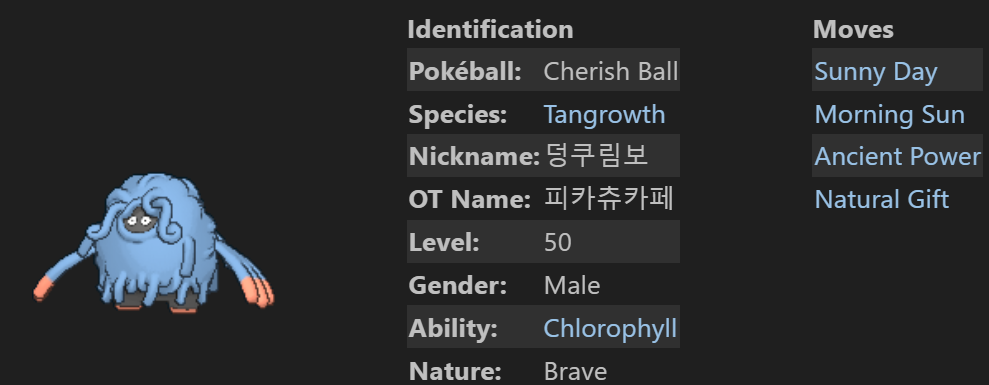
-
When did the encounter become available, and when did the program last update?
-
PKHeX's word filter is proactive in that the most recent word filters (Nintendo Switch) will also be used to check in the contexts of Generation 6 and 7. Why is it this way? To warn you in advance that it will be flagged/blocked when transferred to future games, and/or OT names/nicknames will be wiped on trade. Additionally, the program is retroactive and will check previous contexts (like Gen5) if the entity has passed through that context. You can toggle a setting within the program to only use the current context's word filter.
-
Well, it's not legitimate, it's illegal. The program is working as intended. This thread is for reporting unmodified-game Pokemon; having any cheat codes active or modifying something to be shiny is not legitimate.
-
Hacked raid? Shouldn't be shiny.
-
Legality issue for ralts wish egg? Help Requested
Kaphotics replied to Lucylle's topic in Pokémon Legality
You can adapt the script that I posted and see that my other post (that you quoted) is true -- your request is too statistically improbable that there is no seed that can generate what you want, not even for any nature. If you're too lazy to tweak a script, I've attached a csv for you to manually filter and pick whatever spread you want. How did I create it? I just had the script save the output without filtering for shiny. wish_ralts.csv -
Open your save file in a hex editor and you'll see it's a repeating pattern of FF FF 00 00 (with the latter 2 bytes sometimes being FF). There is nothing that can be recovered from the save file that you have uploaded. Try cleaning your cartridge's contacts, and dump again. If it looks the same in the hex editor, then all data is truly lost.
-
Save twice in game. Delta is known to not give fresh initial save files.
-
needs to be main.
