



theSLAYER
-
Posts
22959 -
Joined
-
Last visited
-
Days Won
1016
Content Type
Profiles
Pokédex
Portal
Technical Documentation
Pages
Tutorials
Forums
Events
Downloads
Gallery
Blogs
Everything posted by theSLAYER
-
Let's say you have a file. A large file. And data can corrupt over time, depending on storage medium. Now, let's say if you looked at the data a few years later, how would you know whether the data became corrupted? That is where the checksum comes in. If you think about it simply, without resorting to complicated algorithms, checksums does this: it checks if the file is corrupt, based on the sum of the data. Simple checksums calculate every byte in a data file, to get a number. Let's call this calculated checksum. Then, on the file itself, it has the data of a previously written checksum. Let's call this written checksum. If the calculated checksum doesn't equal to the written checksum, there's 2 reasons: 1) You used the wrong method to achieve the calculated checksum, or 2) The file is corrupt.
-
 Even if the ISO is dumped and shared, people can't use it because a) needs proper saves and most importantly, b) no emulator can run it. It requires a NR reader (effectively a way to read dev discs) and AFAIK no emulator wants to include it. Thus all it does is take up space for the layperson. If you're able to to build up your hacking reputation I believe you'll get a way to gain access to it, but that is something I cannot say definitely, since I am not part of the preservation group. To my understanding, it has already been archived and there is no risk to it going missing, so there is no need for that too. Anyhow, this entire discussion is piracy, and the forum rule's don't permit the discussion of piracy. So we should end it here.
 -
Also HOME update isn’t supported yet too. So anything HOME recently transferred would look illegal. Wait it out.
-
Wait for the PKHeX update then try again then
-
Need Help for Ultra Moon .sav file to Switch
theSLAYER replied to WoahBoi's topic in Miscellaneous Help
Nah I don’t do transfer requests mate sorry. -
Need Help for Ultra Moon .sav file to Switch
theSLAYER replied to WoahBoi's topic in Miscellaneous Help
1) buy 2DS/3DS with Transporter already installed. CFW it, and load the save into your cart. Then transfer as normal. You’re gonna need HOME sub. 2) pray that someone would help you. Give them your save, they inject the save, then transfer up to your HOME via HOME transfer code. You’ll also need HOME sub. -
Enabling/Disabling Event Flags in Sword & Shield
theSLAYER replied to sora10pls's topic in Saves - Guides and Other Resources
What happens with the horses wouldn’t be a single flag. Since it’s tied to the story (of the DLC), you’re probably gonna have to check and uncheck quite a bit, and make sure you’ve progressed that far, etc etc. -
Yes it’s fake. edit: there’s also a chance you misunderstood. He could be saying based on datamined info, that means that almost all Pokémon are available across Switch games. Not that they’ll all be in the DLC.
- 1 reply
-
- 1
-

-
As it stands, injecting directly into SWSH may be okay, as HOME shares it’s substructure with SWSH. But stuff is still stored on the server, so no idea if it’ll come back to bite us. Consider using entries from this: They’ve been sent in from the correct games (including receiving from HOME if it’s from HOME). Just don’t remove the Tracker and don’t change any of the immutable values.
-
Do you have Sysnand/Emunand?
-
May cause an issue due to HOME tracker. Especially since we don’t know what 3.0.0 would change.
-
pkhex hidden ability mismatch for encounter type
theSLAYER replied to Alonso9492's topic in Pokémon Legality
Generate an egg from the encounter database. -
I’ve not been able to replicate it, so I’m kinda confused. Well at least it works for you. Also it’ll help if you have any more specific steps so that others can try to reproduce it too. Cheers
-
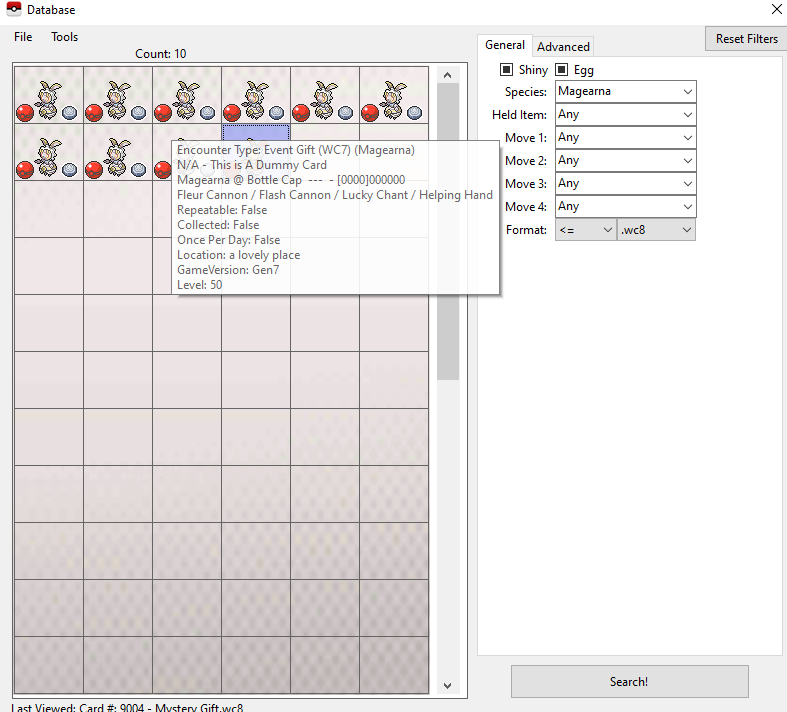
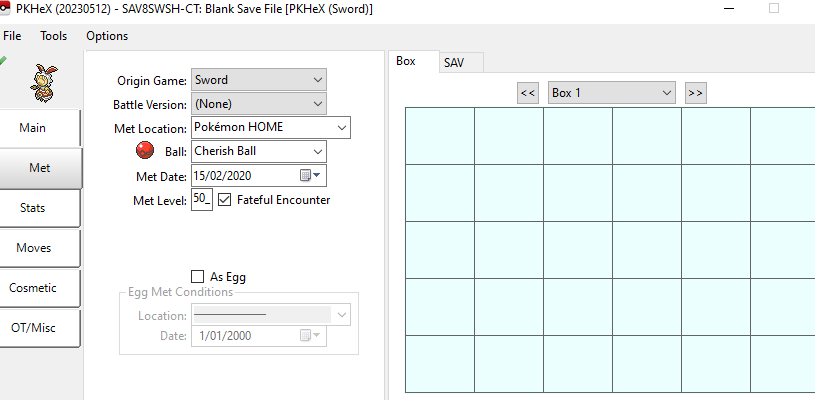
Don't generate one from scratch. Use the Mystery Gift Database. It'll generate a proper one for you.
-
Preface Recently, it has been getting harder and harder to find legitimate affordable copies of Generation 3 Pokémon games online. For one reason or another, regardless if it is due to sheer ignorance or nonchalance, people have been acquiring bootleg Pokémon carts. Together with other sites, such as emulator support sites, we have noticed an influx of requests relating to reading and editing saves of such games. Frankly, I would much recommend that if you own such a cart, to nab the save and use it on a legitimate retail cart instead, as those are way way more reliable. But in any case: This tutorial isn't to judge why people get bootleg carts. This tutorial would not work for every bootleg cart; this tutorial is aimed at the carts that store the save files as part of the ROM. As a disclaimer, I would like to: 1. Remind everyone that ROM files are not to be uploaded to our site 2. Warn people to not do this many times, as I am not sure how many flash read/write cycles these carts can take (basically, do too many times, and risk breaking your cart) 3. This method will not work for every GBA repro in existence. You run the risk of bricking your GBA repro cart. 4. A minor issue, but due to how these carts handle saves, Hall of Fame data would not be intact. Necessary programs and files 1. Loads of patience, and also the ability to read and follow steps 2. A NDS or NDS Lite. (Neither DSi nor DSi XL nor any 3DS/2DS model.) 3. NDS flashcart of some kind 4. gbabf_1.2.7z (Source: https://gbatemp.net/download/gbabf.37005/)(https://gitlab.com/Fexean/gbabf) 5. Bootleg Pokémon GBA Extractor and Injector Must-do for first timers YOU MUST MAKE A BACKUP OF YOUR ENTIRE BOOTLEG GBA ROM, IN CASE ANYTHING GOES WRONG! Make sure you keep this file as a safe unedited backup somewhere on your computer. If anything goes wrong, this is the file you'll restore to your cart. Regular steps I cannot stress this enough. I am not sure how many flash read/write cycles these carts can take, so constantly reflashing your cart is likely to shorten its lifespan. If you can, grab the save and transfer it to a retail legitimate cart and carry on playing from there. Also, I am aware there is a Flash data option, which you can specify size of save and location to flash to. But that doesn't seem to work for Pokémon games, as their saves are too far into the ROM, in terms of offset. In any case, congratulations on your quest to edit your save on your bootleg cart! View full tutorial
-
Extracting and Injecting Save for Bootleg GBA Pokémon Carts
theSLAYER posted a tutorial in Managing GBA Saves
Preface Recently, it has been getting harder and harder to find legitimate affordable copies of Generation 3 Pokémon games online. For one reason or another, regardless if it is due to sheer ignorance or nonchalance, people have been acquiring bootleg Pokémon carts. Together with other sites, such as emulator support sites, we have noticed an influx of requests relating to reading and editing saves of such games. Frankly, I would much recommend that if you own such a cart, to nab the save and use it on a legitimate retail cart instead, as those are way way more reliable. But in any case: This tutorial isn't to judge why people get bootleg carts. This tutorial would not work for every bootleg cart; this tutorial is aimed at the carts that store the save files as part of the ROM. As a disclaimer, I would like to: 1. Remind everyone that ROM files are not to be uploaded to our site 2. Warn people to not do this many times, as I am not sure how many flash read/write cycles these carts can take (basically, do too many times, and risk breaking your cart) 3. This method will not work for every GBA repro in existence. You run the risk of bricking your GBA repro cart. 4. A minor issue, but due to how these carts handle saves, Hall of Fame data would not be intact. Necessary programs and files 1. Loads of patience, and also the ability to read and follow steps 2. A NDS or NDS Lite. (Neither DSi nor DSi XL nor any 3DS/2DS model.) 3. NDS flashcart of some kind 4. gbabf_1.2.7z (Source: https://gbatemp.net/download/gbabf.37005/)(https://gitlab.com/Fexean/gbabf) 5. Bootleg Pokémon GBA Extractor and Injector Must-do for first timers YOU MUST MAKE A BACKUP OF YOUR ENTIRE BOOTLEG GBA ROM, IN CASE ANYTHING GOES WRONG! Make sure you keep this file as a safe unedited backup somewhere on your computer. If anything goes wrong, this is the file you'll restore to your cart. Regular steps I cannot stress this enough. I am not sure how many flash read/write cycles these carts can take, so constantly reflashing your cart is likely to shorten its lifespan. If you can, grab the save and transfer it to a retail legitimate cart and carry on playing from there. Also, I am aware there is a Flash data option, which you can specify size of save and location to flash to. But that doesn't seem to work for Pokémon games, as their saves are too far into the ROM, in terms of offset. In any case, congratulations on your quest to edit your save on your bootleg cart! -
You've got a few issues: 1. Some illegal due to incorrect encounter data 2. There's a slight PID and Gender relation. Meaning the PID you are using is the problem.
-
I’m gonna see if I can replicate it, if so, share your save with the devs to get them to look at it. I’ll let you know.
-
Upload an example, we can take a look
-
Yeah nah the newer the game, the more you shouldn’t do that. I’m not saying you can’t, I’m saying you probably shouldn’t. You might miss stuff that the legality for that encounter requires, yadda yadda, it’s a way to avoid issues.
-
Yeah don’t create stuff from scratch. Load up your save in PKHeX, then use the templates in the encounter database.
-
When you go into your system settings, what’s the firmware code written. Maybe take a picture to show the whole thing Do you launch the console any differently between going online and injecting/extracting saves?
-
Do you happen to have Emunand setup, and been using that?
-
@Whitelion yeah the files won't load for me on PKHeX too. Does the game still function on your Switch? (don't try to restore these saves)
-
Sorry, I guess my instructions were unclear. You know how when you extract it from JKSV there’s a few named files, such as main and main2? None of the file names there should be changed when you restore the save. Also, I’m asking for the main2 file to be checked. Not that you rename it to main2. To be sure, show me a screenshot of the files in that folder JKSV extracted.